Update option not available

Dolfin

New member
Local time
11:02 AM
Messages
14
I am running Windows 7 Pro 64bit on a HP 530 laptop. The Windows update facility is fine but, I have no option to download other Microsoft updates. On the settings page, there is nothing after "Who can install updates?" Can anyone help me as to where the option is?

Thanks
 

My Computer

Computer Manufacturer/Model Number
Microsoft Corporation
OS
Windows 7 Professional (64bit)
CPU
Intel Core 2 Quad
Motherboard
AsusTeK
Memory
4GB
Graphics Card(s)
NVIDIA GeForce 9400GT
Sound Card
High Definition Audio Device
Monitor(s) Displays
Fujitsu Siemens LL3200T
Hard Drives
ST3500418AS 500,11GB
PSU
Not Known
Case
Not Known
Cooling
Not Known
Welcome

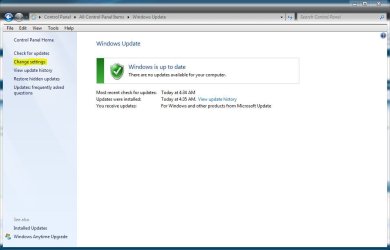
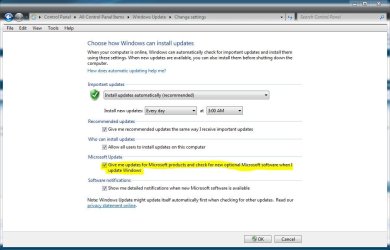
Type windows update in search>change settings>check the MS box

This will allow MS to send other updates. It should be there if you access updates using this method.

Can you send a screen shot?

If this is not want you meant explain further.
 

My Computer

Computer type
PC/Desktop
Computer Manufacturer/Model Number
Dell XPS 420
OS
Windows 10, Home Clean Install
CPU
Intel Core2 processsor Q8200(2.33Ghz 1333FSB) Quad Core Tech
Motherboard
Dell
Memory
6 gb
Graphics Card(s)
ATI Radeon 256MB HD3650
Sound Card
Intergrated 7.1 Channel Audio
Monitor(s) Displays
Dell SP2009W 20"
Hard Drives
640 GB Serial ATA Hard drive
Cooling
Fan
Keyboard
Dell USB Keyboard
Mouse
Dell Premium Optical USB
Internet Speed
DSL 2.85
Here's a couple pictures to go with Rich's instructions,
 

Attachments

  • wu 1.JPG
    wu 1.JPG
    48.7 KB · Views: 21
  • wu.JPG
    wu.JPG
    70.2 KB · Views: 33

My Computer

Computer type
PC/Desktop
Computer Manufacturer/Model Number
Self Built
OS
Win 10 Pro x64
CPU
Intel I5-2500K @3.3GHz
Motherboard
Asrock P67 Extreme4
Memory
16GB G.Skill Ripjaws X (4x4GB)
Graphics Card(s)
EVGA GeForce 750 Ti SC 2GB
Sound Card
ASUS Xonar DG 5.1 Channels 24-bit 96KHz PCI Interface Sound
Monitor(s) Displays
auria eq2367
Screen Resolution
1920 x 1080
Hard Drives
250GB Samsung 850 EVO SSD
1TB WD Blue
1TB Hitachi
PSU
SeaSonic X 650W 80 Plus Gold
Case
Corsair Obsidian 750D
Cooling
Corsair H60, Three 140mm case fans
Keyboard
Logitech Wireless Keyboard K520
Mouse
Logitech Wireless Mouse M310
Internet Speed
Wave Broadband ~ 100 dn 5 up
Antivirus
Windows Defender, Malwarebytes Premium
Browser
Edge, IE11, Chrome
Other Info
Laptop specs: HP g7-1365dx /
CPU: AMD A6-3420M APU with Radeon(tm) HD Graphics /
RAM: Crucial 8Gb (2x4Gb) /
SSD: Crucial M4-CT128M4SSD2 ATA Device/ FW 000F /
GFX: AMD Radeon HD 6520G /
OS: Windows 10 Pro x64
Thanks for your help but on the "settings" page, there is no MS option to check. Also there is no option to check "Software notifications". These two items are completely missing from the menu. I only know about them because a friend has the same OS on his desktop and these two options are available.

Thanks
 

My Computer

Computer Manufacturer/Model Number
Microsoft Corporation
OS
Windows 7 Professional (64bit)
CPU
Intel Core 2 Quad
Motherboard
AsusTeK
Memory
4GB
Graphics Card(s)
NVIDIA GeForce 9400GT
Sound Card
High Definition Audio Device
Monitor(s) Displays
Fujitsu Siemens LL3200T
Hard Drives
ST3500418AS 500,11GB
PSU
Not Known
Case
Not Known
Cooling
Not Known
Try this

Go to search type cmd. Do not hit enter>run as administrator

In the cmd type sfc /scannow.
 

My Computer

Computer type
PC/Desktop
Computer Manufacturer/Model Number
Dell XPS 420
OS
Windows 10, Home Clean Install
CPU
Intel Core2 processsor Q8200(2.33Ghz 1333FSB) Quad Core Tech
Motherboard
Dell
Memory
6 gb
Graphics Card(s)
ATI Radeon 256MB HD3650
Sound Card
Intergrated 7.1 Channel Audio
Monitor(s) Displays
Dell SP2009W 20"
Hard Drives
640 GB Serial ATA Hard drive
Cooling
Fan
Keyboard
Dell USB Keyboard
Mouse
Dell Premium Optical USB
Internet Speed
DSL 2.85
See what you get when you go here,
Microsoft Update
You might need to accept the terms there to get the other options.
 

My Computer

Computer type
PC/Desktop
Computer Manufacturer/Model Number
Self Built
OS
Win 10 Pro x64
CPU
Intel I5-2500K @3.3GHz
Motherboard
Asrock P67 Extreme4
Memory
16GB G.Skill Ripjaws X (4x4GB)
Graphics Card(s)
EVGA GeForce 750 Ti SC 2GB
Sound Card
ASUS Xonar DG 5.1 Channels 24-bit 96KHz PCI Interface Sound
Monitor(s) Displays
auria eq2367
Screen Resolution
1920 x 1080
Hard Drives
250GB Samsung 850 EVO SSD
1TB WD Blue
1TB Hitachi
PSU
SeaSonic X 650W 80 Plus Gold
Case
Corsair Obsidian 750D
Cooling
Corsair H60, Three 140mm case fans
Keyboard
Logitech Wireless Keyboard K520
Mouse
Logitech Wireless Mouse M310
Internet Speed
Wave Broadband ~ 100 dn 5 up
Antivirus
Windows Defender, Malwarebytes Premium
Browser
Edge, IE11, Chrome
Other Info
Laptop specs: HP g7-1365dx /
CPU: AMD A6-3420M APU with Radeon(tm) HD Graphics /
RAM: Crucial 8Gb (2x4Gb) /
SSD: Crucial M4-CT128M4SSD2 ATA Device/ FW 000F /
GFX: AMD Radeon HD 6520G /
OS: Windows 10 Pro x64
Almost solved

Thanks to everyone for your help. I have downloaded the Windows update agent and this has restored an option to "Get more updates" where I have to click "find out more". However, when I do this I am taken to the Windows update page where there are no further updates. I am not offered the option to update Office or other Microsoft programs I know need updating, and I am not asked to select anything to give me more updates.

Thanks
 

My Computer

Computer Manufacturer/Model Number
Microsoft Corporation
OS
Windows 7 Professional (64bit)
CPU
Intel Core 2 Quad
Motherboard
AsusTeK
Memory
4GB
Graphics Card(s)
NVIDIA GeForce 9400GT
Sound Card
High Definition Audio Device
Monitor(s) Displays
Fujitsu Siemens LL3200T
Hard Drives
ST3500418AS 500,11GB
PSU
Not Known
Case
Not Known
Cooling
Not Known
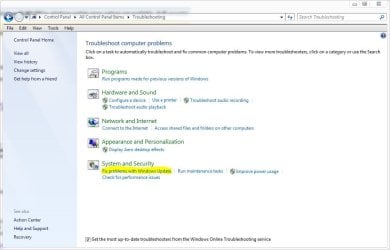
See if you can correct that with the troubleshooter in the control panel.
 

Attachments

  • update.JPG
    update.JPG
    63.7 KB · Views: 19

My Computer

Computer type
PC/Desktop
Computer Manufacturer/Model Number
Self Built
OS
Win 10 Pro x64
CPU
Intel I5-2500K @3.3GHz
Motherboard
Asrock P67 Extreme4
Memory
16GB G.Skill Ripjaws X (4x4GB)
Graphics Card(s)
EVGA GeForce 750 Ti SC 2GB
Sound Card
ASUS Xonar DG 5.1 Channels 24-bit 96KHz PCI Interface Sound
Monitor(s) Displays
auria eq2367
Screen Resolution
1920 x 1080
Hard Drives
250GB Samsung 850 EVO SSD
1TB WD Blue
1TB Hitachi
PSU
SeaSonic X 650W 80 Plus Gold
Case
Corsair Obsidian 750D
Cooling
Corsair H60, Three 140mm case fans
Keyboard
Logitech Wireless Keyboard K520
Mouse
Logitech Wireless Mouse M310
Internet Speed
Wave Broadband ~ 100 dn 5 up
Antivirus
Windows Defender, Malwarebytes Premium
Browser
Edge, IE11, Chrome
Other Info
Laptop specs: HP g7-1365dx /
CPU: AMD A6-3420M APU with Radeon(tm) HD Graphics /
RAM: Crucial 8Gb (2x4Gb) /
SSD: Crucial M4-CT128M4SSD2 ATA Device/ FW 000F /
GFX: AMD Radeon HD 6520G /
OS: Windows 10 Pro x64
Thanks, I've tried the troubleshooter and it can't identify the problem.
 

My Computer

Computer Manufacturer/Model Number
Microsoft Corporation
OS
Windows 7 Professional (64bit)
CPU
Intel Core 2 Quad
Motherboard
AsusTeK
Memory
4GB
Graphics Card(s)
NVIDIA GeForce 9400GT
Sound Card
High Definition Audio Device
Monitor(s) Displays
Fujitsu Siemens LL3200T
Hard Drives
ST3500418AS 500,11GB
PSU
Not Known
Case
Not Known
Cooling
Not Known

My Computer

Computer type
PC/Desktop
Computer Manufacturer/Model Number
Self Built
OS
Win 10 Pro x64
CPU
Intel I5-2500K @3.3GHz
Motherboard
Asrock P67 Extreme4
Memory
16GB G.Skill Ripjaws X (4x4GB)
Graphics Card(s)
EVGA GeForce 750 Ti SC 2GB
Sound Card
ASUS Xonar DG 5.1 Channels 24-bit 96KHz PCI Interface Sound
Monitor(s) Displays
auria eq2367
Screen Resolution
1920 x 1080
Hard Drives
250GB Samsung 850 EVO SSD
1TB WD Blue
1TB Hitachi
PSU
SeaSonic X 650W 80 Plus Gold
Case
Corsair Obsidian 750D
Cooling
Corsair H60, Three 140mm case fans
Keyboard
Logitech Wireless Keyboard K520
Mouse
Logitech Wireless Mouse M310
Internet Speed
Wave Broadband ~ 100 dn 5 up
Antivirus
Windows Defender, Malwarebytes Premium
Browser
Edge, IE11, Chrome
Other Info
Laptop specs: HP g7-1365dx /
CPU: AMD A6-3420M APU with Radeon(tm) HD Graphics /
RAM: Crucial 8Gb (2x4Gb) /
SSD: Crucial M4-CT128M4SSD2 ATA Device/ FW 000F /
GFX: AMD Radeon HD 6520G /
OS: Windows 10 Pro x64
Probably a silly question; but are you running as an administrator?
 

My Computer

Computer Manufacturer/Model Number
Home built
OS
Windows 7 Ultimate 32 bit
CPU
Intel(R) Pentium(R) 4 CPU 3.00GHz
Motherboard
ASUS P4P800-VM Motherboard Chipset: Intel 865G + ICH5
Memory
2.50 GB RAM
Graphics Card(s)
NVIDIA GeForce 7600 GS
Sound Card
SoundMax Integrated Digital Audio (Chip)
Monitor(s) Displays
ViewSonic VX 1962 wm
Screen Resolution
1680 X 1050
Hard Drives
Seagate Barracuda 7200.10 80 GB
ST380215A ATA Device 18.6 GB
Western Digital "My Book" external hard drive 750 GB
Cooling
Fan based
Keyboard
Microsoft Comfort Curve Keyboard 2000 v10 USB
Mouse
Logitec optic USB
Internet Speed
3.01 Mb/s download 0.64 Mb/s upload
Back
Top