update question

bluesfloyd

New member
Local time
1:31 PM
Messages
38
hi guys,
just reinstalled win7, got over 200 updates to install, some guys say install the updates in blocks of five, rather then try to install all 200 updates in one attempt,

do i take the first block of five from the top of the update list to in stall first or do i take the first five from the bottom of the update list ?????


thanks for your help, bluesfloyd.
 

My Computer

Computer type
PC/Desktop
OS
32 bits window7
I reinstalled Windows 7 for my uncle about a month ago and did all at one time no trouble at all.

Jerry
 

My Computer

Computer type
Laptop
Computer Manufacturer/Model Number
Sager NP9170
OS
Win 7 Pro x64 / Win 10 Pro
CPU
Intel(R) Core(TM) i7-3630QM CPU @ 2.40GHz
Motherboard
CLEVO P170EM
Memory
12 GB
Graphics Card(s)
(1) Intel(R) HD Graphics 4000 (2) NVIDIA GeForce GTX 675M
Sound Card
(1) Realtek High Definition Audio (2) Intel(R) Display Aud
Monitor(s) Displays
17.3
Screen Resolution
1920x1080
Hard Drives
(1) Samsung 860 EVO 500GB(OS) (1) Samsung 860 EVO 500GB(Data)
Keyboard
Backlite
Antivirus
MSE, Malwarebytes Pro
Browser
Firefox
Other Info
DESKTOP: Custom-built.
OS: Win 10 Pro x64.
CASE: Rosewill R5.
CPU: Intel I5 4670K CPU @ 3.40GHz.
CPU COOLER: Cool Master Hyper 212 EVO.
MOTHERBOARD: Asus Z87-A.
MEMORY: Kingston HyperX 2x4 GB.
GPU: Nvidia Geforce 650 TI.
PSU: Corsair TX750.
DRIVES: (1) Samsung 840 120 GB SSD (2) Western Digital blue 500 GB 7200 RPM.
I would do them in packs of 50. Then you do not loose so much time in case you have to go back to a restore point.
 

My Computer

Computer Manufacturer/Model Number
HP, Dell, Gateway, Toshiba - 4 laptops and 2 desktops
OS
Vista, Windows7, Mint Mate, Zorin, Windows 8
CPU
from 1.6GHz Duo to i7
Monitor(s) Displays
2x HP w2207
Hard Drives
5x HDD, 7x SSD, 12x Externals
Keyboard
with trackball - no mices
Mouse
Trackball mice
Internet Speed
DSL 6000
Your lucky, as i have just installed win7 x64 updated it to SP1 and then the next Windows Update Agent 7.6.7600.320 that it downloaded and installed has nuked windows update, it now stay searching for updated and it isn't even checking the ms servers I have installed this crap 3 times today on the same machine, the machine is brand new, and nothing else installed apart from usb3 and 3.1 drivers and GPU drivers and ant virus eset this would appear to be the same or very similar to my issue, i hope there is a solution that actually works unlike Microsoft offerings all useless, sorry to hi jack this thread
 

My Computer

OS
Win 7 premium SP1 x86
Your lucky, as i have just installed win7 x64 updated it to SP1 and then the next Windows Update Agent 7.6.7600.320 that it downloaded and installed has nuked windows update, it now stay searching for updated and it isn't even checking the ms servers I have installed this crap 3 times today on the same machine, the machine is brand new, and nothing else installed apart from usb3 and 3.1 drivers and GPU drivers and ant virus eset this would appear to be the same or very similar to my issue, i hope there is a solution that actually works unlike Microsoft offerings all useless, sorry to hi jack this thread
The list of updates would have come in. You just have to let it search for one or two days... Or, you can skip installing Windows Update Agent 7.6.7600.320 and install the latest Windows Update Client KB3135445 and the list of updates should appear within an hour. [Windows Update Agent was renamed Windows Update Client somewhere along the way.] There are lots of threads about this. You did not see one before posting?
 

My Computer

Computer type
Laptop
Computer Manufacturer/Model Number
Employer provided Dell Latitude
OS
W7 Pro SP1 64bit
CPU
i7
Memory
8GB
Graphics Card(s)
Intel HD Graphics
Hard Drives
crappy SSD
Antivirus
Employer mandated Symantec Endpoint Protection
Browser
Pale Moon 64bit, IE11 64bit & Chrome 64bit
[/QUOTE]
The list of updates would have come in. You just have to let it search for one or two days... Or, you can skip installing Windows Update Agent 7.6.7600.320 and install the latest Windows Update Client KB3135445 and the list of updates should appear within an hour. [Windows Update Agent was renamed Windows Update Client somewhere along the way.] There are lots of threads about this. You did not see one before posting?[/QUOTE]

hi, UsernameIssues
you mentioned above (you can skip installing Windows Update Agent 7.6.7600.320 and install the latest Windows Update Client KB3135445 )

when/how do you skip installing Windows Update Agent 7.6.7600.320????

if i already have Windows Update Agent 7.6.7600.320 installed, could i still install Windows Update Client KB3135445 ) and run it ????

thanks for your help, bluesfloyd.
 
Last edited:

My Computer

Computer type
PC/Desktop
OS
32 bits window7
Hi
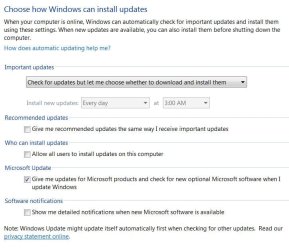
I personally only install all of the Important updates first
This is after of course altering my update setting to separate them properly
Just a FYI KB3112343 is an Important update relating to upgrading to win-10
If you're interested in win-10 install it
If not don't right click and Hide.
Update settings.JPG
 

My Computer

Computer type
PC/Desktop
Computer Manufacturer/Model Number
Custom assembled by me :}
OS
Win-7-Pro64bit 7-H-Prem-64bit
CPU
i7-5930K 2nd i9-9940x both water blocked VRM's too
Motherboard
ASUS SABERTOOTH X99 2nd ASUS x299 Apex
Memory
Trident-z 3200C14 2nd Trident-z 3600C16
Graphics Card(s)
EVGA 1080ti ftw3 2nd Titan Xp both water blocked
Sound Card
Built-in Realtek
Monitor(s) Displays
1-AOC G2460PG 24"G-Sync 144Hz/ 2nd 1-ASUS VG248QE 24" 144Hz
Screen Resolution
1920 x 1080 144Hz
Hard Drives
2-Samsung M.2 Evo & Evo Plus
2-Samsung 850 EVO 500GB SSD's/ 3-2.5 W.D. Black 1tb-&3-1tb/3-3.5 WD Black 1tb hdd's
PSU
EVGA SuperNOVA 1000-P2 2nd 1200-P2
Case
2-Corsair Obsidian Series 450D Black ATX Mid Tower
Cooling
Custom water loops
Keyboard
Logitech G710+/ 2nd Logitech G910
Mouse
2-RedDragon M901 Perdition 16400 dpi Gaming mouse = wired
Internet Speed
Comcast Ping 19ms 89.31mbps download speed 6.12mbps upload
Antivirus
Malwarebytes Pro/ Superantispyware Pro
Browser
FireFox & Pale moon
Other Info
2nd ASUS X299 Apex/Intel i9-9940x with Custom water loop/7H-Prem-x64/Corsair 450D case/Ram Trident-z 3600C16 4x8gb / Samsung970Evo plus 500gb SSD/Dual ssd EZ swap evo/PSU EVGA SuperNova 1200w-P2 80+Platinum/GPU Titan Xp /8-ML-140 on push-pull on 2-280GTX rads
Sorry that I was not clear. You don't have to skip installing Windows Update Agent 7.6.7600.320 - but you can skip it the next time you do a fresh install of W7. Manually download and install latest installing Windows Update Client before you start the search for updates.

If/Since Windows Update Agent 7.6.7600.320 is already installed, just install the latest installing Windows Update Client over top of it.
 

My Computer

Computer type
Laptop
Computer Manufacturer/Model Number
Employer provided Dell Latitude
OS
W7 Pro SP1 64bit
CPU
i7
Memory
8GB
Graphics Card(s)
Intel HD Graphics
Hard Drives
crappy SSD
Antivirus
Employer mandated Symantec Endpoint Protection
Browser
Pale Moon 64bit, IE11 64bit & Chrome 64bit
Sorry that I was not clear. You don't have to skip installing Windows Update Agent 7.6.7600.320 - but you can skip it the next time you do a fresh install of W7. Manually download and install latest installing Windows Update Client before you start the search for updates.

If/Since Windows Update Agent 7.6.7600.320 is already installed, just install the latest installing Windows Update Client over top of it.

hi,
OK, just checking, reinstalled win7 and not yet searched for updates, downloaded Update Client (KB3135445)
do i leave Update Client (KB3135445) in downloads and run it from there????
do i run/not run Update Agent 7.6.7600.320 ????

still not sure what to do, please note i am new to this pc thing,

thanks for your help guys, bluesfloyd.
 

My Computer

Computer type
PC/Desktop
OS
32 bits window7
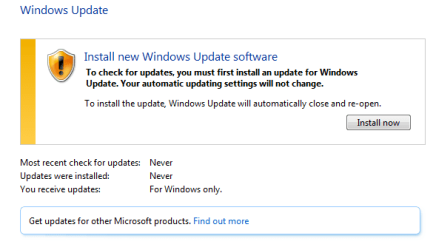
If your installation media for Windows 7 already contains SP1, then the first time that you ask for updates, Windows should show you this:

WU.PNG

You can install the requested software or you can just close that Window. It does not matter.


You can run the installation file for KB3135445 from most any folder that you wish.
 

My Computer

Computer type
Laptop
Computer Manufacturer/Model Number
Employer provided Dell Latitude
OS
W7 Pro SP1 64bit
CPU
i7
Memory
8GB
Graphics Card(s)
Intel HD Graphics
Hard Drives
crappy SSD
Antivirus
Employer mandated Symantec Endpoint Protection
Browser
Pale Moon 64bit, IE11 64bit & Chrome 64bit
This worked good for me on a Fresh install...

During Fresh/Custom install, select "Install Important Updates Only".
In Control Panel, under Power Plan Options, select "Never Off" for monitor and computer.
In Windows Update, change setting to "Never Check for Updates".
From a thumb drive on a different computer, download from Microsoft the fix called KB3135445.
Run this fix until it installs itself. You may need to try it several times and reboot til it installs.
Reboot, and then try Windows Update again.

Within 10 minutes, Update had found 153 updates. I clicked OK, and it immediately started to
download and install all 153 updates.
It takes about 3 hours to download and install the updates, and everything appears to be back to normal.


I found this fix after trying several re-installs, and Fix-it tools and Diagnostic tools. Pretty much wasted 4 days,
clicked on too many things, and tried to install too many fixes.
 

My Computer

Computer type
PC/Desktop
OS
Win 7 Home 64 bit
Back
Top