
Update seems to be totally 'broken'?

markg2

New member
Member
VIP
Local time
5:46 AM
Messages
477
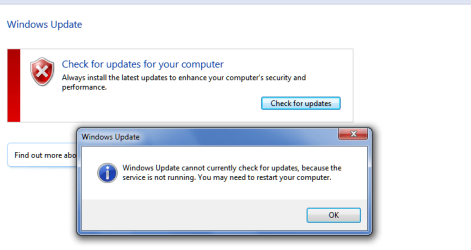
I periodically check my wife's Win7 machine for updates. The icon was present indicating updates available. I clicked the icon. The screen looked different. There were no n important/n optional available. I clicked update now. Got a message (paraphrased) service not working restart computer. I did and same problem. I checked the service and it showed as working, I restarted the service. Same problem. This time I shutdown and started the machine. Same problem.

That's why I'm saying the update truly is broken?

Mark
 

Attachments
  • Update1.png
    Update1.png
    13.7 KB · Views: 28
  • Update2.png
    Update2.png
    3.2 KB · Views: 0

My Computer My Computer

Computer type
PC/Desktop
OS
Windows 7 & Windows 10

My Computer My Computer

Computer type
PC/Desktop
Computer Manufacturer/Model Number
Home made Desktop
OS
Windows 10 Pro. 64/ version 1709 Windows 7 Pro/64
CPU
Intel i7-6800K @ 4.3
Motherboard
ASUS X-99 Deluxe II
Memory
Corsair Platinum 16 gig @2400
Graphics Card(s)
EVGA GTX 1070 OC
Monitor(s) Displays
Asus 27" LED LCD/VE278Q
Screen Resolution
1920-1080 or 1280-720 HDMI
Hard Drives
INTEL SSD 730-240 Gb Sata 3.0/
PSU
EVGA Platium 1200W
Case
Phanteks Luxe Tempered Glass 8 fans/ one radiator
Cooling
XSPC/ Water Cooled CPU
Keyboard
Das 4 Professional
Mouse
Logitech M705/MX Anywhere 2-S
Internet Speed
100 mbits
Antivirus
Microsoft Security Essentials/ Malwarebytes Premium 3.0/ SAS
Browser
I.E. 11 default/Firefox/ ISP Time Warner Cable/Spectrum
Other Info
LG BluRay Burner/
Sound system-KLipsch-THX/
Icy Dock ssd Hot Swap bays.
No luck.

I rolled the date back to the Friday before this past Sunday. I then ran update from control panel. It took a good 10-15 minutes for the update screen to finally load. It looked the same. I ran update and got the same error. I reset the date to current.

Here's what I really don't get.

99% of Window's users do not come to user forums for assistance and wouldn't know to do what you guys have done or know. If MS, per the referenced discussion, acknowledges this as their error and that it's fixed. Then why would I need to do anything? Why wouldn't this problem if it is fixed have been fixed automatically by a push from MS?

Mark
 

My Computer My Computer

Computer type
PC/Desktop
OS
Windows 7 & Windows 10
My mistake. I reset the date but didn't turn off auto check.

Followed instruction correctly and problem solved.

Thanks.

Mark
 

My Computer My Computer

Computer type
PC/Desktop
OS
Windows 7 & Windows 10
That is good to here.

Happy computing

Jack
 

My Computer My Computer

Computer type
PC/Desktop
Computer Manufacturer/Model Number
Home made Desktop
OS
Windows 10 Pro. 64/ version 1709 Windows 7 Pro/64
CPU
Intel i7-6800K @ 4.3
Motherboard
ASUS X-99 Deluxe II
Memory
Corsair Platinum 16 gig @2400
Graphics Card(s)
EVGA GTX 1070 OC
Monitor(s) Displays
Asus 27" LED LCD/VE278Q
Screen Resolution
1920-1080 or 1280-720 HDMI
Hard Drives
INTEL SSD 730-240 Gb Sata 3.0/
PSU
EVGA Platium 1200W
Case
Phanteks Luxe Tempered Glass 8 fans/ one radiator
Cooling
XSPC/ Water Cooled CPU
Keyboard
Das 4 Professional
Mouse
Logitech M705/MX Anywhere 2-S
Internet Speed
100 mbits
Antivirus
Microsoft Security Essentials/ Malwarebytes Premium 3.0/ SAS
Browser
I.E. 11 default/Firefox/ ISP Time Warner Cable/Spectrum
Other Info
LG BluRay Burner/
Sound system-KLipsch-THX/
Icy Dock ssd Hot Swap bays.
Back
Top
