
You are using an out of date browser. It may not display this or other websites correctly.
You should upgrade or use an alternative browser.
You should upgrade or use an alternative browser.
Update W7 RC
- Thread starter sigbart
- Start date

the latest x86 version is build 7260, you can try upgrading by just inserting the DVD or mounting the ISO file using something like MagicISO and running setup. but chances the upgrade will fail because of the way the ISO file was created using older setup files, it is also recomended to do a clean install from the previews builds. you can do a clean install without formating too, which keeps your data, and just moves the old windows directory to windows.old to use the windows directory for the new installation, hope this helps
My Computer
- Computer Manufacturer/Model Number
- home made
- OS
- Windows 7 7264x64(main), 7260x86(secendary), XP SP3 Triple Boot
- CPU
- Intel Core 2 Duo E7400 2.8Mhz
- Motherboard
- Intel G33 express chipset
- Memory
- 2GB DD2 667
- Graphics Card(s)
- Intel(R) 82G33 Graphics and Memory Controller Hub
- Sound Card
- Realtek Built into the G31
- Monitor(s) Displays
- 19"
- Screen Resolution
- 1280x1024
- Hard Drives
- 320GB SATA (Main), 160GB IDE (Backup)
- Case
- Gigabyte SETTO
- Keyboard
- Genius
- Mouse
- Logitech
- Internet Speed
- 1MB Download, 128k Upload
you can do a clean install without formating too, which keeps your data, and just moves the old windows directory to windows.old to use the windows directory for the new installation, hope this helps
How do you do that?
My Computer
- Computer Manufacturer/Model Number
- Dell Inspiron 1520 (Laptop)/ Home (Desktop)
- OS
- Windows 7 x64 / Same
- CPU
- Intel Core 2 Duo T7250 / Intel Core i7 930
- Motherboard
- Intel 945 / Asus P6X58D-E
- Memory
- 4GB / 6GB
- Graphics Card(s)
- NVIDIA GeForce 8400M GS / ASUS 1GB
- Sound Card
- Whatever Dell gave me :-( / Onboard
- Monitor(s) Displays
- 15.4" LCD / Crappy CRT
- Hard Drives
- Seagate 500GB SATA; 7200 RPM / Seagate 1TB SATA; 7200 RPM
- PSU
- N/A / OCZ Fatal1ty 550W Modular
- Case
- N/A / Antec 900
- Cooling
- Air
- Mouse
- Microsoft Presenter (Bluetooth)

How do you do that?
I believe if you do a clean install from within the OS, it just makes a Windows.old folder in C:/
My Computer
- Computer Manufacturer/Model Number
- Custom | Whitebox
- OS
- Windows 7 Ultimate, OS X 10.7, Ubuntu 11.04
- CPU
- Intel E6750 @ 3.80GHz
- Motherboard
- Gigabyte GA-EP45-UD3L (Revision 1.1)
- Memory
- 2x2GB & 2x1GB (6GB) OCZ Reaper 1066MHz @ 1080MHz
- Graphics Card(s)
- EVGA nVidia GTX 260 896mb (216 Core) FTW Edition
- Sound Card
- Realtek ALC888
- Monitor(s) Displays
- 21" VIZIO TV
- Screen Resolution
- 1680x1050 @ 60Hz
- Hard Drives
- Western Digital WD6401AALS - 640GB
Hitachi HDP725016GLA380 - 160GB
- PSU
- Corsair 750W
- Case
- NZXT Nemesis Elite
- Cooling
- Thermaltake SpinQ
- Keyboard
- Logitech Wireless S520
- Mouse
- Logitech Wireless S520 - Microsoft Wireless Arc Mouse
- Internet Speed
- Download: 20mbps, Upload: 3mbps
I believe if you do a clean install from within the OS, it just makes a Windows.old folder in C:/
Oh, I thought you could only do upgrades from within the OS. I only do clean installs with formatting when I install OS's these days.
My Computer
- Computer Manufacturer/Model Number
- Dell Inspiron 1520 (Laptop)/ Home (Desktop)
- OS
- Windows 7 x64 / Same
- CPU
- Intel Core 2 Duo T7250 / Intel Core i7 930
- Motherboard
- Intel 945 / Asus P6X58D-E
- Memory
- 4GB / 6GB
- Graphics Card(s)
- NVIDIA GeForce 8400M GS / ASUS 1GB
- Sound Card
- Whatever Dell gave me :-( / Onboard
- Monitor(s) Displays
- 15.4" LCD / Crappy CRT
- Hard Drives
- Seagate 500GB SATA; 7200 RPM / Seagate 1TB SATA; 7200 RPM
- PSU
- N/A / OCZ Fatal1ty 550W Modular
- Case
- N/A / Antec 900
- Cooling
- Air
- Mouse
- Microsoft Presenter (Bluetooth)
Oh, I thought you could only do upgrades from within the OS. I only do clean installs with formatting when I install OS's these days.
Thats how I do it as well. =P
My Computer
- Computer Manufacturer/Model Number
- Custom | Whitebox
- OS
- Windows 7 Ultimate, OS X 10.7, Ubuntu 11.04
- CPU
- Intel E6750 @ 3.80GHz
- Motherboard
- Gigabyte GA-EP45-UD3L (Revision 1.1)
- Memory
- 2x2GB & 2x1GB (6GB) OCZ Reaper 1066MHz @ 1080MHz
- Graphics Card(s)
- EVGA nVidia GTX 260 896mb (216 Core) FTW Edition
- Sound Card
- Realtek ALC888
- Monitor(s) Displays
- 21" VIZIO TV
- Screen Resolution
- 1680x1050 @ 60Hz
- Hard Drives
- Western Digital WD6401AALS - 640GB
Hitachi HDP725016GLA380 - 160GB
- PSU
- Corsair 750W
- Case
- NZXT Nemesis Elite
- Cooling
- Thermaltake SpinQ
- Keyboard
- Logitech Wireless S520
- Mouse
- Logitech Wireless S520 - Microsoft Wireless Arc Mouse
- Internet Speed
- Download: 20mbps, Upload: 3mbps

It's the other way round, install from boot and chose your existing Windows 7 partition and install without formatting and it will then give you the Windows.old folder.
My Computer
- Computer Manufacturer/Model Number
- Home Brew
- OS
- Windows 7 Ultimate Vista Ultimate x64
- CPU
- Core 2 Duo E8500 3.16Ghz @ 3.8Ghz
- Motherboard
- eVGA 750i FTW
- Memory
- 2x2Gigs Patriot PC2-6400 LL
- Graphics Card(s)
- Inno3D GeForce GTX260 216 SP
- Monitor(s) Displays
- ASUS VW222U 22" 2ms Response time
- Screen Resolution
- 1680x1050
- Hard Drives
- SATA 150GB
SATA II 250GB
USB IDE 750GB Ext.
- PSU
- HYTEC 600W & Thermaltake 650W Toughpower Power Exp
- Case
- Thermaltake Armor LCS (Liquid Cooling System)
- Cooling
- Liquid Cooling System
- Keyboard
- Logitech G15 Gaming Keyboard
- Mouse
- Logitech G9 Gaming Mouse
It's the other way round, install from boot and chose your existing Windows 7 partition and install without formatting and it will then give you the Windows.old folder.
Oopsies, my bad. It is located in the C:/ dir after clean install right?
My Computer
- Computer Manufacturer/Model Number
- Custom | Whitebox
- OS
- Windows 7 Ultimate, OS X 10.7, Ubuntu 11.04
- CPU
- Intel E6750 @ 3.80GHz
- Motherboard
- Gigabyte GA-EP45-UD3L (Revision 1.1)
- Memory
- 2x2GB & 2x1GB (6GB) OCZ Reaper 1066MHz @ 1080MHz
- Graphics Card(s)
- EVGA nVidia GTX 260 896mb (216 Core) FTW Edition
- Sound Card
- Realtek ALC888
- Monitor(s) Displays
- 21" VIZIO TV
- Screen Resolution
- 1680x1050 @ 60Hz
- Hard Drives
- Western Digital WD6401AALS - 640GB
Hitachi HDP725016GLA380 - 160GB
- PSU
- Corsair 750W
- Case
- NZXT Nemesis Elite
- Cooling
- Thermaltake SpinQ
- Keyboard
- Logitech Wireless S520
- Mouse
- Logitech Wireless S520 - Microsoft Wireless Arc Mouse
- Internet Speed
- Download: 20mbps, Upload: 3mbps
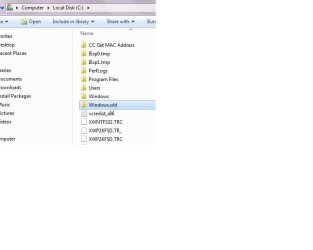
I did a clean install and selected my system parition for the old installation ( C:\ Drive) and it moved the old windows into windows.old directory, here is a screen shot attached that shows the location of the directory, no format was neccessaryOopsies, my bad. It is located in the C:/ dir after clean install right?
Attachments
My Computer
- Computer Manufacturer/Model Number
- home made
- OS
- Windows 7 7264x64(main), 7260x86(secendary), XP SP3 Triple Boot
- CPU
- Intel Core 2 Duo E7400 2.8Mhz
- Motherboard
- Intel G33 express chipset
- Memory
- 2GB DD2 667
- Graphics Card(s)
- Intel(R) 82G33 Graphics and Memory Controller Hub
- Sound Card
- Realtek Built into the G31
- Monitor(s) Displays
- 19"
- Screen Resolution
- 1280x1024
- Hard Drives
- 320GB SATA (Main), 160GB IDE (Backup)
- Case
- Gigabyte SETTO
- Keyboard
- Genius
- Mouse
- Logitech
- Internet Speed
- 1MB Download, 128k Upload
I did a clean install and selected my system parition for the old installation ( C:\ Drive) and it moved the old windows into windows.old directory, here is a screen shot attached that shows the location of the directory, no format was neccessary
The same in my case.
You can use data from Windows.old, but have to reinstall all programs working in Windows.
My Computer
- Computer Manufacturer/Model Number
- Gericom Blockbuster2
- OS
- Win 7, Home Premium
- CPU
- P4 3.2
- Memory
- 1.25
- Graphics Card(s)
- ATI Mobility Radeon 9600/9700, 128
- Internet Speed
- DSL
The same in my case.
You can use data from Windows.old, but have to reinstall all programs working in Windows.
I understand, that I can not do upgrade Win7 7100 to other build without reinstaling all now working programs...

My Computer
- OS
- Vista Ultimate and Windows 7 32x (7048)
I've had NO problems with upgrades. In fact, I've done a couple via Remote Desktop, and never needed to touch the physical machine at all. I don't understand why everyone does a fresh installation each time, unless it's for testing purposes.
My Computer
- Computer Manufacturer/Model Number
- Homebuilt
- OS
- Win7 x64
- CPU
- AMD Athlon 64 X2 7750 Kuma 2.7GHz Socket AM2+ Black Edition
- Motherboard
- GIGABYTE GA-MA780G-UD3H AM2+/AM2 AMD 780G
- Memory
- Kingston HyperX T1 Series 4GB DDR2 1066
- Graphics Card(s)
- Onboard
- Sound Card
- Onboard
- Monitor(s) Displays
- Hanns·G Hi-221DPB Black 22" 5ms Widescreen LCD
- Screen Resolution
- 1680 x 1050
- Hard Drives
- Western Digital Caviar Black WD1001FALS 1TB 7200 RPM SATA 3.0Gb/s
- PSU
- HEC HP485D 485W ATX12V
- Case
- HEC 6C28BB8S Black Steel ATX Mid Tower
- Cooling
- Stock
- Keyboard
- Microsoft Standard Basic
- Mouse
- Microsoft Standard Basic
- Internet Speed
- DSL
Upgrade is always risky - many posts here - I mean you have updated 7100, changed for sure some drivers or configs, and new built will install another, so ssome applications may not work properly and it is sometimes difficult to find out what is wrong. As you probably know it is easy to waste few night and finally - to reinstall everything is the only solution. Or at least optimal.
best regards,
best regards,
My Computer
- Computer Manufacturer/Model Number
- Gericom Blockbuster2
- OS
- Win 7, Home Premium
- CPU
- P4 3.2
- Memory
- 1.25
- Graphics Card(s)
- ATI Mobility Radeon 9600/9700, 128
- Internet Speed
- DSL
I've had NO problems with upgrades. In fact, I've done a couple via Remote Desktop, and never needed to touch the physical machine at all. I don't understand why everyone does a fresh installation each time, unless it's for testing purposes.
In some cases just for testing, in some other as working system. In my, it is the only working system (limited space) so I make testing and changes rather carefully. The main purpose for me is to get knowledge about this new system before I buy it. And thanks to this forum and many smart persons (my best regards) I can learn a lot and very fast.
My Computer
- Computer Manufacturer/Model Number
- Gericom Blockbuster2
- OS
- Win 7, Home Premium
- CPU
- P4 3.2
- Memory
- 1.25
- Graphics Card(s)
- ATI Mobility Radeon 9600/9700, 128
- Internet Speed
- DSL
You can still try upgrading as I said, but like others have said it may cause driver or other issues that we don't know about , as you know these builds are still under testing and they may have bugs still, so clean install is safer but doesn't mean you cannot upgrade, you can try and see if it works, if not try a clean installI understand, that I can not do upgrade Win7 7100 to other build without reinstaling all now working programs...
My Computer
- Computer Manufacturer/Model Number
- home made
- OS
- Windows 7 7264x64(main), 7260x86(secendary), XP SP3 Triple Boot
- CPU
- Intel Core 2 Duo E7400 2.8Mhz
- Motherboard
- Intel G33 express chipset
- Memory
- 2GB DD2 667
- Graphics Card(s)
- Intel(R) 82G33 Graphics and Memory Controller Hub
- Sound Card
- Realtek Built into the G31
- Monitor(s) Displays
- 19"
- Screen Resolution
- 1280x1024
- Hard Drives
- 320GB SATA (Main), 160GB IDE (Backup)
- Case
- Gigabyte SETTO
- Keyboard
- Genius
- Mouse
- Logitech
- Internet Speed
- 1MB Download, 128k Upload
OK, I will same wait with 7100RC and after to do clean install. ThanksYou can still try upgrading as I said, but like others have said it may cause driver or other issues that we don't know about , as you know these builds are still under testing and they may have bugs still, so clean install is safer but doesn't mean you cannot upgrade, you can try and see if it works, if not try a clean install
My Computer
- OS
- Vista Ultimate and Windows 7 32x (7048)