
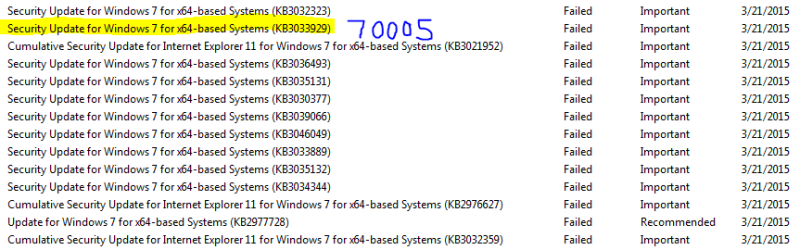
I've been offered the same 14 updates over and over. They fail to configure after reboot and are reverted. In the attached picture all show 800F0826 except for the one marked (that one is 80070005). I suspect permissions on the registry or filesystem are to blame.
I removed IE11 from my features a year ago when IE11 updates started to fail. I tried to add IE11 back,. but the updates still failed. I also tried turning IIS off in add remove features, but those got reverted.
The zip file for the CBS folder is too large to attach so here is the OneDrive link Microsoft services
*SubInACL used
"c:\Program Files (x86)\Windows Resource Kits\Tools\subinacl.exe" /subkeyreg HKEY_LOCAL_MACHINE /grant=administrators=f
"c:\Program Files (x86)\Windows Resource Kits\Tools\subinacl.exe" /subkeyreg HKEY_CURRENT_USER /grant=administrators=f
"c:\Program Files (x86)\Windows Resource Kits\Tools\subinacl.exe" /subkeyreg HKEY_CLASSES_ROOT /grant=administrators=f
"c:\Program Files (x86)\Windows Resource Kits\Tools\subinacl.exe" /subdirectories %SystemDrive% /grant=administrators=f
"c:\Program Files (x86)\Windows Resource Kits\Tools\subinacl.exe" /subkeyreg HKEY_LOCAL_MACHINE /grant=system=f
"c:\Program Files (x86)\Windows Resource Kits\Tools\subinacl.exe" /subkeyreg HKEY_CURRENT_USER /grant=system=f
"c:\Program Files (x86)\Windows Resource Kits\Tools\subinacl.exe" /subkeyreg HKEY_CLASSES_ROOT /grant=system=f
"c:\Program Files (x86)\Windows Resource Kits\Tools\subinacl.exe" /subdirectories %SystemDrive% /grant=system=f
I also tried the similar one posted here https://onedrive.live.com/?cid=27e6a35d1a492af7&id=27E6A35D1A492AF7!533
EDIT
Found that people have issues with kb3033929 and multiboot. I think my PC has ability to boot into some HP utilities, but I don't use a boot loader I installed
EDIT
Ran scandisk, no issues found. Recyclebin was reported corrupted under a user and was cleared out.
I removed IE11 from my features a year ago when IE11 updates started to fail. I tried to add IE11 back,. but the updates still failed. I also tried turning IIS off in add remove features, but those got reverted.
- Cleaned out Catroot2, CBS and WindowsUpdate.log in repair boot shell to get logs as clean and empty as possible. Not sure if that was a bad idea, but I got frustrated.
- Reattempted update
- Ran SubInACL* to grant access to the Adminstrators to registry and file system. Those logs are huge (3 GB plus and I don't have tools to parse them, plus I don't know where failure to set permissions are to be expected.
- I ran latest SURT and got a clean CheckSUR log
- SFC /scannow found no issues.
The zip file for the CBS folder is too large to attach so here is the OneDrive link Microsoft services
*SubInACL used
"c:\Program Files (x86)\Windows Resource Kits\Tools\subinacl.exe" /subkeyreg HKEY_LOCAL_MACHINE /grant=administrators=f
"c:\Program Files (x86)\Windows Resource Kits\Tools\subinacl.exe" /subkeyreg HKEY_CURRENT_USER /grant=administrators=f
"c:\Program Files (x86)\Windows Resource Kits\Tools\subinacl.exe" /subkeyreg HKEY_CLASSES_ROOT /grant=administrators=f
"c:\Program Files (x86)\Windows Resource Kits\Tools\subinacl.exe" /subdirectories %SystemDrive% /grant=administrators=f
"c:\Program Files (x86)\Windows Resource Kits\Tools\subinacl.exe" /subkeyreg HKEY_LOCAL_MACHINE /grant=system=f
"c:\Program Files (x86)\Windows Resource Kits\Tools\subinacl.exe" /subkeyreg HKEY_CURRENT_USER /grant=system=f
"c:\Program Files (x86)\Windows Resource Kits\Tools\subinacl.exe" /subkeyreg HKEY_CLASSES_ROOT /grant=system=f
"c:\Program Files (x86)\Windows Resource Kits\Tools\subinacl.exe" /subdirectories %SystemDrive% /grant=system=f
I also tried the similar one posted here https://onedrive.live.com/?cid=27e6a35d1a492af7&id=27E6A35D1A492AF7!533
EDIT
Found that people have issues with kb3033929 and multiboot. I think my PC has ability to boot into some HP utilities, but I don't use a boot loader I installed
EDIT
Ran scandisk, no issues found. Recyclebin was reported corrupted under a user and was cleared out.
Attachments
Last edited:
My Computer
At a glance
Windows 7 Home Premium x64 SP1Q6700 (Quad Core 2 2.66GHz)4GB DDR2NVidia GeForce 240
- Computer type
- PC/Desktop
- Computer Manufacturer/Model Number
- HP
- OS
- Windows 7 Home Premium x64 SP1
- CPU
- Q6700 (Quad Core 2 2.66GHz)
- Motherboard
- IPIBL-IP (Benicia)
- Memory
- 4GB DDR2
- Graphics Card(s)
- NVidia GeForce 240
- Hard Drives
- 2 x 500GB (RAID 0)
- Antivirus
- Microsoft Security Essentials
- Browser
- Firefox


