
Updates will not download even after a in-place reinstall!

runedog

New member
Power User
VIP
Local time
11:03 PM
Messages
190
I cannot install or download new updates so, after trying a MS tools I decided to do a in-place reinstall.

After this had finished I still cannot install updates and receive the encloed error (please see screenshot) when Windows first boots up???

Any/all help appreciated
Graham
 

Attachments
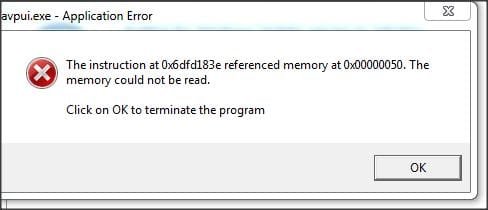
  • Snap 2015-06-16 at 19.16.10.jpg
    Snap 2015-06-16 at 19.16.10.jpg
    12.3 KB · Views: 26

My Computer My Computer

At a glance

Windows 7 Professional x64Intel Core i7 950 CPU (3.06Ghz Quad Core)12 gigATI HD 5970 2GB PCI Express Graphics card
Computer type
PC/Desktop
Computer Manufacturer/Model Number
Arbico
OS
Windows 7 Professional x64
CPU
Intel Core i7 950 CPU (3.06Ghz Quad Core)
Motherboard
Asus P6X58D-E motherboard with SATA III support
Memory
12 gig
Graphics Card(s)
ATI HD 5970 2GB PCI Express Graphics card
Sound Card
Creative XFi Xtreme Audio 7.1 channel sound card
Monitor(s) Displays
Samsung 24" inch
Hard Drives
250gig SSD
2TB
PSU
Quiet Coolermaster 1000W Quad PCI-E PSU
Case
Quiet Coolermaster Cosmos Case
Cooling
Water cooled with multiple fans
Antivirus
Kaspersky Internet Security 2012
Browser
Firefox
This appears to be from Kaspersky - you should uninstall it and run their cleanup tool, and then either reinstall it or install MSE (at least temporarily)
You apparently need to make sure that .NET 4 (at least - preferably .NET 4.5.2 now) is installed o
 

My Computer My Computer

At a glance

Win 7 x64 Home Premium (and x86 VirtualBox VM...i3 370M/i7 6500U8GB - finally :)/8GBit's an i3, dude!/dual Intel&nVidia
Computer type
Laptop
Computer Manufacturer/Model Number
Asus K52F or Lenovo B51-80
OS
Win 7 x64 Home Premium (and x86 VirtualBox VM)/Win10
CPU
i3 370M/i7 6500U
Motherboard
Asus/Lenovo
Memory
8GB - finally :)/8GB
Graphics Card(s)
it's an i3, dude!/dual Intel&nVidia
Sound Card
onboard
Monitor(s) Displays
15.6" built-in
Screen Resolution
1366x768/1920x1080
Hard Drives
750GB Seagate internal
Sundry external drives attached to other computers on the local network
1TB SSD on the Lenovo
PSU
n/a
Internet Speed
as much as I can get - usually on a dongle/phone, so <1MB/s
Antivirus
MSE/Defender
Browser
IE11/12/Edge/Chrome/FF(if I must)
Hi Noel, thanks for your reply, really appreciated.

When I logged-off last night the PC downloaded 191 updates! When I booted-up this morning after trying to register them I received the message that it couldn't install them and was reverting the procedure; 2.5 hours later it let me in again.

Do you think your instruction will sort the matter?

Many thanks
Graham
 

My Computer My Computer

At a glance

Windows 7 Professional x64Intel Core i7 950 CPU (3.06Ghz Quad Core)12 gigATI HD 5970 2GB PCI Express Graphics card
Computer type
PC/Desktop
Computer Manufacturer/Model Number
Arbico
OS
Windows 7 Professional x64
CPU
Intel Core i7 950 CPU (3.06Ghz Quad Core)
Motherboard
Asus P6X58D-E motherboard with SATA III support
Memory
12 gig
Graphics Card(s)
ATI HD 5970 2GB PCI Express Graphics card
Sound Card
Creative XFi Xtreme Audio 7.1 channel sound card
Monitor(s) Displays
Samsung 24" inch
Hard Drives
250gig SSD
2TB
PSU
Quiet Coolermaster 1000W Quad PCI-E PSU
Case
Quiet Coolermaster Cosmos Case
Cooling
Water cooled with multiple fans
Antivirus
Kaspersky Internet Security 2012
Browser
Firefox
With any luck - yes.
You should avoid installing that many updates at once, though.

Here's my preferredmethodology for installing the 200+ windows Updates in Vista and Win7...


Note - between eachof the below batches of updates, reboot at least once, even if the machineauto-rebooted during the updates. After teh update, do a new Check for Updates.Add any remaining updates or failed updates to the next batch.


1) Install all'Security Update for Windows'

Reboot

Check for Updates

(some will havefailed, and some new ones will have appeared)

2) Install theremaining/new 'Security Update for Windows'

Reboot

Check for Updates

3) Install allordinary 'Update for Windows'

Reboot

Check for Updates

4) install updatesfor IE8 - but NOT IE 9/10/11

Reboot

Check for Updates

5) install all otherupdates EXCEPT .NET ones and IE9/10/11

Reboot

Check for Updates

repeat 5 untilthere's nothing left in the main window except the .NET and IE upgrades


6) Install allSecurity Updates for .NET - but nothing else

Reboot

Check for Updates

7) Install all other.NET updates

Reboot

Check for Updates

8) Install IE10 ifoffered - IE11 should wait if it's still an Optional update.

9) Install the IE10updates, then install IE11 and update that.
 

My Computer My Computer

At a glance

Win 7 x64 Home Premium (and x86 VirtualBox VM...i3 370M/i7 6500U8GB - finally :)/8GBit's an i3, dude!/dual Intel&nVidia
Computer type
Laptop
Computer Manufacturer/Model Number
Asus K52F or Lenovo B51-80
OS
Win 7 x64 Home Premium (and x86 VirtualBox VM)/Win10
CPU
i3 370M/i7 6500U
Motherboard
Asus/Lenovo
Memory
8GB - finally :)/8GB
Graphics Card(s)
it's an i3, dude!/dual Intel&nVidia
Sound Card
onboard
Monitor(s) Displays
15.6" built-in
Screen Resolution
1366x768/1920x1080
Hard Drives
750GB Seagate internal
Sundry external drives attached to other computers on the local network
1TB SSD on the Lenovo
PSU
n/a
Internet Speed
as much as I can get - usually on a dongle/phone, so <1MB/s
Antivirus
MSE/Defender
Browser
IE11/12/Edge/Chrome/FF(if I must)
Brilliant Noel, it worked 100% as you suggested. I repaired ,NET up to the latest version then Kaspersky actually asked me to re-enter the regcode which I did. I then got on with successfully downloading all the updates and we are rocking again :)

Thank you again sir, you are a gent.
Graham
 

My Computer My Computer

At a glance

Windows 7 Professional x64Intel Core i7 950 CPU (3.06Ghz Quad Core)12 gigATI HD 5970 2GB PCI Express Graphics card
Computer type
PC/Desktop
Computer Manufacturer/Model Number
Arbico
OS
Windows 7 Professional x64
CPU
Intel Core i7 950 CPU (3.06Ghz Quad Core)
Motherboard
Asus P6X58D-E motherboard with SATA III support
Memory
12 gig
Graphics Card(s)
ATI HD 5970 2GB PCI Express Graphics card
Sound Card
Creative XFi Xtreme Audio 7.1 channel sound card
Monitor(s) Displays
Samsung 24" inch
Hard Drives
250gig SSD
2TB
PSU
Quiet Coolermaster 1000W Quad PCI-E PSU
Case
Quiet Coolermaster Cosmos Case
Cooling
Water cooled with multiple fans
Antivirus
Kaspersky Internet Security 2012
Browser
Firefox
You're welcome! - good luck.
 

My Computer My Computer

At a glance

Win 7 x64 Home Premium (and x86 VirtualBox VM...i3 370M/i7 6500U8GB - finally :)/8GBit's an i3, dude!/dual Intel&nVidia
Computer type
Laptop
Computer Manufacturer/Model Number
Asus K52F or Lenovo B51-80
OS
Win 7 x64 Home Premium (and x86 VirtualBox VM)/Win10
CPU
i3 370M/i7 6500U
Motherboard
Asus/Lenovo
Memory
8GB - finally :)/8GB
Graphics Card(s)
it's an i3, dude!/dual Intel&nVidia
Sound Card
onboard
Monitor(s) Displays
15.6" built-in
Screen Resolution
1366x768/1920x1080
Hard Drives
750GB Seagate internal
Sundry external drives attached to other computers on the local network
1TB SSD on the Lenovo
PSU
n/a
Internet Speed
as much as I can get - usually on a dongle/phone, so <1MB/s
Antivirus
MSE/Defender
Browser
IE11/12/Edge/Chrome/FF(if I must)
After rebooting the PC today I was told there were 197 updates available again? After installing these a couple of days ago, why do I need to reinstall again?

Many thanks
Graham
 

My Computer My Computer

At a glance

Windows 7 Professional x64Intel Core i7 950 CPU (3.06Ghz Quad Core)12 gigATI HD 5970 2GB PCI Express Graphics card
Computer type
PC/Desktop
Computer Manufacturer/Model Number
Arbico
OS
Windows 7 Professional x64
CPU
Intel Core i7 950 CPU (3.06Ghz Quad Core)
Motherboard
Asus P6X58D-E motherboard with SATA III support
Memory
12 gig
Graphics Card(s)
ATI HD 5970 2GB PCI Express Graphics card
Sound Card
Creative XFi Xtreme Audio 7.1 channel sound card
Monitor(s) Displays
Samsung 24" inch
Hard Drives
250gig SSD
2TB
PSU
Quiet Coolermaster 1000W Quad PCI-E PSU
Case
Quiet Coolermaster Cosmos Case
Cooling
Water cooled with multiple fans
Antivirus
Kaspersky Internet Security 2012
Browser
Firefox
Hmmm. Please post a new set of logs. Inlude the C:\windows\windowsupdate.log.
 

My Computer My Computer

At a glance

Win 7 x64 Home Premium (and x86 VirtualBox VM...i3 370M/i7 6500U8GB - finally :)/8GBit's an i3, dude!/dual Intel&nVidia
Computer type
Laptop
Computer Manufacturer/Model Number
Asus K52F or Lenovo B51-80
OS
Win 7 x64 Home Premium (and x86 VirtualBox VM)/Win10
CPU
i3 370M/i7 6500U
Motherboard
Asus/Lenovo
Memory
8GB - finally :)/8GB
Graphics Card(s)
it's an i3, dude!/dual Intel&nVidia
Sound Card
onboard
Monitor(s) Displays
15.6" built-in
Screen Resolution
1366x768/1920x1080
Hard Drives
750GB Seagate internal
Sundry external drives attached to other computers on the local network
1TB SSD on the Lenovo
PSU
n/a
Internet Speed
as much as I can get - usually on a dongle/phone, so <1MB/s
Antivirus
MSE/Defender
Browser
IE11/12/Edge/Chrome/FF(if I must)
Back
Top