Solved Updates?

AirPower4ever

New member
Member
VIP
Local time
5:37 AM
Messages
269
Not sure, but I have a two questions. First, is it just my systems (3 of them) or has anyone else have the same thing occur. I have 3 Windows 7 Pro systems, yesterday the patches came out and all 3 systems had 19 to do, but I usually do not install them right away until I read from others that no issues arise. The only thing I did yesterday was update Adobe Flash Player.

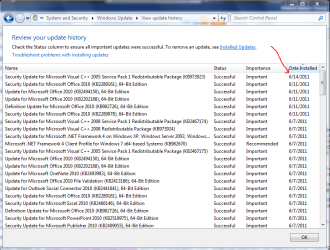
Today, all three systems show now only 15 updates, the NET Framework 3.5.1 and 4.0 ones are now missing. Here is a screen shot of my update history that you can see I did not install anything since 6-14-2011.

So did these get pulled back? Some reading around shows some people having troubles, but I am just wanting to know. Did Flash Player take care of the 3.5.1 and 4.0? Again, I am just wondering.

Second question, has anyone been using Scunia and how has their experience been with it? Is it worth installing and if so what are the good and bad of using it? Or is it not worth installing?
 

Attachments
  • Capture.PNG
    Capture.PNG
    35.9 KB · Views: 51

My Computer

Computer type
PC/Desktop
Computer Manufacturer/Model Number
Home Built
OS
Windows 10 Pro 64-bit
CPU
Core I7-6700
Motherboard
Asus Maximus VIII Hero
Memory
8GB Corsair Dominator
Graphics Card(s)
Asus STRIX GTX 980Ti
Monitor(s) Displays
Asus PG278Q, Dell U2410
Screen Resolution
2560 x 1440, 1920 x 1200
Hard Drives
1 x Samsung 950 Pro 512GB
1 x 1TB HGST
PSU
750W Seasonic
Case
Antec 900 v3
Cooling
Stock
Internet Speed
Cable Internet
You've posted the list from Windows Update > View update history. That list does not show the updates that were offered to your system.

In order for anyone to see which updates are or were being offered, please post the list of Available updates ( Windows Update > View available Important or Optional updates

There are always installation issues with updates for the .NET Frameworks. I strongly suggest that updates for the .NET Framework be installed by themselves along with no other updates.
AFAIK, this month's updates for .NET have not been pulled by MS.

As to Secunia's PSI, if you stay abreast of Security news and regularly check for updates for all of the installed software, then it's not needed. If you do not do that, then PSI is worthwhile but it's not always correct.
 

My Computer

OS
Windows 7 Ultimate x86; Windows XP Pro SP3 x86; Windows Vista Ultimate x86
Just a maybe- check that your Flash updates have actually installed by making sure the correct version appears in Programs and Features.

When I did the Flash updates yesterday the installers seemed to have run fine. Later when I tried to update Windows- after hitting download nothing happened. Rebooted a couple of times, tried the Windows updates again and still nothing. At some point I opened Revo to see if anything was showing as installed there, and noticed the Flash updates hadn't installed.

After 2/3 further attempts, with the Flash installers seemingly having completed, there was still no change. I then uninstalled both older versions of Flash and did a fresh install of the latest version for both. Rebooted, and they were finally installed. I then ran the Windows update and everything installed just fine.
 

My Computer

Computer type
PC/Desktop
OS
Windows 7
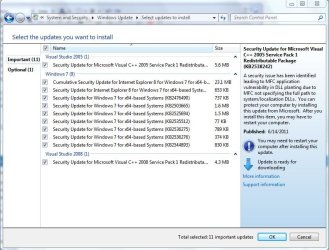
Mow Green - I cannot show the missing updates as they no longer appear on the Important and optional updates, but here were the ones that did appear all day on the 15th and then this morning these were not available
KB2518870
KB2478661
KB2478663
These were on my "to update" listing as security updates from Microsoft, but are now not offered (see pic)

Thanks for the Secunia info, I typically do every update manually and one by one. I figured I saw this pass by and that I can do all that from just one interface. But I agree with you, since I check, I'll stick to my current way.

Oaken - Yes, I did check that. I read that it's always better to uninstall the older versions prior to installing the new ones. Here is an uninstaller that I use

Uninstall Flash Player | Windows

I see basically 3 files that get installed (from each, for I.E. and for non-I.E.) Depending on your system; they reside at
XP - C:\WINDOWS\system32\Macromed\Flash
Vista and 7 (32-bit) - C:\WINDOWS\system32\Macromed\Flash
Vista and 7 (64-bit) - C:\Windows\SysWOW64\Macromed\Flash

Once I uninstall the flash player, I go in here to see if they truly get removed. Then once I install I check to see if they got installed. Hover over these files and a small window will display the version that got installed
I.E. file - FlashUtil10t.dll
non-I.E. file - NPSWF32.dll

Thanks both of you for your replies and your inputs.
 

Attachments

  • Capture.JPG
    Capture.JPG
    91 KB · Views: 17

My Computer

Computer type
PC/Desktop
Computer Manufacturer/Model Number
Home Built
OS
Windows 10 Pro 64-bit
CPU
Core I7-6700
Motherboard
Asus Maximus VIII Hero
Memory
8GB Corsair Dominator
Graphics Card(s)
Asus STRIX GTX 980Ti
Monitor(s) Displays
Asus PG278Q, Dell U2410
Screen Resolution
2560 x 1440, 1920 x 1200
Hard Drives
1 x Samsung 950 Pro 512GB
1 x 1TB HGST
PSU
750W Seasonic
Case
Antec 900 v3
Cooling
Stock
Internet Speed
Cable Internet
Don't try to 2nd guess ms and their updates.
Installl all critical, all important, and all optional updates.

Control Panel | Windows Updates |
in the left-hand column click on Check for Updates EVEN IF update says you are already up to date.

Install the updates, in the sequence of critical,important,optional.
Keep repeating the above procedure until finally when you click on Check for Updates, you are told that you are uptodate.
 

My Computer

Computer Manufacturer/Model Number
Toshiba Satellite S875D-S7239 laptop
OS
MS Windows 7 Ultimate SP1 64-bit
CPU
AMD A10-4600M
Motherboard
AMD Pumori (Socket FT1)
Memory
6.00 GB Dual-Channel DDR3 @ 798MHz (11-11-12-28)
Graphics Card(s)
AMD Radeon HD 7660G
Sound Card
High Definition Audio Device
Monitor(s) Displays
Generic PnP Monitor (1600x900@60Hz)
Screen Resolution
1600x900@60Hz
Hard Drives
SSD 119GB Corsair CSSD-V128GB2 ATA Device
Keyboard
Standard PS/2 Keyboard
Mouse
HP Wireless Optical Mobile Mouse Model FHA-3410
Internet Speed
What the local pub, local coffee shop offers.
Other Info
Optical Drive:MATSHITA BD-CMB UJ160B ATA Device


Also have an Asus ha1002xp netbook with Win 7 Ultimate installed.
You may find that after you install the others the .NET ones will reappear. I have had that happen before.
 

My Computer

Computer type
Laptop
Computer Manufacturer/Model Number
Hewlett-Packard/G62-107SA Notebook
OS
Microsoft Windows 7 Home Premium 64-bit Service Pack 1
CPU
Intel(R) Core(TM) i3 CPU M 330 @ 2.13GHz
Motherboard
Hewlett-Packard 1425
Memory
8 GB DDR3
Graphics Card(s)
Intel(R) HD Graphics
Sound Card
Realtek High Definition Audio
Monitor(s) Displays
Builtin
Screen Resolution
1366 x 768 x 32 bits (4294967296 colors) @ 60 Hz
Hard Drives
250 GB SATA Hard Disk Drive 7200 rpm
2TB Seagate GoFlex USB 2 Drive
1TB Iomega Prestige USB 2 Drive
1.5TB Iomega Prestige USB 2 Drive (Samsung)
2TB WD MyBook Live NAS.
Mouse
Logitech Anywhere MX
Internet Speed
152 Mbs download 10 Mbs upload
Antivirus
Norton 360
Browser
Chrome
Mow Green - I cannot show the missing updates as they no longer appear on the Important and optional updates, but here were the ones that did appear all day on the 15th and then this morning these were not available
KB2518870

This security update for .NET Framework 4 failed to install yesterday so I uninstalled the only other security update (KB2446708) then did a repair to .NET Framework 4.

When I tried "check for updates" it selected KB2446708 to install but KB2518870 never shows up again in updates, even after KB2446708 is re-installed and PC rebooted.

Perhaps it was problematic and was pulled.

Next time I will not bother messing with the PC, it is just that it was my first ever Windows 7 update to fail. :)
 

My Computer

Computer Manufacturer/Model Number
Shop built
OS
Windows 7
CPU
Intel E2200
Motherboard
Intel D945GCNL
Memory
2GB
Graphics Card(s)
Onboard
Sound Card
Onboard
Monitor(s) Displays
Samsung SyncMaster 2032BW
Hard Drives
Samsung F3 500GB
PSU
Corsair 450W
Case
Antec Mini p180
Cooling
Stock
Mow Green - I cannot show the missing updates as they no longer appear on the Important and optional updates, but here were the ones that did appear all day on the 15th and then this morning these were not available
KB2518870
This security update for .NET Framework 4 failed to install yesterday so I uninstalled the only other security update (KB2446708) then did a repair to .NET Framework 4.

When I tried "check for updates" it selected KB2446708 to install but KB2518870 never shows up again in updates, even after KB2446708 is re-installed and PC rebooted.

Perhaps it was problematic and was pulled.

Next time I will not bother messing with the PC, it is just that it was my first ever Windows 7 update to fail. :)
KB2518870 is still available on the MS Download Center.
As to why it's not showing as an offered update, there are 2 .NET updates available for Windows 7. One is for .NET Framework 3.5 SP1, which is a component of Windows 7, the second is for .NET Framework 4, which is usually installed along with software or by a web site that requires it be installed in order for said software or web site to function.

As of today, I have heard nothing about either .NET updates being pulled by MS .
Perhaps one needs to install the update for 3.5 SP1 by itself, along with no other updates, then install the update for .NET Framework 4 afterwards.

As stephens posted, a Repair of .NET Frameworks sometimes resolves their updating installation issues.
Unfortunately, MS still can not resolve the continual updating issues associated with the various Frameworks.

So, what I'd suggest, is that one only install .NET Frameworks that are required by software and web sites that depend upon it to function.
Examples of such software is the ATI Control Panel and Microsoft's CBS Package Inspector.

As for .NET Framework 4, I'd suggest that it be uninstalled unless software or a web site requires that it be installed.
As of today I am not aware of any software that requires that it be installed. That will change and let's hope that MS finally figures out a way to update it reliably .
 

My Computer

OS
Windows 7 Ultimate x86; Windows XP Pro SP3 x86; Windows Vista Ultimate x86
So went through a list of KB's and found out what my system is doing. My older Windows 7 (installed around December last year) has all these updates, more than my second system which was installed in May.

I was really bored and actually read the Microsoft updates and technical areas. Seems like depending on what date you install the updates, you will get the newer ones, but also I read some obscure points that those KB9xxxxx updates and securities actually prevent the newer updates from coming up?! Yes, from Microsoft, buried in the depths of their website. So I did a test on one, I uninstalled a KB9xxxxx and then rebooted, ran the updates and the .NET 4.0 KB's are now available. Installed.

I tried to then install that KB9xxxxx that I uninstalled and I get the "not needed" so it is true that some of the KB9xxxxx hold back some of the newer updates. I did a second test with another KB9xxxxx and the .NET 3.5.1 shows up now.

I guess FYI to everyone? Which KB9xxxxx is holding back certain updates from your system? I don't want to go back to the depths. Not sure which one holds back which .NET, but I uninstalled these KB's during my test and both .NET's show up

KB982214
KB974332
 

My Computer

Computer type
PC/Desktop
Computer Manufacturer/Model Number
Home Built
OS
Windows 10 Pro 64-bit
CPU
Core I7-6700
Motherboard
Asus Maximus VIII Hero
Memory
8GB Corsair Dominator
Graphics Card(s)
Asus STRIX GTX 980Ti
Monitor(s) Displays
Asus PG278Q, Dell U2410
Screen Resolution
2560 x 1440, 1920 x 1200
Hard Drives
1 x Samsung 950 Pro 512GB
1 x 1TB HGST
PSU
750W Seasonic
Case
Antec 900 v3
Cooling
Stock
Internet Speed
Cable Internet
Back
Top