
Updates

jpolacko

Minion
Member
VIP
Local time
8:26 AM
Messages
38
Location
Beloit, Wisconsin
Hey everyone, I just reinstalled Windows 7 Home Premium on my laptop using HyperV in Windows 10 Pro installation and activation went great and I also got the first round of updates installed and service pack 1 but now when I try to scan for updates it just scans and scans but nothing ever pops up. I already did sfc and reset the windows update service but still the same result. I was wondering if there was anything I'm forgetting to do or anything I can do to get it up to date? This is a fresh install and bare bones I have no AV installed . Thanks
 

My Computer

Computer type
Laptop
Computer Manufacturer/Model Number
HP Pavillion DV6 WW146AC
OS
Opensuse 42.2 (Windows 7 Pro through Virtual box)
CPU
Intel Core i5 - M460 @ 2.53 GHz
Motherboard
Hp factory board
Memory
6 GB
Graphics Card(s)
Intel HD Graphics Card
Sound Card
IDT High Def sound card
Hard Drives
Toshiba 600 GB as well as Samsung 600 GB SSD
Keyboard
HP Backlit Keyboard
Mouse
USB Standard Mouse
Internet Speed
60 Mbps download 5 Mbps upload
Antivirus
None
Browser
IE 11 Metro and Firefox v48.0
Other Info
Custom Built Windows Server 2008 R2 used for storage server, DHCP server, Primary DNS server. Novell Suse Server running 2 custom built desktop that have Novell Netware installed.
Hi,
Probably would of been better to start with a iso with sp1 already on it,
But in any rate you'll need to manually install a couple of updates 3 if you want to expedite the process a tad
Make sure KB3020369 is installed if not manually install it this is the main article page with all versions,
https://support.microsoft.com/en-us/kb/3020369
These other links do prompt you to download as soon as you click on them just to give you a heads up :)
Win-7 32 bit
https://download.microsoft.com/down...B0A-35769CBBE6B0/Windows6.1-KB3020369-x86.msu
Win-7 64 bit
https://download.microsoft.com/down...020-EC41D56B074F/Windows6.1-KB3020369-x64.msu

Then manually install KB3172605 main article page with all versions,
https://support.microsoft.com/en-us/kb/3172605
KB3172605
Win-7 32 bit
https://download.microsoft.com/down...A9C-6B30C3E1735A/Windows6.1-KB3172605-x86.msu

Win-7 64 bit
https://download.microsoft.com/down...67F-C713F7821374/Windows6.1-KB3172605-x64.msu

Lastly manually install KB3125574 you must use internet explorer to download this update from the catalog
On the top right use the search for KB3125574
Microsoft Update Catalog
 

My Computer

Computer type
PC/Desktop
Computer Manufacturer/Model Number
Custom assembled by me :}
OS
Win-7-Pro64bit 7-H-Prem-64bit
CPU
i7-5930K 2nd i9-9940x both water blocked VRM's too
Motherboard
ASUS SABERTOOTH X99 2nd ASUS x299 Apex
Memory
Trident-z 3200C14 2nd Trident-z 3600C16
Graphics Card(s)
EVGA 1080ti ftw3 2nd Titan Xp both water blocked
Sound Card
Built-in Realtek
Monitor(s) Displays
1-AOC G2460PG 24"G-Sync 144Hz/ 2nd 1-ASUS VG248QE 24" 144Hz
Screen Resolution
1920 x 1080 144Hz
Hard Drives
2-Samsung M.2 Evo & Evo Plus
2-Samsung 850 EVO 500GB SSD's/ 3-2.5 W.D. Black 1tb-&3-1tb/3-3.5 WD Black 1tb hdd's
PSU
EVGA SuperNOVA 1000-P2 2nd 1200-P2
Case
2-Corsair Obsidian Series 450D Black ATX Mid Tower
Cooling
Custom water loops
Keyboard
Logitech G710+/ 2nd Logitech G910
Mouse
2-RedDragon M901 Perdition 16400 dpi Gaming mouse = wired
Internet Speed
Comcast Ping 19ms 89.31mbps download speed 6.12mbps upload
Antivirus
Malwarebytes Pro/ Superantispyware Pro
Browser
FireFox & Pale moon
Other Info
2nd ASUS X299 Apex/Intel i9-9940x with Custom water loop/7H-Prem-x64/Corsair 450D case/Ram Trident-z 3600C16 4x8gb / Samsung970Evo plus 500gb SSD/Dual ssd EZ swap evo/PSU EVGA SuperNova 1200w-P2 80+Platinum/GPU Titan Xp /8-ML-140 on push-pull on 2-280GTX rads
Hi,
Probably would of been better to start with a iso with sp1 already on it,
But in any rate you'll need to manually install a couple of updates 3 if you want to expedite the process a tad
Make sure KB3020369 is installed if not manually install it this is the main article page with all versions,
https://support.microsoft.com/en-us/kb/3020369
These other links do prompt you to download as soon as you click on them just to give you a heads up :)
Win-7 32 bit
https://download.microsoft.com/down...B0A-35769CBBE6B0/Windows6.1-KB3020369-x86.msu
Win-7 64 bit
https://download.microsoft.com/down...020-EC41D56B074F/Windows6.1-KB3020369-x64.msu

Then manually install KB3172605 main article page with all versions,
https://support.microsoft.com/en-us/kb/3172605
KB3172605
Win-7 32 bit
https://download.microsoft.com/down...A9C-6B30C3E1735A/Windows6.1-KB3172605-x86.msu

Win-7 64 bit
https://download.microsoft.com/down...67F-C713F7821374/Windows6.1-KB3172605-x64.msu

Lastly manually install KB3125574 you must use internet explorer to download this update from the catalog
On the top right use the search for KB3125574
Microsoft Update Catalog

I will do that as soon as I get off work tonight. Should I stop the update service before I do any of these? Thanks for the fast reply :)
 

My Computer

Computer type
Laptop
Computer Manufacturer/Model Number
HP Pavillion DV6 WW146AC
OS
Opensuse 42.2 (Windows 7 Pro through Virtual box)
CPU
Intel Core i5 - M460 @ 2.53 GHz
Motherboard
Hp factory board
Memory
6 GB
Graphics Card(s)
Intel HD Graphics Card
Sound Card
IDT High Def sound card
Hard Drives
Toshiba 600 GB as well as Samsung 600 GB SSD
Keyboard
HP Backlit Keyboard
Mouse
USB Standard Mouse
Internet Speed
60 Mbps download 5 Mbps upload
Antivirus
None
Browser
IE 11 Metro and Firefox v48.0
Other Info
Custom Built Windows Server 2008 R2 used for storage server, DHCP server, Primary DNS server. Novell Suse Server running 2 custom built desktop that have Novell Netware installed.
Hi,
Just switching the update settings and restarting should work
But yes stopping the service and disabling it should also do the job too :)

If you don't the 2 searches will conflict for sure :)
 

My Computer

Computer type
PC/Desktop
Computer Manufacturer/Model Number
Custom assembled by me :}
OS
Win-7-Pro64bit 7-H-Prem-64bit
CPU
i7-5930K 2nd i9-9940x both water blocked VRM's too
Motherboard
ASUS SABERTOOTH X99 2nd ASUS x299 Apex
Memory
Trident-z 3200C14 2nd Trident-z 3600C16
Graphics Card(s)
EVGA 1080ti ftw3 2nd Titan Xp both water blocked
Sound Card
Built-in Realtek
Monitor(s) Displays
1-AOC G2460PG 24"G-Sync 144Hz/ 2nd 1-ASUS VG248QE 24" 144Hz
Screen Resolution
1920 x 1080 144Hz
Hard Drives
2-Samsung M.2 Evo & Evo Plus
2-Samsung 850 EVO 500GB SSD's/ 3-2.5 W.D. Black 1tb-&3-1tb/3-3.5 WD Black 1tb hdd's
PSU
EVGA SuperNOVA 1000-P2 2nd 1200-P2
Case
2-Corsair Obsidian Series 450D Black ATX Mid Tower
Cooling
Custom water loops
Keyboard
Logitech G710+/ 2nd Logitech G910
Mouse
2-RedDragon M901 Perdition 16400 dpi Gaming mouse = wired
Internet Speed
Comcast Ping 19ms 89.31mbps download speed 6.12mbps upload
Antivirus
Malwarebytes Pro/ Superantispyware Pro
Browser
FireFox & Pale moon
Other Info
2nd ASUS X299 Apex/Intel i9-9940x with Custom water loop/7H-Prem-x64/Corsair 450D case/Ram Trident-z 3600C16 4x8gb / Samsung970Evo plus 500gb SSD/Dual ssd EZ swap evo/PSU EVGA SuperNova 1200w-P2 80+Platinum/GPU Titan Xp /8-ML-140 on push-pull on 2-280GTX rads
Hi,
Just switching the update settings and restarting should work
But yes stopping the service and disabling it should also do the job too :)

If you don't the 2 searches will conflict for sure :)


Okay Thanks! :) Exactly how do you completely stop the the update service? I know you have to go service manager and stop it there but there but I think I did that once before and it didn't completely stop it.
 

My Computer

Computer type
Laptop
Computer Manufacturer/Model Number
HP Pavillion DV6 WW146AC
OS
Opensuse 42.2 (Windows 7 Pro through Virtual box)
CPU
Intel Core i5 - M460 @ 2.53 GHz
Motherboard
Hp factory board
Memory
6 GB
Graphics Card(s)
Intel HD Graphics Card
Sound Card
IDT High Def sound card
Hard Drives
Toshiba 600 GB as well as Samsung 600 GB SSD
Keyboard
HP Backlit Keyboard
Mouse
USB Standard Mouse
Internet Speed
60 Mbps download 5 Mbps upload
Antivirus
None
Browser
IE 11 Metro and Firefox v48.0
Other Info
Custom Built Windows Server 2008 R2 used for storage server, DHCP server, Primary DNS server. Novell Suse Server running 2 custom built desktop that have Novell Netware installed.
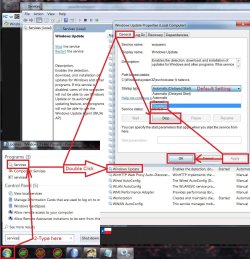
Hi,
Click Start and type in the search box
services
Click on the suggestion or hit the enter key.
Windows service is near the bottom.

Double click windows updates listing = Make note of what it says it's set on now
I believe default is Auto (delayed start) you'll want to switch it back on after installing KB3172605

But either way you should see a Stop button active click on it and then switch from Auto delayed start to Disabled and save the changes.

At this point you can manually install KB3172605
service stop windows update.jpg
 
Last edited:

My Computer

Computer type
PC/Desktop
Computer Manufacturer/Model Number
Custom assembled by me :}
OS
Win-7-Pro64bit 7-H-Prem-64bit
CPU
i7-5930K 2nd i9-9940x both water blocked VRM's too
Motherboard
ASUS SABERTOOTH X99 2nd ASUS x299 Apex
Memory
Trident-z 3200C14 2nd Trident-z 3600C16
Graphics Card(s)
EVGA 1080ti ftw3 2nd Titan Xp both water blocked
Sound Card
Built-in Realtek
Monitor(s) Displays
1-AOC G2460PG 24"G-Sync 144Hz/ 2nd 1-ASUS VG248QE 24" 144Hz
Screen Resolution
1920 x 1080 144Hz
Hard Drives
2-Samsung M.2 Evo & Evo Plus
2-Samsung 850 EVO 500GB SSD's/ 3-2.5 W.D. Black 1tb-&3-1tb/3-3.5 WD Black 1tb hdd's
PSU
EVGA SuperNOVA 1000-P2 2nd 1200-P2
Case
2-Corsair Obsidian Series 450D Black ATX Mid Tower
Cooling
Custom water loops
Keyboard
Logitech G710+/ 2nd Logitech G910
Mouse
2-RedDragon M901 Perdition 16400 dpi Gaming mouse = wired
Internet Speed
Comcast Ping 19ms 89.31mbps download speed 6.12mbps upload
Antivirus
Malwarebytes Pro/ Superantispyware Pro
Browser
FireFox & Pale moon
Other Info
2nd ASUS X299 Apex/Intel i9-9940x with Custom water loop/7H-Prem-x64/Corsair 450D case/Ram Trident-z 3600C16 4x8gb / Samsung970Evo plus 500gb SSD/Dual ssd EZ swap evo/PSU EVGA SuperNova 1200w-P2 80+Platinum/GPU Titan Xp /8-ML-140 on push-pull on 2-280GTX rads
Hi,
Click Start and type in the search box
services
Click on the suggestion or hit the enter key.
Windows service is near the bottom.

Double click windows updates listing = Make note of what it says it's set on now
I believe default is Auto (delayed start) you'll want to switch it back on after installing KB3172605

But either way you should see a Stop button active click on it and then switch from Auto delayed start to Disabled and save the changes.

At this point you can manually install KB3172605
View attachment 390738


Perfect I thought that's how you stop it. I didn't get to it last night but I will get to it tonight and get those updates installed. Thanks.
 

My Computer

Computer type
Laptop
Computer Manufacturer/Model Number
HP Pavillion DV6 WW146AC
OS
Opensuse 42.2 (Windows 7 Pro through Virtual box)
CPU
Intel Core i5 - M460 @ 2.53 GHz
Motherboard
Hp factory board
Memory
6 GB
Graphics Card(s)
Intel HD Graphics Card
Sound Card
IDT High Def sound card
Hard Drives
Toshiba 600 GB as well as Samsung 600 GB SSD
Keyboard
HP Backlit Keyboard
Mouse
USB Standard Mouse
Internet Speed
60 Mbps download 5 Mbps upload
Antivirus
None
Browser
IE 11 Metro and Firefox v48.0
Other Info
Custom Built Windows Server 2008 R2 used for storage server, DHCP server, Primary DNS server. Novell Suse Server running 2 custom built desktop that have Novell Netware installed.
Back
Top