
Updating Driver: Windows cannot verify driver

TD7BA

New member
Local time
5:01 AM
Messages
28
Location
America
Hello,

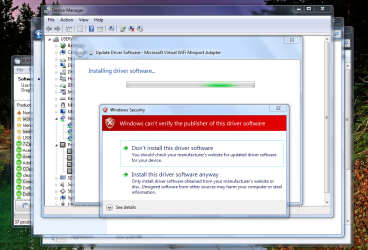
I went into my device manager to see which devices need to be updated. I then went and clicked update "Microsoft Virtual Wifi Miniport Adapter" - then as seen in the below photograph, a Windows error popped up and said "Windows can't verify this driver software". Can anyone tell me what is going on here? Could this be a zombie driver or is it safe to continue the update? Thanks.
 

Attachments
  • Capture.PNG
    Capture.PNG
    111.3 KB · Views: 16

My Computer

Computer Manufacturer/Model Number
xxxxxxx
OS
xxxxxxxxxxxxxxxxxxxxxxx
CPU
xxxxxxxxxxxxxxxxxx
Motherboard
xxxxxxxxxxx
Memory
xxxxxxxxxxx
Hi,

Are you running any Virtualization software (Virtuabox, XP Mode)?

If so then that would explain the Virtual WIFI Adapter. Also, as you're running X64 then some drivers will produce this message as it's part of the X64 system to alert of any X86 drivers that may be installed.
 

My Computer

Computer Manufacturer/Model Number
Compaq Desktop
OS
Windows 7 Ultimate x64
CPU
AMD Sempron Dual Core
Memory
3GB
Graphics Card(s)
NVIDIA GeForce 6150SE nForce 430
Screen Resolution
1024x768
Hard Drives
150GB Sata
"Back in 2002, the research department at Microsoft started experimenting with the virtualization of 802.11 wireless adapters under the project code name VirtualWiFi. They discovered a way to make a single physical Wi-Fi adapter look like multiple adapters in Windows.
VirtualWiFi lets users simultaneously connect to multiple wireless networks with only one wireless card. They hoped this technology could be used in a variety of applications, including wireless diagnosis and troubleshooting, Wi-Fi mesh networking, virtual access points, and wireless repeating........see the link below."

How to: Create Wireless Hosted Networks in Windows 7

It is safe to continue the update, it just means the driver hasn't been verified by Microsoft yet.
 

My Computer

Computer Manufacturer/Model Number
HP Pavilion Elite 495UK
OS
Windows 7 Ultimate SP1 64-Bit
CPU
Intel Core i7 870 @ 2.93GHz
Motherboard
MSI 2A9C (CPU1)
Memory
8Gb Dual-Channel DDR3 @ 664MHz
Graphics Card(s)
nVidia GeForce GTX 460 1024MB dedicated RAM
Sound Card
Realtek HD Audio
Monitor(s) Displays
HP2310i
Screen Resolution
1920 x 1080
Hard Drives
1x1954GB Hitachi HDS22020ALA 330 (RAID), 1x1954GB Hitachi External for backup and storage
PSU
460W
Case
HP Elite
Cooling
Air cooled
Keyboard
Logitech K750 solar-powered keyboard
Mouse
Logitech Wireless M180 mouse
Internet Speed
2Mb
Other Info
Pure Avanti Flow Internet Radio with iPod Dock, 64Gb iPod, HP USB Speakers, Sony MDR-V500 Headphones, Sony Vaio F-Series Laptop
Hi Orbital Shark,

Thanks for your quick response.

I used to have VirtualBox installed on my computer - however I have since uninstalled it. I guess the best thing to do would be to leave the driver alone? I might need VirtualBox again in the future, so no real point removing the driver.

Again, thanks for your response.
 

My Computer

Computer Manufacturer/Model Number
xxxxxxx
OS
xxxxxxxxxxxxxxxxxxxxxxx
CPU
xxxxxxxxxxxxxxxxxx
Motherboard
xxxxxxxxxxx
Memory
xxxxxxxxxxx
A better question would be why are you trying to update a system driver that comes default with Windows, and only comes from Microsoft?
 

My Computer

Computer type
PC/Desktop
Computer Manufacturer/Model Number
Me
OS
Win 7 Ultimate x64
CPU
FX-8350 @ 4.6 GHz so far
Motherboard
Asus M5A97 EVO
Memory
ADATA XPG V1 Series Black 8GB DDR3 1600
Graphics Card(s)
Sapphire R9 270x Dual-X
Sound Card
Xonar DGX w/ Corsair Vengence 1300
Monitor(s) Displays
Acer S232HL Abid
Screen Resolution
1920x1080
Hard Drives
120 GB OCZ Vertex 3
500 GB Seagate 7200.12
PSU
Antec Earthwatts 650W Green
Case
Antec Three Hundred
Cooling
Cooler Master 212 EVO
Keyboard
Logitech G510
Mouse
Logitech G500s
Internet Speed
35000/3000
Back
Top