Upgrade Install / Validation Question

rbi

Power User
Local time
9:45 PM
Messages
13
Location
The state of Hockey
Currently on two different machines one x86, one x64, the current setup is dual boot with Vista & RC 7100 on both. Vista was installed first and is at the beginning of the physical disk on the first partition on each. What I would like to know is, for either system, when I do a clean install from upgrade media, will the setup program overwrite my qualifying install of Vista on the first partition by default, or can I select a different partition for the install choosing to tripple boot if I desire?

I've been searching the forums and cannot seem to nail this one down.

Thanks for help.

RBI*
 

My Computer

Computer Manufacturer/Model Number
Custom x64 & HP dv6871 x64
OS
Windows 7 Professional RTM Clean Install X2
CPU
E6600 / T5550
Motherboard
ASUS P5B Deluxe WiFi / HP MB w/ Junkios Bios 1.0
Memory
4 GB DDR2 Corsair X2
Graphics Card(s)
NVIDIA 8600M GT / 8400M GS
Sound Card
ON BOARD X2
Monitor(s) Displays
2x Westinghouse L1975nw
Screen Resolution
1440 x 900 / 1280 x 800
Hard Drives
WD1001FALS 1T
WD2500AAKS 250G
WD2500KS 250G
& WD3200BEVT-60CT0 ATA IN THE LAPPY
PSU
HYPER 680 & Hampsters on the wheel in the HP
Case
COOLERMASTER 534
Cooling
ROSEWILL Z³
Keyboard
MICROSOFT COMFORT KEYBOARD
Mouse
2x MICROSOFT WIRELESS OPTICAL MOUSE 4000
Internet Speed
20 Mbps / 3.1 mbps
Other Info
ROUTER: DIR-655 Wireless a/ g/ Draft N
MM: SlingBox Pro
Gaming: Wii
ISP: Comcast
I think you will be able to do a clean install. But according to the license agreement you're not supposed to use Vista anymore. You're supposed to buy the full version of 7 if you want to continue using Vista in a dual boot situation or otherwise.
 

My Computer

Computer Manufacturer/Model Number
Too many to list.
OS
XP, Seven, 2008R2
CPU
AMD, Intel, VIA
Motherboard
Various
Memory
Corsair, Kingston, etc.
Graphics Card(s)
ATI, NVIDIA
Monitor(s) Displays
Samsung
Hard Drives
Maxtor, Western Digital
Keyboard
qwerty
Internet Speed
22 Mb/s @ home, 1 Gb/s @ server
Other Info
All of my systems still run fastest on XP 32-bit for the most part. Win7 is fun to play with, but I still prefer XP for raw speed, security, and functionality.
  • Like
Reactions: rbi
The other major issue with how upgrade versions of Windows 7 operate is of course that no one has seen one yet - outside of Microsoft and tier one partners.

All the pre RTM and the actual RTM available now are full installs, you may of course use this to upgrade or clean install - but the actual upgrade will have it's own rules and requirements.

As for the legal situation - one install = one licence,

It may well be that upgrading from vista to Windows 7 will actually transfer the licence key during the install - not difficult technically. We will all await the release of the upgrade disks with interest
 

My Computers

System One System Two

  • Computer type
    PC/Desktop
    Computer Manufacturer/Model Number
    ChillBlast - Custom to my design
    OS
    Windows 11 Pro x64 [Latest Release and Release Preview]
    CPU
    Ryzen 9 5950X, 3.8 - 5.2 MHz
    Motherboard
    Asus Prime X570-Pro
    Memory
    64GB [2 x 32GB] DDR4 3200MHz
    Graphics Card(s)
    4GB NVIDIA GEFORCE GTX 1650 Ti
    Sound Card
    On-board SPDIF to 5.1 System + HDMI [5.1 system]
    Monitor(s) Displays
    32" UHD 32 Bit HDR Monitor + 43" UHD 4K 32Bit HDR TV
    Screen Resolution
    2 x 3840 x 2160 @60Hz
    Hard Drives
    1TB M2 SSD OS, 500GB Fast Access SSD, 2 x 8TB Data + Various Externals from 1TB to 4TB, 10TB NAS
    PSU
    NZXT C750 80 PLUS Gold 750W Modular PSU
    Case
    Workstation Case [Matt Black]
    Cooling
    NZXT Kraken X63 280mm CPU Cooler +2x Quiet Case fans
    Keyboard
    Logitech Wireless MX Keys & K400 + others
    Mouse
    Logitech Wireless MX Master 3S
    Internet Speed
    920 MB Down 50 MB Up
    Antivirus
    BitDefender Total Security Pro
    Browser
    Chrome (always run latest Non-Beta)
    Other Info
    Also run ...
    Laptop - Quad 8GB - Windows 10 Pro x64
    Nexus 7 Android tablet x2
    Samsung 10.2" tablet
    Blackview TAB 8 4G Android Tablet c/w Keyboard
    Wacom Intuos Pro Medium Pen Pad
    Wacom Intuos Pro Small Pen Pad
    Wacom Expresskeys Remote
    Loopdeck+ Graphics Controller
    Shuttle Pro v2 Control
  • Computer type
    Laptop
    System Manufacturer/Model Number
    Dell XPS 17 10750H
    OS
    Windows 11 Pro x64 Latest RP
    CPU
    Intel I7 10750H 5.0GHz
    Motherboard
    Dell XPS
    Memory
    32GB [2x16GB] DDR4 2933 MHz
    Graphics Card(s)
    nVidia GTX1650Ti 4 GB GDDR6
    Sound Card
    Stock [Realtek] 4 Speaker
    Monitor(s) Displays
    17" IPS UHD+ Infinity Edge Touchscreen
    Screen Resolution
    3840 x 2400
    Hard Drives
    2TB M2 NVMe, 4TB External + various 500GB & 1TB External NVMe (also have access to spinner HDD from
    PSU
    Stock
    Case
    Stock XPS Aluminium & Carbon Fibre
    Cooling
    Stock - Active Fan Control
    Keyboard
    Backlit + Various Logitech
    Mouse
    Stock Track Pad + Logitech MX Trackball
    Internet Speed
    72 MB Down 18MB Up
    Browser
    Chrome
    Other Info
    Also run ...
    Laptop - Quad 8GB - Windows 10 Pro x64
    Nexus 7 Android tablet x2
    10.2" tablet
    Sony Z3 Android Smartphone
    Wacom Intuos Pro Medium Pen Pad
    Wacom Intuos Pro Small Pen Pad
    Wacom Expresskeys Remote
    Loopdeck+ Graphics Controller
    Shuttle Pro v2 Control Pad
    10TB NAS
Thanks Sup3rsprt & Barman58. I knew in the back of my head that the ULA barred the continued use of an OS after an upgrade, but I suppose I wasn't applying the right logic to it. And you're right, whatever the specifices of the process are once the product is actually in hand and in use is whatever it is. I was really thinking more in terms of system management. I didn't articulate that aspect very well did I? What I was more interested in was stuff like... How should I plan for the install; Should I be thinking about re-partitioning; What will I have to do after the install to make my post-upgrade system emulate my current RC set-up, etc. I'll formulate a clearer set of questions and re-post. I would like to say thanks again though, I really appreciate font of knowledge that is the Se7en Forums. Cheers ! RBI
 

My Computer

Computer Manufacturer/Model Number
Custom x64 & HP dv6871 x64
OS
Windows 7 Professional RTM Clean Install X2
CPU
E6600 / T5550
Motherboard
ASUS P5B Deluxe WiFi / HP MB w/ Junkios Bios 1.0
Memory
4 GB DDR2 Corsair X2
Graphics Card(s)
NVIDIA 8600M GT / 8400M GS
Sound Card
ON BOARD X2
Monitor(s) Displays
2x Westinghouse L1975nw
Screen Resolution
1440 x 900 / 1280 x 800
Hard Drives
WD1001FALS 1T
WD2500AAKS 250G
WD2500KS 250G
& WD3200BEVT-60CT0 ATA IN THE LAPPY
PSU
HYPER 680 & Hampsters on the wheel in the HP
Case
COOLERMASTER 534
Cooling
ROSEWILL Z³
Keyboard
MICROSOFT COMFORT KEYBOARD
Mouse
2x MICROSOFT WIRELESS OPTICAL MOUSE 4000
Internet Speed
20 Mbps / 3.1 mbps
Other Info
ROUTER: DIR-655 Wireless a/ g/ Draft N
MM: SlingBox Pro
Gaming: Wii
ISP: Comcast
i have a free upgrade hp disc and asistant dvd want to install on another hp laptop that it was not intended for
but is compatible system requirement wise. assistant dvd says of course can not validate what if i skip that step an go right to upgrade disc itself i am willing to do clean install if necessary
 

My Computer

OS
vista home premium
You can try but most Upgrade Kits have the Win7 DVD product key locked to the Vista OEM it is upgrading in the manufacturer's S/N account for that machine.

The DVD should be bootable so you can try a formatted clean install, but don't expect it to be any more than an installer; doubtful it will activate with that key.
 
I received a Win7 DVD through the Upgrade Option program for a Computer I bought back in 2009. My problem is my Mobo is inadequate to the tasks I've set for it (a lack of sufficient SATA slots is an issue) and I want to upgrade the mobo. Am I barred from using the Win78DVD to do a clean install on the machine when a different mobo is put in? Is it required to deactivate the current Windows installation before I swap out the mobo and do a clean install of Windows 7? Is there a workaround? I remember the big secret about that upgrade disc was the choice to do a clean install not just an upgrade install. The product keys for the original Vista install and all the other numbers on the sticker on the side of the machine are different from that on the sticker for the Win7 DVD box.
 

My Computer

OS
Windows 7 Home Premium 64Bit
There still remains some question about exactly what the Win7 Upgrade kit version is. This is due in large part to MS requiring manufacturers to provide a clean copy Installation DVD with separate Product Key so users could get a clean install as easy as in-place Upgrade. It seems to be OEM which ties to the mobo upon first install, but others have claimed it is full or upgrade version.

If you change the mobo you can try reinstalling, or before the mobo change run SysPrep on Win7 to adjust to new hardware. If it activates then it's full or Upgrade version, if not it is OEM which on the possibility it is indeed retail builder's OEM you can plead with phone activation based on mobo failure as MS has been reported to allow lately. However it should be emphasized this would be an exception since under the EULA a copy lives and dies with the mobo first installed upon.
 
I ran on my PC not completely genuine version of Win7.
Some time ago I got upgrade DVD of Win7 Ultimate and successfully installed It as clean (according to this topic). There was no problem or additional question form Billy boy side. But in couple of days after this installation one of my RAID1 HDD deceased and after all tricks I realized that there's necessity of re-installation on my horizon.
I did exactly the same sentence of actions like at previous time, but at the end of installation, after trying of entering of product key I received message, that my product key is wrong.
I called to CS of MS and informed them about the problem. The response was, of course, you shouldn't install it clean, you must upgrade it from genuine MS system, XP and up. After short and productive conversation we shared the opinion, that it's possible to install it clean, but I have to provide them at least S/N of the system I could install legally. I did. The number past MS validation, they tried to do smth. (then I supposed they reactivated my own S/N for Win7, now I am sure they did not) and after this we together attempted to perform the registration with pass key, like at phone registration option. It did not work. I received message that the product I tried to install clean to be only upgrade.
OK, there's nothing to do. I installed XP Pro, I spent two hours to find floppy drive and to installl It, c'z XP cannot recognize USB or DVD during RAID drivers loading at installation and so weiter....
Finally, I ran my upgrade DVD within XP and guess what? I got warning from Billy boy, that there's not valid Win32 application !!!!!

WHAT THE F@CK ?!?!?!
 

My Computer

OS
Windows 7 Home Premium 64-bit
CPU
Intel Q9550
Motherboard
ASUS P5Q Deluxe
Case
Thermaltake Soprano
Yes, the dissk was bought legally.
I tried the solution you wrote, unfortunatelly, It doesn't work - even after all clean procedure (BTW It took almost 7 hours) the Win7 is recognizing my product code as wrong.
So, is there another option unless installation of XP or Vista and upgrading in this routine and non-creative way?
Anyway, It's interesting, where this mark is sitting ???? Installation must see the code, correct ?
 

My Computer

OS
Windows 7 Home Premium 64-bit
CPU
Intel Q9550
Motherboard
ASUS P5Q Deluxe
Case
Thermaltake Soprano
Did you perform Option 3 or 4 in Clean Install with a Upgrade Windows 7 Version - which must be done after wiping the HD to activate Upgrade version on a Cleaned HD?

Make sure you are putting in the correct Product Key? It often has an incorrect character causing Activation to fail.

What is the exact failure message?
 
I performed clean all procedure exactly as descrbed in the corresponding topic. I ran command line form upgrade DVD of Win7, Shift+F10 and as required. Everything was looking correct. The only doubt I have it is about the command it self. Does It really can clean everything including boot sector of current bootable HDD, more correctly -current bootable RAID1 massive? I just don't know.
I performed after this clean installation from upgrade DVD, exactly as I did it in very first time, the only succesful installation with this key.
So... I just lost.
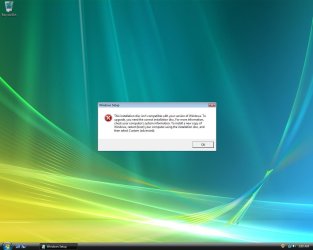
BTW, is it required to install 64 bit upgrade only on 64 version of Windows - XP or Vista ???
Because I installed Vista x86 yesterday and still I can't run upgrade application within the Windows! Vista warns me, that installation disk is not compatible with my version of Windows. See It.
 

Attachments

  • Windows7 upgrade error.jpg
    Windows7 upgrade error.jpg
    77.8 KB · Views: 0

My Computer

OS
Windows 7 Home Premium 64-bit
CPU
Intel Q9550
Motherboard
ASUS P5Q Deluxe
Case
Thermaltake Soprano
Regarding the key - I am checking its correctness twice :-)
The message I received - the product key you put is wrong. Please be sure the product key is correct.
 

My Computer

OS
Windows 7 Home Premium 64-bit
CPU
Intel Q9550
Motherboard
ASUS P5Q Deluxe
Case
Thermaltake Soprano
I performed installation per step 4.
Finally, it's OK. The system installed, accepted S/N and updated as well.
Thank you very much for you assistance.
 

My Computer

OS
Windows 7 Home Premium 64-bit
CPU
Intel Q9550
Motherboard
ASUS P5Q Deluxe
Case
Thermaltake Soprano
Back
Top