Solved Upgrade laptop lcd 1920x1080 to 1920x1200?

redblade8

New member
Member
VIP
Local time
11:01 AM
Messages
144
Hallo, Ive been thinking about upgrading the lcd panel on a laptop. Do you think it's possible to change the lcd on a sager 7378 to one that has a resolution of 1920x1200? Thanks! =)

Other Information/Specifications:

FHD Matte 16:9 LED Backlit Wide screen (1920x1080) Super Clear Matte Type Sager Screen

Intel® i7-4700MQ

NVIDIA® GTX 860M [2GB]

Up to 24GB RAM

750GB Hard Drive

2+ Hours / 7.06 lbs

3D Score: 19,428 [Vantage]

Screen to upgrade with:
CCFL WUXGA Glossy LCD Screen (1920x1200)

~Red. ^_^
 
Last edited:

My Computer My Computer

At a glance

Windows 7...Ultimate x64Intel Core i7 2630QM4 GB DDR3NVidea GeForce 540M
Computer Manufacturer/Model Number
ASUS N53SV
OS
Windows 7...Ultimate x64
CPU
Intel Core i7 2630QM
Motherboard
ASUS
Memory
4 GB DDR3
Graphics Card(s)
NVidea GeForce 540M
Hard Drives
750GB SATA
Cooling
Only CPU cooling, none for graphics. Always cool though.
only if they did a higher res panel for a different model of the same generation as your laptop.
any size discrepancies will hinder putting it back together.

also remember with a higher number of vertical pixels normally comes a taller screen and a different screen ratio.

all things to consider before buying a cheap generic oem panel on ebay lol
 
Last edited:

My Computer My Computer

At a glance

Windows 7 Ultimate x64, & Mac OS X 10.9.2Intel Core i5 2500kCorsair Vengence 8gb 1866mhzNvidia GTX 770 OC
Computer type
PC/Desktop
Computer Manufacturer/Model Number
Built by badgers!!!
OS
Windows 7 Ultimate x64, & Mac OS X 10.9.2
CPU
Intel Core i5 2500k
Motherboard
Asus P8z68 LE
Memory
Corsair Vengence 8gb 1866mhz
Graphics Card(s)
Nvidia GTX 770 OC
Monitor(s) Displays
2x ASUS LED 22" IPS
Screen Resolution
3840x1080
Hard Drives
240GB Crucial M500 SSD
120gb Corsair Force 3 SSD
1TB Western Digital
PSU
Corsair HX650w Modular
Case
Corsair Air 540
Cooling
Corsair H60 Push/Pull
Keyboard
Corsair K70/ Logitech G27 wheel
Mouse
Saitek R.A.T 9
Internet Speed
Too slow!
Other Info
AMD fusion E350N Home server-Windows Home Server 2011 (also made by badgers!)
2011 Macbook 2.4ghz Core2Duo, 4gb ddr3, 120gb Ocz Vertex SSD
I don' think it would work well, you're going from a 16:9 ratios to about 4:3 and the physical dimensions would not fit.
 

My Computer My Computer

At a glance

Windows 7 Ultimate X64 SP1Intel i5-2550K, Differing ~4.4-4.8GHz No buil...16GB G.Skill Sniper 1866MHz @ 2133MHz 2x8GBASUS GTX650TIB-DC2OC-2GD5, (650TI Boost)
Computer type
PC/Desktop
Computer Manufacturer/Model Number
Home Built Desktop By DataTech
OS
Windows 7 Ultimate X64 SP1
CPU
Intel i5-2550K, Differing ~4.4-4.8GHz No built in GPU
Motherboard
ASUS P8Z68-V PRO/GEN3
Memory
16GB G.Skill Sniper 1866MHz @ 2133MHz 2x8GB
Graphics Card(s)
ASUS GTX650TIB-DC2OC-2GD5, (650TI Boost)
Sound Card
Onboard Realtek 5-1
Monitor(s) Displays
Samsung P2570HD
Screen Resolution
1920x1080
Hard Drives
Samsung 840 Pro 256GB SSD for OS, 500GB Seagate Constellation (Enterprise drive) for Data
PSU
Corsair HX650W
Case
Inwin Dragon Rider
Cooling
Hyper 212 EVO w/two Noctua fans, push-pull, @1300 RPM
Keyboard
E-Z Eyes, bright yellow keys with large characters
Mouse
steelseries SENSEI Laser Pro Gaming
Internet Speed
48-51Mbs Mbs down, 11 Mbs up Xfinity Cable
Antivirus
Norton Internet Security 2013
Browser
IE 10, Opera, Pale Moon if needed
Other Info
4 case fans, LG BluRay-RE, ASUS DVD-RW, Mr. Fusion power supply, 1.21 gigawatts.
Ah, ok..So nobody thinks so then? I was just wondering not phisically, but the actual connecters could plug into the motherboard? And then if the computer would display it correctly then after?
Thanks for your replies so far =)
 

My Computer My Computer

At a glance

Windows 7...Ultimate x64Intel Core i7 2630QM4 GB DDR3NVidea GeForce 540M
Computer Manufacturer/Model Number
ASUS N53SV
OS
Windows 7...Ultimate x64
CPU
Intel Core i7 2630QM
Motherboard
ASUS
Memory
4 GB DDR3
Graphics Card(s)
NVidea GeForce 540M
Hard Drives
750GB SATA
Cooling
Only CPU cooling, none for graphics. Always cool though.
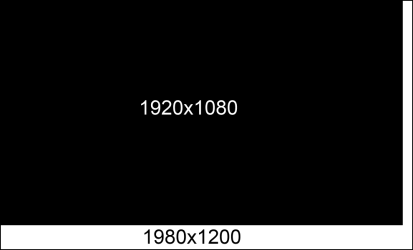
The physical constraint is the biggest hurdle, here is a comparison of the two sizes to exact scale reduced 50%.

screen size.png

There aren't standard connections as far as I know for laptop screens like there is for desktops. Laptops use a very thin and delicate ribbon of various sizes.
 
Last edited:

My Computer My Computer

At a glance

Windows 7 Ultimate X64 SP1Intel i5-2550K, Differing ~4.4-4.8GHz No buil...16GB G.Skill Sniper 1866MHz @ 2133MHz 2x8GBASUS GTX650TIB-DC2OC-2GD5, (650TI Boost)
Computer type
PC/Desktop
Computer Manufacturer/Model Number
Home Built Desktop By DataTech
OS
Windows 7 Ultimate X64 SP1
CPU
Intel i5-2550K, Differing ~4.4-4.8GHz No built in GPU
Motherboard
ASUS P8Z68-V PRO/GEN3
Memory
16GB G.Skill Sniper 1866MHz @ 2133MHz 2x8GB
Graphics Card(s)
ASUS GTX650TIB-DC2OC-2GD5, (650TI Boost)
Sound Card
Onboard Realtek 5-1
Monitor(s) Displays
Samsung P2570HD
Screen Resolution
1920x1080
Hard Drives
Samsung 840 Pro 256GB SSD for OS, 500GB Seagate Constellation (Enterprise drive) for Data
PSU
Corsair HX650W
Case
Inwin Dragon Rider
Cooling
Hyper 212 EVO w/two Noctua fans, push-pull, @1300 RPM
Keyboard
E-Z Eyes, bright yellow keys with large characters
Mouse
steelseries SENSEI Laser Pro Gaming
Internet Speed
48-51Mbs Mbs down, 11 Mbs up Xfinity Cable
Antivirus
Norton Internet Security 2013
Browser
IE 10, Opera, Pale Moon if needed
Other Info
4 case fans, LG BluRay-RE, ASUS DVD-RW, Mr. Fusion power supply, 1.21 gigawatts.
the video driver calls the shots. it needs to handle to the hi res. In my experience, i was told that i must get the same res, bulb type and size to work right. you can always experiment if you can exchange the screen, my roommate has a video driver that can do much more than the current external monitor can handle.
good luck
jim
 

My Computer My Computer

At a glance

win 7 pro 32 bit2.133 GBati 300
Computer type
Laptop
Computer Manufacturer/Model Number
dell d610
OS
win 7 pro 32 bit
CPU
2.13
Motherboard
915 chipset
Memory
3 GB
Graphics Card(s)
ati 300
Hard Drives
Wester Digital 80 gb 5400rpm
Mouse
touch
Antivirus
avast free
Browser
chrome
Other Info
index performance 3.4...not too bad for 10 yr old system
Ok, so I guess all I can do is hope that it works? There doesn't seem to be any documentation of doing this on the web out there that I can find anyhow. The video card is a gtx 860m for the one Ill get, so I'm sure that it can handle alot more, but possibly not. Im just hoping that the connecters will fit to the motherboard since they seem like different versions possibly? Going from a 'sager?' 1920x1080 screen to a ccfl wuxga 1920x1200 screen.
 

My Computer My Computer

At a glance

Windows 7...Ultimate x64Intel Core i7 2630QM4 GB DDR3NVidea GeForce 540M
Computer Manufacturer/Model Number
ASUS N53SV
OS
Windows 7...Ultimate x64
CPU
Intel Core i7 2630QM
Motherboard
ASUS
Memory
4 GB DDR3
Graphics Card(s)
NVidea GeForce 540M
Hard Drives
750GB SATA
Cooling
Only CPU cooling, none for graphics. Always cool though.
Well, how are you going to fit a different size screen to it?
 

My Computer My Computer

At a glance

Windows 7 Ultimate X64 SP1Intel i5-2550K, Differing ~4.4-4.8GHz No buil...16GB G.Skill Sniper 1866MHz @ 2133MHz 2x8GBASUS GTX650TIB-DC2OC-2GD5, (650TI Boost)
Computer type
PC/Desktop
Computer Manufacturer/Model Number
Home Built Desktop By DataTech
OS
Windows 7 Ultimate X64 SP1
CPU
Intel i5-2550K, Differing ~4.4-4.8GHz No built in GPU
Motherboard
ASUS P8Z68-V PRO/GEN3
Memory
16GB G.Skill Sniper 1866MHz @ 2133MHz 2x8GB
Graphics Card(s)
ASUS GTX650TIB-DC2OC-2GD5, (650TI Boost)
Sound Card
Onboard Realtek 5-1
Monitor(s) Displays
Samsung P2570HD
Screen Resolution
1920x1080
Hard Drives
Samsung 840 Pro 256GB SSD for OS, 500GB Seagate Constellation (Enterprise drive) for Data
PSU
Corsair HX650W
Case
Inwin Dragon Rider
Cooling
Hyper 212 EVO w/two Noctua fans, push-pull, @1300 RPM
Keyboard
E-Z Eyes, bright yellow keys with large characters
Mouse
steelseries SENSEI Laser Pro Gaming
Internet Speed
48-51Mbs Mbs down, 11 Mbs up Xfinity Cable
Antivirus
Norton Internet Security 2013
Browser
IE 10, Opera, Pale Moon if needed
Other Info
4 case fans, LG BluRay-RE, ASUS DVD-RW, Mr. Fusion power supply, 1.21 gigawatts.
Ok, so I guess all I can do is hope that it works? There doesn't seem to be any documentation of doing this on the web out there that I can find anyhow. The video card is a gtx 860m for the one Ill get, so I'm sure that it can handle alot more, but possibly not. Im just hoping that the connecters will fit to the motherboard since they seem like different versions possibly? Going from a 'sager?' 1920x1080 screen to a ccfl wuxga 1920x1200 screen.
Assuming that you don't damage your old screen while disassembling it (likely)
And assuming that the connectors fit (not very likely)
And assuming that the ribbon connectors on the new screen are wired the same (also not very likely)
And assuming that you don't blow your graphics card and new screen up when you hook them up (very very likely)

As Britton30 pointed out, how do you plan to fit a screen that is larger into your case? Folding the edges over won't work.

We can't stop you from wasting your money, but you really need to think this through before you destroy your hardware.
 

My Computer My Computer

At a glance

Win 7 Pro x64/Win 10 Pro x64 dual bootAMD FX 8350 Vishera @ 420016 GB Mushkin Blackline DDR3-2400 @ 1866 (9-1...XFX Radeon R9 280 Double D Black Edition
Computer type
PC/Desktop
Computer Manufacturer/Model Number
Mellon Labs (custom build)
OS
Win 7 Pro x64/Win 10 Pro x64 dual boot
CPU
AMD FX 8350 Vishera @ 4200
Motherboard
ASUS M5A97 R2.0
Memory
16 GB Mushkin Blackline DDR3-2400 @ 1866 (9-10-10-10-31)
Graphics Card(s)
XFX Radeon R9 280 Double D Black Edition
Sound Card
Realtek HD Audio on MB. Sounds great.
Monitor(s) Displays
Acer 24", Acer 22"
Screen Resolution
3840 x 1080
Hard Drives
1 x Mushkin Chronos 120 GB SSD (Win 10)
1 x Samsung 850 EVO 250 GB SSD (Win 7)
1 x WD 1TB SATA Blue
1 x WD 1TB SATA Green
PSU
Corsair TX-750
Case
CoolerMaster HAF 912+
Cooling
Coolermaster Seidon 240M Liquid AIO. 6 case fans
Keyboard
Logitech G710+
Mouse
Logitech G500s
Internet Speed
Much better since I got fiber, but still way overpriced.
Antivirus
MSE, Malware Bytes for scanning
Browser
Firefox
Other Info
Corsair VOID USB headphones.

A Mellon Labs X-1 - LCD Smartie driven system status display.

Brought to you by the letter E
Well, how are you going to fit a different size screen to it?

The 1920x1200 lcd screen comes with a lid already, I'm sorry I failed to mention this..so I don't have to worry about the physical part of this, and was just asking about the connector/technical part of it, if anyone actually knew anything for 100% sure about doing this, macgyver something to force this to work, or has actually done this before. I've found a website that states:

"Upgrading from CCFL to LED backlight:

All the laptops use LCD screens:

LCD screens require a backlight system to operate, there are two backlight systems in use today: CCFL and LED

CCFL - Cold Cathode Fluorescent Light, is an older backlight method, which utilizes a daylight specter fluorescent tube and an inverter which powers it.

LED - is a newer backlighting system which does not use an inverter, and instead of a fluorescent tube it uses a strip of LEDs (Light Emitting Diodes).

So in essence there are two types of laptop screens: LCD-CCFL and LCD-LED. These screens are NOT INTERCHANGEABLE.

Laptop manufacturers tailor their system for a particular LCD screen, so it is impossible to install a CCFL screen into a computer outfitted for an LED screen, and vice-versa.

Currently there is no possible way to upgrade from screen that uses CCFL backlight to LED. LED and CCFL laptop screens are not interchangeable since they use different connectors, as well as power sources. Laptop's motherboard will have to be replaced in order to upgrade the laptop from CCFL backlight type to the LED backlight type."

To Mr. Mellonish. I hope you're well. Thanks for your reply, but your post seems to have an unnessessary attitude attached to it. I'm not sure why I was chosen for your bitterness of the day, if that was which you were planning, but it's very unnessessary, and also not decent of you. This is for a project I plan to do, I've found alternative means now to do this. Ill probably post it once I'm done. I've completed a dissasembly before, and I'm very careful in doing so.. Dissasembly is the easiest part of this. Everything else you said is possible if I had chosen to go this route of just swapping screens, though I don't think it could've worked if what I read from the website is correct. I'm not wasting my money as I don't have a laptop currently, and need one now. I've just decided to..do a little something with it. ;D

Im not sure that you know everything. Where have you seen an example where 'folding over edges' would've worked? Point me to the link. I'm curious of where this could've possibly worked. It sounds interesting.

So, all in all, this isn't actually doable then. Thanks for all of your replies so far, it's much appriciated. -Red ^_^~

 
Last edited:

My Computer My Computer

At a glance

Windows 7...Ultimate x64Intel Core i7 2630QM4 GB DDR3NVidea GeForce 540M
Computer Manufacturer/Model Number
ASUS N53SV
OS
Windows 7...Ultimate x64
CPU
Intel Core i7 2630QM
Motherboard
ASUS
Memory
4 GB DDR3
Graphics Card(s)
NVidea GeForce 540M
Hard Drives
750GB SATA
Cooling
Only CPU cooling, none for graphics. Always cool though.
To Mr. Mellonish. I hope you're well. Thanks for your reply, but your post seems to have an unnessessary attitude attached to it. I'm not sure why I was chosen for your bitterness of the day, if that was which you were planning, but it's very unnessessary, and also not decent of you.
No bitterness or attitude intended. Just being the voice of reason. Sorry you felt slighted.

Im not sure that you know everything. Where have you seen an example where 'folding over edges' would've worked? Point me to the link. I'm curious of where this could've possibly worked. It sounds interesting.
I never claimed to know everything, but I do have 25 years in the electronics industry and know my way around a little. Based on the limited information you gave on the panel, your enthusiasm, and the fact that you seemed not to listen to Britton30 about the size of the new panel, I was hoping to get you to stop and think before you did something stupid.

And don't take the "folding the edges over" thing too literally. That was a little bit of sarcasm, which you obviously missed.
 

My Computer My Computer

At a glance

Win 7 Pro x64/Win 10 Pro x64 dual bootAMD FX 8350 Vishera @ 420016 GB Mushkin Blackline DDR3-2400 @ 1866 (9-1...XFX Radeon R9 280 Double D Black Edition
Computer type
PC/Desktop
Computer Manufacturer/Model Number
Mellon Labs (custom build)
OS
Win 7 Pro x64/Win 10 Pro x64 dual boot
CPU
AMD FX 8350 Vishera @ 4200
Motherboard
ASUS M5A97 R2.0
Memory
16 GB Mushkin Blackline DDR3-2400 @ 1866 (9-10-10-10-31)
Graphics Card(s)
XFX Radeon R9 280 Double D Black Edition
Sound Card
Realtek HD Audio on MB. Sounds great.
Monitor(s) Displays
Acer 24", Acer 22"
Screen Resolution
3840 x 1080
Hard Drives
1 x Mushkin Chronos 120 GB SSD (Win 10)
1 x Samsung 850 EVO 250 GB SSD (Win 7)
1 x WD 1TB SATA Blue
1 x WD 1TB SATA Green
PSU
Corsair TX-750
Case
CoolerMaster HAF 912+
Cooling
Coolermaster Seidon 240M Liquid AIO. 6 case fans
Keyboard
Logitech G710+
Mouse
Logitech G500s
Internet Speed
Much better since I got fiber, but still way overpriced.
Antivirus
MSE, Malware Bytes for scanning
Browser
Firefox
Other Info
Corsair VOID USB headphones.

A Mellon Labs X-1 - LCD Smartie driven system status display.

Brought to you by the letter E
To Mr. Mellonish. I hope you're well. Thanks for your reply, but your post seems to have an unnessessary attitude attached to it. I'm not sure why I was chosen for your bitterness of the day, if that was which you were planning, but it's very unnessessary, and also not decent of you.
No bitterness or attitude intended. Just being the voice of reason. Sorry you felt slighted.

Im not sure that you know everything. Where have you seen an example where 'folding over edges' would've worked? Point me to the link. I'm curious of where this could've possibly worked. It sounds interesting.I never claimed to know everything, but I do have 25 years in the electronics industry and know my way around a little. Based on the limited information you gave on the panel, your enthusiasm, and the fact that you seemed not to listen to Britton30 about the size of the new panel, I was hoping to get you to stop and think before you did something stupid.

And don't take the "folding the edges over" thing too literally. That was a little bit of sarcasm, which you obviously missed.

Ah, mister mister. Hallo. I didn't miss your sarcasm, and I'm still awaiting on your link to where I can find something so interesting being done. ;D

Your second part of your reply does seem to imply a possible bitterness though still.

What do you mean by enthusiasm? And I assure you what I want to do isn't stupid. This also isn't your thread just to post 'this is stupid' if that is which you were after. ^_^ I'm sure that I said before that I missed saying that it will be a laptop lid. For what I'll be doing, the physical size almost doesn't matter, I was just wondering about the technical part of it. By which way were you trying to help? It doesn't seem like you're actually trying to contribute to this thread in any way, shape or form. You say you were trying to prevent me from doing something by giving valuable information, but it seems your just thread bashing for fun or some matter. Well, though it'd be nice if I could become your lackey, and learn a few things from you? Then maybe everything could be prevented then that you'd consider to be not as smart. I thankyou for your time, and posts that you've put in so far though.
 

My Computer My Computer

At a glance

Windows 7...Ultimate x64Intel Core i7 2630QM4 GB DDR3NVidea GeForce 540M
Computer Manufacturer/Model Number
ASUS N53SV
OS
Windows 7...Ultimate x64
CPU
Intel Core i7 2630QM
Motherboard
ASUS
Memory
4 GB DDR3
Graphics Card(s)
NVidea GeForce 540M
Hard Drives
750GB SATA
Cooling
Only CPU cooling, none for graphics. Always cool though.
Disagreements aside, did you manage to change the screen redblade8? :D
 

My Computer My Computer

At a glance

Windows 7 Ultimate X64 SP1Intel i5-2550K, Differing ~4.4-4.8GHz No buil...16GB G.Skill Sniper 1866MHz @ 2133MHz 2x8GBASUS GTX650TIB-DC2OC-2GD5, (650TI Boost)
Computer type
PC/Desktop
Computer Manufacturer/Model Number
Home Built Desktop By DataTech
OS
Windows 7 Ultimate X64 SP1
CPU
Intel i5-2550K, Differing ~4.4-4.8GHz No built in GPU
Motherboard
ASUS P8Z68-V PRO/GEN3
Memory
16GB G.Skill Sniper 1866MHz @ 2133MHz 2x8GB
Graphics Card(s)
ASUS GTX650TIB-DC2OC-2GD5, (650TI Boost)
Sound Card
Onboard Realtek 5-1
Monitor(s) Displays
Samsung P2570HD
Screen Resolution
1920x1080
Hard Drives
Samsung 840 Pro 256GB SSD for OS, 500GB Seagate Constellation (Enterprise drive) for Data
PSU
Corsair HX650W
Case
Inwin Dragon Rider
Cooling
Hyper 212 EVO w/two Noctua fans, push-pull, @1300 RPM
Keyboard
E-Z Eyes, bright yellow keys with large characters
Mouse
steelseries SENSEI Laser Pro Gaming
Internet Speed
48-51Mbs Mbs down, 11 Mbs up Xfinity Cable
Antivirus
Norton Internet Security 2013
Browser
IE 10, Opera, Pale Moon if needed
Other Info
4 case fans, LG BluRay-RE, ASUS DVD-RW, Mr. Fusion power supply, 1.21 gigawatts.
Ah, mister mister. Hallo. I didn't miss your sarcasm, and I'm still awaiting on your link to where I can find something so interesting being done. ;D

Your second part of your reply does seem to imply a possible bitterness though still.

What do you mean by enthusiasm? And I assure you what I want to do isn't stupid. This also isn't your thread just to post 'this is stupid' if that is which you were after. ^_^ I'm sure that I said before that I missed saying that it will be a laptop lid. For what I'll be doing, the physical size almost doesn't matter, I was just wondering about the technical part of it. By which way were you trying to help? It doesn't seem like you're actually trying to contribute to this thread in any way, shape or form. You say you were trying to prevent me from doing something by giving valuable information, but it seems your just thread bashing for fun or some matter. Well, though it'd be nice if I could become your lackey, and learn a few things from you? Then maybe everything could be prevented then that you'd consider to be not as smart. I thankyou for your time, and posts that you've put in so far though.
It's clear that you misunderstand both of my posts, and my intent, so I'll just leave it at that.

Have a nice day.
 

My Computer My Computer

At a glance

Win 7 Pro x64/Win 10 Pro x64 dual bootAMD FX 8350 Vishera @ 420016 GB Mushkin Blackline DDR3-2400 @ 1866 (9-1...XFX Radeon R9 280 Double D Black Edition
Computer type
PC/Desktop
Computer Manufacturer/Model Number
Mellon Labs (custom build)
OS
Win 7 Pro x64/Win 10 Pro x64 dual boot
CPU
AMD FX 8350 Vishera @ 4200
Motherboard
ASUS M5A97 R2.0
Memory
16 GB Mushkin Blackline DDR3-2400 @ 1866 (9-10-10-10-31)
Graphics Card(s)
XFX Radeon R9 280 Double D Black Edition
Sound Card
Realtek HD Audio on MB. Sounds great.
Monitor(s) Displays
Acer 24", Acer 22"
Screen Resolution
3840 x 1080
Hard Drives
1 x Mushkin Chronos 120 GB SSD (Win 10)
1 x Samsung 850 EVO 250 GB SSD (Win 7)
1 x WD 1TB SATA Blue
1 x WD 1TB SATA Green
PSU
Corsair TX-750
Case
CoolerMaster HAF 912+
Cooling
Coolermaster Seidon 240M Liquid AIO. 6 case fans
Keyboard
Logitech G710+
Mouse
Logitech G500s
Internet Speed
Much better since I got fiber, but still way overpriced.
Antivirus
MSE, Malware Bytes for scanning
Browser
Firefox
Other Info
Corsair VOID USB headphones.

A Mellon Labs X-1 - LCD Smartie driven system status display.

Brought to you by the letter E
Mr. mellon, thanks mate. =) I'm sorry for being snippity, I just don't take attitude too well, and I suppose I did misunderstand. I hope you have a good day as well, & thanks for trying to help anyhows.

Britton, it's a bit far off still, though I could keep you updated on what happens. It might be awhiles however.

-Red ^_^~
 

My Computer My Computer

At a glance

Windows 7...Ultimate x64Intel Core i7 2630QM4 GB DDR3NVidea GeForce 540M
Computer Manufacturer/Model Number
ASUS N53SV
OS
Windows 7...Ultimate x64
CPU
Intel Core i7 2630QM
Motherboard
ASUS
Memory
4 GB DDR3
Graphics Card(s)
NVidea GeForce 540M
Hard Drives
750GB SATA
Cooling
Only CPU cooling, none for graphics. Always cool though.
Back
Top