Upgrade to Windows 7-Nividia 7600 GS not recognized

sonikdreem

New member
Local time
3:15 PM
Messages
22
I upgraded from Vista to Windows 7 and everything seemed fine until I realized, that I was now using an updated Windows driver for my Intel integrated graphics chip instead of my Nvidia 7600 GS, which was working just fine before the upgrade. I have tried multiple solutions from multiple forums to no avail. When I download the driver from Nvidia, it gives me an error on install that no drivers were found matching the hardware in my system...it seems my computer can no longer identify the PCI Express chip that I have always used. Please help!:cry:
 
Last edited:

My Computer My Computer

At a glance

Windows 7Intel Core 2 Duo 1.86Ghz2 gigsNvidia 7600 GS, Intel Q965/Q963 Express
Computer Manufacturer/Model Number
Gateway E4610 SB
OS
Windows 7
CPU
Intel Core 2 Duo 1.86Ghz
Memory
2 gigs
Graphics Card(s)
Nvidia 7600 GS, Intel Q965/Q963 Express
Sound Card
SoundBlaster Audigy 2ZS
Monitor(s) Displays
Gateway 22" HD LCD
Have you tried disabling the onboard video from bios?
 

My Computer My Computer

At a glance

Windows 7 Ultimate 64-bitQ95508 GB DDR-3ATI 5770
Computer Manufacturer/Model Number
homebuilt
OS
Windows 7 Ultimate 64-bit
CPU
Q9550
Motherboard
Asus P5P43TD PRO
Memory
8 GB DDR-3
Graphics Card(s)
ATI 5770
Sound Card
on MB
Monitor(s) Displays
Viewsonic LE150
Hard Drives
2 x 250 GB SATA 3GB/s in RAID 0
1 x 500 GB IDE
PSU
Corsair TX750W
Case
Raidmax
Cooling
Aftermarket air
Keyboard
MS Natural USB
Mouse
Logitech wireless USB
Internet Speed
Cell Phone. Just a notch better than dial-up
Other Info
Hauppage TV tuner
No...I will try that thanks...
 

My Computer My Computer

At a glance

Windows 7Intel Core 2 Duo 1.86Ghz2 gigsNvidia 7600 GS, Intel Q965/Q963 Express
Computer Manufacturer/Model Number
Gateway E4610 SB
OS
Windows 7
CPU
Intel Core 2 Duo 1.86Ghz
Memory
2 gigs
Graphics Card(s)
Nvidia 7600 GS, Intel Q965/Q963 Express
Sound Card
SoundBlaster Audigy 2ZS
Monitor(s) Displays
Gateway 22" HD LCD
I checked the BIOS settings...the video default is set to PCI-express which is my Nvidia card, of course...but when I boot up, it is still using the Intel driver and I cannot install the drivers from the Nvidia website
 

My Computer My Computer

At a glance

Windows 7Intel Core 2 Duo 1.86Ghz2 gigsNvidia 7600 GS, Intel Q965/Q963 Express
Computer Manufacturer/Model Number
Gateway E4610 SB
OS
Windows 7
CPU
Intel Core 2 Duo 1.86Ghz
Memory
2 gigs
Graphics Card(s)
Nvidia 7600 GS, Intel Q965/Q963 Express
Sound Card
SoundBlaster Audigy 2ZS
Monitor(s) Displays
Gateway 22" HD LCD
I think I am ready to switch to MAC...:(
 

My Computer My Computer

At a glance

Windows 7Intel Core 2 Duo 1.86Ghz2 gigsNvidia 7600 GS, Intel Q965/Q963 Express
Computer Manufacturer/Model Number
Gateway E4610 SB
OS
Windows 7
CPU
Intel Core 2 Duo 1.86Ghz
Memory
2 gigs
Graphics Card(s)
Nvidia 7600 GS, Intel Q965/Q963 Express
Sound Card
SoundBlaster Audigy 2ZS
Monitor(s) Displays
Gateway 22" HD LCD
Ok, I am bringing this back to the top...seriously...can anyone tell me how to get my video card working?:huh:
 

My Computer My Computer

At a glance

Windows 7Intel Core 2 Duo 1.86Ghz2 gigsNvidia 7600 GS, Intel Q965/Q963 Express
Computer Manufacturer/Model Number
Gateway E4610 SB
OS
Windows 7
CPU
Intel Core 2 Duo 1.86Ghz
Memory
2 gigs
Graphics Card(s)
Nvidia 7600 GS, Intel Q965/Q963 Express
Sound Card
SoundBlaster Audigy 2ZS
Monitor(s) Displays
Gateway 22" HD LCD
What does it show for your adapter in device manager? If it shows standard VGA we can try and force the install. First download the driver to your desktop and unpack (if needed)Then go to device manager right click on standard vga>Update driver software>browse my computer>let me pick>have disk> browse>navigate to the file on your desktop>click(or double click the .inf file>click ok>then next and let it install. Hope this wil let it install. Fabe
 

My Computer My Computer

At a glance

Windows 7 ultimate 64 bit / XP Home sp3intel Core 2 Duo E8400 3.0ghz8 gigs 1066 OCZ Fata1tyEVGA GTX 580 Call of Duty Black Ops Edition
Computer Manufacturer/Model Number
Self Built
OS
Windows 7 ultimate 64 bit / XP Home sp3
CPU
intel Core 2 Duo E8400 3.0ghz
Motherboard
Asus P5ND bios 1401
Memory
8 gigs 1066 OCZ Fata1ty
Graphics Card(s)
EVGA GTX 580 Call of Duty Black Ops Edition
Sound Card
Creative Soundblaster Audigy 2zs
Monitor(s) Displays
Asus 24in LCD's 2MS X2
Screen Resolution
1920x1080p @60Hz
Hard Drives
WD Caviar 500 Black/ WD Caviar 200 Blue
PSU
OCZ 700W GameXtreme
Case
NZXT Apollo
Cooling
Corsair H50 CPU/120mm x3 /60mm x2 /Corsair Dominator Ram
Keyboard
Logitech Bluetooth Wireless MX5000
Mouse
Logitech Bluetooth Wireless MX1000
Internet Speed
Download 19.83 Upload 0.97
Other Info
Logitech Z2300 Speakers/ Bose Noise Cancelling Headphones/Avermedia PCI-e Hybrid TV Bravo/Epson NX415 all in one/ 4 Port Powered USB Hub/ LG 10x Bluray Burner /TSST Corp DVDRW External
What does it show for your adapter in device manager? If it shows standard VGA we can try and force the install. First download the driver to your desktop and unpack (if needed)Then go to device manager right click on standard vga>Update driver software>browse my computer>let me pick>have disk> browse>navigate to the file on your desktop>click(or double click the .inf file>click ok>then next and let it install. Hope this wil let it install. Fabe

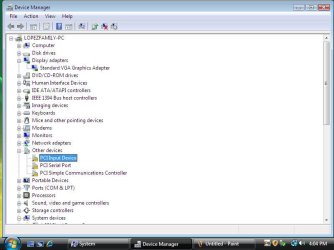
In my device manager...it shows my pesky Intel integrated chip which I cannot seem to disable in the BIOS, I cannot disable or uninstall it without it showing back up everytime I reboot. I have tried rebooting in safe mode and running driver sweeper, I have removed all remnants of old Nvidia drivers and associated files...and my device manager only recongnizes the PCI card in 'other devices' with a yellow warning triangle, I have tried the drivers directly from Nvidia, from Gateway (PC Manufacturer) and others. They all say that the install cannot find drivers to match my hardware...my Nvidia card is simply not getting recognized. I have tried removing the card, reboooting, re-installing the card...so on and so on...

Perhaps I just need to try a clean install of WIndows 7? I would have alot of backing up to do first..and then have to install all my other drivers and software...geez. I thought this was supposed to be easy!:confused:
 

My Computer My Computer

At a glance

Windows 7Intel Core 2 Duo 1.86Ghz2 gigsNvidia 7600 GS, Intel Q965/Q963 Express
Computer Manufacturer/Model Number
Gateway E4610 SB
OS
Windows 7
CPU
Intel Core 2 Duo 1.86Ghz
Memory
2 gigs
Graphics Card(s)
Nvidia 7600 GS, Intel Q965/Q963 Express
Sound Card
SoundBlaster Audigy 2ZS
Monitor(s) Displays
Gateway 22" HD LCD
Well, I disabled the automatic windows update which was creating a good deal of the problem. I have now disabled and unistalled the nvida and Intel drivers and am now where I can only see the Standard VGA adapter in the device manager. However, the Nvidai drivers still will not load no matter how I try to install them. I did however leave several windows open yesterday before going out and when I cam back the 7600 GS was sitting right there in the device manager. After cursing at the confusing appearance of the driver, I updated the driver and Windows updated my Nvidia card just fine (though it still showed the Intel driver as well), I say 'yay' and went to run a demo of the 'Avatar' game to test it...well, the screen went black, lost the signal and I had to reboot. When I did this, the 7600 was no longer there and I was back to my VGA connection and right back where I started. Nvida and Microsoft have been no help. In fact, Microsoft said this was a hardware issue...morons! I am ready to sell off this junk and go buy APPLE!

Is there anyone out there who has a decent answer?
 

My Computer My Computer

At a glance

Windows 7Intel Core 2 Duo 1.86Ghz2 gigsNvidia 7600 GS, Intel Q965/Q963 Express
Computer Manufacturer/Model Number
Gateway E4610 SB
OS
Windows 7
CPU
Intel Core 2 Duo 1.86Ghz
Memory
2 gigs
Graphics Card(s)
Nvidia 7600 GS, Intel Q965/Q963 Express
Sound Card
SoundBlaster Audigy 2ZS
Monitor(s) Displays
Gateway 22" HD LCD
Have you installed the Intel chipset drivers? The yellow triangle suggests that all isn't well there. The latest installer is here:

INF Update Utility - Primarily for Intel® 5, 4, 3, 900 Series Chipsets

It appears to support your Q965 chipset, along with newer ones. You may wish to try it with the -overall switch, which will replace Microsoft drivers with Intel ones.

I doubt that you're going to like this suggestion, but if you did an upgrade-in-place from Vista to Win7, you might have gotten a better result with a custom (clean) install.

Your problem makes me glad that my system is a) homebuilt and b) has no onboard graphics.
 

My Computer My Computer

At a glance

Windows 7 Pro X64 SP1Intel Core I7-3930k16 GB Gskill DDR3-2133eVGA GTX680
Computer Manufacturer/Model Number
homegrown
OS
Windows 7 Pro X64 SP1
CPU
Intel Core I7-3930k
Motherboard
Asus P9X79 Pro
Memory
16 GB Gskill DDR3-2133
Graphics Card(s)
eVGA GTX680
Sound Card
Creative X-Fi Titanium
Monitor(s) Displays
As PA246Q
Screen Resolution
1920 X 1200
Hard Drives
Corsair Force GT, 120 GB
WDC 1.5TB Caviar Black
PSU
PCP&C Silencer 750 Crossfire
Case
Silverstone FT02
Cooling
Noctua NH-D14
Keyboard
cheap Logitech USB
Mouse
Microsoft Intellimouse Explorer (old optical) USB
Internet Speed
6Mb cable
Other Info
Pioneer BDR-205
Samsung SH-203B
Monsoon 5.1 speakers
Well, I have udpated the intel chipset drivers, but I still cannot get my Nvidia card to work. I think I am just going to back up my files and do a clean install...
 

My Computer My Computer

At a glance

Windows 7Intel Core 2 Duo 1.86Ghz2 gigsNvidia 7600 GS, Intel Q965/Q963 Express
Computer Manufacturer/Model Number
Gateway E4610 SB
OS
Windows 7
CPU
Intel Core 2 Duo 1.86Ghz
Memory
2 gigs
Graphics Card(s)
Nvidia 7600 GS, Intel Q965/Q963 Express
Sound Card
SoundBlaster Audigy 2ZS
Monitor(s) Displays
Gateway 22" HD LCD
I have a similar problem with my NVidia 7700M the windows 7 detect the video card as the correct one, but i can't play any game and some say the drivers are not the most updated, the nvidia drivescan say to talk with the computer manufactor (Asus) and the asus does not have the windows7 drivers for my computer model G1 (first edition) the hardware changed after i bought mine.

I'm running the the last version of the drivers available in the nvidia download center
 

My Computer My Computer

At a glance

Windows 7i7 Q720 1.6GHz4GBNVIDIA GeForce GTX 260M GDDR3 1GB
Computer Manufacturer/Model Number
Asus/G60J
OS
Windows 7
CPU
i7 Q720 1.6GHz
Memory
4GB
Graphics Card(s)
NVIDIA GeForce GTX 260M GDDR3 1GB
Monitor(s) Displays
16" HD LED
Screen Resolution
1366x768
Hard Drives
640GB (320Gbx2) 5400rpm SATA
ok, now I have tried clean installing Windows 7 after hours of backing up files...still does not work...I tried clean installing back to Vista...does not work either...could the upgrade to 7 have fried my card or something...what is going on? Microsfoft stinks...
 

My Computer My Computer

At a glance

Windows 7Intel Core 2 Duo 1.86Ghz2 gigsNvidia 7600 GS, Intel Q965/Q963 Express
Computer Manufacturer/Model Number
Gateway E4610 SB
OS
Windows 7
CPU
Intel Core 2 Duo 1.86Ghz
Memory
2 gigs
Graphics Card(s)
Nvidia 7600 GS, Intel Q965/Q963 Express
Sound Card
SoundBlaster Audigy 2ZS
Monitor(s) Displays
Gateway 22" HD LCD
Download your driver -=> Here

Let us know if this helps...
 

My Computer My Computer

At a glance

64-bit Windows 8.1 ProCore(TM) i5 CPU 4330 Haswell @ 3.20GHz12.00 GBIntel(R) HD Graphics
Computer type
PC/Desktop
Computer Manufacturer/Model Number
LENOVO K450 @3.0GHZ
OS
64-bit Windows 8.1 Pro
CPU
Core(TM) i5 CPU 4330 Haswell @ 3.20GHz
Motherboard
LENOVO
Memory
12.00 GB
Graphics Card(s)
Intel(R) HD Graphics
Sound Card
Intel HD integtrated
Monitor(s) Displays
HP 25' ISP Monitor
Screen Resolution
1900/1020
Hard Drives
(1) ST1000DM003-1CH162 (2) Generic STORAGE DEVICE USB Device (3) Generic STORAGE DEVICE USB Device
Internet Speed
100mb down/10mb up
The Intel chipset drivers are updated. I did a clean install of both Windows 7 and Vista. Now my card does not work in Vista either...
 

My Computer My Computer

At a glance

Windows 7Intel Core 2 Duo 1.86Ghz2 gigsNvidia 7600 GS, Intel Q965/Q963 Express
Computer Manufacturer/Model Number
Gateway E4610 SB
OS
Windows 7
CPU
Intel Core 2 Duo 1.86Ghz
Memory
2 gigs
Graphics Card(s)
Nvidia 7600 GS, Intel Q965/Q963 Express
Sound Card
SoundBlaster Audigy 2ZS
Monitor(s) Displays
Gateway 22" HD LCD
Download your driver -=> Here

Let us know if this helps...


Thank you Tews, I see this is a different driver version...was this here before? Is it an older version? I am so confused. Should I re-install Windows 7 and then try this driver? or should I just try it on Vista (which I have installed at this moment)?
 
Last edited:

My Computer My Computer

At a glance

Windows 7Intel Core 2 Duo 1.86Ghz2 gigsNvidia 7600 GS, Intel Q965/Q963 Express
Computer Manufacturer/Model Number
Gateway E4610 SB
OS
Windows 7
CPU
Intel Core 2 Duo 1.86Ghz
Memory
2 gigs
Graphics Card(s)
Nvidia 7600 GS, Intel Q965/Q963 Express
Sound Card
SoundBlaster Audigy 2ZS
Monitor(s) Displays
Gateway 22" HD LCD
Try it on Vista, if it works on Vista chances are it will work just fine on Windows 7..
 

My Computer My Computer

At a glance

64-bit Windows 8.1 ProCore(TM) i5 CPU 4330 Haswell @ 3.20GHz12.00 GBIntel(R) HD Graphics
Computer type
PC/Desktop
Computer Manufacturer/Model Number
LENOVO K450 @3.0GHZ
OS
64-bit Windows 8.1 Pro
CPU
Core(TM) i5 CPU 4330 Haswell @ 3.20GHz
Motherboard
LENOVO
Memory
12.00 GB
Graphics Card(s)
Intel(R) HD Graphics
Sound Card
Intel HD integtrated
Monitor(s) Displays
HP 25' ISP Monitor
Screen Resolution
1900/1020
Hard Drives
(1) ST1000DM003-1CH162 (2) Generic STORAGE DEVICE USB Device (3) Generic STORAGE DEVICE USB Device
Internet Speed
100mb down/10mb up
Before I jump in...I want to see your results based on Tews' suggestion
 

My Computer My Computer

At a glance

Windows 7 Home Premium x64 - Mac OS X 10.6.4 x64Intel Core 2 Duo T9300 2.5 GHz4GB Kingston DDR2-800NVIDIA Geforce 8600M GT (512MB Model)
Computer Manufacturer/Model Number
Compal JFT02 (Custom Build Laptop)
OS
Windows 7 Home Premium x64 - Mac OS X 10.6.4 x64
CPU
Intel Core 2 Duo T9300 2.5 GHz
Motherboard
JFT02
Memory
4GB Kingston DDR2-800
Graphics Card(s)
NVIDIA Geforce 8600M GT (512MB Model)
Sound Card
Realtek HD Audio
Monitor(s) Displays
WUXGA Standard Laptop Display
Screen Resolution
1680*1050
Hard Drives
Toshiba 320GB 5400RPM Laptop HD
PSU
Standard Laptop Power Supply
Case
Standard Laptop Case
Cooling
Standard Laptop Cooling
Keyboard
Standard Laptop 105 Key-Keyboard
Mouse
Synaptics Touchpad
Internet Speed
Verizion Online DSL 3360/864 kbs (dl/up)
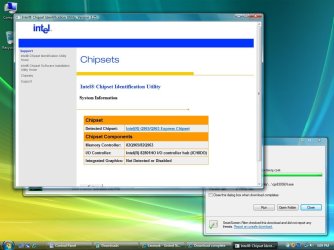
ok, it didn't work...I also tried the WQHL driver from Nvidia's site again...you can see the error I continue to get in the attached file.

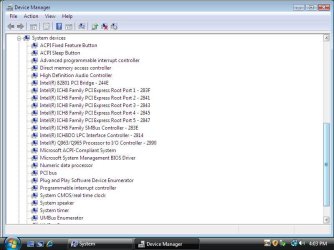
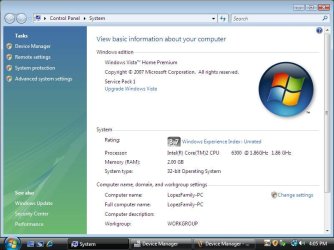
I have attached some screen shots that may help.

I did notice, however that a clean install makes for easy installation of my printer driver which was also a nuisance:D

However, I still need to get this graphics card working:confused:
 

Attachments

  • Screen Shot Driver Error.jpg
    Screen Shot Driver Error.jpg
    53.3 KB · Views: 56
  • Intel Detected Chipset.jpg
    Intel Detected Chipset.jpg
    91.6 KB · Views: 48
  • Device Manager.jpg
    Device Manager.jpg
    49 KB · Views: 134
  • System Devices.jpg
    System Devices.jpg
    61.1 KB · Views: 33
  • System Info.jpg
    System Info.jpg
    53.3 KB · Views: 39

My Computer My Computer

At a glance

Windows 7Intel Core 2 Duo 1.86Ghz2 gigsNvidia 7600 GS, Intel Q965/Q963 Express
Computer Manufacturer/Model Number
Gateway E4610 SB
OS
Windows 7
CPU
Intel Core 2 Duo 1.86Ghz
Memory
2 gigs
Graphics Card(s)
Nvidia 7600 GS, Intel Q965/Q963 Express
Sound Card
SoundBlaster Audigy 2ZS
Monitor(s) Displays
Gateway 22" HD LCD
Ok...do this

Right click on each device that has a yellow exclamation mark and go to properties->Details->Hardware IDs->Copy/Paste the list of info you see

I will then find out with devices are missing and post the drivers necessary

Do all of this from Windows 7
 

My Computer My Computer

At a glance

Windows 7 Home Premium x64 - Mac OS X 10.6.4 x64Intel Core 2 Duo T9300 2.5 GHz4GB Kingston DDR2-800NVIDIA Geforce 8600M GT (512MB Model)
Computer Manufacturer/Model Number
Compal JFT02 (Custom Build Laptop)
OS
Windows 7 Home Premium x64 - Mac OS X 10.6.4 x64
CPU
Intel Core 2 Duo T9300 2.5 GHz
Motherboard
JFT02
Memory
4GB Kingston DDR2-800
Graphics Card(s)
NVIDIA Geforce 8600M GT (512MB Model)
Sound Card
Realtek HD Audio
Monitor(s) Displays
WUXGA Standard Laptop Display
Screen Resolution
1680*1050
Hard Drives
Toshiba 320GB 5400RPM Laptop HD
PSU
Standard Laptop Power Supply
Case
Standard Laptop Case
Cooling
Standard Laptop Cooling
Keyboard
Standard Laptop 105 Key-Keyboard
Mouse
Synaptics Touchpad
Internet Speed
Verizion Online DSL 3360/864 kbs (dl/up)
Back
Top