Upgrade to Windows 7 or keep Vista on a HP Pavilion Dv2-1030us?

frh1

New member
Local time
2:57 PM
Messages
13
A couple of years ago I bought a HP Pavilion Dv2-1030us 12" notebook with an AMD Athlon Neo 64 processor, 4GB memory and Windows Vista Home Premium. I hoped to carry it in my truck, but it's lousy battery life and slow performance with a 3G MiFi connection made that nearly impossible. It also runs so hot you can't use it sitting on your lap and I wasn't comfortable leaving it in the truck (even in an insulated bag) on hot days (and that's everyday in the summer here in Phoenix, AZ). According to CPUbenchmark.net, the Neo 64 processor benchmark score is only 386, the same as an Intel Atom 550 netbook processor.

My wife used it in the bedroom for web browsing and email for the last year. She gave it back when I moved her desktop computer into the bedroom. The old Dell Inspiron I kept in the Family Room finally died so I plan to keep the Dv2 downstairs for web browsing, email and occasional html editing.

Speedtest.net reported a download speed at 11.30 Mbps on it this evening, so it has a fast wireless internet connection. But most web pages are really slow to load. McAfee says it's clean, but I have not ran any other diagnostic tools. A couple of months ago I cloned it's hard drive onto a new 7200 rpm drive before I figured out the intermittent noise it makes is from it's system fan.

I found Windows 7 drivers on HP's website. I also found a Windows 7 Home Premium 3 user family pack in stock at a retailer I trust. Then I found an online user review saying it was slower with Windows 7.

So I decided to ask the experts if I could expect a noticeable increase in performance by doing a clean install of Windows 7 Home Premium on the new 7200 rpm hard drive? Or would I be better off trying to tweak the existing Vista Home Premium installation?
 

My Computer My Computer

At a glance

Windows 7 Srarter 32bit
OS
Windows 7 Srarter 32bit
windows 7 is faster, but not by too much. I would suggest keeping vista, but cleaning it up a bit. update the goodness into that thing. windows update, and look for the important and optional updates you need. defragment that bad boy. remove all programs you don't need. i recommend Microsoft security essentials and malewarebytes instead of mcafee (unless you are paying for it). even if you are paying, then malewarebytes is a good software program to have. it doesn't need to be set up to automate, but just use it every once in a while (free).

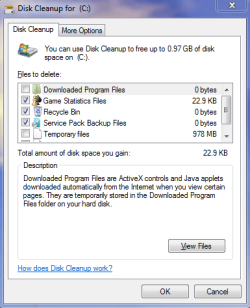
Disk check and clean up some things for more space:
Capture.PNG

You could upgrade the RAM without paying too much if you really wanted. 3-4 GB RAM would alleviate trouble on that end. make sure all RAM matches though, no mixing RAM.

You could go into computer>system properties>advanced system settings (far left hand side)>performance>Settings and then uncheck as many "pretties" as you don't mind letting go.

you can click computer>properties (right click first) and then DESELECT compress drive and DESELECT allow files to.. index if you don't mind not having a search index. compressing a drive isn't a good idea anyway for that first one.

look up ways to make vista faster on google and it will give you lots of info, both good and bad. you will have to decide what you like or not. You could also install IE9 on your computer and remove every other web browser (unless you prefer another), as IE9 has been streamlined a bit.
 

My Computer My Computer

At a glance

Microsoft Windows 8.1 Pro 64-bitIntel(R) Core(TM) i3-4130 CPU @ 3.40GHz8.00 GBNone
Computer type
PC/Desktop
Computer Manufacturer/Model Number
Custom Asus Build
OS
Microsoft Windows 8.1 Pro 64-bit
CPU
Intel(R) Core(TM) i3-4130 CPU @ 3.40GHz
Motherboard
B85M-E
Memory
8.00 GB
Graphics Card(s)
None
Sound Card
Realtek High Definition Audio
Monitor(s) Displays
Asus 23.6" Monitor
Screen Resolution
1920 x 1080 x 32 bits (4294967296 colors) @ 60 Hz
Hard Drives
INTEL SSDSC2BW180A4
Samsung SSD 840 PRO Series
PSU
Seasonic S12II-380Bronze
Case
Lian Li
Cooling
Fan, Passive
Keyboard
Logitech K120
Mouse
Microsoft Touch Mouse
Internet Speed
4ms Ping, 19.0 Mbps Download, 19.0 Mbps Upload
Antivirus
Eset Endpoint
Browser
Internet Explorer, Chrome
The system came with 4GB installed in 1 slot. The specs say it only has one slot and will accept up to 4 GB. But when I took the cover off of the memory bay, it looked like it had 2 slots. I'll have to check it again tomorrow, but even if it does have 2 slots, more memory might not work.

Since I started using Google Chrome to sync with my Android phone and tablet, I stopped using IE. And I've never been impressed with Firefox or Opera.

There are a lot of programs on the laptop, but not a lot of programs I use very often. I have a feeling removing McAfee and using msconfig to prevent a lot of stuff from starting might make a big difference. I'm not sure how to clean up the registry.
 

My Computer My Computer

At a glance

Windows 7 Srarter 32bit
OS
Windows 7 Srarter 32bit
cleaning up the registry can be and is very dangerous, but there are some programs that you can put on a 'safe' track to do it. The one i recognize the most and seems to be used more than others is ccleaner, but there are others just as good.

You have a startup folder that you could clean out that will keep some programs from starting up when windows starts, provided you don't want them to load without you clicking on them first. misconfig is handy in dealing with startup programs just like the folder i mentioned

The amount of RAM you have sounds fine, no matter if you have more slots or not. 4GB is PLENTY. check if you are using it all by clicking computer> system properties and then looking at how much installed RAM you have. Also as a side note, you wrote in your system specs that you have a 32 bit system. If that is the case, 4GB RAM is the max you or any system can use.

chrome is supposed to be just about the fastest browser, but can lack certain features a few might enjoy, and i am not sure about its security. However, it is perfectly fine, and a great web browser at that. You like it, keep it. Be very careful in uninstalling any program that you don't know much about, as windows lists some very important programs in there. only things you know you don't want should be removed (online games is a common one i find on systems, as an example). You mentioned the web pages loaded slowly? look in the browser for a place to delete everything (temporary data, passwords, form data, etc) and then go back into those settings and reset them. update chrome to its latest. go into internet settings and give chrome more space to use.

If McAfee is an Antivirus and not just an antivirus scanner, then don't remove McAfee without installing another antivirus just to insure you do not catch a virus. I mentioned MSE, but there are many virus protections out there. Here is a forum thread on the "best AV", most of which they talk about are free as most don't seem to want to pay for an AV (Me included). Never use more than one antivirus at the same time as they may conflict. Most if not all AVs will auto-disable windows defender due to this reason. However, as I said before, you may want to download malwarebytes. The free version of malwarebytes is compatible with most AVs in that it will not create conflict (it isn't exactly an antivirus, but helps all the same)

EDIT: This post is down a couple ways, but thought i'd bring it up here for you just in case you need it now:
One caution, if I may. If you decide to remove McAfee, follow the instructions to safely remove it. There's a special removal tool from McAfee that needs to be used after going through control panel > programs and features. (The removal tool link is in the section for XP.)

How to uninstall or reinstall supported McAfee consumer products using the McAfee Consumer Products Removal tool (MCPR.exe)

And for future reference should you decide to try different products, here's a list of removal tools offered by other companies (and other non-vendors that have been checked out by the author.)

Security Software | Uninstallers
 
Last edited:

My Computer My Computer

At a glance

Microsoft Windows 8.1 Pro 64-bitIntel(R) Core(TM) i3-4130 CPU @ 3.40GHz8.00 GBNone
Computer type
PC/Desktop
Computer Manufacturer/Model Number
Custom Asus Build
OS
Microsoft Windows 8.1 Pro 64-bit
CPU
Intel(R) Core(TM) i3-4130 CPU @ 3.40GHz
Motherboard
B85M-E
Memory
8.00 GB
Graphics Card(s)
None
Sound Card
Realtek High Definition Audio
Monitor(s) Displays
Asus 23.6" Monitor
Screen Resolution
1920 x 1080 x 32 bits (4294967296 colors) @ 60 Hz
Hard Drives
INTEL SSDSC2BW180A4
Samsung SSD 840 PRO Series
PSU
Seasonic S12II-380Bronze
Case
Lian Li
Cooling
Fan, Passive
Keyboard
Logitech K120
Mouse
Microsoft Touch Mouse
Internet Speed
4ms Ping, 19.0 Mbps Download, 19.0 Mbps Upload
Antivirus
Eset Endpoint
Browser
Internet Explorer, Chrome
Does the Vista have any service packs? I got a dual core desktop before SP1 came out. Vista home premium 32 bit. Even after a lot of tuning, disabling services, turning of indexing, it's not as responsive as Windows Seven. (Don't ask. I couldn't put SP1 on no way no how.. did all the stuff that's supposed to work but didn't.) Since then I bought a quad with Vista64 SP1. That runs good enough I didn't put W7 on. But if it's Vista with no SP you may notice a lot of "drive busy for no reason" goes away with W7.

My dual core only has 2 GB ram and Windows Seven is quite snappy. I run chromium browser and it's very responsive.
 

My Computer My Computer

At a glance

Windows 7 32 bitAMD 5200+ dual core2 GBNVidia GeForce 6150SE 128 MB
Computer Manufacturer/Model Number
HP Media Center
OS
Windows 7 32 bit
CPU
AMD 5200+ dual core
Memory
2 GB
Graphics Card(s)
NVidia GeForce 6150SE 128 MB
Monitor(s) Displays
CRT
Screen Resolution
1280x1024
Hard Drives
500 GB Sata internal :

SIIG USB 3.0 docking stations w/WD Caviar Black 6 Gb/s drives
Keyboard
PS/2
Mouse
PS/2 Wheel Mouse
Other Info
SIIG USB 3.0 PCIexpress card.
there is also Vista SP2 that may fix a lot of things. Both SP1 and SP2 are very important to have if I am to keep my recommendation you keep vista and avoid buying windows 7 (simply for the cost. if you must have it, it is up to you my friend). Vista's problems were fixed in its updates, so if it works for you, it is just as pretty as windows 7. windows 7 comes with a few new neat tricks, but its base is still Vista
 

My Computer My Computer

At a glance

Microsoft Windows 8.1 Pro 64-bitIntel(R) Core(TM) i3-4130 CPU @ 3.40GHz8.00 GBNone
Computer type
PC/Desktop
Computer Manufacturer/Model Number
Custom Asus Build
OS
Microsoft Windows 8.1 Pro 64-bit
CPU
Intel(R) Core(TM) i3-4130 CPU @ 3.40GHz
Motherboard
B85M-E
Memory
8.00 GB
Graphics Card(s)
None
Sound Card
Realtek High Definition Audio
Monitor(s) Displays
Asus 23.6" Monitor
Screen Resolution
1920 x 1080 x 32 bits (4294967296 colors) @ 60 Hz
Hard Drives
INTEL SSDSC2BW180A4
Samsung SSD 840 PRO Series
PSU
Seasonic S12II-380Bronze
Case
Lian Li
Cooling
Fan, Passive
Keyboard
Logitech K120
Mouse
Microsoft Touch Mouse
Internet Speed
4ms Ping, 19.0 Mbps Download, 19.0 Mbps Upload
Antivirus
Eset Endpoint
Browser
Internet Explorer, Chrome
The trouble with not buying a machine with the SP already on the OS is you can't always get the damn things to install. I wasted at least a dozen hours watching my PC reboot only to get "service pack not installed, rolling back." If it doesn't go on by the 3rd try, forget it. Get the new OS.
 

My Computer My Computer

At a glance

Windows 7 32 bitAMD 5200+ dual core2 GBNVidia GeForce 6150SE 128 MB
Computer Manufacturer/Model Number
HP Media Center
OS
Windows 7 32 bit
CPU
AMD 5200+ dual core
Memory
2 GB
Graphics Card(s)
NVidia GeForce 6150SE 128 MB
Monitor(s) Displays
CRT
Screen Resolution
1280x1024
Hard Drives
500 GB Sata internal :

SIIG USB 3.0 docking stations w/WD Caviar Black 6 Gb/s drives
Keyboard
PS/2
Mouse
PS/2 Wheel Mouse
Other Info
SIIG USB 3.0 PCIexpress card.
One caution, if I may. If you decide to remove McAfee, follow the instructions to safely remove it. There's a special removal tool from McAfee that needs to be used after going through control panel > programs and features. (The removal tool link is in the section for XP.)

How to uninstall or reinstall supported McAfee consumer products using the McAfee Consumer Products Removal tool (MCPR.exe)

And for future reference should you decide to try different products, here's a list of removal tools offered by other companies (and other non-vendors that have been checked out by the author.)

Security Software | Uninstallers
 

My Computer My Computer

At a glance

Win 7 Pro 64-bitIntel i5 2.4 Ghz8GB DDR3Intel HD 3000
Computer type
Laptop
Computer Manufacturer/Model Number
Sony Vaio VPCEB47GM Laptop
OS
Win 7 Pro 64-bit
CPU
Intel i5 2.4 Ghz
Memory
8GB DDR3
Graphics Card(s)
Intel HD 3000
Sound Card
IDT High Definition
Monitor(s) Displays
15.6 WGXA Anti-Glare LED
Screen Resolution
1280x800
Hard Drives
640Gb 7200rpm
Antivirus
MSE
Browser
Opera (primary) with IE9 backup
I tend to agree with Dust Sailor, but you might want to run the Windows 7 Upgrade Advisor before you decide what to to do.

Download Details - Microsoft Download Center - Windows 7 Upgrade Advisor

Windows 7 isn't a great deal faster than Windows Vista, but it is more stable and less troublesome.

Removing McAfee and using Microsoft Security Essentials instead would certainly be of benefit in my view and a clean install is far preferable to an upgrade.

As for it running hot, a good clean inside and a laptop cooler pad would help.
 

My Computer My Computer

At a glance

Windows 7 Ultimate SP1 64-BitIntel Core i7 870 @ 2.93GHz8Gb Dual-Channel DDR3 @ 664MHznVidia GeForce GTX 460 1024MB dedicated RAM
Computer Manufacturer/Model Number
HP Pavilion Elite 495UK
OS
Windows 7 Ultimate SP1 64-Bit
CPU
Intel Core i7 870 @ 2.93GHz
Motherboard
MSI 2A9C (CPU1)
Memory
8Gb Dual-Channel DDR3 @ 664MHz
Graphics Card(s)
nVidia GeForce GTX 460 1024MB dedicated RAM
Sound Card
Realtek HD Audio
Monitor(s) Displays
HP2310i
Screen Resolution
1920 x 1080
Hard Drives
1x1954GB Hitachi HDS22020ALA 330 (RAID), 1x1954GB Hitachi External for backup and storage
PSU
460W
Case
HP Elite
Cooling
Air cooled
Keyboard
Logitech K750 solar-powered keyboard
Mouse
Logitech Wireless M180 mouse
Internet Speed
2Mb
Other Info
Pure Avanti Flow Internet Radio with iPod Dock, 64Gb iPod, HP USB Speakers, Sony MDR-V500 Headphones, Sony Vaio F-Series Laptop
The best thing you can do with either OS is a clean reinstall without the factory bloatware. Here's how to get a perfect one: Clean Reinstall steps

Until that happy day, you can clean up the factory bloatware and useless factory utilities which have better versions built into Win7 using these tips: Clean up factory bloatware

You'll also get much better performance by uninstalling MucAfee which is the most problematic AV we deal with there (at least weekly) and replace it with lightweight free Microsoft Security Essentials or Avast 6 with the Windows firewall.

With 4gb RAM I'd stick with 32 bit for best performance.
 
I got home a little late this afternoon, so I barely had time to delete McAfee and start the MCPR removal tool. My wife and son were waiting in the car so I did not have time to install Microsoft Security Essentials. Heck, we were on the way to pick up a couple of grandkids while the MCPR tool finished. Fortunately, we made it to the local Staples store before they closed.

When I took the netbook (that I am typing this on) to Staples, in addition to removing all traces of the previous owner, their $10.00 tune-up made it run way faster than I ever expected. (In fact, right now this netbook is running a lot faster than the notebook.)

Because I don't fully understand what I would be doing, I figure it would take a lot of hours to research and plan... For $10,00 they will check the notebook for malware, check the registry for errors, stop unnecessary programs from starting, defrag the hard drive and do several other tweaks suggested in above posts.

When I get it back tomorrow afternoon, I plan to install Microsoft Security Essentials, run the Windows 7 Upgrade Advisor, double check what they allow to start and make sure updates only happen when I want them.

Regarding the thing running hot, just about every review I read complained about that. Seems kind of stupid to me that a laptop computer has to sit on top of a cooling fan. What worries me is the system fan makes so much noise I thought the hard drive was failing. (That's why I bought a new hard drive and ghosted the existing drive onto it.)

I am a little confused about something in a previous post. The laptop is currently 64 bit Vista Home Premium. If I decide to do a clean install of Windows 7 Home Premium, are there advantages / disadvantages to sticking with 64 bit or going to a 32 bit installation.
 
Last edited:

My Computer My Computer

At a glance

Windows 7 Srarter 32bit
OS
Windows 7 Srarter 32bit
If I decide to do a clean install of Windows 7 Home Premium, are there advantages / disadvantages to sticking with 64 bit or going to a 32 bit installation.

You may as well stick with 64 bit unless there is an over-riding reason for 32 bit. The most common reason to stick with 32 bit would be that you have an application that won't install and run properly on a 64 bit system. Such applications exist, but they are uncommon. In most situations, you can't tell if you are running a 32 bit system or a 64 bit system--the apparent differences are minor. You can't use more than about 3.3 to 3.5 GB of RAM on a 32 bit system and that may be a consideration.
 

My Computer My Computer

At a glance

Windows 7 Home Premium SP1, 64-bitIntel Skylake i5-6600K, not overclocked8 GB HyperX DDR4-2666 (2 x 4 GB)none; graphics are integrated on CPU
Computer type
PC/Desktop
Computer Manufacturer/Model Number
Ignatz Special; 4 speed manual gearbox; factory air conditioning; one of one
OS
Windows 7 Home Premium SP1, 64-bit
CPU
Intel Skylake i5-6600K, not overclocked
Motherboard
AsRock Z170M Extreme 4, micro ATX
Memory
8 GB HyperX DDR4-2666 (2 x 4 GB)
Graphics Card(s)
none; graphics are integrated on CPU
Sound Card
onboard: Realtek ALC1150; external: USB Behringer UF0-202
Monitor(s) Displays
Dell S2340M 23 inch IPS
Screen Resolution
1600 x 900
Hard Drives
System: Crucial MX100 series SSD, 128 GB;
Data: Samsung Spinpoint 103SJ, 1 TB;
Backup: WD Caviar Green WD30EZRX-00D8PB0, 3 TB
PSU
Rosewill SilentNight 500 watt fanless, semi-modular
Case
Antec Solo II
Cooling
Noctua NH-U12S; Noctua F12 intake, Noctua S12A exhaust
Keyboard
Microsoft 200 6JH-00001 USB
Mouse
Dell or Microsoft optical wired; USB
Antivirus
Microsoft Security Essentials and Malwarebytes Premium
Browser
Pale Moon
Other Info
All fans PWM; speeds at idle: CPU circa 500 rpm; intake circa 600 rpm; exhaust circa 600 rpm; CPU temps 27 idle and 47 C load in a warm room (27 C/81 F) when running Intel Extreme Tuning Utility stress test.
I am a little confused about something in a previous post. The laptop is currently 64 bit Vista Home Premium. If I decide to do a clean install of Windows 7 Home Premium, are there advantages / disadvantages to sticking with 64 bit or going to a 32 bit installation.

The biggest advantage of 64 bit vs. 32 bit is how much memory (RAM) can be accessed. A 32 bit system is limited to 4GB and of that about 3 - 3.25GB can be accessed. (A portion of the RAM is set aside for other hardware.) A 64 bit system can make use of more RAM.

32-bit and 64-bit Windows: frequently asked questions

Since your computer was already set up for 64 bit I'd stay with it.

IMHO. :)
 

My Computer My Computer

At a glance

Win 7 Pro 64-bitIntel i5 2.4 Ghz8GB DDR3Intel HD 3000
Computer type
Laptop
Computer Manufacturer/Model Number
Sony Vaio VPCEB47GM Laptop
OS
Win 7 Pro 64-bit
CPU
Intel i5 2.4 Ghz
Memory
8GB DDR3
Graphics Card(s)
Intel HD 3000
Sound Card
IDT High Definition
Monitor(s) Displays
15.6 WGXA Anti-Glare LED
Screen Resolution
1280x800
Hard Drives
640Gb 7200rpm
Antivirus
MSE
Browser
Opera (primary) with IE9 backup
frh1, If you have UNDER 4 GB or RAM installed (located in computer>system properties>Installed memory (RAM): there at the bottom of the page) and you plan to keep it that way, than 32bit (or x86) is the one you want, as it is recommended for that amount of RAM. If you have 4GB or higher, than 64bit is the best option for you. This would be the most important reason to choose between the two, in my opinion, and it is highly recommended you base your decision on how much RAM you have (or plan to upgrade to).
 

My Computer My Computer

At a glance

Microsoft Windows 8.1 Pro 64-bitIntel(R) Core(TM) i3-4130 CPU @ 3.40GHz8.00 GBNone
Computer type
PC/Desktop
Computer Manufacturer/Model Number
Custom Asus Build
OS
Microsoft Windows 8.1 Pro 64-bit
CPU
Intel(R) Core(TM) i3-4130 CPU @ 3.40GHz
Motherboard
B85M-E
Memory
8.00 GB
Graphics Card(s)
None
Sound Card
Realtek High Definition Audio
Monitor(s) Displays
Asus 23.6" Monitor
Screen Resolution
1920 x 1080 x 32 bits (4294967296 colors) @ 60 Hz
Hard Drives
INTEL SSDSC2BW180A4
Samsung SSD 840 PRO Series
PSU
Seasonic S12II-380Bronze
Case
Lian Li
Cooling
Fan, Passive
Keyboard
Logitech K120
Mouse
Microsoft Touch Mouse
Internet Speed
4ms Ping, 19.0 Mbps Download, 19.0 Mbps Upload
Antivirus
Eset Endpoint
Browser
Internet Explorer, Chrome
If you were using Windows Vista 64-bit you should have no trouble installing Windows 7 64-bit and you should also have no problem with drivers.

However, if you decide to install Windows 7 32-bit you MAY have a problem with drivers so on balance I'd be inclined to stick with the 64-bit version of Windows 7.
 

My Computer My Computer

At a glance

Windows 7 Ultimate SP1 64-BitIntel Core i7 870 @ 2.93GHz8Gb Dual-Channel DDR3 @ 664MHznVidia GeForce GTX 460 1024MB dedicated RAM
Computer Manufacturer/Model Number
HP Pavilion Elite 495UK
OS
Windows 7 Ultimate SP1 64-Bit
CPU
Intel Core i7 870 @ 2.93GHz
Motherboard
MSI 2A9C (CPU1)
Memory
8Gb Dual-Channel DDR3 @ 664MHz
Graphics Card(s)
nVidia GeForce GTX 460 1024MB dedicated RAM
Sound Card
Realtek HD Audio
Monitor(s) Displays
HP2310i
Screen Resolution
1920 x 1080
Hard Drives
1x1954GB Hitachi HDS22020ALA 330 (RAID), 1x1954GB Hitachi External for backup and storage
PSU
460W
Case
HP Elite
Cooling
Air cooled
Keyboard
Logitech K750 solar-powered keyboard
Mouse
Logitech Wireless M180 mouse
Internet Speed
2Mb
Other Info
Pure Avanti Flow Internet Radio with iPod Dock, 64Gb iPod, HP USB Speakers, Sony MDR-V500 Headphones, Sony Vaio F-Series Laptop
If you were using Windows Vista 64-bit you should have no trouble installing Windows 7 64-bit and you should also have no problem with drivers.

However, if you decide to install Windows 7 32-bit you MAY have a problem with drivers so on balance I'd be inclined to stick with the 64-bit version of Windows 7.
I've never heard or experienced this before. Very strange. You sure about this? How can this be?
 

My Computer My Computer

At a glance

Microsoft Windows 8.1 Pro 64-bitIntel(R) Core(TM) i3-4130 CPU @ 3.40GHz8.00 GBNone
Computer type
PC/Desktop
Computer Manufacturer/Model Number
Custom Asus Build
OS
Microsoft Windows 8.1 Pro 64-bit
CPU
Intel(R) Core(TM) i3-4130 CPU @ 3.40GHz
Motherboard
B85M-E
Memory
8.00 GB
Graphics Card(s)
None
Sound Card
Realtek High Definition Audio
Monitor(s) Displays
Asus 23.6" Monitor
Screen Resolution
1920 x 1080 x 32 bits (4294967296 colors) @ 60 Hz
Hard Drives
INTEL SSDSC2BW180A4
Samsung SSD 840 PRO Series
PSU
Seasonic S12II-380Bronze
Case
Lian Li
Cooling
Fan, Passive
Keyboard
Logitech K120
Mouse
Microsoft Touch Mouse
Internet Speed
4ms Ping, 19.0 Mbps Download, 19.0 Mbps Upload
Antivirus
Eset Endpoint
Browser
Internet Explorer, Chrome
If you were using Windows Vista 64-bit you should have no trouble installing Windows 7 64-bit and you should also have no problem with drivers.

However, if you decide to install Windows 7 32-bit you MAY have a problem with drivers so on balance I'd be inclined to stick with the 64-bit version of Windows 7.
I've never heard or experienced this before. Very strange. You sure about this? How can this be?

Probably didn't explain myself very well, but speaking from experience, Vista drivers can often get you out of trouble when you can't find a Windows 7 driver.

However, if an OEM computer has the 64-bit version of Windows installed, finding 32-bit drivers can be a problem if you install a 32-bit version of Windows instead.
 

My Computer My Computer

At a glance

Windows 7 Ultimate SP1 64-BitIntel Core i7 870 @ 2.93GHz8Gb Dual-Channel DDR3 @ 664MHznVidia GeForce GTX 460 1024MB dedicated RAM
Computer Manufacturer/Model Number
HP Pavilion Elite 495UK
OS
Windows 7 Ultimate SP1 64-Bit
CPU
Intel Core i7 870 @ 2.93GHz
Motherboard
MSI 2A9C (CPU1)
Memory
8Gb Dual-Channel DDR3 @ 664MHz
Graphics Card(s)
nVidia GeForce GTX 460 1024MB dedicated RAM
Sound Card
Realtek HD Audio
Monitor(s) Displays
HP2310i
Screen Resolution
1920 x 1080
Hard Drives
1x1954GB Hitachi HDS22020ALA 330 (RAID), 1x1954GB Hitachi External for backup and storage
PSU
460W
Case
HP Elite
Cooling
Air cooled
Keyboard
Logitech K750 solar-powered keyboard
Mouse
Logitech Wireless M180 mouse
Internet Speed
2Mb
Other Info
Pure Avanti Flow Internet Radio with iPod Dock, 64Gb iPod, HP USB Speakers, Sony MDR-V500 Headphones, Sony Vaio F-Series Laptop
If you were using Windows Vista 64-bit you should have no trouble installing Windows 7 64-bit and you should also have no problem with drivers.

However, if you decide to install Windows 7 32-bit you MAY have a problem with drivers so on balance I'd be inclined to stick with the 64-bit version of Windows 7.
I've never heard or experienced this before. Very strange. You sure about this? How can this be?

Probably didn't explain myself very well, but speaking from experience, Vista drivers can often get you out of trouble when you can't find a Windows 7 driver.

However, if an OEM computer has the 64-bit version of Windows installed, finding 32-bit drivers can be a problem if you install a 32-bit version of Windows instead.
Ah, now I gotcha. thanks for explaining
 

My Computer My Computer

At a glance

Microsoft Windows 8.1 Pro 64-bitIntel(R) Core(TM) i3-4130 CPU @ 3.40GHz8.00 GBNone
Computer type
PC/Desktop
Computer Manufacturer/Model Number
Custom Asus Build
OS
Microsoft Windows 8.1 Pro 64-bit
CPU
Intel(R) Core(TM) i3-4130 CPU @ 3.40GHz
Motherboard
B85M-E
Memory
8.00 GB
Graphics Card(s)
None
Sound Card
Realtek High Definition Audio
Monitor(s) Displays
Asus 23.6" Monitor
Screen Resolution
1920 x 1080 x 32 bits (4294967296 colors) @ 60 Hz
Hard Drives
INTEL SSDSC2BW180A4
Samsung SSD 840 PRO Series
PSU
Seasonic S12II-380Bronze
Case
Lian Li
Cooling
Fan, Passive
Keyboard
Logitech K120
Mouse
Microsoft Touch Mouse
Internet Speed
4ms Ping, 19.0 Mbps Download, 19.0 Mbps Upload
Antivirus
Eset Endpoint
Browser
Internet Explorer, Chrome
I am a little confused about something in a previous post. The laptop is currently 64 bit Vista Home Premium. If I decide to do a clean install of Windows 7 Home Premium, are there advantages / disadvantages to sticking with 64 bit or going to a 32 bit installation.
I appologize if you mentioned this already, but you say you have the full windows 7 cd or just a oem version? I guess I just assumed you had full. and your system specs indicate you have windows 7 starter, which I guess I overlooked. could you do this for me, please? Fill out your system specs (this tool may help you out a great deal).
 

My Computer My Computer

At a glance

Microsoft Windows 8.1 Pro 64-bitIntel(R) Core(TM) i3-4130 CPU @ 3.40GHz8.00 GBNone
Computer type
PC/Desktop
Computer Manufacturer/Model Number
Custom Asus Build
OS
Microsoft Windows 8.1 Pro 64-bit
CPU
Intel(R) Core(TM) i3-4130 CPU @ 3.40GHz
Motherboard
B85M-E
Memory
8.00 GB
Graphics Card(s)
None
Sound Card
Realtek High Definition Audio
Monitor(s) Displays
Asus 23.6" Monitor
Screen Resolution
1920 x 1080 x 32 bits (4294967296 colors) @ 60 Hz
Hard Drives
INTEL SSDSC2BW180A4
Samsung SSD 840 PRO Series
PSU
Seasonic S12II-380Bronze
Case
Lian Li
Cooling
Fan, Passive
Keyboard
Logitech K120
Mouse
Microsoft Touch Mouse
Internet Speed
4ms Ping, 19.0 Mbps Download, 19.0 Mbps Upload
Antivirus
Eset Endpoint
Browser
Internet Explorer, Chrome
I am a little confused about something in a previous post. The laptop is currently 64 bit Vista Home Premium. If I decide to do a clean install of Windows 7 Home Premium, are there advantages / disadvantages to sticking with 64 bit or going to a 32 bit installation.
I appologize if you mentioned this already, but you say you have the full windows 7 cd or just a oem version? I guess I just assumed you had full. and your system specs indicate you have windows 7 starter, which I guess I overlooked. could you do this for me, please? Fill out your system specs (this tool may help you out a great deal).

DustSailor, I noticed the left sidebar lists Windows 7 Starter underneath my username. I never filled out any of the user profile stuff, so I'm not quite sure how that got there. However, my first posts in this forum were about a used Samsung N-150 netbook with Windows 7 Starter. It's system restore function (F4 during boot-up) would only take it back to after "first run" instead of factory fresh. That problem was resolved by my local Staples store for $10.00.

The little 12" HP laptop I am asking about in this thread has Vista Home Premium on it. I bought it a little over 2 years ago and spent quite a bit of money installing programs (including Microsoft Office) on it. After my wife got a virus on her desktop computer, she borrowed the laptop and used it in the bedroom for browsing the internet, participating in a couple of health related support groups and checking her AOL web mail for about a year. When I got it back, it ran extremely slow.

I got it back from Staples this afternoon. They charged me $10.00 for a "tune-up". The guy had it on his bench for several hours today. After he gave it back, I set it and the Samsung netbook side by side on the counter. The first thing I did after connecting both of them to a Verizon 4G LTE wireless Mifi was to take both computers to speedtest.net. I ran the speed test several times on each machine and the numbers were fairly consistent each time. The last test the HP laptop was a Download Speed of 18.60 and the Samsung netbook got a 12.21 Mbps Download Speed. (The store must be real close to a tower.)

After that, I opened this forum, my industry trade association's forum, XDA Developers forum, Android Central Forum, then Home Depot and a couple of other retailer's websites on both machines. They all opened faster on the netbook than on the laptop.

That's not at all what I hoped to see. Even though they both have slow processors, I thought a 64 bit dual core laptop with 4GB of ram should run faster than a 32 bit single core netbook with 2GB of ram.

Unless something that can be fixed is causing it's performance to suck, I will probably figure out how to get a spill-proof keyboard cover and put parental controls on it so my developmentally disabled adult son can play Angry Birds and go to PBS kids on it...
 

My Computer My Computer

At a glance

Windows 7 Srarter 32bit
OS
Windows 7 Srarter 32bit
Back
Top