Upgrade without DVD

Mikaka

New member
Member
Local time
8:29 PM
Messages
65
I want to upgrade to Windows 7 from Windows 7 (a repair install), but I have no DVD or USB at hand right now. So can I do it without the DVD? If so how??
I searched, but I found tutorials like "how to install windows 7 without DVD", but they have no information whether the methods there will work for upgrade too. They only talk about clean install there.
 

My Computer

OS
Windows 7 build 7600 64 bit
CPU
Intel Core2Quad Q8200 2.33 GHz @ 2.33 GHz
Motherboard
Gigabyte GA-P35-S3 rev. 1
Memory
GoodRAM DDR2 3 x 1 GB 800 MHz
Graphics Card(s)
HIS ATI Radeon HD 4850 512 MB VRAM
Sound Card
Creative X-FI Gamer
PSU
400 W
In order to do a repair/upgrade, you need the original Windows 7 media. It would be a DVD, USB, or the extracted files/student download file.
 

My Computer

Computer Manufacturer/Model Number
Dell XPS 15 L502x
OS
Windows 7 Ultimate x64 SP1
CPU
Core i7-2670QM
Memory
8GB DDR3 PC3-10600
Graphics Card(s)
Intel HD Graphics 3000 + GeForce GT 540M
Screen Resolution
1920x1080
Hard Drives
1TB 5400RPM Seagate
A repair install in Windows 7 is an upgrade over itself. This can be run from install files within Win7.

Perhaps if you explain what you wish to accomplish, we can advise you better.
 
I want to do a repair install (upgrade over itself like you said), but I have no DVD or USB to burn the installation .iso
So I'm asking how to do it.
If the method posted in this tutorial is valid for upgrade too, not just clean install just say so I know I can begin.
I just don't know if what he said in the tutorial will work for upgrade, because he only talks about installing windows 7.

http://www.sevenforums.com/tutorials/10280-install-windows-7-without-using-any-external-device.html
 

My Computer

OS
Windows 7 build 7600 64 bit
CPU
Intel Core2Quad Q8200 2.33 GHz @ 2.33 GHz
Motherboard
Gigabyte GA-P35-S3 rev. 1
Memory
GoodRAM DDR2 3 x 1 GB 800 MHz
Graphics Card(s)
HIS ATI Radeon HD 4850 512 MB VRAM
Sound Card
Creative X-FI Gamer
PSU
400 W
Do you have the Win7 installation files or an .iso?

If you have the installation files, run Setup from within Win7. No need to burn or boot anything. Run Setup and choose Upgrade which will reinstall the OS while saving all programs, files and settings in place. You just need to reactivate afterwards.

If you have an .iso then unzip it using 7zip, WinRAR, PowerISO, etc. and run as above.

What exactly is the problem you are trying to solve? I am a repair install fan, and can tell you if it will help.
 
Do you have the Win7 installation files or an .iso?

If you have the installation files, run Setup from within Win7. No need to burn or boot anything. Run Setup and choose Upgrade which will reinstall the OS while saving all programs, files and settings in place. You just need to reactivate afterwards.

If you have an .iso then unzip it using 7zip, WinRAR, PowerISO, etc. and run as above.

What exactly is the problem you are trying to solve? I am a repair install fan, and can tell you if it will help.

I have .iso
This is the problem:
http://www.sevenforums.com/customization/37978-right-click-menu-turned-old-style.html
 

My Computer

OS
Windows 7 build 7600 64 bit
CPU
Intel Core2Quad Q8200 2.33 GHz @ 2.33 GHz
Motherboard
Gigabyte GA-P35-S3 rev. 1
Memory
GoodRAM DDR2 3 x 1 GB 800 MHz
Graphics Card(s)
HIS ATI Radeon HD 4850 512 MB VRAM
Sound Card
Creative X-FI Gamer
PSU
400 W
Do you have the Win7 installation files or an .iso?

If you have the installation files, run Setup from within Win7. No need to burn or boot anything. Run Setup and choose Upgrade which will reinstall the OS while saving all programs, files and settings in place. You just need to reactivate afterwards.

If you have an .iso then unzip it using 7zip, WinRAR, PowerISO, etc. and run as above.

What exactly is the problem you are trying to solve? I am a repair install fan, and can tell you if it will help.

I have .iso
This is the problem:
http://www.sevenforums.com/customization/37978-right-click-menu-turned-old-style.html

I am at school now and on a MAC so I can't remember exactly how to get to Themes, but that's what I would check first. I believe it is rightclick Desktop>Personalize and make sure Theme is set to Windows 7.

Also look at Computer>Properties>Advanced Settings>Advanced Graphics settings (first choice) and make sure all boxes are checked.

Others may have more specific suggestions, but I believe you are right that a Repair Install will reset this since it reinstalls the OS.

Extract the files from the .iso and run Setup.
 
I tried all of your suggestions, but they did no good I'm affraid.
Ok, so I'm going to go try the repair install.
 

My Computer

OS
Windows 7 build 7600 64 bit
CPU
Intel Core2Quad Q8200 2.33 GHz @ 2.33 GHz
Motherboard
Gigabyte GA-P35-S3 rev. 1
Memory
GoodRAM DDR2 3 x 1 GB 800 MHz
Graphics Card(s)
HIS ATI Radeon HD 4850 512 MB VRAM
Sound Card
Creative X-FI Gamer
PSU
400 W
Ok its done (overnight).
But sadly the crappy looking menu is still there :(
Windows must have copied over the bug with the settings.
 

My Computer

OS
Windows 7 build 7600 64 bit
CPU
Intel Core2Quad Q8200 2.33 GHz @ 2.33 GHz
Motherboard
Gigabyte GA-P35-S3 rev. 1
Memory
GoodRAM DDR2 3 x 1 GB 800 MHz
Graphics Card(s)
HIS ATI Radeon HD 4850 512 MB VRAM
Sound Card
Creative X-FI Gamer
PSU
400 W
There are several other solutions, which are so basic, it is probably assumed that you have already tried them. But, more likely there are reasons that you cannot try it.
System Restore
System Image
Try the above two in the order given. I know for a fact if you made an image before the problem happened the restoration will work.

Finally, the most drastic. If you can just get your hands on a full or upgrade copy. I am, hopeful that you would be able to make a clean install. Just start from scratch and do not give your key until the process is completed.

If it does not take your key at the end of the process, call the number given. If that does not work a person will speak to you. Give him the facts, what you are doint is legit and he should accept it.

Make copies of all your documents and have yourprograms ready to install, you will lose everything with the clean install
 

My Computer

Computer type
PC/Desktop
Computer Manufacturer/Model Number
Dell XPS 420
OS
Windows 10, Home Clean Install
CPU
Intel Core2 processsor Q8200(2.33Ghz 1333FSB) Quad Core Tech
Motherboard
Dell
Memory
6 gb
Graphics Card(s)
ATI Radeon 256MB HD3650
Sound Card
Intergrated 7.1 Channel Audio
Monitor(s) Displays
Dell SP2009W 20"
Hard Drives
640 GB Serial ATA Hard drive
Cooling
Fan
Keyboard
Dell USB Keyboard
Mouse
Dell Premium Optical USB
Internet Speed
DSL 2.85
Rich is spot on about System Restore. See if you can restore back before the corruption occurred, or keep going back until you get behind it.

You can also run a clean reinstall from the desktop by running Setup and choosing Custom, I believe, if it comes to that. Or burn the ISO to DVD using ImgBurn at 4x speed with Verify. Or format a USB stick primary in Disk management and copy the files into its root, boot from HDD listed USB.
 
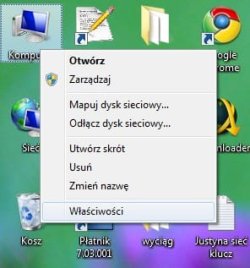
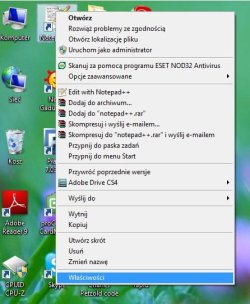
I can't see any difference between those menus. One has a lot more entries - that's all.

Are you trying to remove the context menu entries?
 

My Computers

System One System Two

  • Computer type
    PC/Desktop
    OS
    7 X64
    CPU
    i5 8400
    Motherboard
    gigabyte b365m ds3h
    Memory
    2x8gb 3200mhz
    Hard Drives
    various
    PSU
    pure power 11 400w cm
    Case
    Coolermaster
    Cooling
    cryorig m9i
  • Computer type
    PC/Desktop
    OS
    7x64
    CPU
    g5400
    Motherboard
    ga b365m ds3h
    Memory
    8gb ddr4 2400
    PSU
    xfx pro 450w
Are your WinRAR, eSet and Adobe still installed and functional?

What happened that may have caused their drop-menus to stop displaying?

Can you system restore before that point in time?
 
There are several other solutions, which are so basic, it is probably assumed that you have already tried them. But, more likely there are reasons that you cannot try it.
System Restore
System Image
Try the above two in the order given. I know for a fact if you made an image before the problem happened the restoration will work.

Finally, the most drastic. If you can just get your hands on a full or upgrade copy. I am, hopeful that you would be able to make a clean install. Just start from scratch and do not give your key until the process is completed.

If it does not take your key at the end of the process, call the number given. If that does not work a person will speak to you. Give him the facts, what you are doint is legit and he should accept it.

Make copies of all your documents and have yourprograms ready to install, you will lose everything with the clean install

Yes, I think in the end it will come to clean install, I'd just rather not do it again (as I did it so many times, always something was wrong after like 2 months).

And I cannot call any guy, I don't have my key. I'm still on 120 day trial, I'll get Windows 7 for Christmas.

I can't see any difference between those menus. One has a lot more entries - that's all.

Are you trying to remove the context menu entries?

Look again, this time I'm hovering the mouse over properties (last item).
No I'm not trying to remove the entries. Everything in entries is fine, and works fine.
Just for some items, this right click menu looks like it is from Windows XP, not Seven.

Modern: http://i37.tinypic.com/118krrb.png
Old style: http://i35.tinypic.com/311th1u.png

Are your WinRAR, eSet and Adobe still installed and functional?

What happened that may have caused their drop-menus to stop displaying?

Can you system restore before that point in time?

Sorry I cannot do system restore, image. There were no points (although windows should have created some). Maybe it is connected to malware, there may have been/is present on the system.

Everything is functionall. But, when this have happened, I noticed that the Eset was offline, and couldn't be turned on. So I reinstalled it, and scanned the system with it and with Windows Defender and Spybot S&D. Nothing was found.

The menus are displaying, thats not the problem. The only problem is that for some reason, menus for items like files (or desktop items not from Windows itself), are displaying in Windows XP style. Look at the pictures as I hover in them over the last item. It clearly looks like XP menu to me. Strange is that menu for Computer is fine, but menu for the notepad++ is not (everything on my desktop except Computer, Network, and Recycle bin, and folders is displaying old style menus).


So if you know what file may have been corrupted that could cause the menus to switch styles (not for all items), could you upload this file somewhere?? 32 bit version plz.

 

My Computer

OS
Windows 7 build 7600 64 bit
CPU
Intel Core2Quad Q8200 2.33 GHz @ 2.33 GHz
Motherboard
Gigabyte GA-P35-S3 rev. 1
Memory
GoodRAM DDR2 3 x 1 GB 800 MHz
Graphics Card(s)
HIS ATI Radeon HD 4850 512 MB VRAM
Sound Card
Creative X-FI Gamer
PSU
400 W

My Computer

OS
Windows 7 build 7600 64 bit
CPU
Intel Core2Quad Q8200 2.33 GHz @ 2.33 GHz
Motherboard
Gigabyte GA-P35-S3 rev. 1
Memory
GoodRAM DDR2 3 x 1 GB 800 MHz
Graphics Card(s)
HIS ATI Radeon HD 4850 512 MB VRAM
Sound Card
Creative X-FI Gamer
PSU
400 W
Back
Top