Upgrade

craig46

New member
Local time
10:48 AM
Messages
6
Just upgraded to Win 7 Ulimate x64 bit and what I now have is a screen that is to dark to even go online with (doing this on another laptop) where can I find the solution/fix to this and what is causing it ?
It's a Gateway laptop that came originally with Vista x 64 bit
 

My Computer

OS
Winows 7 Ultimatex64
Hi, welcome to the forums :)

Most/all laptops have a [FN] key which when pressed along with another [F] key will produce an built in action. You should have (normally in blue) buttons marked with the standard contrast/brightness icons, try [FN] + [one of those keys]
 

My Computer

Computer Manufacturer/Model Number
Compaq Desktop
OS
Windows 7 Ultimate x64
CPU
AMD Sempron Dual Core
Memory
3GB
Graphics Card(s)
NVIDIA GeForce 6150SE nForce 430
Screen Resolution
1024x768
Hard Drives
150GB Sata
Hi, welcome to the forums :)

Most/all laptops have a [FN] key which when pressed along with another [F] key will produce an built in action. You should have (normally in blue) buttons marked with the standard contrast/brightness icons, try [FN] + [one of those keys]

Yes, but the software that controls what some of the function keys do isn't part of Windows.

Gateway may have a utility available for download that gives the desired hotkey functions, but we'd need a model number to point to a download location.
 

My Computer

Computer Manufacturer/Model Number
homegrown
OS
Windows 7 Pro X64 SP1
CPU
Intel Core I7-3930k
Motherboard
Asus P9X79 Pro
Memory
16 GB Gskill DDR3-2133
Graphics Card(s)
eVGA GTX680
Sound Card
Creative X-Fi Titanium
Monitor(s) Displays
As PA246Q
Screen Resolution
1920 X 1200
Hard Drives
Corsair Force GT, 120 GB
WDC 1.5TB Caviar Black
PSU
PCP&C Silencer 750 Crossfire
Case
Silverstone FT02
Cooling
Noctua NH-D14
Keyboard
cheap Logitech USB
Mouse
Microsoft Intellimouse Explorer (old optical) USB
Internet Speed
6Mb cable
Other Info
Pioneer BDR-205
Samsung SH-203B
Monsoon 5.1 speakers
Hi, welcome to the forums :)

Most/all laptops have a [FN] key which when pressed along with another [F] key will produce an built in action. You should have (normally in blue) buttons marked with the standard contrast/brightness icons, try [FN] + [one of those keys]

Yes, but the software that controls what some of the function keys do isn't part of Windows.

Gateway may have a utility available for download that gives the desired hotkey functions, but we'd need a model number to point to a download location.
Hi.
Thanks for the replies, guys all I know is it's an M-Series. The label on the bottoms a bit worn !
 

My Computer

OS
Winows 7 Ultimatex64

My Computer

Computer type
PC/Desktop
Computer Manufacturer/Model Number
Built them myself, Science Experiments !
OS
Win7 Enterprise, Win7 x86 (Ult 7600), Win7 x64 Ult 7600, TechNet RTM on AMD x64 (2.8Ghz)
CPU
AMD fx8350 4ghz, AMD-32 2400mhz, AMD-64 3200mhz, AMDx64 2.8G
Motherboard
SIS 755, ECS-K8M890M-M (Ult 7600), GigaByte & others
Memory
2gb, 4gb on the Ult 7600, 4gb on Technet RTM, 32gb on FX8350
Graphics Card(s)
Draw my own Graphics, several nVidia cards
Sound Card
on motherboard
Monitor(s) Displays
19" flat scr, 28" I-Inc widescr,22" Emprex Widescr, 23" Acer
Screen Resolution
1280 x 1024, 1440 x 900, 1920 x 1080
Hard Drives
6 pata Ide HD's & 2 Sata HD's
added 80gb external on Ult 7600 computer,
numerous extra 1tb, 2TB, 3Tb SATA HD's
A collection of ext HD Docks w/ HDs
PSU
430w, 550w, 600w, 700, 800, etc
Case
All Generic Full Towers
Cooling
Open Air & a few fans, some w/ colored LEDs
Keyboard
Compaq & Dell recycled from GoodWill
Mouse
Made in China Optical Wired Mouse
Internet Speed
Fast Cable InterNet
Antivirus
AVG Free on 24 different Desktops, NO Problems!
Browser
IE 8 is preferred, but use FireFox sometimes
Other Info
Linksys Routers, switches, & Hubs
Too Many USB Flash Drives to count, Biggest is 64GB !
Eight computers in my home network.
Sixteen computers at my business network.
Linked via TeamViewer !
Lots of old used spare computer parts everywhere!
Buy a legitimate copy of windows, then do a clean install... ;)
 

My Computer

Computer type
PC/Desktop
Computer Manufacturer/Model Number
LENOVO K450 @3.0GHZ
OS
64-bit Windows 8.1 Pro
CPU
Core(TM) i5 CPU 4330 Haswell @ 3.20GHz
Motherboard
LENOVO
Memory
12.00 GB
Graphics Card(s)
Intel(R) HD Graphics
Sound Card
Intel HD integtrated
Monitor(s) Displays
HP 25' ISP Monitor
Screen Resolution
1900/1020
Hard Drives
(1) ST1000DM003-1CH162 (2) Generic STORAGE DEVICE USB Device (3) Generic STORAGE DEVICE USB Device
Internet Speed
100mb down/10mb up
Hello craig46, welcome to Seven Forums!


If you have a legitimate Windows 7 to install do a complete wipe of the entire Hard Disk Drive to over-write all the old code and do a clean install, have a look through the information below and be sure to post back with any further questions you may have and to keep us informed.


After you have copied out or made back-ups of the data you need to save to external media, then boot the Windows 7 installation media to use Step One of this tutorial at the first link below to do a wipe (secure erase) to the entire Hard Disk Drive / Solid State Drive.

:info: Whether you use diskpart to run either the clean all command to completely wipe a HDD / SSD or just the clean command to remove the format configuration data and don't use diskpart to create at least a single partition to do the installation to, letting the Windows installer do the format you will end up with the new Windows 7 System Reserved partition, if you want to make your own decision whether this partition is added, study these two (2) options below.
  • Then if you do not want to create the new Windows 7 "System Reserved" partition use the outline in Step Two #2 to create, format and mark Active a single 100GB partition to do the installation to.
  • If you do want to create the "System Reserved" partition use the outline in Step Two #3 to create, format and mark Active the System Reserved partition and then create and format the 100GB partition to do the installation to.
Either way, running the "clean all" then creating and formatting the partition(s) using diskpart will get you the best possible space to do a clean install of Windows 7 to; you can always extend the Windows partition to include the remaining unallocated space on the HDD / SSD or create additional Primary partitions or an Extended partition after the installation completes if you choose.

SSD / HDD : Optimize for Windows Reinstallation

DISKPART : At PC Startup

Do a Clean Install with a Upgrade Windows 7 Version

 

My Computer

Computer Manufacturer/Model Number
* BFK Customs *
OS
W 7 64-bit Ultimate
CPU
Intel Q9550 Yorkfield
Motherboard
ASUS P5Q Pro
Memory
8GB Dominator 8500C5D
Graphics Card(s)
ATI : XFX 5870
Sound Card
Realtek HD Audio 7-1
Monitor(s) Displays
1x 47" LCD HDMI & 3x 26" LCD HDMI
Screen Resolution
1920x1080P & 1920x1200
Hard Drives
1x 80GB Intel X25-M G2 SSD : 1x 500GB & 1x 640GB WD Caviar Black(s)
PSU
Corsair 620HX
Case
Cooler Master RC-690
Cooling
Tuniq Tower 120, 2x 140mm and 3x 120mm case fans
Keyboard
Microsoft 500
Mouse
Razer Diamondback 3G
Internet Speed
14 Mb/s
Other Info
1x Koutech 3Gb/s SATA HDD Hot Swap Rack
Buy a legitimate copy of windows, then do a clean install... ;)
That's my point I HAVE a legitimate copy of win 7...I think the version I was trying to upgrade from was pirated...I ain't an techie y'know. The guy sold me the laptop with a "legitimate" win 7 Pro" and I thought I would buy a legitimate upgrade to ultimate. That's when I asked my original question about screen brightness.
Now how the hell do I format a laptop that tells me Operating system not found ?
 

My Computer

OS
Winows 7 Ultimatex64
I explained that to you in my post #8 above;


We are all volunteers here and do not help rude people.
 

My Computer

Computer Manufacturer/Model Number
* BFK Customs *
OS
W 7 64-bit Ultimate
CPU
Intel Q9550 Yorkfield
Motherboard
ASUS P5Q Pro
Memory
8GB Dominator 8500C5D
Graphics Card(s)
ATI : XFX 5870
Sound Card
Realtek HD Audio 7-1
Monitor(s) Displays
1x 47" LCD HDMI & 3x 26" LCD HDMI
Screen Resolution
1920x1080P & 1920x1200
Hard Drives
1x 80GB Intel X25-M G2 SSD : 1x 500GB & 1x 640GB WD Caviar Black(s)
PSU
Corsair 620HX
Case
Cooler Master RC-690
Cooling
Tuniq Tower 120, 2x 140mm and 3x 120mm case fans
Keyboard
Microsoft 500
Mouse
Razer Diamondback 3G
Internet Speed
14 Mb/s
Other Info
1x Koutech 3Gb/s SATA HDD Hot Swap Rack
Sorry...did not mean to be rude, far from it. If I've offended you, I apologise. I s'pose I just feel the seller has ripped me off somehow. I know how to format a PC in Win 98/2000 etc., but I'm new to laptops. With my original problem I'm just wary of screwing it up DOH!
 

My Computer

OS
Winows 7 Ultimatex64

My Computer

Computer Manufacturer/Model Number
* BFK Customs *
OS
W 7 64-bit Ultimate
CPU
Intel Q9550 Yorkfield
Motherboard
ASUS P5Q Pro
Memory
8GB Dominator 8500C5D
Graphics Card(s)
ATI : XFX 5870
Sound Card
Realtek HD Audio 7-1
Monitor(s) Displays
1x 47" LCD HDMI & 3x 26" LCD HDMI
Screen Resolution
1920x1080P & 1920x1200
Hard Drives
1x 80GB Intel X25-M G2 SSD : 1x 500GB & 1x 640GB WD Caviar Black(s)
PSU
Corsair 620HX
Case
Cooler Master RC-690
Cooling
Tuniq Tower 120, 2x 140mm and 3x 120mm case fans
Keyboard
Microsoft 500
Mouse
Razer Diamondback 3G
Internet Speed
14 Mb/s
Other Info
1x Koutech 3Gb/s SATA HDD Hot Swap Rack
Hi Guys...I'm back

Hi Guys I'm back with more noobie questions regarding my problem. I checked what the size of windows premium is and I was told 4.37 gigs. OK great I'll buy a new USB stick transfer the contents of the installation disc onto that with a friends laptop, then use the USB stick to get win 7 back in to mine. When it was almost done I got a message that the wim. files was too large at 4. gigs !! How come if the whole win 7 disc is 4.37 gigs it won't fit on a new, formatted (twice) 8 gig USB stick. don't make sense to me...what is a win. file anyway?
 

My Computer

OS
Winows 7 Ultimatex64
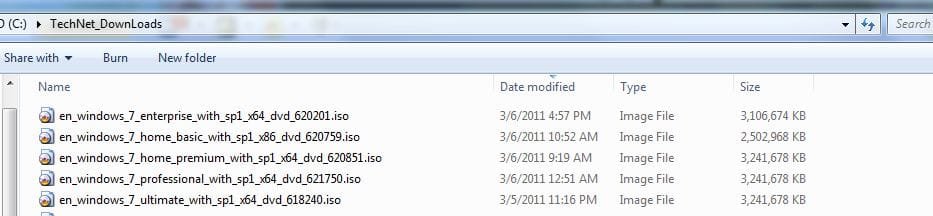
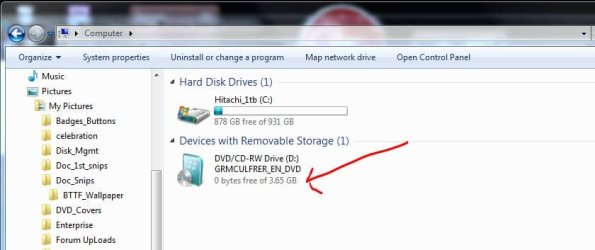
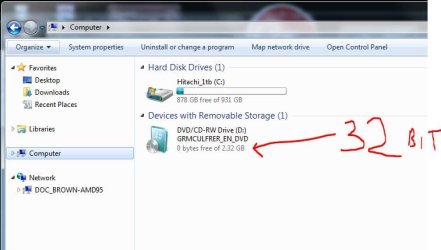
4.37gb still sounds incorrect to all my win7 installs, even with SP1
 

Attachments

  • Tech_Net_w_SP1.JPG
    Tech_Net_w_SP1.JPG
    37.8 KB · Views: 0
  • Win7_DVD_GBs.JPG
    Win7_DVD_GBs.JPG
    40.1 KB · Views: 0
  • Win7_DVD_GBs_32bit.JPG
    Win7_DVD_GBs_32bit.JPG
    40.5 KB · Views: 0

My Computer

Computer type
PC/Desktop
Computer Manufacturer/Model Number
Built them myself, Science Experiments !
OS
Win7 Enterprise, Win7 x86 (Ult 7600), Win7 x64 Ult 7600, TechNet RTM on AMD x64 (2.8Ghz)
CPU
AMD fx8350 4ghz, AMD-32 2400mhz, AMD-64 3200mhz, AMDx64 2.8G
Motherboard
SIS 755, ECS-K8M890M-M (Ult 7600), GigaByte & others
Memory
2gb, 4gb on the Ult 7600, 4gb on Technet RTM, 32gb on FX8350
Graphics Card(s)
Draw my own Graphics, several nVidia cards
Sound Card
on motherboard
Monitor(s) Displays
19" flat scr, 28" I-Inc widescr,22" Emprex Widescr, 23" Acer
Screen Resolution
1280 x 1024, 1440 x 900, 1920 x 1080
Hard Drives
6 pata Ide HD's & 2 Sata HD's
added 80gb external on Ult 7600 computer,
numerous extra 1tb, 2TB, 3Tb SATA HD's
A collection of ext HD Docks w/ HDs
PSU
430w, 550w, 600w, 700, 800, etc
Case
All Generic Full Towers
Cooling
Open Air & a few fans, some w/ colored LEDs
Keyboard
Compaq & Dell recycled from GoodWill
Mouse
Made in China Optical Wired Mouse
Internet Speed
Fast Cable InterNet
Antivirus
AVG Free on 24 different Desktops, NO Problems!
Browser
IE 8 is preferred, but use FireFox sometimes
Other Info
Linksys Routers, switches, & Hubs
Too Many USB Flash Drives to count, Biggest is 64GB !
Eight computers in my home network.
Sixteen computers at my business network.
Linked via TeamViewer !
Lots of old used spare computer parts everywhere!
Do you not have a DVD drive, or just want to try a USB flash stick install? Either way you need to boot the installer. How to Boot your Computer from a Bootable CD or DVD -

The installer is under 3gb so 4gb stick is fine.

Easiest method is to install UltraISO: on File tab Open ISO or DVD, on Bootable Tab "Write Disk Image," FOrmat stick, Write button.

Boot under USB or HD's on BIOS one-time Boot Menu.

Here are tips for getting a perfect install - use the ones which apply:
 
Back
Top