Upgraded from Windows Vista Home Premium and having problems

Keyhero

New member
Local time
2:03 AM
Messages
1
Ok, so today I bought the upgrade for Windows 7 and I ran it on my Notebook and everything went fine until I had to put it on a disk. Now I got my computer used and the guy had partitioned the hard drive and their wasn't enough space on the C drive so I put Windows 7 Ultimate on my D drive. I was stupid enough to think that it would just over right Vista but I guess because I had to put it on a different partition it didn't. So now I have to dual boot, and I figured I would just move all of my important documents and files from Vista onto Windows 7 using an external hard drive, but I was wondering if I could take Vista off my computer some how and un-partition my hard drive myself or if it would be a big deal and I would have to have someone who knew what they were doing do it. I don't know much about computers but I'm not completely computer illiterate. I would appreciate any help that I could get. This is my first time on a forum like this so I'm sorry if there is a post somewhere like this. Thank you.
 

My Computer My Computer

At a glance

64 bit Windows 7 Ultamite
OS
64 bit Windows 7 Ultamite

My Computer My Computer

At a glance

MS Windows 7 Ultimate SP1 64-bitAMD A10-4600M6.00 GB Dual-Channel DDR3 @ 798MHz (11-11-12-28)AMD Radeon HD 7660G
Computer Manufacturer/Model Number
Toshiba Satellite S875D-S7239 laptop
OS
MS Windows 7 Ultimate SP1 64-bit
CPU
AMD A10-4600M
Motherboard
AMD Pumori (Socket FT1)
Memory
6.00 GB Dual-Channel DDR3 @ 798MHz (11-11-12-28)
Graphics Card(s)
AMD Radeon HD 7660G
Sound Card
High Definition Audio Device
Monitor(s) Displays
Generic PnP Monitor (1600x900@60Hz)
Screen Resolution
1600x900@60Hz
Hard Drives
SSD 119GB Corsair CSSD-V128GB2 ATA Device
Keyboard
Standard PS/2 Keyboard
Mouse
HP Wireless Optical Mobile Mouse Model FHA-3410
Internet Speed
What the local pub, local coffee shop offers.
Other Info
Optical Drive:MATSHITA BD-CMB UJ160B ATA Device


Also have an Asus ha1002xp netbook with Win 7 Ultimate installed.
Back up your files to external HD.

Follow the steps here to wipe the HD clean first so you will have the cleanest possible install: http://www.sevenforums.com/tutorials/91339-ssd-hdd-optimize-windows-reinstallation.html

Now reboot with the Win7 DVD in tray and it should autostart, install to the partition you made.

The Win7 installer is mostly driver-complete, with newer drivers arriving quickly via optional Windows Updates. You'll need to get online to get them, however, so be sure your wireless driver is backed up to external so you can install it if the installer doesn't. Find your wireless driver on the manufacturer's Support Downloads webpage for your computer model. If you use a wire, back up the ethernet driver.

After updating drivers from optional Windows Updates, look in Device manager again to see if any drivers are missing or in error with an (!) exclamation mark. If so, download and install those drivers from the computer's Support Downloads webpage.

Install programs slowly over time to gauge any performance changes. Don't let any programs write themselves into the msconfig>Startup list besides AV and gadgets as they freeload on CPU/RAM and can spy on you. Use a lightweight free AV like MS Security Essentials or Avast 5.

When it is finished, clean and order your HD perfectly using state-of-the-art CCleaner and Auslogics Disk and Registry defraggers. Then save a Win7 backup image externally so you never have to reinstall again.

Locate Device Manager, msconfig, Windows Update by typing in Start Search box.
 
Hello Keyhero, welcome to Seven Forums!


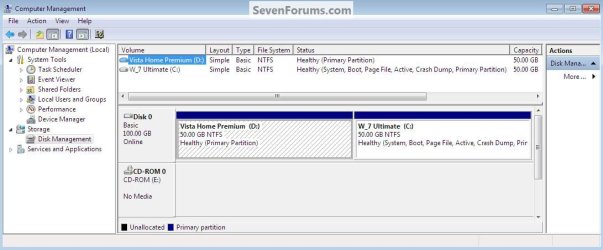
Will you please post a snip/screen-shot of the entire disk management drive map so we can see what you have going on as there may be a fairly simple way to resolve the situation.

In the Windows start menu right click computer and click manage, in the left pane of the "Computer Management" window that opens click disk management and post a snip of that, it should look similar to this.

How to Post a Screenshot in Seven Forums
click to enlarge
Dual.jpg
 

My Computer My Computer

At a glance

W 7 64-bit UltimateIntel Q9550 Yorkfield8GB Dominator 8500C5DATI : XFX 5870
Computer Manufacturer/Model Number
* BFK Customs *
OS
W 7 64-bit Ultimate
CPU
Intel Q9550 Yorkfield
Motherboard
ASUS P5Q Pro
Memory
8GB Dominator 8500C5D
Graphics Card(s)
ATI : XFX 5870
Sound Card
Realtek HD Audio 7-1
Monitor(s) Displays
1x 47" LCD HDMI & 3x 26" LCD HDMI
Screen Resolution
1920x1080P & 1920x1200
Hard Drives
1x 80GB Intel X25-M G2 SSD : 1x 500GB & 1x 640GB WD Caviar Black(s)
PSU
Corsair 620HX
Case
Cooler Master RC-690
Cooling
Tuniq Tower 120, 2x 140mm and 3x 120mm case fans
Keyboard
Microsoft 500
Mouse
Razer Diamondback 3G
Internet Speed
14 Mb/s
Other Info
1x Koutech 3Gb/s SATA HDD Hot Swap Rack
Back
Top