Upgraded hard drive, windows 7 hangs randomly on start loading screen

ComputerNoob407

New member
Local time
9:24 PM
Messages
24
I upgraded my laptop hard drive to a hitachi gst travelstar 1tb 7200 rpm on 5-11-13. This morning 5-25-13 laptop started hanging on the windows loading screen with hard drive activity from a cold boot. It's done this total of 5 times, it's random, most of the time it boots up fine. After 15 min of waiting I hold the power button down to turn it off, that's the only time the health drops. Currently my laptop is running great, no problems at all. Looking at hd sentinel, it shows hard drive health at 88% and it says 'the drive tried to examine and reallocate data sector(s) 20 times. The examined data area is perfect. At this point, warranty replacement of the disk is not yet possible, only if the health drops further.' Surface disk check from HD tune and easeUS partition master reported zero bad sectors (all green). Raw read error rate is 196,609 at the time is started. It's been at 0 so far. I've created a full image with macrium reflect on an external hd and I downloaded WD data life guard and will perform a disk check with that later in the next couple days. While upgrading I lost one of the screws that holds it into the enclosure. I'm really worried, this never happened before.
 

My Computer My Computer

At a glance

Windows 7 home premium 64 bit
Computer type
Laptop
OS
Windows 7 home premium 64 bit
It is possible that without the screw the hard drive is not making good contact with it's interface and that could cause these kinds of intermittent problems. So your first task is to replace that screw.

If that produces no joy then you might try running chkdsk on the drive. Be sure to have backup of your personal files before running any hard drive diagnostic.
http://www.sevenforums.com/tutorials/433-disk-check.html
 

My Computer My Computer

At a glance

Windows 7 64 Bit Home Premium SP1i7-3820GSkill F3-14900CL9Q - 16GBEVGA GeForce GTX660 - Driver 352.86
Computer type
PC/Desktop
Computer Manufacturer/Model Number
Home Built - Jan 2013
OS
Windows 7 64 Bit Home Premium SP1
CPU
i7-3820
Motherboard
Asus P9X79-PRO - Bios 4608
Memory
GSkill F3-14900CL9Q - 16GB
Graphics Card(s)
EVGA GeForce GTX660 - Driver 352.86
Sound Card
On board Realtek ALC898
Monitor(s) Displays
Acer S271HL
Screen Resolution
1920 x 1080
Hard Drives
#1- Samsung 840 Pro Series
#2- Western Digital WD1002FAEX Sata3 Black
#3- Western Digital WD1002FAEX Sata3 Black
PSU
Corsair CMPSU-850TX-V2 - 850 watt (by Seasonic)
Case
Corsair Obsidian 550D
Cooling
Standard 3 120mm case fans, Cooler Master Hyper 212 EVO
Keyboard
MS KC-0405
Mouse
Intellimouse 5-button
Internet Speed
56 Mbits/Sec (on a good day)
Antivirus
Avast & Malwarebytes
Browser
Firefox
Other Info
Asus DVD - DRW-24B1ST 24X
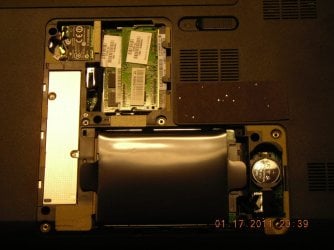
I ran chkdsk earlier and it didn't find anything. Does it matter if I use a screws from a different hard drive enclosure on another laptop. The current screws are black and the ones from my other laptop are silver. To give you an idea the hard drive is covered with a black plastic and that covering has small bumpers on each corner to keep it snugged, on each end and the sata connecter is on the right when it's upside down.
 

Attachments

  • Inside.JPG
    Inside.JPG
    125.4 KB · Views: 2

My Computer My Computer

At a glance

Windows 7 home premium 64 bit
Computer type
Laptop
OS
Windows 7 home premium 64 bit
Supposedly everything is fine, but you know that it's not. Well maybe when Chkdsk, etc. programs are running, everything checks out OK... As you said, it's intermittent.​

Are you starting up any programs on other drives during boot? If so, that other drive may be the culprit.​

If you're just booting with the C: drive OS and C: drive programs, with your pagefile.sys on the C: drive.... and still are getting boot / HD errors, my suggestion would be to move your OS partition to a different part of the hd (temporarily probably). Maybe that'll help.

If you still get the errors, then I would suspect something in common to both areas of the HD: the read/write heads... or maybe your power supply and/or power connection is flaking out once in a while.​
 
Last edited:

My Computer My Computer

At a glance

win7 64bit Ult. using: XP Mode, in English or...8GB - included when purchased.
Computer type
Laptop
OS
win7 64bit Ult. using: XP Mode, in English or Español, SUA, Bitlocker
Memory
8GB - included when purchased.
Monitor(s) Displays
two: Laptop: 1366x768 and HP 1024x768.
Hard Drives
1: 750GB
Keyboard
Second: PS2 connection Compaq kboard, used w/adapter cable.
Mouse
USB mouse.
Antivirus
MS Security Essentials
Other Info
XP Mode Apps used: VC6 C++ and MSDN help as virtual PC apps - one for ea. monitor.
Tri-boot machine. Has Ubuntu 12.04 and Win 8.0 on as well - both used seldomly.
I would get a perfect Clean Reinstall - Factory OEM Windows 7 so you know it's not the software, especially if you're still using the corrupt factory preinstalled Win7 with all the bloatware and useless duplicate utilities. At the minimum I'd Clean Up Factory Bloatware .

You can gather clues and go over the install closely using Troubleshooting Steps for Windows 7

Use Data Lifeguard, Disk Check and CrystalDiskInfo - Software to confirm the drive's condition and read it's SMART status. I don't trust HD Sentinel any longer since it's found errors on every HD its sniffed.
 
Well, tried to turn on laptop from cold boot and it still hangs. Turned it off and did a system repair option, but it gave a boot manager error saying 'windows encountered a problem communicating with a device connected to your computer. If you continue to receive this error, contact the hardware manufacturer.' Status: 0xc00000e9, Info: Unexpected I/O error has occured. So I replaced the one screw, by using one from a hard drive enclosure on a old laptop. This screw is metal, but the one's in my current laptop is black. After turning it on it booted up fine. HD sentinel hard drive health is still at 88%. I ran the WD data life guard program and it pass both quick and extended tests. I'll continue to monitor my hard drive health and see if it still hangs on the windows loading screen.
 

My Computer My Computer

At a glance

Windows 7 home premium 64 bit
Computer type
Laptop
OS
Windows 7 home premium 64 bit
Yes, I/O errors just mean the system can find a hard drive and that sort of confirms the idea that it is a connection problem. Otherwise it would be a failed hard drive, which does not seem to be the case.

I've seen a couple of laptops now that use an adapter over the standard SATA connector that allows the connection to the motherboard to be a laid-in/pressed in type, and that screw could be what is needed to press it in and make a positive connection.

The screws used in laptops are fairly generic, the only differences are size and length. So if it fits and turns easily and is not so long that it hits bottom then you are good to go.

Let us know if that solves it.
 

My Computer My Computer

At a glance

Windows 7 64 Bit Home Premium SP1i7-3820GSkill F3-14900CL9Q - 16GBEVGA GeForce GTX660 - Driver 352.86
Computer type
PC/Desktop
Computer Manufacturer/Model Number
Home Built - Jan 2013
OS
Windows 7 64 Bit Home Premium SP1
CPU
i7-3820
Motherboard
Asus P9X79-PRO - Bios 4608
Memory
GSkill F3-14900CL9Q - 16GB
Graphics Card(s)
EVGA GeForce GTX660 - Driver 352.86
Sound Card
On board Realtek ALC898
Monitor(s) Displays
Acer S271HL
Screen Resolution
1920 x 1080
Hard Drives
#1- Samsung 840 Pro Series
#2- Western Digital WD1002FAEX Sata3 Black
#3- Western Digital WD1002FAEX Sata3 Black
PSU
Corsair CMPSU-850TX-V2 - 850 watt (by Seasonic)
Case
Corsair Obsidian 550D
Cooling
Standard 3 120mm case fans, Cooler Master Hyper 212 EVO
Keyboard
MS KC-0405
Mouse
Intellimouse 5-button
Internet Speed
56 Mbits/Sec (on a good day)
Antivirus
Avast & Malwarebytes
Browser
Firefox
Other Info
Asus DVD - DRW-24B1ST 24X
Back
Top