
I upgraded my Dell laptop to Win 7 Ultimate from Vista Ultimate. Everything just about worked but I discovered a couple of serious issues that I need help from members of this forum.
1. I started getting warnings about my HD running out of space. I thought it was weird since I have over 60GB of space, until I noticed that my user was defined in Drive D and NOT C. Drive D is the recovery drive and C is the OS drive. I can't seem to define users in Drive C.
2. Also, I noticed that Drive D is the boot drive while Drive C is the system drive. Shouldn't Drive C be the boot drive?
Also of note, when the computer boots up, it goes into the Dual-boot mode for Windows 7 and Vista. Not sure how I got there but it was never intended; I just want Win 7.
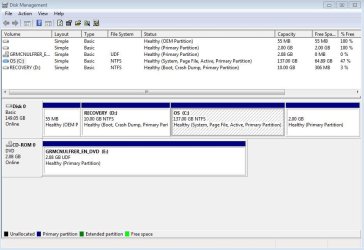
I have attached the Disk Management image for reference. Please help: I just want to boot from Drive C and have user be on Drive C as well. What do I need to do? If necessary, I am fine with reformatting the whole drive if need be.
Thanks in advance for your help.
1. I started getting warnings about my HD running out of space. I thought it was weird since I have over 60GB of space, until I noticed that my user was defined in Drive D and NOT C. Drive D is the recovery drive and C is the OS drive. I can't seem to define users in Drive C.
2. Also, I noticed that Drive D is the boot drive while Drive C is the system drive. Shouldn't Drive C be the boot drive?
Also of note, when the computer boots up, it goes into the Dual-boot mode for Windows 7 and Vista. Not sure how I got there but it was never intended; I just want Win 7.
I have attached the Disk Management image for reference. Please help: I just want to boot from Drive C and have user be on Drive C as well. What do I need to do? If necessary, I am fine with reformatting the whole drive if need be.
Thanks in advance for your help.
Attachments
My Computer
At a glance
Windows 7
- OS
- Windows 7

