Solved Upgrading from Vista

spkeller

New member
Local time
1:15 PM
Messages
19
Hi, I have a Dell Inspiron 1525 that came with Vista. I bought an upgrade to Windows 7 pro, installed it and it worked - mostly. There are a few things that seem to behave differently from my desktop machine that was purchased with Win 7 pro. As time went on, things just got worse - IE 8 barely works at all, Itunes and WMP don't always work smoothly, even connecting to my wireless network can be a chore at times. I've compared settings and both look to be set the same. I finally got tired of fighting the 'bad' laptop installation, and I started to re-install windows 7 from the upgrade dvd. Now at the end of the process, it's asking me for the product key. I tried the Vista key and that didn't work. The COA from the Win7 disc does not have a product key. (It looks legit as compared to the images and descriptions on the MSFT site). Does anyone have any ideas? (I'd rather not do a complete wipe and reinstall if I can avoid it).

Thanks.
 

My Computer

OS
Win 7 Pro 32 bit
Where did you get the Windows 7 Upgrade disc from.
 

My Computer

OS
Windows 7
Things don't always work out when doing an upgrade. I've seen it happen countless times. A clean install is the way to go, which can be done even with an upgrade version. http://www.sevenforums.com/tutorials/31402-clean-install-upgrade-windows-7-version.html?ltr=C
You should have had to enter a product code the first time around too, so what did you enter then? Are you looking at the DVD for the product code or the COA sticker that should have been included with the DVD. Its the sticker you want.
 

My Computer

Computer type
PC/Desktop
Computer Manufacturer/Model Number
Home Built
OS
Windows 10 Education 64 bit
CPU
AMD Phenom II X4 980 Black Edition Deneb 3.7GHz
Motherboard
Asus M4N68T-M V2 µATX Motherboard
Memory
8GB 4GBx2 Kingston PC10600 DDR3 1333 Memory
Graphics Card(s)
Zotac NVIDIA Geforce GT640 2 Gig DDR3 PCIe
Sound Card
VIA VT1708s High Definition Audio 8-channel Onboard
Monitor(s) Displays
22" LG E2242 1080p and 2 19" I-INC AG191D
Screen Resolution
1280x1024 - 1920x1080 - 1280x1024
Hard Drives
Crucial M100 256 GB SSD and 500 GB WD Blue SATA
PSU
Thermaltake TR 620
Case
Power Up Black ATX Mid-Tower Case
Cooling
Stock heatsink and fan
Keyboard
Logitech Wireless K350 Wave
Mouse
Logitech Wireless M570 Trackman Wheel
Internet Speed
80 Mbps Down 30 Mbps Up
Antivirus
Windows Defender
Browser
Internet Explorer 11
Other Info
HP DVD1040e Lightscribe - External USB2
Hello spkeller, welcome to Seven Forums!

You will have better success if you completely wipe the entire Hard Disk Drive and clean install Windows 7 and be sure to boot the Windows installer and not run the installer from within an already installed Windows.

All the installed programs/apps will have to be reinstalled so be sure to save the activation keys where applicable as they integrate themselves into the Windows registry and are not moveable from one Windows installation to another.

Have a thorough look through all the information presented below and be sure to post back with any further questions you may have and to keep us informed.


After you have copied out or made back-ups of the data you need to save to external media, use Step One of this tutorial at the first link below to do a wipe (secure erase) to the entire Hard Disk Drive / Solid State Drive.
  • Then if you do not want to create the new Windows 7 "System Reserved" partition use the outline in Step Two #2 to create, format and mark Active a single 100GB partition to do the installation to.
  • If you do want to create the "System Reserved" partition use the outline in Step Two #3 to create, format and mark Active the System Reserved partition and then create and format the 100GB partition to do the installation to.
Either way, running the "clean all" then creating and formatting the partition(s) using diskpart will get you the best possible space to do a clean install of Windows 7 to; you can always extend the Windows partition to include the remaining unallocated space on the HDD / SSD or create additional Primary partitions or an Extended partition after the installation completes if you choose.

SSD / HDD : Optimize for Windows Reinstallation

DISKPART : At PC Startup

Do a Clean Install with a Upgrade Windows 7 Version
 

My Computer

Computer Manufacturer/Model Number
* BFK Customs *
OS
W 7 64-bit Ultimate
CPU
Intel Q9550 Yorkfield
Motherboard
ASUS P5Q Pro
Memory
8GB Dominator 8500C5D
Graphics Card(s)
ATI : XFX 5870
Sound Card
Realtek HD Audio 7-1
Monitor(s) Displays
1x 47" LCD HDMI & 3x 26" LCD HDMI
Screen Resolution
1920x1080P & 1920x1200
Hard Drives
1x 80GB Intel X25-M G2 SSD : 1x 500GB & 1x 640GB WD Caviar Black(s)
PSU
Corsair 620HX
Case
Cooler Master RC-690
Cooling
Tuniq Tower 120, 2x 140mm and 3x 120mm case fans
Keyboard
Microsoft 500
Mouse
Razer Diamondback 3G
Internet Speed
14 Mb/s
Other Info
1x Koutech 3Gb/s SATA HDD Hot Swap Rack
You should have a Product Key that came with the Upgrade DVD on an insert in the packaging.

Where did you get the Win7 Upgrade? It's possible the key can be recovered.
 
The upgrade came from JourneyEd.com - It's an Academic Software discount website. ( My daughter goes to Marquette University - It's her laptop). She's going to contact them also, but based on the info I've received so far, it sounds like we should just start from scratch. I'll update this thread as I move forward with this project.
Thanks.
 

My Computer

OS
Win 7 Pro 32 bit
The upgrade came from JourneyEd.com - It's an Academic Software discount website. ( My daughter goes to Marquette University - It's her laptop). She's going to contact them also, but based on the info I've received so far, it sounds like we should just start from scratch. I'll update this thread as I move forward with this project.
Thanks.


Hello again.


Be sure to post back here if you need further help and to keep us posted.
 

My Computer

Computer Manufacturer/Model Number
* BFK Customs *
OS
W 7 64-bit Ultimate
CPU
Intel Q9550 Yorkfield
Motherboard
ASUS P5Q Pro
Memory
8GB Dominator 8500C5D
Graphics Card(s)
ATI : XFX 5870
Sound Card
Realtek HD Audio 7-1
Monitor(s) Displays
1x 47" LCD HDMI & 3x 26" LCD HDMI
Screen Resolution
1920x1080P & 1920x1200
Hard Drives
1x 80GB Intel X25-M G2 SSD : 1x 500GB & 1x 640GB WD Caviar Black(s)
PSU
Corsair 620HX
Case
Cooler Master RC-690
Cooling
Tuniq Tower 120, 2x 140mm and 3x 120mm case fans
Keyboard
Microsoft 500
Mouse
Razer Diamondback 3G
Internet Speed
14 Mb/s
Other Info
1x Koutech 3Gb/s SATA HDD Hot Swap Rack
The MS student discount fulfiller Digital River sent the Product Key in an email then required users to download the ISO to burn their own DVD - in fact at first they failed to provide an ISO until this was corrected.

Did your supplier do anything like this? If so the Key might be in a confirmation email, on the receipt or sales page.
 
My daughter is checking her email archives, and we also contacted the vendor, I hope we'll hear something by Monday. stay tuned...
 

My Computer

OS
Win 7 Pro 32 bit

My Computer

Computer type
PC/Desktop
Computer Manufacturer/Model Number
Built them myself, Science Experiments !
OS
Win7 Enterprise, Win7 x86 (Ult 7600), Win7 x64 Ult 7600, TechNet RTM on AMD x64 (2.8Ghz)
CPU
AMD fx8350 4ghz, AMD-32 2400mhz, AMD-64 3200mhz, AMDx64 2.8G
Motherboard
SIS 755, ECS-K8M890M-M (Ult 7600), GigaByte & others
Memory
2gb, 4gb on the Ult 7600, 4gb on Technet RTM, 32gb on FX8350
Graphics Card(s)
Draw my own Graphics, several nVidia cards
Sound Card
on motherboard
Monitor(s) Displays
19" flat scr, 28" I-Inc widescr,22" Emprex Widescr, 23" Acer
Screen Resolution
1280 x 1024, 1440 x 900, 1920 x 1080
Hard Drives
6 pata Ide HD's & 2 Sata HD's
added 80gb external on Ult 7600 computer,
numerous extra 1tb, 2TB, 3Tb SATA HD's
A collection of ext HD Docks w/ HDs
PSU
430w, 550w, 600w, 700, 800, etc
Case
All Generic Full Towers
Cooling
Open Air & a few fans, some w/ colored LEDs
Keyboard
Compaq & Dell recycled from GoodWill
Mouse
Made in China Optical Wired Mouse
Internet Speed
Fast Cable InterNet
Antivirus
AVG Free on 24 different Desktops, NO Problems!
Browser
IE 8 is preferred, but use FireFox sometimes
Other Info
Linksys Routers, switches, & Hubs
Too Many USB Flash Drives to count, Biggest is 64GB !
Eight computers in my home network.
Sixteen computers at my business network.
Linked via TeamViewer !
Lots of old used spare computer parts everywhere!
The Win 7 program ran complete. I did run a key code finder program, but it just returns a 'generic' code that will not authenticate. I have the little 'This is not genuine..." banner displaying in the bottom right of the screen.
 

My Computer

OS
Win 7 Pro 32 bit
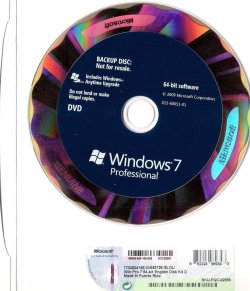
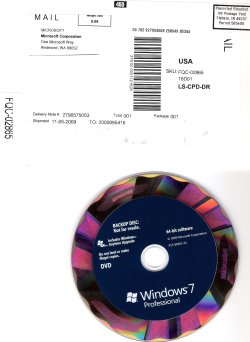
You mention a COA on the Upgrade disk which you say has no Product Key which is unusual.

That may have the Product ID on it, with which MS CUstomer service can provide you with the key, or replace it. You may need to deal with your supplier directly.
 
Most student upgrade DVDs were mailed out with just a generic install DVD & a COA with NO Key Code. The Key Codes were usually sent by email & it was best to print out Two copies for safe keeping.

" The upgrade came from JourneyEd.com - It's an Academic Software discount website. "

That JourneyED.com should have a valid record of the transaction & the Key Code issued. So hopefully you will get the answer from them during this business week.

Keep us informed. :)
 

Attachments

  • Student_W7_Pro_x64-0001.jpg
    Student_W7_Pro_x64-0001.jpg
    145 KB · Views: 5
  • Student_W7_Pro_x64_0002.jpg
    Student_W7_Pro_x64_0002.jpg
    165.8 KB · Views: 4

My Computer

Computer type
PC/Desktop
Computer Manufacturer/Model Number
Built them myself, Science Experiments !
OS
Win7 Enterprise, Win7 x86 (Ult 7600), Win7 x64 Ult 7600, TechNet RTM on AMD x64 (2.8Ghz)
CPU
AMD fx8350 4ghz, AMD-32 2400mhz, AMD-64 3200mhz, AMDx64 2.8G
Motherboard
SIS 755, ECS-K8M890M-M (Ult 7600), GigaByte & others
Memory
2gb, 4gb on the Ult 7600, 4gb on Technet RTM, 32gb on FX8350
Graphics Card(s)
Draw my own Graphics, several nVidia cards
Sound Card
on motherboard
Monitor(s) Displays
19" flat scr, 28" I-Inc widescr,22" Emprex Widescr, 23" Acer
Screen Resolution
1280 x 1024, 1440 x 900, 1920 x 1080
Hard Drives
6 pata Ide HD's & 2 Sata HD's
added 80gb external on Ult 7600 computer,
numerous extra 1tb, 2TB, 3Tb SATA HD's
A collection of ext HD Docks w/ HDs
PSU
430w, 550w, 600w, 700, 800, etc
Case
All Generic Full Towers
Cooling
Open Air & a few fans, some w/ colored LEDs
Keyboard
Compaq & Dell recycled from GoodWill
Mouse
Made in China Optical Wired Mouse
Internet Speed
Fast Cable InterNet
Antivirus
AVG Free on 24 different Desktops, NO Problems!
Browser
IE 8 is preferred, but use FireFox sometimes
Other Info
Linksys Routers, switches, & Hubs
Too Many USB Flash Drives to count, Biggest is 64GB !
Eight computers in my home network.
Sixteen computers at my business network.
Linked via TeamViewer !
Lots of old used spare computer parts everywhere!
Well, after a lot of fooling around, I finally got it. I used a web site 'orderfind.com'. I got a copy of the original receipt with the product key. Everything went well after that.
For the record, I did an 'inplace upgrade' (at least that's what it's called in 2000 and XP). Everything is now running fine - AND I didn't need to reinstall my other software.
 

My Computer

OS
Win 7 Pro 32 bit
Good to see you got it all sorted and thanks for the update.
 

My Computer

Computer Manufacturer/Model Number
* BFK Customs *
OS
W 7 64-bit Ultimate
CPU
Intel Q9550 Yorkfield
Motherboard
ASUS P5Q Pro
Memory
8GB Dominator 8500C5D
Graphics Card(s)
ATI : XFX 5870
Sound Card
Realtek HD Audio 7-1
Monitor(s) Displays
1x 47" LCD HDMI & 3x 26" LCD HDMI
Screen Resolution
1920x1080P & 1920x1200
Hard Drives
1x 80GB Intel X25-M G2 SSD : 1x 500GB & 1x 640GB WD Caviar Black(s)
PSU
Corsair 620HX
Case
Cooler Master RC-690
Cooling
Tuniq Tower 120, 2x 140mm and 3x 120mm case fans
Keyboard
Microsoft 500
Mouse
Razer Diamondback 3G
Internet Speed
14 Mb/s
Other Info
1x Koutech 3Gb/s SATA HDD Hot Swap Rack
Back
Top