
You are using an out of date browser. It may not display this or other websites correctly.
You should upgrade or use an alternative browser.
You should upgrade or use an alternative browser.
UPGRADING FROM WINDOWS 7 BETA to RC
- Thread starter djdeep
- Start date

You should read some of the threads before you post questions that have been already answered, in short no you should do a fresh install otherwise you will most likely run into problems.
My Computer
- Computer Manufacturer/Model Number
- Home Brew
- OS
- Windows 7 Ultimate Vista Ultimate x64
- CPU
- Core 2 Duo E8500 3.16Ghz @ 3.8Ghz
- Motherboard
- eVGA 750i FTW
- Memory
- 2x2Gigs Patriot PC2-6400 LL
- Graphics Card(s)
- Inno3D GeForce GTX260 216 SP
- Monitor(s) Displays
- ASUS VW222U 22" 2ms Response time
- Screen Resolution
- 1680x1050
- Hard Drives
- SATA 150GB
SATA II 250GB
USB IDE 750GB Ext.
- PSU
- HYTEC 600W & Thermaltake 650W Toughpower Power Exp
- Case
- Thermaltake Armor LCS (Liquid Cooling System)
- Cooling
- Liquid Cooling System
- Keyboard
- Logitech G15 Gaming Keyboard
- Mouse
- Logitech G9 Gaming Mouse

- Local time
- 2:08 PM
- Messages
- 18,396
Microsoft actually recommends you don't upgrade from the beta to the RC, although it is possible, I wouldn't recommend it either. A quick search of "Windows 7 RC upgrade from 7000" you will find instructions on how.
My Computer
- Computer type
- PC/Desktop
- Computer Manufacturer/Model Number
- Airbot 2.0
- OS
- Windows 7 Ultimate x64 SP1
- CPU
- Core i7 920 (D0) @ 4Ghz, *26c idle *65c full load on air
- Motherboard
- Asus P6X58D Premium - Sata 6Gb/s - USB 3.0
- Memory
- 12GB DDR3 Corsair Dominator -CMD12GX3M6A1600C8 at 1600MHz
- Graphics Card(s)
- Zotac Geforce GTX 770
- Sound Card
- ASUS Xonar D2X
- Monitor(s) Displays
- 1 LG 24" Flatron W2453V-PF 1 Samsung 24" P2450H both 2ms RT
- Screen Resolution
- 1920x1080@60hz
- Hard Drives
- 1 Samsung 250GB 840 Evo SSD
1 OCZ Vertex2 180GB SSD
1 TB Samsung Spinpoint F1 7200RPM 32MB cache
2 500GB WD Caviar Blacks 7200RPM 32MB cache (WD5001AALS)
Pioneer DVD Burner DVR-S18M
- PSU
- Corsair HX1000W
- Case
- Cooler Master HAF 932
- Cooling
- Case Fans *3 230mm, *1 140mm/CPU - *Tuniq Tower 120 Extreme
- Keyboard
- Logitech Wireless MK700
- Mouse
- Logitech Wireless MK700
- Internet Speed
- DL 15 Mbps UL 0.98 Mbps
- Antivirus
- None
- Browser
- Firefox Nightly
- Other Info
- Processor-7.7 *RAM- 7.9 *Graphics-7.9 *Gaming Graphics- 7.9 *SSD- 7.8 W.E.I final score= 7.7
*Phone- LG Nexus 5

Was you wanting to know if you should upgrade versus clean install? Or was you saying hey should I install this ? download from a torrent and nuke my tried and true 7000 beta install?.Well ...
guys i need to know if ther is any prob if i upgrade from Win 7 beta version to WIN 7 RC
plz lemme know asap ...kinda scared :d
PEACE !!!!!!
My Computer
- Computer Manufacturer/Model Number
- Gateway GT5692
- OS
- Windows 7 Ulti. x64
- CPU
- AMD Phenom 8450 triple-core 2.10 ghz
- Memory
- 4GB
- Graphics Card(s)
- ATI Radion HD 3200
- Monitor(s) Displays
- Gateway FPD1775W
- Screen Resolution
- 1280x720
- Hard Drives
- 465.6613 Gibibytes
You should read some of the threads before you post questions that have been already answered, in short no you should do a fresh install otherwise you will most likely run into problems.
MY BAD GRim ... ,
but to be true its really confusing
 so i cant upgrade from WIN 7 beta to RC ..
 well if i want to freshly install do i need all the drivers ? or it will download itself ... ? and i see we can install RC using DVD ... is tht true ?
Plz lemme know ... its really confusin ..
My Computer
- OS
- Windows Vista Home
MY BAD GRim ... ,
but to be true its really confusing
well if i want to freshly install do i need all the drivers ? or it will download itself ... ? and i see we can install RC using DVD ... is tht true ?
Plz lemme know ... its really confusin ..
You can upgrade but you would need to modify a file in the .iso, clean install would be better though.
If you never had a problem getting the drivers with the beta i doubt it would be a problem with the RC, and yes you can install from a DVD (is that not how you did it with the beta?).
My Computer
- OS
- Win 7
Yes you can burn the ISO to DVD with something like UltraISO, PowerISO, Image Burn, Nero or even the native support for burning ISO in Windows 7 which can be access by right clicking the download ISO and selecting Open with and Windows Disc Image Burner.
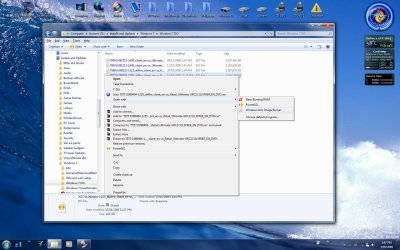
You will have generic driver pre installed with windows but you may want to install your motherboard chipset drivers etc. if you have them, if you are installing drivers make sure you use Vista one if available or Windows 7 drivers would be even better but so far the only drivers I have seen so far specifically for Windows 7 are the Nvidia drivers.
You will have generic driver pre installed with windows but you may want to install your motherboard chipset drivers etc. if you have them, if you are installing drivers make sure you use Vista one if available or Windows 7 drivers would be even better but so far the only drivers I have seen so far specifically for Windows 7 are the Nvidia drivers.
My Computer
- Computer Manufacturer/Model Number
- Home Brew
- OS
- Windows 7 Ultimate Vista Ultimate x64
- CPU
- Core 2 Duo E8500 3.16Ghz @ 3.8Ghz
- Motherboard
- eVGA 750i FTW
- Memory
- 2x2Gigs Patriot PC2-6400 LL
- Graphics Card(s)
- Inno3D GeForce GTX260 216 SP
- Monitor(s) Displays
- ASUS VW222U 22" 2ms Response time
- Screen Resolution
- 1680x1050
- Hard Drives
- SATA 150GB
SATA II 250GB
USB IDE 750GB Ext.
- PSU
- HYTEC 600W & Thermaltake 650W Toughpower Power Exp
- Case
- Thermaltake Armor LCS (Liquid Cooling System)
- Cooling
- Liquid Cooling System
- Keyboard
- Logitech G15 Gaming Keyboard
- Mouse
- Logitech G9 Gaming Mouse
Was you wanting to know if you should upgrade versus clean install? Or was you saying hey should I install this ? download from a torrent and nuke my tried and true 7000 beta install?.
haha .. i donwloaded it frm http://www.demonoid.com/ actually wat im scared of his how to install .. it .. in net i found many diff .. steps .. so im confused and lookin for the easiest way ya know ...

My Computer
- OS
- Windows Vista Home
You can upgrade but you would need to modify a file in the .iso, clean install would be better though.
If you never had a problem getting the drivers with the beta i doubt it would be a problem with the RC, and yes you can install from a DVD (is that not how you did it with the beta?).
nah mayn ... i upgraded from Windows Vista to Win 7000 .. so thts y it was already loaded ...
i have downloaded all the drivers ... from hp site ... coz hp ppl neva gave me drivers DVD ... but still wonderin neways thnx mayn

My Computer
- OS
- Windows Vista Home
Yes you can burn the ISO to DVD with something like UltraISO, PowerISO, Image Burn, Nero or even the native support for burning ISO in Windows 7 which can be access by right clicking the download ISO and selecting Open with and Windows Disc Image Burner.
View attachment 9482
You will have generic driver pre installed with windows but you may want to install your motherboard chipset drivers etc. if you have them, if you are installing drivers make sure you use Vista one if available or Windows 7 drivers would be even better but so far the only drivers I have seen so far specifically for Windows 7 are the Nvidia drivers.
o okie ... dude .. it was really help full .. i know how to make ISO DISK .. but the man thing is .. i have downloaded DRIVERS ... from HP SITE ..if i install all of them randomly ... it will not create any prob rite ... ?
and ya also ... when i make the disk .. it will start installin if i just restart
? or i have to change something in BIOS ?
Lemme know ... im not gud in all this thangs ...
My Computer
- OS
- Windows Vista Home
If your Bios has the DVD drive to boot first then you are good to go, if not you will need to change it, then just insert the DVD and restart and hit any key when promoted to boot from DVD.
As far as installing drivers, I don't think it makes any difference what order you install them.
As far as installing drivers, I don't think it makes any difference what order you install them.
My Computer
- Computer Manufacturer/Model Number
- Home Brew
- OS
- Windows 7 Ultimate Vista Ultimate x64
- CPU
- Core 2 Duo E8500 3.16Ghz @ 3.8Ghz
- Motherboard
- eVGA 750i FTW
- Memory
- 2x2Gigs Patriot PC2-6400 LL
- Graphics Card(s)
- Inno3D GeForce GTX260 216 SP
- Monitor(s) Displays
- ASUS VW222U 22" 2ms Response time
- Screen Resolution
- 1680x1050
- Hard Drives
- SATA 150GB
SATA II 250GB
USB IDE 750GB Ext.
- PSU
- HYTEC 600W & Thermaltake 650W Toughpower Power Exp
- Case
- Thermaltake Armor LCS (Liquid Cooling System)
- Cooling
- Liquid Cooling System
- Keyboard
- Logitech G15 Gaming Keyboard
- Mouse
- Logitech G9 Gaming Mouse
thnx mayn thnx ... i will come reply after im done with all my installation
TK CARE
and listen my music ... its relaxing ...
DEEP on MySpace Music - Free Streaming MP3s, Pictures & Music Downloads
PEACE !!!!!!!!
TK CARE
and listen my music ... its relaxing ...
DEEP on MySpace Music - Free Streaming MP3s, Pictures & Music Downloads
PEACE !!!!!!!!
My Computer
- OS
- Windows Vista Home
Thanks I will have a listen.
My Computer
- Computer Manufacturer/Model Number
- Home Brew
- OS
- Windows 7 Ultimate Vista Ultimate x64
- CPU
- Core 2 Duo E8500 3.16Ghz @ 3.8Ghz
- Motherboard
- eVGA 750i FTW
- Memory
- 2x2Gigs Patriot PC2-6400 LL
- Graphics Card(s)
- Inno3D GeForce GTX260 216 SP
- Monitor(s) Displays
- ASUS VW222U 22" 2ms Response time
- Screen Resolution
- 1680x1050
- Hard Drives
- SATA 150GB
SATA II 250GB
USB IDE 750GB Ext.
- PSU
- HYTEC 600W & Thermaltake 650W Toughpower Power Exp
- Case
- Thermaltake Armor LCS (Liquid Cooling System)
- Cooling
- Liquid Cooling System
- Keyboard
- Logitech G15 Gaming Keyboard
- Mouse
- Logitech G9 Gaming Mouse
- Local time
- 2:08 PM
- Messages
- 18,396
You can use one of the 7000 beta keys. They work on 7100 RC.
My Computer
- Computer type
- PC/Desktop
- Computer Manufacturer/Model Number
- Airbot 2.0
- OS
- Windows 7 Ultimate x64 SP1
- CPU
- Core i7 920 (D0) @ 4Ghz, *26c idle *65c full load on air
- Motherboard
- Asus P6X58D Premium - Sata 6Gb/s - USB 3.0
- Memory
- 12GB DDR3 Corsair Dominator -CMD12GX3M6A1600C8 at 1600MHz
- Graphics Card(s)
- Zotac Geforce GTX 770
- Sound Card
- ASUS Xonar D2X
- Monitor(s) Displays
- 1 LG 24" Flatron W2453V-PF 1 Samsung 24" P2450H both 2ms RT
- Screen Resolution
- 1920x1080@60hz
- Hard Drives
- 1 Samsung 250GB 840 Evo SSD
1 OCZ Vertex2 180GB SSD
1 TB Samsung Spinpoint F1 7200RPM 32MB cache
2 500GB WD Caviar Blacks 7200RPM 32MB cache (WD5001AALS)
Pioneer DVD Burner DVR-S18M
- PSU
- Corsair HX1000W
- Case
- Cooler Master HAF 932
- Cooling
- Case Fans *3 230mm, *1 140mm/CPU - *Tuniq Tower 120 Extreme
- Keyboard
- Logitech Wireless MK700
- Mouse
- Logitech Wireless MK700
- Internet Speed
- DL 15 Mbps UL 0.98 Mbps
- Antivirus
- None
- Browser
- Firefox Nightly
- Other Info
- Processor-7.7 *RAM- 7.9 *Graphics-7.9 *Gaming Graphics- 7.9 *SSD- 7.8 W.E.I final score= 7.7
*Phone- LG Nexus 5
- Local time
- 2:08 PM
- Messages
- 18,396
I'll pm you with them.
My Computer
- Computer type
- PC/Desktop
- Computer Manufacturer/Model Number
- Airbot 2.0
- OS
- Windows 7 Ultimate x64 SP1
- CPU
- Core i7 920 (D0) @ 4Ghz, *26c idle *65c full load on air
- Motherboard
- Asus P6X58D Premium - Sata 6Gb/s - USB 3.0
- Memory
- 12GB DDR3 Corsair Dominator -CMD12GX3M6A1600C8 at 1600MHz
- Graphics Card(s)
- Zotac Geforce GTX 770
- Sound Card
- ASUS Xonar D2X
- Monitor(s) Displays
- 1 LG 24" Flatron W2453V-PF 1 Samsung 24" P2450H both 2ms RT
- Screen Resolution
- 1920x1080@60hz
- Hard Drives
- 1 Samsung 250GB 840 Evo SSD
1 OCZ Vertex2 180GB SSD
1 TB Samsung Spinpoint F1 7200RPM 32MB cache
2 500GB WD Caviar Blacks 7200RPM 32MB cache (WD5001AALS)
Pioneer DVD Burner DVR-S18M
- PSU
- Corsair HX1000W
- Case
- Cooler Master HAF 932
- Cooling
- Case Fans *3 230mm, *1 140mm/CPU - *Tuniq Tower 120 Extreme
- Keyboard
- Logitech Wireless MK700
- Mouse
- Logitech Wireless MK700
- Internet Speed
- DL 15 Mbps UL 0.98 Mbps
- Antivirus
- None
- Browser
- Firefox Nightly
- Other Info
- Processor-7.7 *RAM- 7.9 *Graphics-7.9 *Gaming Graphics- 7.9 *SSD- 7.8 W.E.I final score= 7.7
*Phone- LG Nexus 5