Upgrading HDD - Question re mirroring please.

BertieBassett

New member
Local time
4:25 PM
Messages
11
Hi

I currently have 2 identical 320gb HDDs . The second of the 2 (which is currently empty following upgrade to Windows 7) is primarily used for my flight simulators and associated software.

My other hobby is photography and therefore My Pictures folder on primary HDD is becoming uncomfortably full. I also have a fast 37gb internall HDD which is also currently empty.

It makes sense in my eyes to increase the size of 1 HDD to 1GB and I am basically wondering whether to mirror primary to secondary, replace primary and then re-transfer back to primary? By so doing, I preserve My Pictures folder and give myself lots of space.

Sadly, my knowledge of such things is limited and I am therefore asking others opinions.

A) Is this the best way to do it?
B) Is mirroring failsafe?
C) Can I utilise the fast drive for just the OS?

Any thoughts, ideas or suggestions would be much appreciated.

Thanks:)

Incidentally, I also have externals of 750mb and 200mb. The latter is used as a Personal Folders backup.
 

My Computer

Computer Manufacturer/Model Number
Custom build
OS
Windows 7 Home premium 64bit
CPU
2.40 gigahertz Intel Core2 Quad
Motherboard
ASUSTeK Computer INC. Commando Rev 1.xx
Memory
8gb
Graphics Card(s)
NVIDIA GeForce 8800 GTS
Sound Card
SoundMAX Integrated Digital HD Audio
Monitor(s) Displays
Samsung SyncMaster
Hard Drives
ST3320620AS [Hard drive] (320.07 GB) x 2
WDC WD360ADFD-00NLR5 [Hard drive] (37.02 GB)
Case
Antec
Why not just use another drive and just move your picture files to folder in that drive? There's no real reason to keep them in the My Pictures folder if the drive is getting full. Any folder will be fine for pictures as long as you know they are there.
 

My Computer

Computer type
PC/Desktop
Computer Manufacturer/Model Number
Mellon Labs (custom build)
OS
Win 7 Pro x64/Win 10 Pro x64 dual boot
CPU
AMD FX 8350 Vishera @ 4200
Motherboard
ASUS M5A97 R2.0
Memory
16 GB Mushkin Blackline DDR3-2400 @ 1866 (9-10-10-10-31)
Graphics Card(s)
XFX Radeon R9 280 Double D Black Edition
Sound Card
Realtek HD Audio on MB. Sounds great.
Monitor(s) Displays
Acer 24", Acer 22"
Screen Resolution
3840 x 1080
Hard Drives
1 x Mushkin Chronos 120 GB SSD (Win 10)
1 x Samsung 850 EVO 250 GB SSD (Win 7)
1 x WD 1TB SATA Blue
1 x WD 1TB SATA Green
PSU
Corsair TX-750
Case
CoolerMaster HAF 912+
Cooling
Coolermaster Seidon 240M Liquid AIO. 6 case fans
Keyboard
Logitech G710+
Mouse
Logitech G500s
Internet Speed
Much better since I got fiber, but still way overpriced.
Antivirus
MSE, Malware Bytes for scanning
Browser
Firefox
Other Info
Corsair VOID USB headphones.

A Mellon Labs X-1 - LCD Smartie driven system status display.

Brought to you by the letter E
Thanks for that Mellon Head. yes, I had considered that but I really wanted them on one of the internals and, as I said, keep the other one free for my flight sim stuff.

One of the things that us photographer types get paranoid about is backups of work so the externals are used as backup (and back up backup :rolleyes:)

These days, with all the graphics software I have plus photos plus a million and one other things, 640gb seems quite small for all the things I do hence the question re increasing the size.

Thanks for taking the trouble to reply.
 

My Computer

Computer Manufacturer/Model Number
Custom build
OS
Windows 7 Home premium 64bit
CPU
2.40 gigahertz Intel Core2 Quad
Motherboard
ASUSTeK Computer INC. Commando Rev 1.xx
Memory
8gb
Graphics Card(s)
NVIDIA GeForce 8800 GTS
Sound Card
SoundMAX Integrated Digital HD Audio
Monitor(s) Displays
Samsung SyncMaster
Hard Drives
ST3320620AS [Hard drive] (320.07 GB) x 2
WDC WD360ADFD-00NLR5 [Hard drive] (37.02 GB)
Case
Antec
Bertie,

To make sure I advise you correctly,
please make a snapshot, using the snipping tool, of the MAXIMIZED output of Disk Management and include in your next post.

WIN | type SNIPP | ENTER
this will get you the snipping tool

WIN |type DISKMGMT.MSC | ENTER
this will get you DiskManagement.

WIN is the key with the wavy flag.

Following explains how to attach a screenshot to your post.
http://www.sevenforums.com/tutorials/9733-how-post-screenshot-seven-forums.html
 

My Computer

Computer Manufacturer/Model Number
Toshiba Satellite S875D-S7239 laptop
OS
MS Windows 7 Ultimate SP1 64-bit
CPU
AMD A10-4600M
Motherboard
AMD Pumori (Socket FT1)
Memory
6.00 GB Dual-Channel DDR3 @ 798MHz (11-11-12-28)
Graphics Card(s)
AMD Radeon HD 7660G
Sound Card
High Definition Audio Device
Monitor(s) Displays
Generic PnP Monitor (1600x900@60Hz)
Screen Resolution
1600x900@60Hz
Hard Drives
SSD 119GB Corsair CSSD-V128GB2 ATA Device
Keyboard
Standard PS/2 Keyboard
Mouse
HP Wireless Optical Mobile Mouse Model FHA-3410
Internet Speed
What the local pub, local coffee shop offers.
Other Info
Optical Drive:MATSHITA BD-CMB UJ160B ATA Device


Also have an Asus ha1002xp netbook with Win 7 Ultimate installed.
You can replace the 2nd 320GB HD with a new 1TB (you said 1GB but I 'm sure that's a typo) drive. Then clone the 320GB drive to the new 1TB drive. Remove the 320GB drive, connect the 1TB drive where it was then put the other 320GB drive back in. You should then be able to boot from the new 1TB drive.

Good info here on software that can be used to clone one HD to another: http://www.sevenforums.com/933352-post16.html

I would also add HDClone Free to the list: Miray Software - HDClone - Hard disk copy, hard disk backup, hard disk rescue!

Then buy an external enclosue and put one of the 320GB drives in it for backup or additional storage, or if the drives are SATA and you have the ports and space to hold it, just leave it as your 3rd internal HD. I have 1 IDE drive and 2 SATA drives in my computer.
 

My Computer

Computer type
PC/Desktop
Computer Manufacturer/Model Number
Lenovo IdeaCenter 450
OS
Windows 10 Pro X64
CPU
Intel Quad Core i7-4770 @ 3.4Ghz
Memory
16.0GB PC3-12800 DDR3 SDRAM 1600 MHz
Graphics Card(s)
Intel Integrated HD Graphics
Sound Card
Realtek HD Audio
Monitor(s) Displays
HP 22" LCD
Screen Resolution
1680 x 1050
Hard Drives
250GB Samsung EVO SATA-3 SSD
2TB Seagate ST2000DM001 SATA-2
1.5TB Seagate ST3150041AS SATA
Keyboard
Dell USB
Mouse
Lenovo USB
Internet Speed
Cable via Road Runner 3MB Upload, 30MB Download
Antivirus
Windows Defender, MBAM Pro, MBAE
Browser
Seamonkey
Other Info
UEFI/GPT
PLDS DVD-RW DH16AERSH
Bertie,

To make sure I advise you correctly,
please make a snapshot, using the snipping tool, of the MAXIMIZED output of Disk Management and include in your next post.

WIN | type SNIPP | ENTER
this will get you the snipping tool

WIN |type DISKMGMT.MSC | ENTER
this will get you DiskManagement.

WIN is the key with the wavy flag.

Following explains how to attach a screenshot to your post.
http://www.sevenforums.com/tutorials/9733-how-post-screenshot-seven-forums.html

Thanks for your interest.

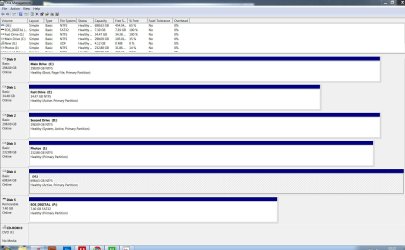
Attached screenshot as you requested.
 

Attachments

  • Capture.JPG
    Capture.JPG
    198.8 KB · Views: 5

My Computer

Computer Manufacturer/Model Number
Custom build
OS
Windows 7 Home premium 64bit
CPU
2.40 gigahertz Intel Core2 Quad
Motherboard
ASUSTeK Computer INC. Commando Rev 1.xx
Memory
8gb
Graphics Card(s)
NVIDIA GeForce 8800 GTS
Sound Card
SoundMAX Integrated Digital HD Audio
Monitor(s) Displays
Samsung SyncMaster
Hard Drives
ST3320620AS [Hard drive] (320.07 GB) x 2
WDC WD360ADFD-00NLR5 [Hard drive] (37.02 GB)
Case
Antec
You can replace the 2nd 320GB HD with a new 1TB (you said 1GB but I 'm sure that's a typo) drive. Then clone the 320GB drive to the new 1TB drive. Remove the 320GB drive, connect the 1TB drive where it was then put the other 320GB drive back in. You should then be able to boot from the new 1TB drive.

Good info here on software that can be used to clone one HD to another: http://www.sevenforums.com/933352-post16.html

I would also add HDClone Free to the list: Miray Software - HDClone - Hard disk copy, hard disk backup, hard disk rescue!

Then buy an external enclosue and put one of the 320GB drives in it for backup or additional storage, or if the drives are SATA and you have the ports and space to hold it, just leave it as your 3rd internal HD. I have 1 IDE drive and 2 SATA drives in my computer.

Ztruker, thanks for that, it's kind of what I was thinking so is good to have a confirmation. I appreciate the software link also.

Just waiting for any other thoughts and then I can move forward.

Cheers.
 

My Computer

Computer Manufacturer/Model Number
Custom build
OS
Windows 7 Home premium 64bit
CPU
2.40 gigahertz Intel Core2 Quad
Motherboard
ASUSTeK Computer INC. Commando Rev 1.xx
Memory
8gb
Graphics Card(s)
NVIDIA GeForce 8800 GTS
Sound Card
SoundMAX Integrated Digital HD Audio
Monitor(s) Displays
Samsung SyncMaster
Hard Drives
ST3320620AS [Hard drive] (320.07 GB) x 2
WDC WD360ADFD-00NLR5 [Hard drive] (37.02 GB)
Case
Antec
Bertie,

1st. Although possible, leave putting the OS on that small fast drive as a brilliant idea for computer geeks. In other words, too many hoops to jump thru and too many possible complications. If you were building a fresh system then the liitle disk would be an option to consider, but for now just forget it.

2nd. Once again, on the keep it simple idea. Leave your operating system where it is.

3rd. I notice that the "D" which you say is empty is marked as system. Is this a vestigal growth from times past? Do you really have zero on that disk? Your disk management display didn't show the % Free for that one.

4th. Are all of your problems solved if simply everything on your nearly full Photos drive is moved to a bigger drive? If so, then probably HDClone will allow you to easily make a copy of your present Photos on to the new monster. Of course, you can always simply use Windows Explorer to move everything on Photos to the new drive. Won't be as fast as some of the "clone" software, but it works.
 

My Computer

Computer Manufacturer/Model Number
Toshiba Satellite S875D-S7239 laptop
OS
MS Windows 7 Ultimate SP1 64-bit
CPU
AMD A10-4600M
Motherboard
AMD Pumori (Socket FT1)
Memory
6.00 GB Dual-Channel DDR3 @ 798MHz (11-11-12-28)
Graphics Card(s)
AMD Radeon HD 7660G
Sound Card
High Definition Audio Device
Monitor(s) Displays
Generic PnP Monitor (1600x900@60Hz)
Screen Resolution
1600x900@60Hz
Hard Drives
SSD 119GB Corsair CSSD-V128GB2 ATA Device
Keyboard
Standard PS/2 Keyboard
Mouse
HP Wireless Optical Mobile Mouse Model FHA-3410
Internet Speed
What the local pub, local coffee shop offers.
Other Info
Optical Drive:MATSHITA BD-CMB UJ160B ATA Device


Also have an Asus ha1002xp netbook with Win 7 Ultimate installed.
Back
Top