Upgrading help

TylerMcT

New member
Local time
9:43 AM
Messages
15
Hey people,
I have a home premium (custom built) i didn't build, i also want to format hard drive. When i put disc in, it doesn't load the windows 7 ultimate install setup, why? can you please help?

Specs
500gb hdd
4gb ram
i5 quad core
 

My Computer

OS
windows 7 home premium 64 bit
Do you know how to enter the bios on your system?
You'll need to put cdrom/dvd in front of the harddrive in boot devices or it will not seek the win 7 disc.
 

My Computer

Computer Manufacturer/Model Number
Insane hobo technologies. ;-)
OS
Windows 7 x64
CPU
Intel i7 2600k
Motherboard
Asrock z68 extreme 4 gen 3
Memory
G.skill Ripjaw 16gigs @ 1866
Graphics Card(s)
Nvidia gtx580 (evga)
Sound Card
Integrated HD audio + hdmi
Monitor(s) Displays
24" ASUS widescreen + 42" insignia
Screen Resolution
1080p (1920x1080)
Hard Drives
128 Samsung 830
256 Samsung 840
3 x 1tb storage drive (various)
1 western digital 1tb (eSATA)
1 Seagate 1tb (eSATA)
PSU
1 kilowatt SLI/Crossfire rated Silverstone modular
Case
NZXT Phantom + additional 220 fan
Cooling
Zalmann
Keyboard
Microsoft wireless 3000 (v2)
Mouse
MS - wireless 5000 (bluetrack)
Internet Speed
depends on if you ask me or my provider.
Other Info
The above information is provided as is, and the author assumes no responsibility for issues it may cause with your sanity or fanboyism.
Do you know how to enter the bios on your system?
You'll need to put cdrom/dvd in front of the harddrive in boot devices or it will not seek the win 7 disc.
How do i do that? sorry for being a noob.
 

My Computer

OS
windows 7 home premium 64 bit
Keep hitting delete as the pc is booting up.

Then find the boot options and change the order so the cd drive is the 1st boot device.
 

My Computer

OS
Windows 7 Professional 64 bit
Keep hitting delete as the pc is booting up.

Then find the boot options and change the order so the cd drive is the 1st boot device.
I think i tried that, let me try again.
 

My Computer

OS
windows 7 home premium 64 bit

My Computer

Computer Manufacturer/Model Number
HP Pavilion Elite 495UK
OS
Windows 7 Ultimate SP1 64-Bit
CPU
Intel Core i7 870 @ 2.93GHz
Motherboard
MSI 2A9C (CPU1)
Memory
8Gb Dual-Channel DDR3 @ 664MHz
Graphics Card(s)
nVidia GeForce GTX 460 1024MB dedicated RAM
Sound Card
Realtek HD Audio
Monitor(s) Displays
HP2310i
Screen Resolution
1920 x 1080
Hard Drives
1x1954GB Hitachi HDS22020ALA 330 (RAID), 1x1954GB Hitachi External for backup and storage
PSU
460W
Case
HP Elite
Cooling
Air cooled
Keyboard
Logitech K750 solar-powered keyboard
Mouse
Logitech Wireless M180 mouse
Internet Speed
2Mb
Other Info
Pure Avanti Flow Internet Radio with iPod Dock, 64Gb iPod, HP USB Speakers, Sony MDR-V500 Headphones, Sony Vaio F-Series Laptop
It's no big deal if you weren't a noob we wouldn't be able to help you and show you how awesome we are :)

That being said please follow the advice above so we can give you more specific instructions.
 

My Computer

Computer Manufacturer/Model Number
Insane hobo technologies. ;-)
OS
Windows 7 x64
CPU
Intel i7 2600k
Motherboard
Asrock z68 extreme 4 gen 3
Memory
G.skill Ripjaw 16gigs @ 1866
Graphics Card(s)
Nvidia gtx580 (evga)
Sound Card
Integrated HD audio + hdmi
Monitor(s) Displays
24" ASUS widescreen + 42" insignia
Screen Resolution
1080p (1920x1080)
Hard Drives
128 Samsung 830
256 Samsung 840
3 x 1tb storage drive (various)
1 western digital 1tb (eSATA)
1 Seagate 1tb (eSATA)
PSU
1 kilowatt SLI/Crossfire rated Silverstone modular
Case
NZXT Phantom + additional 220 fan
Cooling
Zalmann
Keyboard
Microsoft wireless 3000 (v2)
Mouse
MS - wireless 5000 (bluetrack)
Internet Speed
depends on if you ask me or my provider.
Other Info
The above information is provided as is, and the author assumes no responsibility for issues it may cause with your sanity or fanboyism.
It's no big deal if you weren't a noob we wouldn't be able to help you and show you how awesome we are :)

That being said please follow the advice above so we can give you more specific instructions.

As it is a custom build computer, are you able to contact who built it?

To get into your BIOS to check the boot settings you press a key on your keyboard on startup, but until you can find out we're struggling to help you.

Your full computer specs would be a big help too.

http://www.sevenforums.com/tutorials/180324-system-info-see-your-system-specs.html


Here they are...

CPU: Intel(R) Core(TM) i5 CPU 650 @ 3.20GHz
Motherboard: ASUSTeK Computer INC. P7H55-M SI
BIOS: BIOS Date: 07/15/10 17:32:54 Ver: 08.00.15
Total memory: 4.00GB Usable: 3.87GB
HDD: (1) ST3500418AS ATA Device (2) General USB Flash Disk USB Device
Soundcard: (1) High Definition Audio Device (2) High Definition Audio Device (3) High Definition Audio Device (4) USB Audio Device (5) VIA High Definition Audio (6) USB Audio Device (7) Webcam 250 (8) High Definition Audio Device
Graphics Card: NVIDIA GeForce GTS 450
OS: Microsoft Windows 7 Home Premium 64-bit 7601 Multiprocessor Free Service Pack 1
 

My Computer

OS
windows 7 home premium 64 bit

My Computer

Computer Manufacturer/Model Number
HP Pavilion Elite 495UK
OS
Windows 7 Ultimate SP1 64-Bit
CPU
Intel Core i7 870 @ 2.93GHz
Motherboard
MSI 2A9C (CPU1)
Memory
8Gb Dual-Channel DDR3 @ 664MHz
Graphics Card(s)
nVidia GeForce GTX 460 1024MB dedicated RAM
Sound Card
Realtek HD Audio
Monitor(s) Displays
HP2310i
Screen Resolution
1920 x 1080
Hard Drives
1x1954GB Hitachi HDS22020ALA 330 (RAID), 1x1954GB Hitachi External for backup and storage
PSU
460W
Case
HP Elite
Cooling
Air cooled
Keyboard
Logitech K750 solar-powered keyboard
Mouse
Logitech Wireless M180 mouse
Internet Speed
2Mb
Other Info
Pure Avanti Flow Internet Radio with iPod Dock, 64Gb iPod, HP USB Speakers, Sony MDR-V500 Headphones, Sony Vaio F-Series Laptop
actually if it is an ASUS board delete should be the right key.
just start tapping it the very moment you turn the computer on and don't stop until you see the bios screen.
It wouldn't hurt to dig up the manual on the asus site and look over the bios settings that pertain to boot order so you know where you are going first though.
 

My Computer

Computer Manufacturer/Model Number
Insane hobo technologies. ;-)
OS
Windows 7 x64
CPU
Intel i7 2600k
Motherboard
Asrock z68 extreme 4 gen 3
Memory
G.skill Ripjaw 16gigs @ 1866
Graphics Card(s)
Nvidia gtx580 (evga)
Sound Card
Integrated HD audio + hdmi
Monitor(s) Displays
24" ASUS widescreen + 42" insignia
Screen Resolution
1080p (1920x1080)
Hard Drives
128 Samsung 830
256 Samsung 840
3 x 1tb storage drive (various)
1 western digital 1tb (eSATA)
1 Seagate 1tb (eSATA)
PSU
1 kilowatt SLI/Crossfire rated Silverstone modular
Case
NZXT Phantom + additional 220 fan
Cooling
Zalmann
Keyboard
Microsoft wireless 3000 (v2)
Mouse
MS - wireless 5000 (bluetrack)
Internet Speed
depends on if you ask me or my provider.
Other Info
The above information is provided as is, and the author assumes no responsibility for issues it may cause with your sanity or fanboyism.
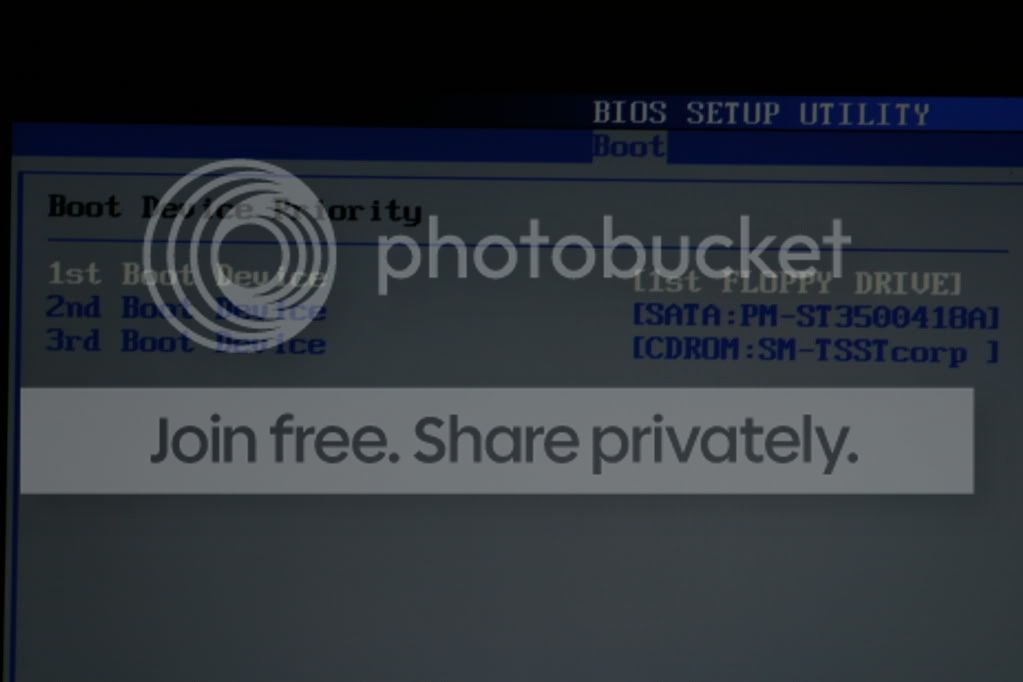
Under "Boot" then "Boot device priority" I put the CDROM:SM-TSSTcorp as first, 1st floppy drive as second and sata as third. is it right?
 

My Computer

OS
windows 7 home premium 64 bit
do you even have a floppy drive? most people don't these days.
If not just the cdrom then hdd is fine.
I've actually disabled floppy drives on my system. I haven't had one in nearly a decade.
 

My Computer

Computer Manufacturer/Model Number
Insane hobo technologies. ;-)
OS
Windows 7 x64
CPU
Intel i7 2600k
Motherboard
Asrock z68 extreme 4 gen 3
Memory
G.skill Ripjaw 16gigs @ 1866
Graphics Card(s)
Nvidia gtx580 (evga)
Sound Card
Integrated HD audio + hdmi
Monitor(s) Displays
24" ASUS widescreen + 42" insignia
Screen Resolution
1080p (1920x1080)
Hard Drives
128 Samsung 830
256 Samsung 840
3 x 1tb storage drive (various)
1 western digital 1tb (eSATA)
1 Seagate 1tb (eSATA)
PSU
1 kilowatt SLI/Crossfire rated Silverstone modular
Case
NZXT Phantom + additional 220 fan
Cooling
Zalmann
Keyboard
Microsoft wireless 3000 (v2)
Mouse
MS - wireless 5000 (bluetrack)
Internet Speed
depends on if you ask me or my provider.
Other Info
The above information is provided as is, and the author assumes no responsibility for issues it may cause with your sanity or fanboyism.
Under "Boot" then "Boot device priority" I put the CDROM:SM-TSSTcorp as first, 1st floppy drive as second and sata as third. is it right?

That's correct.

What's a floppy? :D Haven't seen one in ages.

When you've done that, insert your Windows DVD, restart your computer and it should boot into the Windows disc.

You may see a message at boot up asking you to press any key to boot from your DVD drive.
 

My Computer

Computer Manufacturer/Model Number
HP Pavilion Elite 495UK
OS
Windows 7 Ultimate SP1 64-Bit
CPU
Intel Core i7 870 @ 2.93GHz
Motherboard
MSI 2A9C (CPU1)
Memory
8Gb Dual-Channel DDR3 @ 664MHz
Graphics Card(s)
nVidia GeForce GTX 460 1024MB dedicated RAM
Sound Card
Realtek HD Audio
Monitor(s) Displays
HP2310i
Screen Resolution
1920 x 1080
Hard Drives
1x1954GB Hitachi HDS22020ALA 330 (RAID), 1x1954GB Hitachi External for backup and storage
PSU
460W
Case
HP Elite
Cooling
Air cooled
Keyboard
Logitech K750 solar-powered keyboard
Mouse
Logitech Wireless M180 mouse
Internet Speed
2Mb
Other Info
Pure Avanti Flow Internet Radio with iPod Dock, 64Gb iPod, HP USB Speakers, Sony MDR-V500 Headphones, Sony Vaio F-Series Laptop
Remove Floppy from the BIOS boot order selection list. To avoid future problems I'd also disable anywhere else it registers in BIOS and physically unplug the floppy drive.

You can also boot the Installation DVD by tapping the Asus F8 key at boot, then selecting DVD drive.

Tips for getting a perfect reinstall: Reinstalling Windows 7
 
Remove Floppy from the BIOS boot order selection list. To avoid future problems I'd also disable anywhere else it registers in BIOS and physically unplug the floppy drive.

You can also boot the Installation DVD by tapping the Asus F8 key at boot, then selecting DVD drive.

Tips for getting a perfect reinstall: Reinstalling Windows 7
It don't say dvd drive, it says cd rom and sata: then some code?
 

My Computer

OS
windows 7 home premium 64 bit
Do you have a DVD drive? If so it should be listed in BIOS Boot Order list or F8 one-time BIOS Boot Menu key. Please post back a camera snap of the choices or type them out fully.
 
Do you have a DVD drive? If so it should be listed in BIOS Boot Order list or F8 one-time BIOS Boot Menu key. Please post back a camera snap of the choices or type them out fully.
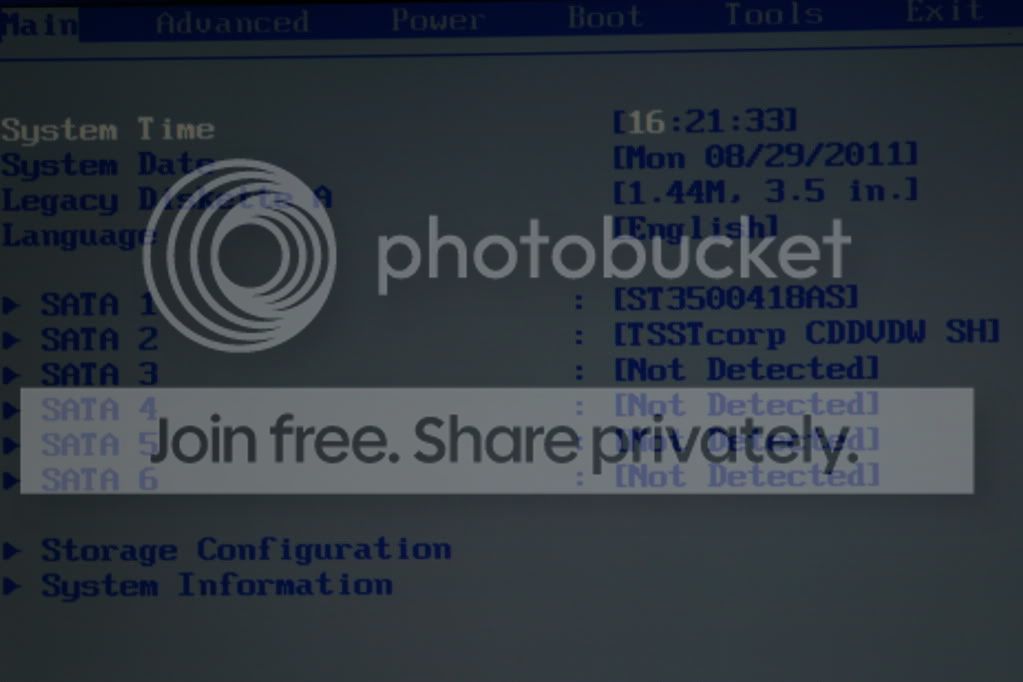
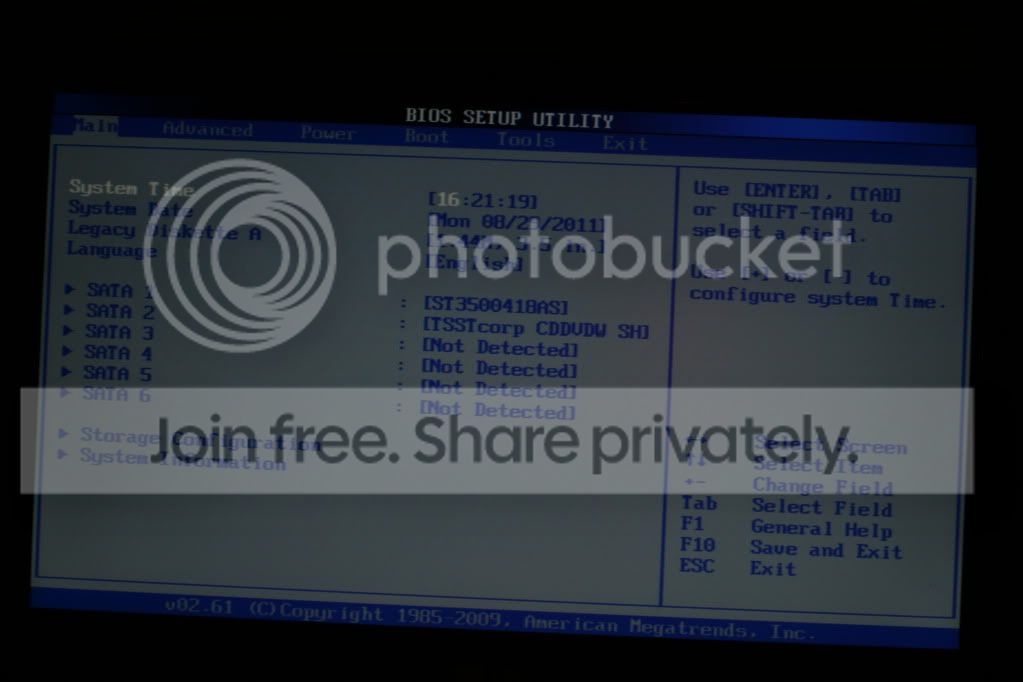
This is when i press 'Delete' screens shots

IMG_0642.jpg

IMG_0641.jpg

IMG_0640.jpg


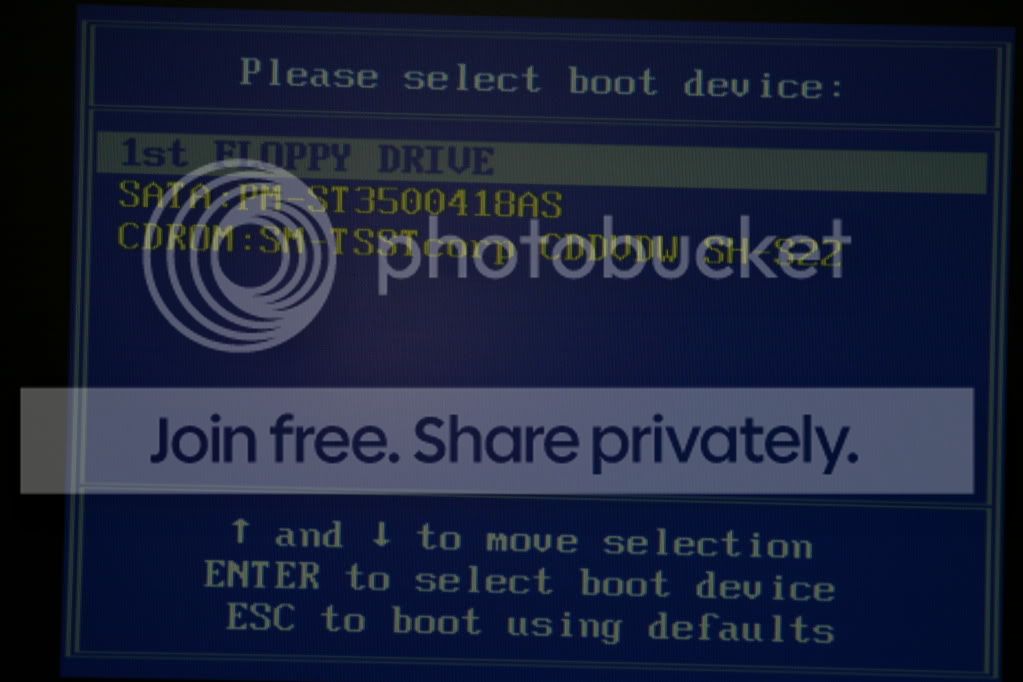
This is the 'F8' screen shots
IMG_0637.jpg
 

My Computer

OS
windows 7 home premium 64 bit
The TSST device is your DVD drive, so choose it to boot the DVD. You should get a prompt to "Press Any Key to boot DVD." What happens?

If it fails, I would remove Floppy drive from the boot order entirely, disable it anywhere else it appears in the BIOS, even unplug it to keep it from interfering.
 
The TSST device is your DVD drive, so choose it to boot the DVD. You should get a prompt to "Press Any Key to boot DVD." What happens?

If it fails, I would remove Floppy drive from the boot order entirely, disable it anywhere else it appears in the BIOS, even unplug it to keep it from interfering.
hmm.. i think i tried that, do you have MSN? because i don't know whats going on?
 

My Computer

OS
windows 7 home premium 64 bit
The help here is interactive. When questions are asked or steps given, please reply to each fully - not just say "It didn't work."

Are you getting the prompt to "Press any key...?" Then what happens?

Did you remove Floppy drive from BIOS Boot order?
 
Back
Top