Upgrading my system

ZachFeen

New member
Member
Local time
11:42 PM
Messages
32
As most of you know, it's nearing the Christmas season here in the US. I'm looking in to a few things, but also looking to upgrade my PC. In another thread, I've learned I need a new RAM Stick, and I'd just like to upgrade them both, to get the optimal performance and speed out of my PC. Thinking about getting possibly 4GB RAM sticks, not sure if that's too much, or too little. I do some gaming, so that may be a factor of how much I need. I also would like to upgrade my graphics card. Not sure what's the best for your money out there, but total looking to spend less than 100$ or at least around there. If this is the wrong subject to put it under, could a Moderator please move it? Thanks and I look forward to your suggestions! Thanks!
 

My Computer

Computer Manufacturer/Model Number
Lenovo, Lenovo Windows7 PC
OS
Microsoft Windows 7 Home Premium 64-bit 7601 Multiprocessor Free Service Pack 1
CPU
Intel(R) Pentium(R) CPU G620 @ 2.60GHz
Motherboard
LENOVO To be filled by O.E.M.
Memory
4.00 GB
Graphics Card(s)
Intel(R) HD Graphics Family
Sound Card
(1) Intel(R) Display Audio (2) USB Audio Device (3) Real
Monitor(s) Displays
Lenovo Wide LCD Monitor
Screen Resolution
1920 x 1080 x 32 bits (4294967296 colors) @ 60 Hz
Hard Drives
(1) ST31000528AS ATA Device (2) Generic- Compact Flash USB Device (3) Generic- MS/MS-Pro/HG USB Device (4) Generic- SD/MMC USB Device (5) Generic- SM/xD-Picture USB Device
Keyboard
Lenovo KB2011
Mouse
Razer Mamba Mouse
Your system specs look funky and incomplete. None can help if we don't know the hardware you have already.
Please fill them using the board's utility here (run it and then at step 7 of that tutorial you see how to have it upload automatically all the data to this forum's spec panel).
 

My Computer

Computer type
PC/Desktop
Computer Manufacturer/Model Number
custom built
OS
Win 7 Pro 64-bit 7601
CPU
AMD Phenom 9650 QuadCore, revision DR-B3
Motherboard
ASUS M4A78
Memory
5 GB yes I run 2x 2GB and 1x 1GB, different brand, spank me.
Graphics Card(s)
NVIDIA GeForce 9800 GT 512 Mb, unknown manufacturer.
Sound Card
Crappy Realtek Integrated Audio
Monitor(s) Displays
Fujitsu Siemens P19-3P
Screen Resolution
1280 x 1024 x 32 bits @ 60 Hz Oh yeah, 4:3 rocks!
Hard Drives
(1) MAXTOR S TM3320613AS SATA Disk Device (2) STM35004 18AS SATA Disk Device (3) TOSHIBA USB 2.5"-HDD
PSU
whatever, around 450w
Case
Scavenged from old company PC, 10+ years old
Cooling
CPU fan, GPU fan, case fan, nothing fancy
Keyboard
Microsoft, PS/2, white.
Mouse
Optical, logitec.
Internet Speed
effective max speeds: 70-ish kB/s down 30-ish kB/s up
Antivirus
Avira, free edition.
Browser
Firefox with FXChrome to make it look like Google Chrome :P
Other Info
Was discarded by previous owner due to "horrible performance".
Was running Win Xp from a IDE drive. Yeah. Was a pain.
SATA II drive and Win7 and it zips away! Yay!
Please fill in your system specs fully and properly to help us get figure out what is compaitable with your current system

use a tool like Sevenforums tool, speccy or cpu id for the information required
 

My Computer

Computer Manufacturer/Model Number
Packard Bell iMedia 2218 -- Has Been Running For Almost 7 Years!
OS
Windows 7 Ultimate x86
CPU
Intel Pentium D 925 @ 3.00GHz
Motherboard
Socket 775 MCP73VT-PM
Memory
1GB DDR2 667MHz
Graphics Card(s)
Overclocked Asus ATI Radeon X1600 Pro 512MB
Sound Card
Sound Blaster Audigy 570
Monitor(s) Displays
19" LCD Monitor; MW19E-AAA
Screen Resolution
1440 x 900
Hard Drives
500gb 7200rpm (Windows 7) ---
160gb 7200rpm (Backup) ---
1TB Iomega External Drive (7200rpm)
PSU
250w Packard Bell Standard
Case
Packard Bell standard
Cooling
Intel Socket 775 Air Cooler
Keyboard
Wired PS/2 Keyboard
Mouse
Dell Wireless USB Mouse
Internet Speed
Wireles --- Download - 6.63 Mbps Upload - 0.38 Mbps
Other Info
Currently Planning To Build New Computer --- Also Got A Samsung Galaxy Ace II (Plays All Games You Throw At It)
Sorry about that, updated all my info that I could find. Hope that helps.
 

My Computer

Computer Manufacturer/Model Number
Lenovo, Lenovo Windows7 PC
OS
Microsoft Windows 7 Home Premium 64-bit 7601 Multiprocessor Free Service Pack 1
CPU
Intel(R) Pentium(R) CPU G620 @ 2.60GHz
Motherboard
LENOVO To be filled by O.E.M.
Memory
4.00 GB
Graphics Card(s)
Intel(R) HD Graphics Family
Sound Card
(1) Intel(R) Display Audio (2) USB Audio Device (3) Real
Monitor(s) Displays
Lenovo Wide LCD Monitor
Screen Resolution
1920 x 1080 x 32 bits (4294967296 colors) @ 60 Hz
Hard Drives
(1) ST31000528AS ATA Device (2) Generic- Compact Flash USB Device (3) Generic- MS/MS-Pro/HG USB Device (4) Generic- SD/MMC USB Device (5) Generic- SM/xD-Picture USB Device
Keyboard
Lenovo KB2011
Mouse
Razer Mamba Mouse
The stuff you've posted is helpful, but there's a lot that can't be gotten from it, like:

How many DIMM slots does it have? What the largest capacity of each?

Does the PC have a PCI-E graphics slot?

If yes, is it limited to low-profile cards, or full-height cards less than some length?

What are the PSU (power supply unit) specs? Appliance PCs tend to be weak in that area, as regards having enough to support an add-in graphics card. (High-end cards can consume up to 300W, all by themselves.)

We may be able to find a lot of that, if you can tell us the Lenovo model number. (Documentation that came with the PC? Sticker on the back of the PC?)

If all of that comes together for you, and you're prepared to drop $100US on a graphics card, my guess is that one based on the Radeon HD 7750 may be your best choice. (I didn't do a lot of looking, but it has a favorable reputation.) The minimum recommended PSU for it is 400W. I'd place a small bet (5¢) that you don't have one.
 

My Computer

Computer Manufacturer/Model Number
homegrown
OS
Windows 7 Pro X64 SP1
CPU
Intel Core I7-3930k
Motherboard
Asus P9X79 Pro
Memory
16 GB Gskill DDR3-2133
Graphics Card(s)
eVGA GTX680
Sound Card
Creative X-Fi Titanium
Monitor(s) Displays
As PA246Q
Screen Resolution
1920 X 1200
Hard Drives
Corsair Force GT, 120 GB
WDC 1.5TB Caviar Black
PSU
PCP&C Silencer 750 Crossfire
Case
Silverstone FT02
Cooling
Noctua NH-D14
Keyboard
cheap Logitech USB
Mouse
Microsoft Intellimouse Explorer (old optical) USB
Internet Speed
6Mb cable
Other Info
Pioneer BDR-205
Samsung SH-203B
Monsoon 5.1 speakers
DIMM Slots: 2
PSU Specs: Around 285W
Product Family: IdeaCentre K330B
PC does not have a PCI-E Graphics Slot from what I have seen. I looked inside, cannot find anything.
@ Crucial, I found my PC, here's the RAM info: Computer memory upgrades for Lenovo IdeaCentre K330B Desktop/PC from Crucial.com

I'd like to spend 100$ on RAM and Graphics Cards total, not each (EX: 50$ on RAM, 50$ on Graphics Cards), hope this clears up some confusion.
 

My Computer

Computer Manufacturer/Model Number
Lenovo, Lenovo Windows7 PC
OS
Microsoft Windows 7 Home Premium 64-bit 7601 Multiprocessor Free Service Pack 1
CPU
Intel(R) Pentium(R) CPU G620 @ 2.60GHz
Motherboard
LENOVO To be filled by O.E.M.
Memory
4.00 GB
Graphics Card(s)
Intel(R) HD Graphics Family
Sound Card
(1) Intel(R) Display Audio (2) USB Audio Device (3) Real
Monitor(s) Displays
Lenovo Wide LCD Monitor
Screen Resolution
1920 x 1080 x 32 bits (4294967296 colors) @ 60 Hz
Hard Drives
(1) ST31000528AS ATA Device (2) Generic- Compact Flash USB Device (3) Generic- MS/MS-Pro/HG USB Device (4) Generic- SD/MMC USB Device (5) Generic- SM/xD-Picture USB Device
Keyboard
Lenovo KB2011
Mouse
Razer Mamba Mouse
DIMM Slots: 2
PSU Specs: Around 285W
Product Family: IdeaCentre K330B
PC does not have a PCI-E Graphics Slot from what I have seen. I looked inside, cannot find anything.
@ Crucial, I found my PC, here's the RAM info: Computer memory upgrades for Lenovo IdeaCentre K330B Desktop/PC from Crucial.com

I'd like to spend 100$ on RAM and Graphics Cards total, not each (EX: 50$ on RAM, 50$ on Graphics Cards), hope this clears up some confusion.

I guess I figured that 4GB of RAM was sufficient.

It has 2 DIMM slots, maximum 4GB each, total 8 GB. You could save a few dollars on the RAM. However, Crucial guarantees compatibility, so that may be the way to go.

According to Lenovo, the K330B has a single PCI-E X16 slot, which is compatible with most of the graphics cards on the market.

http://download.lenovo.com/UserFile...Hardware Replacement Guide V5.0 (English).pdf

I can't explain why you couldn't see it, if it was present as claimed.

The 280W PSU is low. Newegg listed a K330B with a Radeon HD 6450 1GB graphics card:

Newegg.com - lenovo IdeaCentre K330B (77471QU) Desktop PC Intel Core i5 2310(2.90GHz) 8GB DDR3 1.5TB HDD Capacity AMD Radeon HD 6450 (1 GB) Windows 7 Home Premium 64-bit

so you might be able to use that. The least expensive ones at www.newegg.com begin at about $35 plus shipping. I don't know how much of a gain you'd see over the integrated graphics, but it must be better.
 

My Computer

Computer Manufacturer/Model Number
homegrown
OS
Windows 7 Pro X64 SP1
CPU
Intel Core I7-3930k
Motherboard
Asus P9X79 Pro
Memory
16 GB Gskill DDR3-2133
Graphics Card(s)
eVGA GTX680
Sound Card
Creative X-Fi Titanium
Monitor(s) Displays
As PA246Q
Screen Resolution
1920 X 1200
Hard Drives
Corsair Force GT, 120 GB
WDC 1.5TB Caviar Black
PSU
PCP&C Silencer 750 Crossfire
Case
Silverstone FT02
Cooling
Noctua NH-D14
Keyboard
cheap Logitech USB
Mouse
Microsoft Intellimouse Explorer (old optical) USB
Internet Speed
6Mb cable
Other Info
Pioneer BDR-205
Samsung SH-203B
Monsoon 5.1 speakers
verify your system make and model first, you are better off getting 2x4gb of higher quality, higher speed ram (think 1600mhz or 1866mhz) it wont make a big diffrence but in some cases it will be felt. ram is cheep these days , in the uk you can get 2x4 1866mhz ram for under £30 ($48)
 

My Computer

Computer Manufacturer/Model Number
Packard Bell iMedia 2218 -- Has Been Running For Almost 7 Years!
OS
Windows 7 Ultimate x86
CPU
Intel Pentium D 925 @ 3.00GHz
Motherboard
Socket 775 MCP73VT-PM
Memory
1GB DDR2 667MHz
Graphics Card(s)
Overclocked Asus ATI Radeon X1600 Pro 512MB
Sound Card
Sound Blaster Audigy 570
Monitor(s) Displays
19" LCD Monitor; MW19E-AAA
Screen Resolution
1440 x 900
Hard Drives
500gb 7200rpm (Windows 7) ---
160gb 7200rpm (Backup) ---
1TB Iomega External Drive (7200rpm)
PSU
250w Packard Bell Standard
Case
Packard Bell standard
Cooling
Intel Socket 775 Air Cooler
Keyboard
Wired PS/2 Keyboard
Mouse
Dell Wireless USB Mouse
Internet Speed
Wireles --- Download - 6.63 Mbps Upload - 0.38 Mbps
Other Info
Currently Planning To Build New Computer --- Also Got A Samsung Galaxy Ace II (Plays All Games You Throw At It)
That card is going to be around on par with intel integrated HD 4000 graphics, which is pretty much heaps above and beyond the integrated graphics of your current processor (intel HD graphics pentium G).

Frankly, if you don't have compelling reasons to buy more ram (you have already 4 GB, which is more than enough even for gaming) I'd say just get a card in the 100$ range. Like this, it is around the same power consumption of the 6450, and the PSU calculator says the whole computer would require 283 W at 100% utilization (kind of rare), so into the limits of the PSU. With the 6450 at 100% you are looking at 220 W needed.

I'm unsure if the PSU you have was supposed to deliver its rated output (that means I'm unsure it could actually support any graphic card). Most cheap PSUs are able to give only around half of what they state. Since I found only refurbished K330Bs with your specs sold for less than 260$, I have the sneaking suspicion that they decided to install one of such crappy PSUs for the sake of keeping price low.

Can you read the model and brand on it? Do you see a badge like the ones in this page?

If you try to buy used graphic cards, This page lists graphic cards in decreasing performance order (top best, bottom worst).
 

My Computer

Computer type
PC/Desktop
Computer Manufacturer/Model Number
custom built
OS
Win 7 Pro 64-bit 7601
CPU
AMD Phenom 9650 QuadCore, revision DR-B3
Motherboard
ASUS M4A78
Memory
5 GB yes I run 2x 2GB and 1x 1GB, different brand, spank me.
Graphics Card(s)
NVIDIA GeForce 9800 GT 512 Mb, unknown manufacturer.
Sound Card
Crappy Realtek Integrated Audio
Monitor(s) Displays
Fujitsu Siemens P19-3P
Screen Resolution
1280 x 1024 x 32 bits @ 60 Hz Oh yeah, 4:3 rocks!
Hard Drives
(1) MAXTOR S TM3320613AS SATA Disk Device (2) STM35004 18AS SATA Disk Device (3) TOSHIBA USB 2.5"-HDD
PSU
whatever, around 450w
Case
Scavenged from old company PC, 10+ years old
Cooling
CPU fan, GPU fan, case fan, nothing fancy
Keyboard
Microsoft, PS/2, white.
Mouse
Optical, logitec.
Internet Speed
effective max speeds: 70-ish kB/s down 30-ish kB/s up
Antivirus
Avira, free edition.
Browser
Firefox with FXChrome to make it look like Google Chrome :P
Other Info
Was discarded by previous owner due to "horrible performance".
Was running Win Xp from a IDE drive. Yeah. Was a pain.
SATA II drive and Win7 and it zips away! Yay!
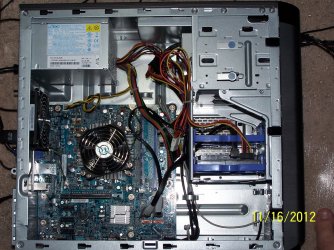
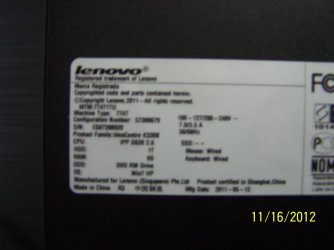
From what I understand, my graphics card is okay? No need to upgrade my RAM (I will need to buy a new stick because one has something wrong with it, discussed on my other forum post)? Well, is there anything else that you guys would recommend that helps a computer? New cooling fan? New case? New power supply? I've included some photos of my PSU and the stickers on my computer showing some details that could be helpful (You can see my toe in one of 'em ;))
 

Attachments

  • 100_5678.jpg
    100_5678.jpg
    710.8 KB · Views: 5
  • 100_5680.jpg
    100_5680.jpg
    615.6 KB · Views: 8
  • 100_5682.JPG
    100_5682.JPG
    310.6 KB · Views: 8

My Computer

Computer Manufacturer/Model Number
Lenovo, Lenovo Windows7 PC
OS
Microsoft Windows 7 Home Premium 64-bit 7601 Multiprocessor Free Service Pack 1
CPU
Intel(R) Pentium(R) CPU G620 @ 2.60GHz
Motherboard
LENOVO To be filled by O.E.M.
Memory
4.00 GB
Graphics Card(s)
Intel(R) HD Graphics Family
Sound Card
(1) Intel(R) Display Audio (2) USB Audio Device (3) Real
Monitor(s) Displays
Lenovo Wide LCD Monitor
Screen Resolution
1920 x 1080 x 32 bits (4294967296 colors) @ 60 Hz
Hard Drives
(1) ST31000528AS ATA Device (2) Generic- Compact Flash USB Device (3) Generic- MS/MS-Pro/HG USB Device (4) Generic- SD/MMC USB Device (5) Generic- SM/xD-Picture USB Device
Keyboard
Lenovo KB2011
Mouse
Razer Mamba Mouse
well, if you have to change RAM anyway, then one more stick won't break the bank.

Now, the PSU should be able to output the watts it's rated for, Liteon is a relatively reputable manufacturer and the sticker shows that it's a PSU made specifically for Lenovo, that will likely have looked that it wasn't crappy as that's bad PR.

At the moment your graphics is the one integrated in the processor (physically inside the processor chip). It sucks from all points of view, but if you don't need to play games nor watch movies it's ok and it needs little power.
The slot where you could put a decent graphic card is the long black one, it is between the three small black ones and the CPU fan. It's likely a PCIe gen 1 so it's not stellar, but will handle most graphic cards below 250$ just fine.

The three small black slots below that are PCIe 1x slots, and can run various kinds of other expansion cards, like for RAID, Wireless, TV cards, more USB or Esata ports and more.

If you want to get a decent graphic card in there (better than the HD 6450 anyway), a very good choice would be to buy a reliable PSU with a bit more watts of output than the one you have already. By reliable I mean ones with a well-known brand, that have the 80plus certification and sticker as I linked above (that means someone tested it to make sure it does not meltdown if asked to run at 100% capacity). They will cost 50$ or more depending on wattage, if your wallet isn't hurt it's very likely a scam. Remember to use the graphic card hierarchy chart and the PSU calculator to make sure you are getting the most bang for your bucks AND that you have enough power to run everything.

You can also upgrade your processor (although this will break your current budget I'm listing it anyway).
As this pdf from lenovo lists what processors they sell the same rig with in the page about your model (page 5).
For the sake of giving a rough idea of the difference in processing power I'm using CPUbenchmark's points as that is a trusty site I use as well.
The processor you have now is the pentium G620 that has 2300 points.
You can install an i5 2310/2320, at 5827 and 5760 points respectively. Here is one on newegg at around 200$
You can install an i7 2600 at 8421 points. Here is one on newegg at around 300$.
You can install some i3 2100 and 2120 too but they aren't so much more powerful than your processor to be worth spending any money on (if you found some for free or for very cheap it's another matter).
I personally like Ebay and buying used processors, as you pay a lot less, and as long as they aren't "k" ones (the overclockable versions) the chances they don't work is slim.

All in all, not that bad. I thought it would be much more locked down. Both the i5 and i7 it can take are good processors.
If you tell some more details about what you want to do with the computer I can give better directions, as I usually assume it's for gaming, but you may have other needs.

 

My Computer

Computer type
PC/Desktop
Computer Manufacturer/Model Number
custom built
OS
Win 7 Pro 64-bit 7601
CPU
AMD Phenom 9650 QuadCore, revision DR-B3
Motherboard
ASUS M4A78
Memory
5 GB yes I run 2x 2GB and 1x 1GB, different brand, spank me.
Graphics Card(s)
NVIDIA GeForce 9800 GT 512 Mb, unknown manufacturer.
Sound Card
Crappy Realtek Integrated Audio
Monitor(s) Displays
Fujitsu Siemens P19-3P
Screen Resolution
1280 x 1024 x 32 bits @ 60 Hz Oh yeah, 4:3 rocks!
Hard Drives
(1) MAXTOR S TM3320613AS SATA Disk Device (2) STM35004 18AS SATA Disk Device (3) TOSHIBA USB 2.5"-HDD
PSU
whatever, around 450w
Case
Scavenged from old company PC, 10+ years old
Cooling
CPU fan, GPU fan, case fan, nothing fancy
Keyboard
Microsoft, PS/2, white.
Mouse
Optical, logitec.
Internet Speed
effective max speeds: 70-ish kB/s down 30-ish kB/s up
Antivirus
Avira, free edition.
Browser
Firefox with FXChrome to make it look like Google Chrome :P
Other Info
Was discarded by previous owner due to "horrible performance".
Was running Win Xp from a IDE drive. Yeah. Was a pain.
SATA II drive and Win7 and it zips away! Yay!
I ran though the RAM Chips as suggested by koolkat77 on another forum, and found one is defective or something, so I will get another one, probably just two for some brand new speeds. As for my graphics card, you said it isn't that great at all, I don't game terribly much, I only play some online MMORPG's, and a full screen FPS game, which i have to put on the lowest settings to run smoothly (when I had both RAM sticks in). That's one of the reasons I feel to upgrade my card. Next, a processor, I've heard that the "i" Series is the best, which one would you recommend that is the most "bang for my buck" (with a PSU upgrade)? My birthday is near Christmas and I'm trying to make a list of things I'd like. Somewhere around 300$ for all (PSU/Processor/RAM/Graphics Card) is what I'm looking for. I do watch movies frequently (4-5 a month), play MMORPG's (everyday), FPS games (every few days), and browse the internet. I'd like to be able to run these games in HD, so looking for a setup that could satisfy that request. Suggest anything that you think would help. Thanks! Hope this info helps!

ADDITIONAL: I'm also looking for a new case, one that lets my computer breathe better, some new fans possibly, and (just for the looks) some LED's to light up the inside. Hopefully that won't take up too much of the power, but just thought I'd add that.
 

My Computer

Computer Manufacturer/Model Number
Lenovo, Lenovo Windows7 PC
OS
Microsoft Windows 7 Home Premium 64-bit 7601 Multiprocessor Free Service Pack 1
CPU
Intel(R) Pentium(R) CPU G620 @ 2.60GHz
Motherboard
LENOVO To be filled by O.E.M.
Memory
4.00 GB
Graphics Card(s)
Intel(R) HD Graphics Family
Sound Card
(1) Intel(R) Display Audio (2) USB Audio Device (3) Real
Monitor(s) Displays
Lenovo Wide LCD Monitor
Screen Resolution
1920 x 1080 x 32 bits (4294967296 colors) @ 60 Hz
Hard Drives
(1) ST31000528AS ATA Device (2) Generic- Compact Flash USB Device (3) Generic- MS/MS-Pro/HG USB Device (4) Generic- SD/MMC USB Device (5) Generic- SM/xD-Picture USB Device
Keyboard
Lenovo KB2011
Mouse
Razer Mamba Mouse
LEDS dont consume hardly any power what so ever,
 

My Computer

Computer Manufacturer/Model Number
Packard Bell iMedia 2218 -- Has Been Running For Almost 7 Years!
OS
Windows 7 Ultimate x86
CPU
Intel Pentium D 925 @ 3.00GHz
Motherboard
Socket 775 MCP73VT-PM
Memory
1GB DDR2 667MHz
Graphics Card(s)
Overclocked Asus ATI Radeon X1600 Pro 512MB
Sound Card
Sound Blaster Audigy 570
Monitor(s) Displays
19" LCD Monitor; MW19E-AAA
Screen Resolution
1440 x 900
Hard Drives
500gb 7200rpm (Windows 7) ---
160gb 7200rpm (Backup) ---
1TB Iomega External Drive (7200rpm)
PSU
250w Packard Bell Standard
Case
Packard Bell standard
Cooling
Intel Socket 775 Air Cooler
Keyboard
Wired PS/2 Keyboard
Mouse
Dell Wireless USB Mouse
Internet Speed
Wireles --- Download - 6.63 Mbps Upload - 0.38 Mbps
Other Info
Currently Planning To Build New Computer --- Also Got A Samsung Galaxy Ace II (Plays All Games You Throw At It)
and youl problably be limited my the number of molex and 3-4pin copnnector before the PSU restricts the number of fans
 

My Computer

Computer Manufacturer/Model Number
Packard Bell iMedia 2218 -- Has Been Running For Almost 7 Years!
OS
Windows 7 Ultimate x86
CPU
Intel Pentium D 925 @ 3.00GHz
Motherboard
Socket 775 MCP73VT-PM
Memory
1GB DDR2 667MHz
Graphics Card(s)
Overclocked Asus ATI Radeon X1600 Pro 512MB
Sound Card
Sound Blaster Audigy 570
Monitor(s) Displays
19" LCD Monitor; MW19E-AAA
Screen Resolution
1440 x 900
Hard Drives
500gb 7200rpm (Windows 7) ---
160gb 7200rpm (Backup) ---
1TB Iomega External Drive (7200rpm)
PSU
250w Packard Bell Standard
Case
Packard Bell standard
Cooling
Intel Socket 775 Air Cooler
Keyboard
Wired PS/2 Keyboard
Mouse
Dell Wireless USB Mouse
Internet Speed
Wireles --- Download - 6.63 Mbps Upload - 0.38 Mbps
Other Info
Currently Planning To Build New Computer --- Also Got A Samsung Galaxy Ace II (Plays All Games You Throw At It)
Nice cases like you ask cost around 50$ (some much more), and more fans are not necessary if you don't overclock (and you cannot overclock with that board)
Given your limited budget, I'd recommend focusing more on power than on looks.

Anyway 300$ you say? Then no ram, a good 450W PSU, and a the best card you can get with what is left (in this order). And leave for the future the upgrade to the i5 2310 as that's another 200$. Consider that if you sue an additional graphic card, the onboard one is disabled and should leave more RAM for you, so even 4 GB isn't that bad.

Still, I'm very very tempted to recommend you to ditch both current processor and motherboard, and take an asrock extreme4-m plus a Win7 Home Premium OEM licence with a i5 3570k. Processor sells for 220$, mobo for 140$ the new Win7 licence (because the windows installed on your current machine needs a new licence if you want to migrate it to another machine) for 100$. Since you have one working 4GB ram stick, if you move it to the new board you can use it for a while and save a bit. It's not that bad.

The i5 3570k is currently one of the best if not the best processor for gaming (surely the best for the price, and performs better than the best processor you could mount in your current PC even if not overclocked), and it has pretty good integrated graphics, about on par with the HD 6450 card (so it can play HD movies fine, it can go up to a resolution of 2560x1600, which is a 30"-ish monitor or TV).
Of course the HD 4000 graphics is not going to play very demanding modern games like say BF3 (while the processor could run it easily if you installed a graphic card).
If you are accustomed to what a G620 can do, that's a huge leap forward.

The board isn't crappy either with 2 last-generation PCIe 16x slots where you can mount and use two modern graphic cards if you want. Plus you get the usual stuff like native USB 3.0 ports, a e-sata port, 4 SATA III ports in case you want to buy an SSD, HDMI port to connect it to a TV, and a PCIe slot in case you want addon cards.

This is 460$, right, but it's the foundation of a good modern rig with significant horsepower even as-is, with still plenty of room for real upgrades and overclocking in case you need it, that will run fine in your current case and with your current PSU (not overclocked).
The real elephant in the room is the 100$ Win7 licence though. After you tried transferring the HDD with Win7 on it hoping it just accepts the same licence, you can try the phone activation, you tell that the older board died or whatever, and hope the guy at the phone gives a new licence. It works a lot of times.

Next recommended upgrade would be a 50$ for a good 450W psu and some 100-200$ for a good graphic card plus a better CPU fan in case you want more and want to do some overclocking.

Yeah, I'm a salesman :D, I tried to give you the whole picture, probably someone will start bashing me for my choice of motherboard, and maybe offer something better, so keep an eye on this thread. But frankly, at most you are going to save 60$ even if you drop every feature saved for one PCIe graphic card slot.
 

My Computer

Computer type
PC/Desktop
Computer Manufacturer/Model Number
custom built
OS
Win 7 Pro 64-bit 7601
CPU
AMD Phenom 9650 QuadCore, revision DR-B3
Motherboard
ASUS M4A78
Memory
5 GB yes I run 2x 2GB and 1x 1GB, different brand, spank me.
Graphics Card(s)
NVIDIA GeForce 9800 GT 512 Mb, unknown manufacturer.
Sound Card
Crappy Realtek Integrated Audio
Monitor(s) Displays
Fujitsu Siemens P19-3P
Screen Resolution
1280 x 1024 x 32 bits @ 60 Hz Oh yeah, 4:3 rocks!
Hard Drives
(1) MAXTOR S TM3320613AS SATA Disk Device (2) STM35004 18AS SATA Disk Device (3) TOSHIBA USB 2.5"-HDD
PSU
whatever, around 450w
Case
Scavenged from old company PC, 10+ years old
Cooling
CPU fan, GPU fan, case fan, nothing fancy
Keyboard
Microsoft, PS/2, white.
Mouse
Optical, logitec.
Internet Speed
effective max speeds: 70-ish kB/s down 30-ish kB/s up
Antivirus
Avira, free edition.
Browser
Firefox with FXChrome to make it look like Google Chrome :P
Other Info
Was discarded by previous owner due to "horrible performance".
Was running Win Xp from a IDE drive. Yeah. Was a pain.
SATA II drive and Win7 and it zips away! Yay!
Good upgrades. Took a loot just at the reviews on NewEgg, and they seem decent. As soon as you mentioned the word HDMI, I thought about a screen. I would like another screen, since I always have a lot of projects going on at once. Right now, I think i have a 23.5in monitor. I'd like to get another, doesn't necessarily have to be the same size, but hopefully somewhere close. Any recommendations for one of those? Also, is the Windows 7 OEM License a worthy upgrade over a monitor? If not, I'd replace the software upgrade with a monitor. If it is, might just get a monitor later, but still recommend me one! I still am probably going to get some RAM, as my computer is noticeably slower now that it was with 2 RAM Sticks, just to get back to what I was before. RAM shouldn't break the bank, any sticks you think are worth your money? Let me know your thoughts.
 

My Computer

Computer Manufacturer/Model Number
Lenovo, Lenovo Windows7 PC
OS
Microsoft Windows 7 Home Premium 64-bit 7601 Multiprocessor Free Service Pack 1
CPU
Intel(R) Pentium(R) CPU G620 @ 2.60GHz
Motherboard
LENOVO To be filled by O.E.M.
Memory
4.00 GB
Graphics Card(s)
Intel(R) HD Graphics Family
Sound Card
(1) Intel(R) Display Audio (2) USB Audio Device (3) Real
Monitor(s) Displays
Lenovo Wide LCD Monitor
Screen Resolution
1920 x 1080 x 32 bits (4294967296 colors) @ 60 Hz
Hard Drives
(1) ST31000528AS ATA Device (2) Generic- Compact Flash USB Device (3) Generic- MS/MS-Pro/HG USB Device (4) Generic- SD/MMC USB Device (5) Generic- SM/xD-Picture USB Device
Keyboard
Lenovo KB2011
Mouse
Razer Mamba Mouse
Took a loot just at the reviews on NewEgg, and they seem decent.
Reviews on newegg and any other site selling things have to be take with a grain of salt, as the people posting there are just common people without any real experience in the field. If you want to know what actual experts think, use google, search for the device name and "review", you'll find sites like tom's hardware, anandtech, 3dguru, and others that reviewed the product and give their expert opinion on it.

I would like another screen, since I always have a lot of projects going on at once.
both options will allow you to use more than one screen (the one in your budget and the second one that is well over 150$ out of that), as pretty much all cards have 2 or 3 outputs and can handle two-three screens. Gaming on multiscreen requires a very powerful GPU, but when you aren't playing games pretty much all cards can deal with multiple screens.
I'd like to get another, doesn't necessarily have to be the same size, but hopefully somewhere close.
Do you have a TV with a HDMI port? You can use that as well, as long as the graphic card you buy has an HDMI port (most do). Of course you need a HDMI cable, but that's a lot more space for your stuff.
As for buying a good screen, I can only give you tips on what to look for as screen models change faster than printers and it's hard to find a specific model after a few months you first saw it. Try to buy from a shop where you can see it working and play with its color/contrast/whatever options and look at it from various angles to check if colours remain correct if you do so.

Also, is the Windows 7 OEM License a worthy upgrade over a monitor?
You need the licence to run Win7 on a new motherboard (as it's linked to motherboards), as the licence you have is linked to your current one.
But as I said, even if you go the conservative route and just buy ram, a psu and a graphic card you can use two or three screens (again, all for work, only one when gaming).

RAM shouldn't break the bank, any sticks you think are worth your money? Let me know your thoughts.
Good brands, like Corsair, Kingston, IGSKILL, Crucial, and probably some other I'm forgetting.
They all have three general RAM lines, normal, with low profile heatsink, with big heatsink.
THis page from Crucial is an example.

What you want is the ram without any kind of heatsink, where you can see the naked board and the chips, which in the example is the ballistix sport.

Heatsinks are supposed to help you overclock the RAM, but as that's totally pointless even for serious gamers with current processors, it makes no sense to waste money on useless features.
 

My Computer

Computer type
PC/Desktop
Computer Manufacturer/Model Number
custom built
OS
Win 7 Pro 64-bit 7601
CPU
AMD Phenom 9650 QuadCore, revision DR-B3
Motherboard
ASUS M4A78
Memory
5 GB yes I run 2x 2GB and 1x 1GB, different brand, spank me.
Graphics Card(s)
NVIDIA GeForce 9800 GT 512 Mb, unknown manufacturer.
Sound Card
Crappy Realtek Integrated Audio
Monitor(s) Displays
Fujitsu Siemens P19-3P
Screen Resolution
1280 x 1024 x 32 bits @ 60 Hz Oh yeah, 4:3 rocks!
Hard Drives
(1) MAXTOR S TM3320613AS SATA Disk Device (2) STM35004 18AS SATA Disk Device (3) TOSHIBA USB 2.5"-HDD
PSU
whatever, around 450w
Case
Scavenged from old company PC, 10+ years old
Cooling
CPU fan, GPU fan, case fan, nothing fancy
Keyboard
Microsoft, PS/2, white.
Mouse
Optical, logitec.
Internet Speed
effective max speeds: 70-ish kB/s down 30-ish kB/s up
Antivirus
Avira, free edition.
Browser
Firefox with FXChrome to make it look like Google Chrome :P
Other Info
Was discarded by previous owner due to "horrible performance".
Was running Win Xp from a IDE drive. Yeah. Was a pain.
SATA II drive and Win7 and it zips away! Yay!
Back
Top