Upgrading Win7 from MSDNAA download

novicenovice1

New member
Local time
1:55 PM
Messages
1
Hi. I download Windows 7 Professional from my local college's partnership with MSDNAA. I try to install the upgrade but my comp states that I cannot use this upgrade with the Anytime Upgrade. I try to do a manual install straight from the CD but it says I have a incorrect product code. I've done this exact process before with XP from the same vendor and it installed fine. What gives? Any suggestions? Thanks in advance.
 

My Computer My Computer

OS
Win7 64bit
You may have to ask the "local" college's partnership with MSDNAA ... are you a student?

I try to do a manual install straight from the CD but it says I have a incorrect product code.
This is not a CD ... it's an .ISO file
 

My Computer My Computer

Computer type
PC/Desktop
Computer Manufacturer/Model Number
Bruce ... somewhere in his 40's
OS
Windows 7 Ultimate 32bit SP1
CPU
Intel(R) Core(TM)2 Quad CPU @ 2.40GHz, 2400 MHz
Motherboard
INTEL/D975XBX2
Memory
4 GB
Graphics Card(s)
ATI Radeon HD 2600 Pro
Monitor(s) Displays
Samsung SyncMaster 914v
Screen Resolution
1280 x 1024
Hard Drives
2/500GB each ... ST3500630AS ATA Device.
One is not connected
PSU
Rocketfish 700 W
Case
G.Skill Gigabyte Chassis
Keyboard
Standard PS/2 Keyboard
Mouse
Microsoft PS/2 Mouse
Internet Speed
DSL
Antivirus
Avira Internet Security
Browser
IE 11
Other Info
ATI HDMI Audio
Are you booting the DVD following these illustrated steps? Clean Install Windows 7

If you burned it yourself, did you confirm the ISO integrity and use an image burner like ImgBUrn at slow 4x speed with Verify? ImgBurn - Free software downloads and software reviews - CNET Download.com

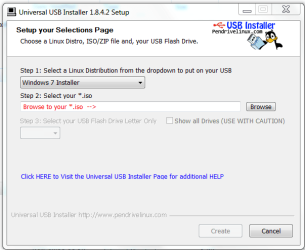
You can also write the ISO to a flash stick to try install. Load the ISO and select Win7 in dropdown menu: Universal USB Installer – Easy as 1 2 3 | USB Pen Drive Linux

Capture.PNG

If you wiped the HD, leave the Product Key blank until after install then do the quick registry workaround given here to activate Upgrade version on cleaned HD: Clean Install with a Upgrade Windows 7 Version
 
Back
Top