Upgrading Windows 7 Home Premium to Professional

xceebeex

New member
Local time
11:46 AM
Messages
33
I have a quick question. I installed a retail copy of Windows 7 Home Premium on my desktop a while back. I recently purchase a copy of Windows 7 Professional (from Digital River). I want to use my Home Premium license to put on my netbook which is currently running XP.

Anyway, I would like to upgrade the desktop without losing any data. Can I use my key that I received from Digital River to do the Anytime Upgrade? Is there any downside to doing it that way?

Next, when I go to install Home Premium on my netbook, will it activate without me having to call in?
 

My Computer My Computer

At a glance

Windows 7 Home Premium
OS
Windows 7 Home Premium

My Computer My Computer

At a glance

Windows 7 Enterprise x64 SP1Intel Core i3-2100 @ 3.10GHz10 GB DDR3Asus EAH5450 series (Radeon)
Computer Manufacturer/Model Number
ATX Custom Build 2012
OS
Windows 7 Enterprise x64 SP1
CPU
Intel Core i3-2100 @ 3.10GHz
Motherboard
Intel DH67CL desktop ATX
Memory
10 GB DDR3
Graphics Card(s)
Asus EAH5450 series (Radeon)
Monitor(s) Displays
Samsung SyncMaster 226BW, Samsung Syncmaster P2450H
Screen Resolution
226BW: 1680 x 1050 & P2450H: 1920 x 1080
Hard Drives
Western Digital 320 GB sata (boot), Samsung 640 GB sata, Seagate 2 TB sata (data)
PSU
Cooler Master Extreme Power Plus 500W
Case
Thermaltake V3 Black Edition
Cooling
stock cooling with added intake fan
Keyboard
HP Wireless Elite Keyboard Wireless Keyboard
Mouse
Microsoft Touch
Internet Speed
Comcast Cable business class <=18Mb {averages 12Mb}
Other Info
Optical drives: LG SuperMulti Blue, HP DVD 1260T
Other: Kensington Bluetooth Receiver
Network: Buffalo Wireless N USB, DLink N router/DLink Ethernet Switch/DLink Xtreme N wireless bridge
Printer: HP Photosmart Plus, HP Officejet Pro 8600 Plus
PCs: HP dv6-3040us (7 x64 SP1), HP DM4-2165dx (7 x64 SP1), HP Pavilion zv6130us (7 x86), Apple Macbook Air (Lion)
************
I just wanted to make sure that there were no other issues or limitations associated with using the Anytime Upgrade. So I am assuming that is my best option then correct since I don't want to do a clean install at this time?

Thanks!
 

My Computer My Computer

At a glance

Windows 7 Home Premium
OS
Windows 7 Home Premium
I believe the Pro key used in Anytime Upgrade will completely replace the HP activation. When you then install HP on the netbook, you will be referred to an Activation robocall which updates the hardware signature associated with that Product Key. A recording will ask you if you only have that product key on one computer. When you answer correctly, it will update the hardware signature in MS activation computers so that any other machine's use of that key will be deactivated upon connection to the internet.

Only if the underlying use of HP as the launching platform for the Pro Anytime upgrade still somehow maintains HP activation would this deactivate your Pro install. This is fairly new ground for us here as we only confirmed in recent months that retail keys work in Anytime and related issues have not been completely sorted.

In the worst case where the HP key maintains activation as the base of your Pro install, you might have to do the workaround which allows an in-place Upgrade between versions of Win7, to avoid having to do a clean install of Pro. This definitely resets activation and says bye-bye to HP.

Once you have it set up running as you like, make a Win7 backup image stored externally so you can reimage the HD or a replacement instead of having to reinstall.

http://www.sevenforums.com/tutorials/663-backup-complete-computer-create-image-backup.html
 
Will an in-place upgrade allow me to retain my data? What does Windows do if it keeps the HP key as the underlying key? Will I still be able to access my data and whatnot?

Does it make sense to just do an in place upgrade now to avoid any potential issues all together?

I just don't want to risk losing any data that I may not have on my external drive currently. I have to go through the drive and clean some stuff off of it before I can back everything up again.

Thanks for the help so far!
 

My Computer My Computer

At a glance

Windows 7 Home Premium
OS
Windows 7 Home Premium
I'd like to see what others say about whether using Pro retail key in Anytime is known to overwrite the underlying Home Prem activation and free up it's Product Key for reuse.

It is much safer to just unlock features with Anytime, as you'll need to backup all of your data to do either the in-place Upgrade workaround or of course a clean install of Pro.

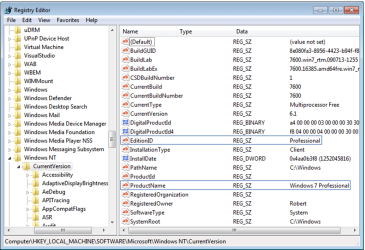
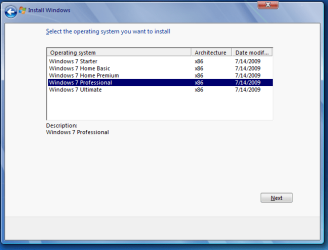
To do the workaround, set a Restore point and then change the registry key shown in screenshot exactly as shown, which tricks the installer into thinking it is doing an (always allowed) same-version Repair Install Then run the Pro DVD upgrade install from HP desktop.
 

Attachments

  • Capture.PNG
    Capture.PNG
    111 KB · Views: 164
Anytime upgrade only adds on the Programs & Features from version to version.
No install files needed.
Only the Upgrade key is neeed.
 

My Computer My Computer

At a glance

ME/XP/Vista/Win7
OS
ME/XP/Vista/Win7
I would really like to do it without formatting and whatnot, so the Anytime Upgrade is obviously attractive, if it doesn't cause more heartache. How much compression (roughly) is there when creating an image?
 

My Computer My Computer

At a glance

Windows 7 Home Premium
OS
Windows 7 Home Premium
Very little image compression except in the paid programs. It only uses that actual used space however, not the empty spaces.

What brought up my hesitation about Anytime releasing your Home Premium key for reuse is that I am not even sure which DVD would be used for a Repair Install on the Anytime Upgraded Pro.

I posed this here some months ago and received only conjecture that it might not be possible to Repair Install the unlocked Pro version since neither HP or Pro DVD's would likely work.

Based on the principle that an in-place Upgrade invalidates the underlying OS's activation (under the EULA only, there is no mechanism), I would have to guess that since Anytime is an Upgrade it would invalidate the underlying Win7 for further use under EULA.

Hence you probably will want to do either the Clean Install or the in-Place Upgrade workaround which completely wipes away the HP activation and resets it requiring the insertion of a Pro key.
 
Very little image compression except in the paid programs. It only uses that actual used space however, not the empty spaces.

What brought up my hesitation about Anytime releasing your Home Premium key for reuse is that I am not even sure which DVD would be used for a Repair Install on the Anytime Upgraded Pro.

I posed this here some months ago and received only conjecture that it might not be possible to Repair Install the unlocked Pro version since neither HP or Pro DVD's would likely work.

Based on the principle that an in-place Upgrade invalidates the underlying OS's activation (under the EULA only, there is no mechanism), I would have to guess that since Anytime is an Upgrade it would invalidate the underlying Win7 for further use under EULA.

Hence you probably will want to do either the Clean Install or the in-Place Upgrade workaround which completely wipes away the HP activation and resets it requiring the insertion of a Pro key.

Thanks for the follow-up. So can an in-place upgrade be done while keeping files and whatnot intact? It looks like that was possible when going from Vista to Windows 7, so I would hope that it is still possible when going from one Windows 7 to another.
 

My Computer My Computer

At a glance

Windows 7 Home Premium
OS
Windows 7 Home Premium

My Computer My Computer

At a glance

Windows 7 Home Premium
OS
Windows 7 Home Premium
Also, just to verify; the "Repair-Install" can be used to upgrade from HP to Pro? And this should free up that HP license to be used on another machine?
 

My Computer My Computer

At a glance

Windows 7 Home Premium
OS
Windows 7 Home Premium

My Computer My Computer

At a glance

ME/XP/Vista/Win7
OS
ME/XP/Vista/Win7
Also, just to verify; the "Repair-Install" can be used to upgrade from HP to Pro? And this should free up that HP license to be used on another machine?

Upgrade the Windows 7 RC to any retail version « Icrontic Tech

This is a workaround that was given at the time millions of beta testers were needing to change from the RC beta to a retail version of Win7. It worked amazingly well in spite of MS warnings, and got rave reviews from everyone who tried it here. It worked fine in recent months, too.

It is possible now that the RC is expired, MS has sent out an update to disable it, however. Reading the comments in the original tutorial there was a fail on July 1st, and testing here in VM also failed today.

It is still worth a try as you'll only have to clean install if it fails and you need to do that anyway to be sure Anytime Upgrade doesn't block your underlying Premium key.
 

The best way is anytime upgrade.
Anytime upgrade only adds on the Programs & Features from version to version.
No install files needed.
Only the Upgrade key is neeed.

My problem is that I am not sure if that will use the Professional key as the underlying validation versus the Home Premium and I haven't found a clear answer.

Also, just to verify; the "Repair-Install" can be used to upgrade from HP to Pro? And this should free up that HP license to be used on another machine?

Upgrade the Windows 7 RC to any retail version « Icrontic Tech

This is a workaround that was given at the time millions of beta testers were needing to change from the RC beta to a retail version of Win7. It worked amazingly well in spite of MS warnings, and got rave reviews from everyone who tried it here. It worked fine in recent months, too.

It is possible now that the RC is expired, MS has sent out an update to disable it, however. Reading the comments in the original tutorial there was a fail on July 1st, and testing here in VM also failed today.

It is still worth a try as you'll only have to clean install if it fails and you need to do that anyway to be sure Anytime Upgrade doesn't block your underlying Premium key.

I wanted to try and do this without having to worry about going in and backing up everything on my desktop, so I am little nervous about "trying" something out. I might just have to suck it up and go through and back everything up.
 

My Computer My Computer

At a glance

Windows 7 Home Premium
OS
Windows 7 Home Premium
Anytime upgrade, will upgrade to any higher version.
Have read of the tutorial & the MS link at the bottom.
 

My Computer My Computer

At a glance

ME/XP/Vista/Win7
OS
ME/XP/Vista/Win7
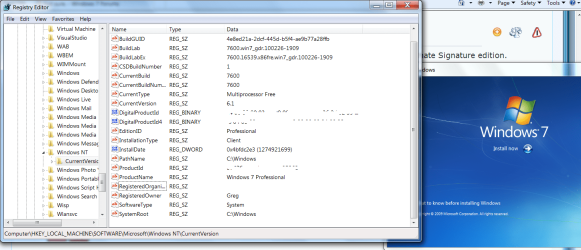
Just worked for me only changing the reg keys to Professional from my Ultimate Signature edition:


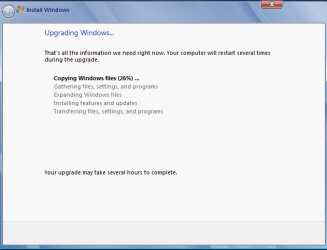
How long did it take to do the upgrade.
 

My Computer My Computer

At a glance

ME/XP/Vista/Win7
OS
ME/XP/Vista/Win7
Back
Top