Upgrading Windows 7

asdsker90

New member
Local time
5:16 AM
Messages
8
my computer is running on Windows 7 Home Premium and i was wondering if I could use a Windows 7 Professional full version to do an upgrade? would i need to do a clean install or simply an upgrade?
 
Last edited:

My Computer

OS
Windows 7 Home Premium
Hello asdsker90,

1) You can do either an upgrade or a clean install. A clean install will wipe out your installed apps as well as any data that you have stored on the system partition. An upgrade will preserve all these. So an upgrade is less work. But generally speaking, a clean install is more advisable since you are less likely to have problems in the future.

2) Why do you want to switch editions. Heres a page that compared editions.

Which one is right for you? - Microsoft Windows
 

My Computer

Computer Manufacturer/Model Number
Too many to describe...
OS
Windows 7 x64 pro/ Windows 7 x86 Pro/ XP SP3 x86
cos i think the xp compatibility would come in handy? haha thanks though bill!
 

My Computer

OS
Windows 7 Home Premium
You can install any program in XP compatibility mode with any version of Win7. Are you referring to Virtual XP?

Unfortunately, MS requires using Anytime Upgrade to in-place upgrade within Win7 versions. You would need to clean install.

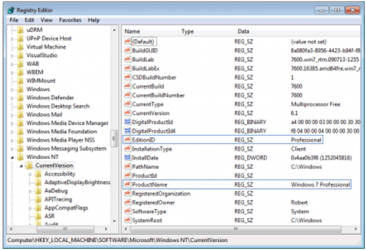
There is a workaround to fool Home Premium into thinking it is Pro which allows an in-place Upgrade since this is allowed within same version to do a Repair Install. You need to adapt the registry fix here: Upgrade the Windows 7 RC to any retail version Icrontic Tech
 
AFAIK, Windows 7 Professional retail full version can do Anytime upgrades.
 

My Computer

Computer Manufacturer/Model Number
Too many to describe...
OS
Windows 7 x64 pro/ Windows 7 x86 Pro/ XP SP3 x86
Good idea. You could try inserting your Pro retail key into Anytime Upgrade. Seems like some others have reported doing that successfully. Would you let us know if it works so we can pass it along to others?

If not you'll need to clean install or try the workaround.
 
no sad to say, anytime upgrade fail with them saying my serial key is not for that purpose. guess i'll try and 'fool' the system!
 

My Computer

OS
Windows 7 Home Premium
It is very important that the Edition ID and Product Name read precisely as shown in tutorial so that the when the installer checks version it sees it's own version and allows in-place Upgrade to continue as a same-version Repair Install always can:
Capture.PNG

About a dozen times this has worked here using almost all version combinations within Win7, however it can fail if not done correctly.

Let us know how it goes, and how performance holds up. Clean installs are always best so that should be the ultimate goal when you can get around to it.
 
Did you get the message "this is not a valid upgrade key" or something like that? Try retyping the key, it might have got typed in wrong. Also, is your current install activated?

In any case, if you can fool the system, go ahead with that. But theres no reason why a full price key will not upgrade.
 

My Computer

Computer Manufacturer/Model Number
Too many to describe...
OS
Windows 7 x64 pro/ Windows 7 x86 Pro/ XP SP3 x86
The Anytime Upgrade key is different than the Windows 7 retail Product Key.

You buy the Anytime Key online and insert it into Anytime prompt in All Programs to unlock hidden features of the greater version.

Get Windows Vista: Windows Anytime Upgrade

Do you have experience inserting retail key into Anytime, Bill? I do believe I have read it has been done by one of the Gurus here, but I may have it wrong.
 
I havent personally inserted a retail key into WAU but a couple of pals did and it worked. Also i remember reading on either technet or that answers site that many people successfully did it. Unless i'm going senile, i think the MS people on those forums also said it works. But really, if it doesnt its ridiculous. One can understand a AU key not doing a full install but not the other way around.
 

My Computer

Computer Manufacturer/Model Number
Too many to describe...
OS
Windows 7 x64 pro/ Windows 7 x86 Pro/ XP SP3 x86
i'll do another check with the WAU using a full version key again. but should it still not work, i'll use the other method. just checking, should the other method fail, does it mean i gotta do a clean install all over?
 

My Computer

OS
Windows 7 Home Premium
If you're asking whether an Upgrade (repair) install can fail, the answer is yes - but rarely.

So you should always back up your files and possibly a Win7 backup image externally just in case.

If you're asking what are your options if the registry workaround doesn't allow you to in-place from Premium to Pro, then the answer is Clean Install. Or buy an Anytime Upgrade key.
 
Last edited:
nah doubt i will until i exceed the 16gb 64x home premium limitation. haha. and thats a long way to go
 

My Computer

OS
Windows 7 Home Premium
Back
Top