Upon boot I get a flashing Black screen which says "MBR 1: _"

amishra123

New member
Local time
5:52 PM
Messages
8
Upon boot I get a flashing Black screen which says "MBR 1: _"

Hey guys, I think I have messed this up quite a bit! But here goes from the beginning! I had linux and windows on dual boot with grub as the bootloader. I then as a complete pillock decided to get rid of ubuntu by formatting/deleting that partition from within windows :cry: . Now next time I restarted my computer I got a black screen saying Grub no partition found (OWTTE). I then instead of reaching for the windows CD straightaway tried Rescatux. And tried to use it to restore windows MBR. (I basically did this Restore Windows MBR - YouTube) . And after that upon starting my laptop I now just get a blank screen with "MBR 1:_" and a flashing cursor (but i cant type anything).
I then tried the windows usb. When I click repair my computer it came up saying repair and restart or something and I agreed. Now when I restarted it still said "MBR 1" however when consequently booted from the usb it this time booted me into my windows installation. So I can only get in with this USB in!
Once in I also noticed that there is a new partition called "Local Disk :D"
It contains two folders "Recovery and SOURCES"
I have since made another windows USB (my other one is my key into the system!)
however when I get it to search for existing installations it can't find one!

Sorry for the long explanation. But I am at my end here, I really dont know what else to do!
Thank you so much for all your help!
 

My Computer My Computer

At a glance

Windows 7 Ultimate (7600)
Computer Manufacturer/Model Number
Asus eee 1008ha
OS
Windows 7 Ultimate (7600)
Exactly that's why it is repeatedly advised to not install Linux in the same HDD with windows.

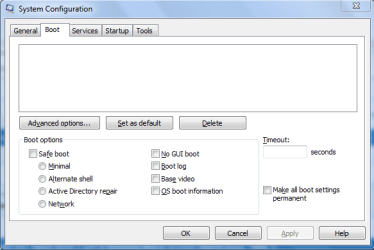
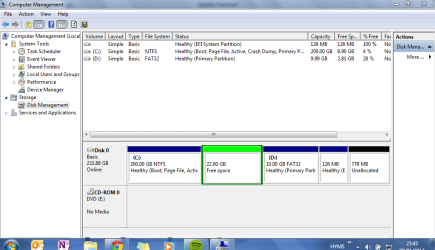
Can you post a screenshot of your maximized disk management window and the msconfig window's boot tab ?

It is to check if GRUB is still there as a partition, say swap, and which partition is active .
 

My Computer My Computer

At a glance

Microsoft Windows 10 Pro Insider Preview 64-bitIntel(R) Core(TM) i3-4130 CPU @ 3.40GHzCorsair Vengence 4GB x2 (8.00GB Dual-Channel ...2047MB GeForce GTS 450 (ZOTAC International)
Computer type
PC/Desktop
Computer Manufacturer/Model Number
Self Assembled
OS
Microsoft Windows 10 Pro Insider Preview 64-bit
CPU
Intel(R) Core(TM) i3-4130 CPU @ 3.40GHz
Motherboard
Gigabyte Technology Co., Ltd. B85M-D3H
Memory
Corsair Vengence 4GB x2 (8.00GB Dual-Channel DDR3 @ 798MHz)
Graphics Card(s)
2047MB GeForce GTS 450 (ZOTAC International)
Sound Card
Onboard (Realtek High Definition Audio)
Monitor(s) Displays
LG Flatron E2040T
Screen Resolution
1600x900
Hard Drives
Western Digital 1 TB
Seagate 500 GB
PSU
Corsair VS550
Case
Cooler Master K380
Cooling
Cooler Master Seidon 120V Plus
Keyboard
Logitech MK260r
Mouse
Logitech MK260r
Internet Speed
PMPL Broadband
Antivirus
Windows Defender + MBAM
Browser
Firefox
Other Info
Dell Studio 15" Laptop

My Computer My Computer

At a glance

Windows 7 Ultimate X64 SP1Intel i5-2550K, Differing ~4.4-4.8GHz No buil...16GB G.Skill Sniper 1866MHz @ 2133MHz 2x8GBASUS GTX650TIB-DC2OC-2GD5, (650TI Boost)
Computer type
PC/Desktop
Computer Manufacturer/Model Number
Home Built Desktop By DataTech
OS
Windows 7 Ultimate X64 SP1
CPU
Intel i5-2550K, Differing ~4.4-4.8GHz No built in GPU
Motherboard
ASUS P8Z68-V PRO/GEN3
Memory
16GB G.Skill Sniper 1866MHz @ 2133MHz 2x8GB
Graphics Card(s)
ASUS GTX650TIB-DC2OC-2GD5, (650TI Boost)
Sound Card
Onboard Realtek 5-1
Monitor(s) Displays
Samsung P2570HD
Screen Resolution
1920x1080
Hard Drives
Samsung 840 Pro 256GB SSD for OS, 500GB Seagate Constellation (Enterprise drive) for Data
PSU
Corsair HX650W
Case
Inwin Dragon Rider
Cooling
Hyper 212 EVO w/two Noctua fans, push-pull, @1300 RPM
Keyboard
E-Z Eyes, bright yellow keys with large characters
Mouse
steelseries SENSEI Laser Pro Gaming
Internet Speed
48-51Mbs Mbs down, 11 Mbs up Xfinity Cable
Antivirus
Norton Internet Security 2013
Browser
IE 10, Opera, Pale Moon if needed
Other Info
4 case fans, LG BluRay-RE, ASUS DVD-RW, Mr. Fusion power supply, 1.21 gigawatts.
Yes, Gary ! Is is to run Startup Repair , I guess he ran it , and got the MBR stored somewhere else , and that is why he is getting the MBR1 thing.

I am guessing that System Reserved is not the active partition there , but some partition containing GRUB or some Linux leftover is still active . So he is to mark that System Reserved partition at first (http://www.sevenforums.com/tutorials/71432-partition-mark-active.html) . Then the Startup Repair will work properly .

Moreover, if there are some Linux leftovers, those need to be removed. But without seeingthe Disk Management window, all it is guess.
http://www.sevenforums.com/tutorials/681-startup-repair.html
 

My Computer My Computer

At a glance

Microsoft Windows 10 Pro Insider Preview 64-bitIntel(R) Core(TM) i3-4130 CPU @ 3.40GHzCorsair Vengence 4GB x2 (8.00GB Dual-Channel ...2047MB GeForce GTS 450 (ZOTAC International)
Computer type
PC/Desktop
Computer Manufacturer/Model Number
Self Assembled
OS
Microsoft Windows 10 Pro Insider Preview 64-bit
CPU
Intel(R) Core(TM) i3-4130 CPU @ 3.40GHz
Motherboard
Gigabyte Technology Co., Ltd. B85M-D3H
Memory
Corsair Vengence 4GB x2 (8.00GB Dual-Channel DDR3 @ 798MHz)
Graphics Card(s)
2047MB GeForce GTS 450 (ZOTAC International)
Sound Card
Onboard (Realtek High Definition Audio)
Monitor(s) Displays
LG Flatron E2040T
Screen Resolution
1600x900
Hard Drives
Western Digital 1 TB
Seagate 500 GB
PSU
Corsair VS550
Case
Cooler Master K380
Cooling
Cooler Master Seidon 120V Plus
Keyboard
Logitech MK260r
Mouse
Logitech MK260r
Internet Speed
PMPL Broadband
Antivirus
Windows Defender + MBAM
Browser
Firefox
Other Info
Dell Studio 15" Laptop
Thanks alot guys I really appreciate it. I know its not recommended but it has worked so well for me ... thus far ha. I will do that ASAP and post back.
Thanks AMishra
 

My Computer My Computer

At a glance

Windows 7 Ultimate (7600)
Computer Manufacturer/Model Number
Asus eee 1008ha
OS
Windows 7 Ultimate (7600)
Exactly that's why it is repeatedly advised to not install Linux in the same HDD with windows.

Can you post a screenshot of your maximized disk management window and the msconfig window's boot tab ?

It is to check if GRUB is still there as a partition, say swap, and which partition is active .

\http://dl.dropbox.com/u/2663085/Capture.PNG

In the meanwhile i will continue to run system repair a few more times!
 

My Computer My Computer

At a glance

Windows 7 Ultimate (7600)
Computer Manufacturer/Model Number
Asus eee 1008ha
OS
Windows 7 Ultimate (7600)

My Computer My Computer

At a glance

Windows 7 Ultimate X64 SP1Intel i5-2550K, Differing ~4.4-4.8GHz No buil...16GB G.Skill Sniper 1866MHz @ 2133MHz 2x8GBASUS GTX650TIB-DC2OC-2GD5, (650TI Boost)
Computer type
PC/Desktop
Computer Manufacturer/Model Number
Home Built Desktop By DataTech
OS
Windows 7 Ultimate X64 SP1
CPU
Intel i5-2550K, Differing ~4.4-4.8GHz No built in GPU
Motherboard
ASUS P8Z68-V PRO/GEN3
Memory
16GB G.Skill Sniper 1866MHz @ 2133MHz 2x8GB
Graphics Card(s)
ASUS GTX650TIB-DC2OC-2GD5, (650TI Boost)
Sound Card
Onboard Realtek 5-1
Monitor(s) Displays
Samsung P2570HD
Screen Resolution
1920x1080
Hard Drives
Samsung 840 Pro 256GB SSD for OS, 500GB Seagate Constellation (Enterprise drive) for Data
PSU
Corsair HX650W
Case
Inwin Dragon Rider
Cooling
Hyper 212 EVO w/two Noctua fans, push-pull, @1300 RPM
Keyboard
E-Z Eyes, bright yellow keys with large characters
Mouse
steelseries SENSEI Laser Pro Gaming
Internet Speed
48-51Mbs Mbs down, 11 Mbs up Xfinity Cable
Antivirus
Norton Internet Security 2013
Browser
IE 10, Opera, Pale Moon if needed
Other Info
4 case fans, LG BluRay-RE, ASUS DVD-RW, Mr. Fusion power supply, 1.21 gigawatts.
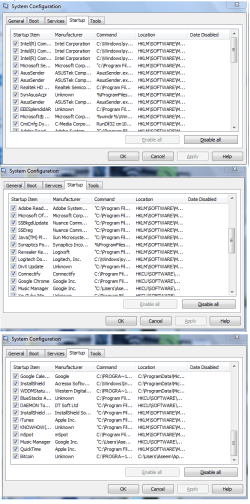
Ok so I have got the things attached, the startup menu, the boot menu and what disk management says. Worryingly there isnt anything in boot at all.

So should I make the D drive active using disk manager and hopefully it will let me boot into it?

Thanks A Mishra
 

Attachments

  • Startup.png
    Startup.png
    49.9 KB · Views: 20
  • System Config Boot.PNG
    System Config Boot.PNG
    13.1 KB · Views: 14
  • Capture.PNG
    Capture.PNG
    34.1 KB · Views: 20

My Computer My Computer

At a glance

Windows 7 Ultimate (7600)
Computer Manufacturer/Model Number
Asus eee 1008ha
OS
Windows 7 Ultimate (7600)
Back
Top