
Log in page will not load on Windows 7. Flashing Black Screen.

goateyes

New member
Local time
9:25 PM
Messages
1
Hello,

Hopefully I posted this in the right forum? Sorry, I'm kinda new to this...

So the log in page on my computer is not loading at all. There is no icon, no password, nothing, just the log in background screen. The screen also flashes a black screen really fast... When I put my computer to safe mode the same problem is there except the flashing occurs once every ~1 minute. Because of this problem I can't use my computer at all and I don't know what I should do next..

Computer:
Windows 7 Home Premium
Fujitsu Lifebook L Series

Also, yesterday night I turned off my computer to go to sleep, my computer was doing an automatic update so it was on for awhile while I slept.

Thanks guys!
 

Attachments
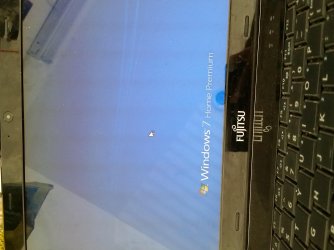
  • 20151111_105745.jpg
    20151111_105745.jpg
    439.3 KB · Views: 0

My Computer My Computer

At a glance

windows 7 Home Premium
Computer type
PC/Desktop
Computer Manufacturer/Model Number
Fujitsu Lifebook
OS
windows 7 Home Premium
I got the exact same thing today
5x Lenovo M72z PCs in my workplace

M$ must have a bad windows update

Repair PC seems to get it going once then the problem returns at next logoff from windows
 

My Computer My Computer

At a glance

Windows 7 x64
Computer type
PC/Desktop
OS
Windows 7 x64

My Computer My Computer

At a glance

Windows 7 x64
Computer type
PC/Desktop
OS
Windows 7 x64
It's a bad update. KB3097877 to be exact. You'll have to run a system restore to before the updates, (assuming that you have restore points). You may need your system disk if you can't get in by hitting F8 or F11 on bootup.

See if any of the following information in this tutorial helps:

http://www.sevenforums.com/tutorials/668-system-recovery-options.html
 

My Computer My Computer

At a glance

Win 7 Pro x64/Win 10 Pro x64 dual bootAMD FX 8350 Vishera @ 420016 GB Mushkin Blackline DDR3-2400 @ 1866 (9-1...XFX Radeon R9 280 Double D Black Edition
Computer type
PC/Desktop
Computer Manufacturer/Model Number
Mellon Labs (custom build)
OS
Win 7 Pro x64/Win 10 Pro x64 dual boot
CPU
AMD FX 8350 Vishera @ 4200
Motherboard
ASUS M5A97 R2.0
Memory
16 GB Mushkin Blackline DDR3-2400 @ 1866 (9-10-10-10-31)
Graphics Card(s)
XFX Radeon R9 280 Double D Black Edition
Sound Card
Realtek HD Audio on MB. Sounds great.
Monitor(s) Displays
Acer 24", Acer 22"
Screen Resolution
3840 x 1080
Hard Drives
1 x Mushkin Chronos 120 GB SSD (Win 10)
1 x Samsung 850 EVO 250 GB SSD (Win 7)
1 x WD 1TB SATA Blue
1 x WD 1TB SATA Green
PSU
Corsair TX-750
Case
CoolerMaster HAF 912+
Cooling
Coolermaster Seidon 240M Liquid AIO. 6 case fans
Keyboard
Logitech G710+
Mouse
Logitech G500s
Internet Speed
Much better since I got fiber, but still way overpriced.
Antivirus
MSE, Malware Bytes for scanning
Browser
Firefox
Other Info
Corsair VOID USB headphones.

A Mellon Labs X-1 - LCD Smartie driven system status display.

Brought to you by the letter E
Encrypted tablets

Hello all,

Exact same error on Motion J3500 tablet, but it's running Sophos Encryption so we can't run any of the start up tools, won't boot into safe mode. How do we roll back an update without booting into Windows? We can browse the file structure by booting from the Sophos encryption disc. We have 60 or so of these tablets out in the field, all over the country, I'm dreading the idea of all of them being returned to be flattened and installed from scratch.

Thanks,

Stuart.
 

My Computer My Computer

At a glance

Windows 7 Professional 32-bit
Computer type
Tablet
Computer Manufacturer/Model Number
Motion J3500
OS
Windows 7 Professional 32-bit
Hello all,

We managed to use Kaseya to run a couple of scripts and force the machine to log in as the administrator account, once it was logged in we could connect remotely, remove the update, disable automatic updates (these tablets are on the verge of being phased out anyway) and then change the registry keys we had changed back to their defaults. All in all, close to a best case scenario considering where we were yesterday.
 

My Computer My Computer

At a glance

Windows 7 Professional 32-bit
Computer type
Tablet
Computer Manufacturer/Model Number
Motion J3500
OS
Windows 7 Professional 32-bit
RDP into computer and remove

If you can, RDP into computer and remove. Worked for me.
 

My Computer My Computer

At a glance

Windows 10
Computer type
PC/Desktop
OS
Windows 10

My Computer My Computer

At a glance

W7 Pro SP1 64biti78GBIntel HD Graphics
Computer type
Laptop
Computer Manufacturer/Model Number
Employer provided Dell Latitude
OS
W7 Pro SP1 64bit
CPU
i7
Memory
8GB
Graphics Card(s)
Intel HD Graphics
Hard Drives
crappy SSD
Antivirus
Employer mandated Symantec Endpoint Protection
Browser
Pale Moon 64bit, IE11 64bit & Chrome 64bit
Back
Top