Upon Install, Most W7 x64 HP Updates Fail

IveyLeaguer

New member
Local time
3:30 PM
Messages
27
Location
Dahlonega, Georgia
Formatting and install went fine ....

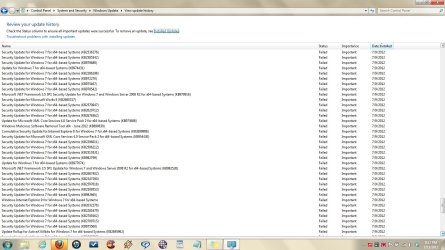
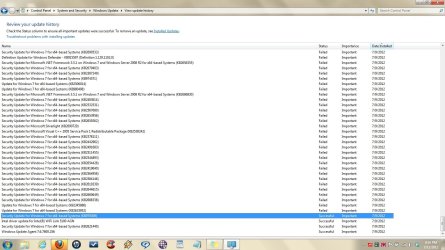
But when I began updating, apparently the internet connection failed for a minute. By then 3 updates had successfully installed. When connection was re-established, the updates for the 2009 W7 continued, but 300 out of 500 had failed, and I've not been able to figure out how to get them to re-install.

However, Windows Update continued updating says W7 is fully up to date. The OS seems fine, no issues for 4 days now. All programs running fine, no issues.

Question: Should I be concerned? If this is going to cause any problem or diminished performance, I want to go ahead and reformat and reinstall now.

Thanks ...
~~~
 

My Computer My Computer

Computer Manufacturer/Model Number
HP dv7-2277cl Notebook PC
OS
Windows 7 Home Premium x64 v6.1.7600
CPU
2.26 GHz Intel Core2 Duo Processor P7550, 3MB L2 Cache
Memory
4096MB DDR3 System Memory
Graphics Card(s)
ATI Mobility Radeon HD 4650 (M96); 1 GB dedicated memory
Sound Card
Altec Lansing with SRS Premium Sound and Sub-Woofer
Monitor(s) Displays
17.3” HD+ LED BrightView Widescreen Display
Screen Resolution
1600 x 900
Hard Drives
640 GB Western Digital 7200 rpm WD3200BEKT-60F3T1 Dual HDD (320 GB x 2)
Keyboard
Microsoft eHome MCIR 109 Keyboard
Confusion:

In your second paragraph you say "300 out of 500 had failed, and I've not been able to figure out how to get them to re-install."

In your third paragraph you say "Windows Update continued updating says Windows 7 is fully up to date."

If the latter statement is true, why do you think there are still 300 (or any) updates to get?

What am I missing?
 

My Computer My Computer

Computer type
PC/Desktop
Computer Manufacturer/Model Number
Ignatz Special; 4 speed manual gearbox; factory air conditioning; one of one
OS
Windows 7 Home Premium SP1, 64-bit
CPU
Intel Skylake i5-6600K, not overclocked
Motherboard
AsRock Z170M Extreme 4, micro ATX
Memory
8 GB HyperX DDR4-2666 (2 x 4 GB)
Graphics Card(s)
none; graphics are integrated on CPU
Sound Card
onboard: Realtek ALC1150; external: USB Behringer UF0-202
Monitor(s) Displays
Dell S2340M 23 inch IPS
Screen Resolution
1600 x 900
Hard Drives
System: Crucial MX100 series SSD, 128 GB;
Data: Samsung Spinpoint 103SJ, 1 TB;
Backup: WD Caviar Green WD30EZRX-00D8PB0, 3 TB
PSU
Rosewill SilentNight 500 watt fanless, semi-modular
Case
Antec Solo II
Cooling
Noctua NH-U12S; Noctua F12 intake, Noctua S12A exhaust
Keyboard
Microsoft 200 6JH-00001 USB
Mouse
Dell or Microsoft optical wired; USB
Antivirus
Microsoft Security Essentials and Malwarebytes Premium
Browser
Pale Moon
Other Info
All fans PWM; speeds at idle: CPU circa 500 rpm; intake circa 600 rpm; exhaust circa 600 rpm; CPU temps 27 idle and 47 C load in a warm room (27 C/81 F) when running Intel Extreme Tuning Utility stress test.
Reboot and go to Windows Updates. Does it indicate that you need more updates?
Do you have SP-1 update. You should because it could very well take care of a lot of those other updates. 500 is a huge number IMO.
 

My Computer My Computer

Computer type
PC/Desktop
Computer Manufacturer/Model Number
Home made Desktop
OS
Windows 10 Pro. 64/ version 1709 Windows 7 Pro/64
CPU
Intel i7-6800K @ 4.3
Motherboard
ASUS X-99 Deluxe II
Memory
Corsair Platinum 16 gig @2400
Graphics Card(s)
EVGA GTX 1070 OC
Monitor(s) Displays
Asus 27" LED LCD/VE278Q
Screen Resolution
1920-1080 or 1280-720 HDMI
Hard Drives
INTEL SSD 730-240 Gb Sata 3.0/
PSU
EVGA Platium 1200W
Case
Phanteks Luxe Tempered Glass 8 fans/ one radiator
Cooling
XSPC/ Water Cooled CPU
Keyboard
Das 4 Professional
Mouse
Logitech M705/MX Anywhere 2-S
Internet Speed
100 mbits
Antivirus
Microsoft Security Essentials/ Malwarebytes Premium 3.0/ SAS
Browser
I.E. 11 default/Firefox/ ISP Time Warner Cable/Spectrum
Other Info
LG BluRay Burner/
Sound system-KLipsch-THX/
Icy Dock ssd Hot Swap bays.
You should be using the latest official installer with SP1 in Clean Reinstall - Factory OEM Windows 7.

I would reinstall and follow the same steps as above which are best practices for setting up and maintaining Win7.

Several restarts should sort out any Windows Updates issues. Pay attention but don't obsess over their status because they will occasionally fail because they are already cued to install at reboot.

If over time Updates continue failing then check back for how to reset Updates.
 
Last edited:
Confusion:

In your second paragraph you say "300 out of 500 had failed, and I've not been able to figure out how to get them to re-install."

In your third paragraph you say "Windows Update continued updating says Windows 7 is fully up to date."

If the latter statement is true, why do you think there are still 300 (or any) updates to get?

What am I missing?
Probably just a clear explanation ... :D

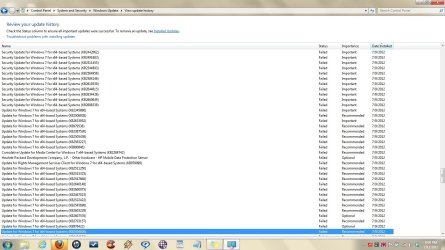
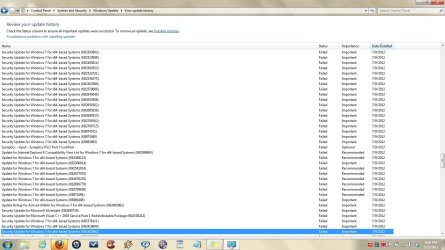
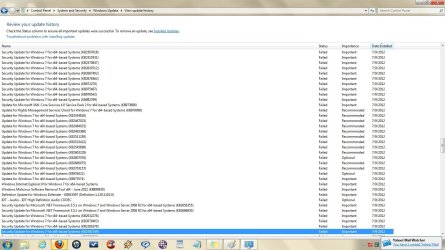
After W7 installation, which went smoothly, internet connection failed shortly after the update process began. When reconnected, several hundred updates showed up failed. But after a reboot, a manual restart of WU continued just fine, even though the failed updates remained in the history.

The update process continued through several more reboots, and there were no further problems, until the updating was completed. WU has run perfectly since. Further, W7 acts fine (and I know Windows). And it's functionally sharp, as it should be with a format and fresh install.

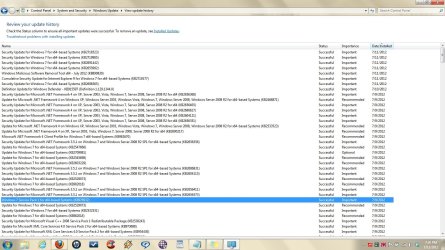
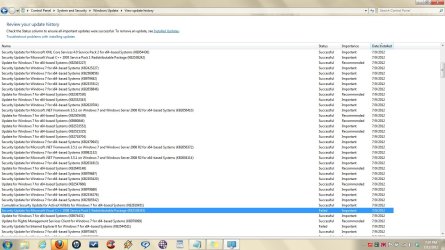
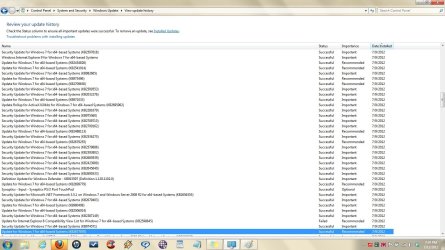
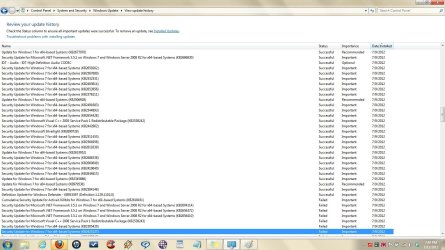
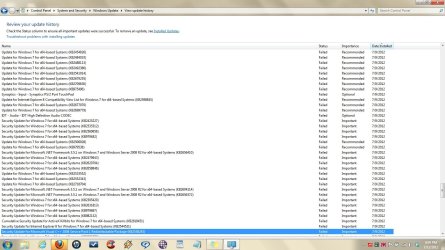
There were ONLY 6 updates that failed after the internet incident, out of 180, and they all show in the first 3 shots, except a IE8 security Update Failure (IE9 is installed and fine).

So, there were 275 failures at the start of the process, all internet related. W7 SP1 installed just fine late in the process.

Screenshots of the WU history will follow ....

Thank again.
~~~
 

My Computer My Computer

Computer Manufacturer/Model Number
HP dv7-2277cl Notebook PC
OS
Windows 7 Home Premium x64 v6.1.7600
CPU
2.26 GHz Intel Core2 Duo Processor P7550, 3MB L2 Cache
Memory
4096MB DDR3 System Memory
Graphics Card(s)
ATI Mobility Radeon HD 4650 (M96); 1 GB dedicated memory
Sound Card
Altec Lansing with SRS Premium Sound and Sub-Woofer
Monitor(s) Displays
17.3” HD+ LED BrightView Widescreen Display
Screen Resolution
1600 x 900
Hard Drives
640 GB Western Digital 7200 rpm WD3200BEKT-60F3T1 Dual HDD (320 GB x 2)
Keyboard
Microsoft eHome MCIR 109 Keyboard
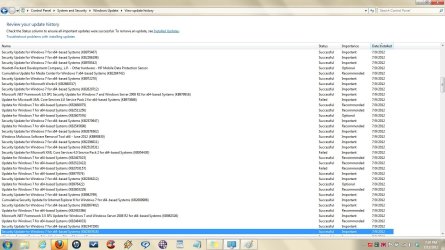
Here are the shots .........

FWIW, I'm thinking the install may be OK. But I'm not confident enough to continue with everything unless you guys feel the same way, which is why I'm here.

A lot of work is in already, and I don't want to lose it. But I run a lot of stuff, a LOT of stuff, mostly related to work. I keep a clean machine. Seems like there would be some sign by now, several days after the internet disruption of the WU process, if there were problems.

So thanks again for your help.
 

Attachments

  • WU Screenshot 1.jpg
    WU Screenshot 1.jpg
    213.5 KB · Views: 12
  • WU Screenshot 2.jpg
    WU Screenshot 2.jpg
    184.7 KB · Views: 7
  • WU Screenshot 3.jpg
    WU Screenshot 3.jpg
    179.8 KB · Views: 7
  • WU Screenshot 4.jpg
    WU Screenshot 4.jpg
    176.4 KB · Views: 6
  • WU Screenshot 5.jpg
    WU Screenshot 5.jpg
    184.4 KB · Views: 8
  • WU Screenshot 10.jpg
    WU Screenshot 10.jpg
    176.6 KB · Views: 10
  • WU Screenshot 9.jpg
    WU Screenshot 9.jpg
    171.1 KB · Views: 5
  • WU Screenshot 8.jpg
    WU Screenshot 8.jpg
    170.5 KB · Views: 5
  • WU Screenshot 7.jpg
    WU Screenshot 7.jpg
    175 KB · Views: 4
  • WU Screenshot 6.jpg
    WU Screenshot 6.jpg
    175.9 KB · Views: 6
  • WU Screenshot 11.jpg
    WU Screenshot 11.jpg
    172.1 KB · Views: 9
  • WU Screenshot 12.jpg
    WU Screenshot 12.jpg
    171.8 KB · Views: 8

My Computer My Computer

Computer Manufacturer/Model Number
HP dv7-2277cl Notebook PC
OS
Windows 7 Home Premium x64 v6.1.7600
CPU
2.26 GHz Intel Core2 Duo Processor P7550, 3MB L2 Cache
Memory
4096MB DDR3 System Memory
Graphics Card(s)
ATI Mobility Radeon HD 4650 (M96); 1 GB dedicated memory
Sound Card
Altec Lansing with SRS Premium Sound and Sub-Woofer
Monitor(s) Displays
17.3” HD+ LED BrightView Widescreen Display
Screen Resolution
1600 x 900
Hard Drives
640 GB Western Digital 7200 rpm WD3200BEKT-60F3T1 Dual HDD (320 GB x 2)
Keyboard
Microsoft eHome MCIR 109 Keyboard
My Computer My Computer

Computer type
PC/Desktop
Computer Manufacturer/Model Number
Lenovo IdeaCenter 450
OS
Windows 10 Pro X64
CPU
Intel Quad Core i7-4770 @ 3.4Ghz
Memory
16.0GB PC3-12800 DDR3 SDRAM 1600 MHz
Graphics Card(s)
Intel Integrated HD Graphics
Sound Card
Realtek HD Audio
Monitor(s) Displays
HP 22" LCD
Screen Resolution
1680 x 1050
Hard Drives
250GB Samsung EVO SATA-3 SSD
2TB Seagate ST2000DM001 SATA-2
1.5TB Seagate ST3150041AS SATA
Keyboard
Dell USB
Mouse
Lenovo USB
Internet Speed
Cable via Road Runner 3MB Upload, 30MB Download
Antivirus
Windows Defender, MBAM Pro, MBAE
Browser
Seamonkey
Other Info
UEFI/GPT
PLDS DVD-RW DH16AERSH
Thanks. Would it be helpful to you guys for me to do that? Or are the pics sufficient?
~~~
 
Last edited:

My Computer My Computer

Computer Manufacturer/Model Number
HP dv7-2277cl Notebook PC
OS
Windows 7 Home Premium x64 v6.1.7600
CPU
2.26 GHz Intel Core2 Duo Processor P7550, 3MB L2 Cache
Memory
4096MB DDR3 System Memory
Graphics Card(s)
ATI Mobility Radeon HD 4650 (M96); 1 GB dedicated memory
Sound Card
Altec Lansing with SRS Premium Sound and Sub-Woofer
Monitor(s) Displays
17.3” HD+ LED BrightView Widescreen Display
Screen Resolution
1600 x 900
Hard Drives
640 GB Western Digital 7200 rpm WD3200BEKT-60F3T1 Dual HDD (320 GB x 2)
Keyboard
Microsoft eHome MCIR 109 Keyboard
I don't need anymore pics. Once or twice a day check Windows Up dates. It only takes a few blinks of the eye. IMO if updates look normal your okay. Just hit the Windows 7 and Pause keys to make sure you have SP-1 installed. Happy computing. If your happy you can close this post.
 

My Computer My Computer

Computer type
PC/Desktop
Computer Manufacturer/Model Number
Home made Desktop
OS
Windows 10 Pro. 64/ version 1709 Windows 7 Pro/64
CPU
Intel i7-6800K @ 4.3
Motherboard
ASUS X-99 Deluxe II
Memory
Corsair Platinum 16 gig @2400
Graphics Card(s)
EVGA GTX 1070 OC
Monitor(s) Displays
Asus 27" LED LCD/VE278Q
Screen Resolution
1920-1080 or 1280-720 HDMI
Hard Drives
INTEL SSD 730-240 Gb Sata 3.0/
PSU
EVGA Platium 1200W
Case
Phanteks Luxe Tempered Glass 8 fans/ one radiator
Cooling
XSPC/ Water Cooled CPU
Keyboard
Das 4 Professional
Mouse
Logitech M705/MX Anywhere 2-S
Internet Speed
100 mbits
Antivirus
Microsoft Security Essentials/ Malwarebytes Premium 3.0/ SAS
Browser
I.E. 11 default/Firefox/ ISP Time Warner Cable/Spectrum
Other Info
LG BluRay Burner/
Sound system-KLipsch-THX/
Icy Dock ssd Hot Swap bays.
Thanks for the help, everybody.

Everything seems fine. SP1 installed perfectly on the first day. WU works great, updates and shows up to date without exception.

Any ideas as to why WU would log so many failures? My W7 was an HP OEM the first week W7 came out. But it seems like WU would install SP1 first, instead of toward the end of the process ...

Thanks again.
~~~
 

My Computer My Computer

Computer Manufacturer/Model Number
HP dv7-2277cl Notebook PC
OS
Windows 7 Home Premium x64 v6.1.7600
CPU
2.26 GHz Intel Core2 Duo Processor P7550, 3MB L2 Cache
Memory
4096MB DDR3 System Memory
Graphics Card(s)
ATI Mobility Radeon HD 4650 (M96); 1 GB dedicated memory
Sound Card
Altec Lansing with SRS Premium Sound and Sub-Woofer
Monitor(s) Displays
17.3” HD+ LED BrightView Widescreen Display
Screen Resolution
1600 x 900
Hard Drives
640 GB Western Digital 7200 rpm WD3200BEKT-60F3T1 Dual HDD (320 GB x 2)
Keyboard
Microsoft eHome MCIR 109 Keyboard
From what I remember reading, SP1 is not offered until certain other updates are installed. No idea why.

Must remember:

Read the entire thread before replying!
 

My Computer My Computer

Computer type
PC/Desktop
Computer Manufacturer/Model Number
Lenovo IdeaCenter 450
OS
Windows 10 Pro X64
CPU
Intel Quad Core i7-4770 @ 3.4Ghz
Memory
16.0GB PC3-12800 DDR3 SDRAM 1600 MHz
Graphics Card(s)
Intel Integrated HD Graphics
Sound Card
Realtek HD Audio
Monitor(s) Displays
HP 22" LCD
Screen Resolution
1680 x 1050
Hard Drives
250GB Samsung EVO SATA-3 SSD
2TB Seagate ST2000DM001 SATA-2
1.5TB Seagate ST3150041AS SATA
Keyboard
Dell USB
Mouse
Lenovo USB
Internet Speed
Cable via Road Runner 3MB Upload, 30MB Download
Antivirus
Windows Defender, MBAM Pro, MBAE
Browser
Seamonkey
Other Info
UEFI/GPT
PLDS DVD-RW DH16AERSH
Back
Top