Urgent help needed please! :(

whenitrains

New member
Local time
6:53 PM
Messages
3
hi guys, i really need help. I cant find the stereo mix in my pc :(

I previously used win xp (installed the drivers from the cd) and had the stereo mix.
now, I'm using windows 7 64 Bit and I didn't install anything from the CD because i thought it's already supported.

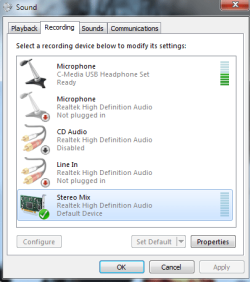
Now I can't find my stereo mix. I checked the disconnected and disabled devices, still can't find anything :(

I'm using ASUS PK5PL-AM motherboard.
Help please :(

I can listen to music and stuff, but I can't use my microphone :(

219b3pu.png


2ebri8n.png


PS: i was trying to install the drivers in my win 7, unfortunately my cd doesn't support win 7 OS, and i can't find any update for the drivers..​
 

My Computer

OS
Windows 7 ultimate
The lack of the Stereo Mix is a major complaint of many. It's the driver that is usually the issue. Check with the sound chip vendor for a Win 7 driver. e.g. if it's RealTek then check with RealTek, if it's Sigmatel check with IDT (SigmaTel is now IDT). But, ultimately you may have to install a Win 7 sound card that does have the feature you want, several on the Dell forum that have upgraded old XP systems to Win 7, and there are no updated drivers, have had to do that.
 

My Computer

Computer type
PC/Desktop
Computer Manufacturer/Model Number
My Own Build
OS
Windows 10 64 bit
CPU
Intel i7 6700K
Motherboard
ASUS ROG Maximus VIII Hero
Memory
16GB Corsair Dominator
Graphics Card(s)
Intel CPU Graphics
Sound Card
RealTek
Monitor(s) Displays
27" Dell S2719dgf
Screen Resolution
2560X1440
Hard Drives
1 TB Samsung 850 EVO SSD for Win 10 Pro
500GB Samsung 850 EVO SSD for Win 10 Insider
2 TB drive for backup
PSU
EVGA Supernova 750G2
Case
BeQuiet Silent Base 600
Cooling
Deepcool Captain 120EX
Keyboard
Microsoft Wireless 2000
Mouse
Microsoft wireless
Internet Speed
100 MB/sec (Cable)
Antivirus
Microsoft Defender and Malwarebytes
Browser
Edge/Firefox
Other Info
Cakewalk (Sonar) by BandLab and Studio One 4.1 Pro recording studio software. MOTU 896Mk3 Hybrid recording interface, Frontier Tranzport wireless control unit, Behringer X-Touch Control Surface.
Five USB connected optical drives for CD Audio production using Nero BurningROM
thanks :(

thank you for answering me, fireberd.
If you don't mind, do you know any alternative software or stuff that will replace the functions of stereo mix?

just in case i can't find any updates for my driver..
 

My Computer

OS
Windows 7 ultimate
For the System Mixer, Total Recorder did this for XP but I don't know if it's been updated to work with Win 7. Vista and Win 7 handle some audio functions differently than XP and require Vista/Win 7 specific audio software.

But, just to use the microphone shouldn't require the System Mixer. What are you doing with the mic that you need the system mixer?
 

My Computer

Computer type
PC/Desktop
Computer Manufacturer/Model Number
My Own Build
OS
Windows 10 64 bit
CPU
Intel i7 6700K
Motherboard
ASUS ROG Maximus VIII Hero
Memory
16GB Corsair Dominator
Graphics Card(s)
Intel CPU Graphics
Sound Card
RealTek
Monitor(s) Displays
27" Dell S2719dgf
Screen Resolution
2560X1440
Hard Drives
1 TB Samsung 850 EVO SSD for Win 10 Pro
500GB Samsung 850 EVO SSD for Win 10 Insider
2 TB drive for backup
PSU
EVGA Supernova 750G2
Case
BeQuiet Silent Base 600
Cooling
Deepcool Captain 120EX
Keyboard
Microsoft Wireless 2000
Mouse
Microsoft wireless
Internet Speed
100 MB/sec (Cable)
Antivirus
Microsoft Defender and Malwarebytes
Browser
Edge/Firefox
Other Info
Cakewalk (Sonar) by BandLab and Studio One 4.1 Pro recording studio software. MOTU 896Mk3 Hybrid recording interface, Frontier Tranzport wireless control unit, Behringer X-Touch Control Surface.
Five USB connected optical drives for CD Audio production using Nero BurningROM
Your motherboard,

ASUSTeK Computer Inc. - Motherboards - P5KPL-AM

checking the specs it has the Via VT1708B audio on it, and they do have Windows 7 64 bit drivers for it. Just click on Download and select Windows 7 64 bit, then under Audio.
 

My Computer

Computer type
PC/Desktop
Computer Manufacturer/Model Number
Me
OS
Win 7 Ultimate x64
CPU
FX-8350 @ 4.6 GHz so far
Motherboard
Asus M5A97 EVO
Memory
ADATA XPG V1 Series Black 8GB DDR3 1600
Graphics Card(s)
Sapphire R9 270x Dual-X
Sound Card
Xonar DGX w/ Corsair Vengence 1300
Monitor(s) Displays
Acer S232HL Abid
Screen Resolution
1920x1080
Hard Drives
120 GB OCZ Vertex 3
500 GB Seagate 7200.12
PSU
Antec Earthwatts 650W Green
Case
Antec Three Hundred
Cooling
Cooler Master 212 EVO
Keyboard
Logitech G510
Mouse
Logitech G500s
Internet Speed
35000/3000
Seems really strange to me that Microsoft hid the system mixer--I can't think of a reason why they would do it.

All you have to do is right-click the speaker in the taskbar and select recording devices, then right-click in that window and check "Show disabled devices" and "Show disconnected devices" (it may just be one of those, but doesn't hurt to check both) then select Stereo Mix as the default.
 

Attachments

  • 2010-08-23_1803.png
    2010-08-23_1803.png
    18 KB · Views: 0

My Computer

OS
Windows 7
Back
Top