URGENT Help needed

Samsung7Buff

New member
Local time
11:45 PM
Messages
9
Hello again I recently (today) got a Samsung N310, I downloaded and mounted a RTM version of Windows 7, However when I try to run the setup I get this message, saying that I have tyhe wrong version for this version of windows im running? what do I do the ISO is a x64bit and the netbook Has 2GB of memory can someone help me please How do I get this bloody thing to run Ive searched google to no avail:cry:
 

My Computer

OS
Vista and windows 7(soon)
Hello again I recently (today) got a Samsung N310, I downloaded and mounted a RTM version of Windows 7, However when I try to run the setup I get this message, saying that I have tyhe wrong version for this version of windows im running? what do I do the ISO is a x64bit and the netbook Has 2GB of memory can someone help me please How do I get this bloody thing to run Ive searched google to no avail:cry:


You really dont want to install 64bit in 2 gigs of ram. That is the absolute minimum. It will crawl

That being said you need to boot from the dvd not try to launch it from within an OS.

Ken J+
 

My Computer

Computer Manufacturer/Model Number
HP Pavillion dv-7 1005 Tx
OS
Win 8 Release candidate 8400
CPU
[email protected]
Memory
4 gigs
Graphics Card(s)
Nvidia 9600M
Sound Card
HD built-in
Monitor(s) Displays
17" Wxga
Screen Resolution
1440x900
Cooling
none
Internet Speed
45Mb down 5Mb up
Agree with Ken: You probably want 32 bit unless you plan to double RAM, and cannot run a 64 bit installer from a 32 bit OS, even mounting the image.

Burn the RTM to DVD using ImgBurn at 4x speed with Verify.

Then boot from the DVD, keep ethernet plugged and "connect to the internet during install" to get latest drivers/updates into installer, select Custom install, use Drive tools there to delete all partitions, create New partition(s) as you wish, then format before installing Win7 to first partition.

You should attempt to make Recovery disks first from the Recov partition, but it will become disabled during install so can be deleted after disks are made.
 
Hello again I recently (today) got a Samsung N310, I downloaded and mounted a RTM version of Windows 7, However when I try to run the setup I get this message, saying that I have tyhe wrong version for this version of windows im running? what do I do the ISO is a x64bit and the netbook Has 2GB of memory can someone help me please How do I get this bloody thing to run Ive searched google to no avail:cry:


You really dont want to install 64bit in 2 gigs of ram. That is the absolute minimum. It will crawl

That being said you need to boot from the dvd not try to launch it from within an OS.

Ken J+

Okay Ill get me a 32 bit version thank you, but I cannot Install from disk its a netbook you see although I have a 320 GB HDD USB that I can use, Ive had trouble tho can I just copy the ISO onto it Run it by using an ISO program to get to the setup and click run?
 

My Computer

OS
Vista and windows 7(soon)
Hello again I recently (today) got a Samsung N310, I downloaded and mounted a RTM version of Windows 7, However when I try to run the setup I get this message, saying that I have tyhe wrong version for this version of windows im running? what do I do the ISO is a x64bit and the netbook Has 2GB of memory can someone help me please How do I get this bloody thing to run Ive searched google to no avail:cry:


You really dont want to install 64bit in 2 gigs of ram. That is the absolute minimum. It will crawl

That being said you need to boot from the dvd not try to launch it from within an OS.

Ken J+

Okay Ill get me a 32 bit version thank you, but I cannot Install from disk its a netbook you see although I have a 320 GB HDD USB that I can use, Ive had trouble tho can I just copy the ISO onto it Run it by using an ISO program to get to the setup and click run?

do you have a usb stick of 3 gigs or more? there are tutorials on how to install from almost any source. If you have more than one partition on your HD you can.

Ken J+
 

My Computer

Computer Manufacturer/Model Number
HP Pavillion dv-7 1005 Tx
OS
Win 8 Release candidate 8400
CPU
[email protected]
Memory
4 gigs
Graphics Card(s)
Nvidia 9600M
Sound Card
HD built-in
Monitor(s) Displays
17" Wxga
Screen Resolution
1440x900
Cooling
none
Internet Speed
45Mb down 5Mb up
You really dont want to install 64bit in 2 gigs of ram. That is the absolute minimum. It will crawl

That being said you need to boot from the dvd not try to launch it from within an OS.

Ken J+

Okay Ill get me a 32 bit version thank you, but I cannot Install from disk its a netbook you see although I have a 320 GB HDD USB that I can use, Ive had trouble tho can I just copy the ISO onto it Run it by using an ISO program to get to the setup and click run?

do you have a usb stick of 3 gigs or more? there are tutorials on how to install from almost any source. If you have more than one partition on your HD you can.

Ken J+
No I only have The HDD, surely I could use that, Im unsure what you mean by partition? as in seperate my external HDD? into a small section only 3Gigs or by half, thank you very much for the help btw.:huh:
 

My Computer

OS
Vista and windows 7(soon)
If you're going to use 32 bit then you can try mounting the ISO or running the unzipped Setup file from the desktop to overwrite your current Win7 Starter.

There is also a workaround to in-place Upgrade Starter to Ultimate which has worked for several on here.

If you want the cleanest possible format install, then use UltraISO trial version to write the ISO to a flash stick using the Bootable tab, boot stick using F-key given on first bootup screen for Boot Menu (listed under Hard drives) and select Custom install, use Drive tools to delete all, create new partition(s) as you wish, then format before installing Win7 to first partition.

The installer is mostly driver-complete with new arriving soon via Windows Updates. Any missing drivers or apps can be found on the Support Downloads page for your model computer.
 
If you're going to use 32 bit then you can try mounting the ISO or running the unzipped Setup file from the desktop to overwrite your current Win7 Starter.

There is also a workaround to in-place Upgrade Starter to Ultimate which has worked for several on here.

If you want the cleanest possible format install, then use UltraISO trial version to write the ISO to a flash stick using the Bootable tab, boot stick using F-key given on first bootup screen for Boot Menu (listed under Hard drives) and select Custom install, use Drive tools to delete all, create new partition(s) as you wish, then format before installing Win7 to first partition.

The installer is mostly driver-complete with new arriving soon via Windows Updates. Any missing drivers or apps can be found on the Support Downloads page for your model computer.
I like the sound of the upgede workaround could you tell me more the laptop is empty I only got it today so no need for a fresh install really
 

My Computer

OS
Vista and windows 7(soon)
First you should make a backup image or create the manufacturer's Recovery Disks so you can start over if there are any problems.

Next you want to uninstall all of the bloatware, which is reason alone for a clean reinstall.

If there is Norton, google the Norton removal tool and use it.

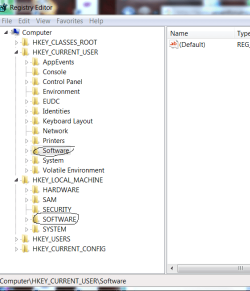
After uninstalling all of the unwanted programs, use Regedit to delete any remaining listings for the uninstalled programs by name in 2nd and 3rd registy hives Software keys. Set a restore point before registry edits.

regedi.PNG

Now download and install state-of-the-art CCleaner and Auslogics Disk Defragger and run the Disk cleaner/Reg cleaner and Disk/reg defrag.
View attachment 43685
View attachment 43686
View attachment 43687

Now modify this workaround designed to downgrade the RTM to a lesser version to instead in-place Upgrade Starter to Ultimate: In-Place Upgrade between Win7 versions

You will be changing the registry key to the exact wording shown for Windows 7 ULTIMATE. This tricks the installer into thinking that it is doing a Repair Install (upgrade over itself) which is the only in-place allowed between Win7 versions. This is because MS wants people to buy Anytime upgrades between versions.
 
Back
Top