USB 2 Problems

w4cnv

New member
Local time
6:14 PM
Messages
6
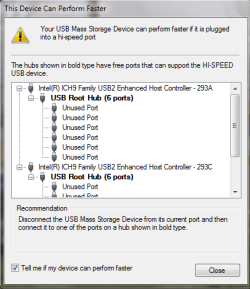
Hello to all. I recently upgraded to Win 7 Home Premium. When I plug in my camera I get a Notification balloon telling me to plug in to a Usb 2 port. In Vista they were all Usb 2. Now i only show two in Device Manger. Tried to update driver and tells me I have the latest one.
 

Attachments
  • Capture.PNG
    Capture.PNG
    3.6 KB · Views: 7

My Computer

Computer Manufacturer/Model Number
dell 530
OS
Windows 7 Home Premium 64bit
CPU
Intel Core 2 Duo 6400
Motherboard
Dell Junk
Memory
4Gb
Graphics Card(s)
Nvidia Geforce 9500
Sound Card
Built in
Monitor(s) Displays
19" wide screen
Screen Resolution
1440x900
Okay tried to find the two usb 2 ports listed and they are no where on here. I have four in front and back and they are all Usb 1.1.
 

My Computer

Computer Manufacturer/Model Number
dell 530
OS
Windows 7 Home Premium 64bit
CPU
Intel Core 2 Duo 6400
Motherboard
Dell Junk
Memory
4Gb
Graphics Card(s)
Nvidia Geforce 9500
Sound Card
Built in
Monitor(s) Displays
19" wide screen
Screen Resolution
1440x900
I would contact dell - you could try the latest intel chipset software utility and the latest intel matrix storage manager - you would need to install the chipset drivers first. You probably havent installed the matrix driver yet?

Chipset : http://downloadcenter.intel.com/SearchResult.aspx?lang=eng&ProductFamily=Chipsets&ProductLine=Chipset+Software&ProductProduct=Intel%c2%ae+Chipset+Software+Installation+Utility&ProdId=816&LineId=1090&FamilyId=40

Matrix :
Intel(R) Matrix Storage Manager


Your driver page : Drivers & Downloads=

http://support.ap.dell.com/support/...n/document?c=ap&docid=361553&l=en&s=gen#Step1
 

My Computer

OS
XP, Vista, W7 64bit Home Premium
CPU
Intel Core Duo 6850 3.0 ghz @ 3.7 ghz
Motherboard
Asus P5E
Memory
4GB Corsair DDR 2 PC-6400
Graphics Card(s)
Ati 4870 1ghz
Sound Card
Supreme FX 11
Monitor(s) Displays
View Sonic VX1962wm
Screen Resolution
1680 X1050
Hard Drives
3 Seagate Sata Drives 160gb 250gb 500gb
PSU
Thermaltake 600 watt
Case
NZXT Alpha
Cooling
3X120cm Fans
Keyboard
Microsoft Digital Media Pro Keyboard
Mouse
Microsoft Wheel Mouse Optical
Internet Speed
1.5Mb to 8Mb/384k
Installed chipset drivers shows same and won't let me install matrix controller.
 

My Computer

Computer Manufacturer/Model Number
dell 530
OS
Windows 7 Home Premium 64bit
CPU
Intel Core 2 Duo 6400
Motherboard
Dell Junk
Memory
4Gb
Graphics Card(s)
Nvidia Geforce 9500
Sound Card
Built in
Monitor(s) Displays
19" wide screen
Screen Resolution
1440x900
Probably means you dont have AHCI enabled in the bios since the matrix wont install - probably sata as IDE which is ok - all you know is the chipset drivers are a waste of time - they usually are - W7 probably installed the latest for your mobo - the intel drivers are only updated per ich 7, 8, 9, 10 etc so if you install the latest they are only updated to the latest for the coresponding chipset plus any fix which is rare, hence, the date associated with drivers isnt realistic.
All i can say is contact dell and enquire, as to why they think it isnt working correctly if no one here has a solution, or try a clean install, and make sure you havent any usb devices attached other then the mouse and keyboard when you install w7.
There is probably easy to follow instructions here at this site under tutorials on how to do a clean install.
I guess there are no devices with a yellow asterisk next to them in device manager, so we havent really much to work with.
http://support.ap.dell.com/support/edocs/systems/inspd530/
 

My Computer

OS
XP, Vista, W7 64bit Home Premium
CPU
Intel Core Duo 6850 3.0 ghz @ 3.7 ghz
Motherboard
Asus P5E
Memory
4GB Corsair DDR 2 PC-6400
Graphics Card(s)
Ati 4870 1ghz
Sound Card
Supreme FX 11
Monitor(s) Displays
View Sonic VX1962wm
Screen Resolution
1680 X1050
Hard Drives
3 Seagate Sata Drives 160gb 250gb 500gb
PSU
Thermaltake 600 watt
Case
NZXT Alpha
Cooling
3X120cm Fans
Keyboard
Microsoft Digital Media Pro Keyboard
Mouse
Microsoft Wheel Mouse Optical
Internet Speed
1.5Mb to 8Mb/384k
Did you read your manual? It says you have 4 usb 2.0 at the back and 4 usb 2.0 at the front - and recommends to use the front ones for cameras and joysticks :

Documentation

Have you checked the settings in your bios for usb 2.0?
 

My Computer

OS
XP, Vista, W7 64bit Home Premium
CPU
Intel Core Duo 6850 3.0 ghz @ 3.7 ghz
Motherboard
Asus P5E
Memory
4GB Corsair DDR 2 PC-6400
Graphics Card(s)
Ati 4870 1ghz
Sound Card
Supreme FX 11
Monitor(s) Displays
View Sonic VX1962wm
Screen Resolution
1680 X1050
Hard Drives
3 Seagate Sata Drives 160gb 250gb 500gb
PSU
Thermaltake 600 watt
Case
NZXT Alpha
Cooling
3X120cm Fans
Keyboard
Microsoft Digital Media Pro Keyboard
Mouse
Microsoft Wheel Mouse Optical
Internet Speed
1.5Mb to 8Mb/384k
Yep read it before I posted. Checked the bios high speed enabled. Called Dell and that was a waste of time. Was told that only the back were 2.0 not the front. I asked why the manual stated they were all 2.0 only got more of the same. Anyways for giggles I plug my camera into the back ports and got the same message about plugging into USB 2.0 ports will make device work faster. I've tried every port on the thing and all give same message.
 

My Computer

Computer Manufacturer/Model Number
dell 530
OS
Windows 7 Home Premium 64bit
CPU
Intel Core 2 Duo 6400
Motherboard
Dell Junk
Memory
4Gb
Graphics Card(s)
Nvidia Geforce 9500
Sound Card
Built in
Monitor(s) Displays
19" wide screen
Screen Resolution
1440x900
I'd be trying a clean install - upgrades can sometimes mess things up - there is no guarantees it will fix the problem - other choice is to go back to vista - so it depends whether you have time to burn I guess. You could use the search engine on the site to sort thru probably 1000's of threads on USB problems - wow there are endless probelms with W7 and usb - here it is but dont fall asleep -
Windows 7 Forums the biggest Windows 7 discussion forum, friendly help and many Windows 7 tutorials that will help you get the most out of Microsofts new Windows 7 Operating System. - Search Results for USB 2 Problems
 

My Computer

OS
XP, Vista, W7 64bit Home Premium
CPU
Intel Core Duo 6850 3.0 ghz @ 3.7 ghz
Motherboard
Asus P5E
Memory
4GB Corsair DDR 2 PC-6400
Graphics Card(s)
Ati 4870 1ghz
Sound Card
Supreme FX 11
Monitor(s) Displays
View Sonic VX1962wm
Screen Resolution
1680 X1050
Hard Drives
3 Seagate Sata Drives 160gb 250gb 500gb
PSU
Thermaltake 600 watt
Case
NZXT Alpha
Cooling
3X120cm Fans
Keyboard
Microsoft Digital Media Pro Keyboard
Mouse
Microsoft Wheel Mouse Optical
Internet Speed
1.5Mb to 8Mb/384k
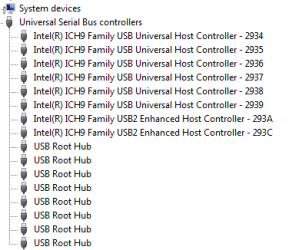
According to the screenshot posted, the installed drivers for the chipset are the generic ones included with windows 7, not the specific ones for the OP's hardware. In order to get the full USB capability you have to manually install the correct drivers.
 
The drivers I think are the problem. Can't seem to get rid of the generic windows drivers. No matter how many times I try. When I installed Windows 7 it was a clean install. Did it twice once for 32bit and then when I went to 64bit.
 

My Computer

Computer Manufacturer/Model Number
dell 530
OS
Windows 7 Home Premium 64bit
CPU
Intel Core 2 Duo 6400
Motherboard
Dell Junk
Memory
4Gb
Graphics Card(s)
Nvidia Geforce 9500
Sound Card
Built in
Monitor(s) Displays
19" wide screen
Screen Resolution
1440x900
To manually install the drivers, go to device manager, select the usb controller, right click and select update driver. Then click "browse my computer for driver software" and navigate to the folder where you downloaded the drivers.. that's how I fixed the USB problems with my laptop when I upgraded to win 7
 
Okay tried to install drivers the manual way. Windows pops up a message that the best driver has already been installed. This it what I get when I plug in camera or other 2.0 devices. And this is in the front and back. I would love to find these ports.:rolleyes:
 

Attachments

  • Capture.PNG
    Capture.PNG
    14.6 KB · Views: 1

My Computer

Computer Manufacturer/Model Number
dell 530
OS
Windows 7 Home Premium 64bit
CPU
Intel Core 2 Duo 6400
Motherboard
Dell Junk
Memory
4Gb
Graphics Card(s)
Nvidia Geforce 9500
Sound Card
Built in
Monitor(s) Displays
19" wide screen
Screen Resolution
1440x900
Back
Top