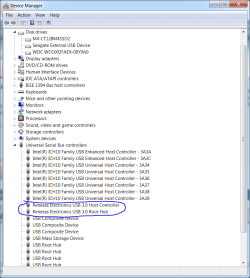
did you tried to force start your driver?
from command prompt type driverquery
you will get a long list of drivers
look for your usb 3 driver by the display name.. and note its module name
you can run driverquery /v this will display which drivers are running and which are not.
anyway when you find out module name for your usb3 driver (if you want you can see its status with /v)
type net start modulename <replace module name with the module name of usb 3 driver you find from driverquery
this will try to force start this driver.
from command prompt type driverquery
you will get a long list of drivers
look for your usb 3 driver by the display name.. and note its module name
you can run driverquery /v this will display which drivers are running and which are not.
anyway when you find out module name for your usb3 driver (if you want you can see its status with /v)
type net start modulename <replace module name with the module name of usb 3 driver you find from driverquery
this will try to force start this driver.
My Computer
At a glance
Windows 7 pro 64bit. (SP1)Intel core I5 24008GB DDR3 KingstonGigabyte GF GTX650OC
- Computer type
- PC/Desktop
- Computer Manufacturer/Model Number
- Self Built PC
- OS
- Windows 7 pro 64bit. (SP1)
- CPU
- Intel core I5 2400
- Motherboard
- Gigabyte H61
- Memory
- 8GB DDR3 Kingston
- Graphics Card(s)
- Gigabyte GF GTX650OC
- Sound Card
- Realtek HD audio
- Monitor(s) Displays
- LCD 20"
- Screen Resolution
- 1600x900
- Hard Drives
- INTEL SSD 320 80GB +Seagate 7200.12 1TBx3
- PSU
- Coolermaster RX450W
- Case
- Coolermaster atx case
- Cooling
- stock cooler
- Keyboard
- logitech
- Mouse
- logitech
- Internet Speed
- FTTD 100mbps