
Solved USB 3.0 not recognising anything

MicroMister

New member
Local time
4:03 AM
Messages
10
I've just finished building a PC, and the mobo's CD installed some of Intel's USB 3.0 drivers. They seem to be up to date, as I have tried updating them via Gigabyte and Intel's website. However, whilst they provide power, they will not recognise any drives. My Device manager is shown below
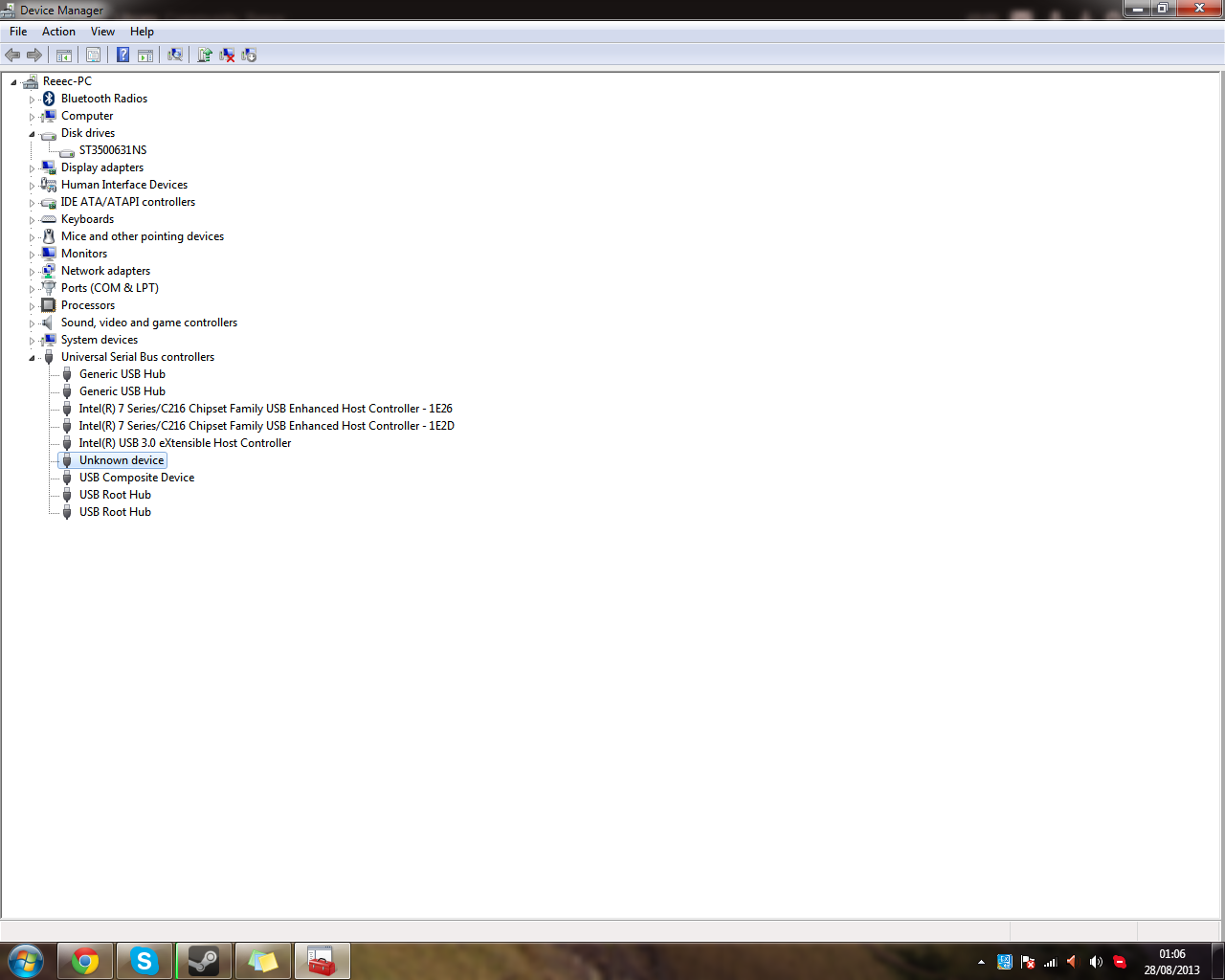
T7BUqLo.png


Is there any way I could just use generic/Microsoft's USB 3.0 drivers?

Why is there so many listings? I have 4 USB 2.0 ports and 4 USB 3.0 ports
 

My Computer My Computer

Computer type
PC/Desktop
Computer Manufacturer/Model Number
Custom built bitfenix prodigy
OS
Windows 7 Ultimate 64Bit
CPU
Intel Pentium G2120
Motherboard
Gigabyte GA-H77N-WIFI
Memory
8GB 1600ghz DDR3 (2x4GB)
Graphics Card(s)
NVIDIA GTX 660
Screen Resolution
1920x1080
Hard Drives
500GB Seagate Barracuda 7200rpm
1TB Seagate Hybrid 7200rpm
PSU
Corsair CX430W Modular
Case
Bitfenix Prodigy
Cooling
2 Bitfenix Spectres, Stock Intel heatsink
Keyboard
Logitech K360
Mouse
Logitech Performance MX
Antivirus
Zonealarm
Browser
Chrome
Unfortunately MS don't provide native USB3 support/drivers.

Have you tried a different drive?
 

My Computer My Computer

Computer type
PC/Desktop
Computer Manufacturer/Model Number
Golden Mk. I.4
OS
Windows 10 Pro x64 ; Xubuntu x64
CPU
Intel i7 860 @ 2.80 GHz O/C'ed to 4.0GHz
Motherboard
Gigabyte P55A-UD3R Rev.1. Award BIOS F13
Memory
16GB Corsair Vengance DDR3 @ 661 MHz Dual Channel (9-9-9-24)
Graphics Card(s)
EVGA NVidia GTX 560 1024MB
Sound Card
Realtek Integrated
Monitor(s) Displays
Dual Samsung SyncMaster 2494HS
Screen Resolution
1920*1080 and 1920*1080
Hard Drives
1*Samsung 840 EVO 120GB SSD;
1*OCZ Vertex 2 60GB SSD;
2*Samsung F3 SpinPoint 1TB in RAID0;
1*Samsung F1 SpinPoint 1TB;
2*Western Digital 1TB External USB 3.0
1*Western Digital 500GB External USB 3.0
1*Seagate 500GB External USB 2.0
PSU
Thermaltake ToughPower QFan 750W
Case
Thermaltake Element S VK60001W2Z
Cooling
Corsair H60 Water Cooling, 2*230mm and 2*80mm case fans
Keyboard
Logitech G110
Mouse
Logitech MX518
Uh, no worries, I think its working now...
I used the much older USB3 drivers from my mobo disk (they must've gotten updated via gigabyte or intel's site), and at the end of the installation I got a BSOD and it crashed, but now its on again, and they appear to we working...
All's well that ends well, I guess.
 

My Computer My Computer

Computer type
PC/Desktop
Computer Manufacturer/Model Number
Custom built bitfenix prodigy
OS
Windows 7 Ultimate 64Bit
CPU
Intel Pentium G2120
Motherboard
Gigabyte GA-H77N-WIFI
Memory
8GB 1600ghz DDR3 (2x4GB)
Graphics Card(s)
NVIDIA GTX 660
Screen Resolution
1920x1080
Hard Drives
500GB Seagate Barracuda 7200rpm
1TB Seagate Hybrid 7200rpm
PSU
Corsair CX430W Modular
Case
Bitfenix Prodigy
Cooling
2 Bitfenix Spectres, Stock Intel heatsink
Keyboard
Logitech K360
Mouse
Logitech Performance MX
Antivirus
Zonealarm
Browser
Chrome
:thumbsup:
 

My Computer My Computer

Computer type
PC/Desktop
Computer Manufacturer/Model Number
Golden Mk. I.4
OS
Windows 10 Pro x64 ; Xubuntu x64
CPU
Intel i7 860 @ 2.80 GHz O/C'ed to 4.0GHz
Motherboard
Gigabyte P55A-UD3R Rev.1. Award BIOS F13
Memory
16GB Corsair Vengance DDR3 @ 661 MHz Dual Channel (9-9-9-24)
Graphics Card(s)
EVGA NVidia GTX 560 1024MB
Sound Card
Realtek Integrated
Monitor(s) Displays
Dual Samsung SyncMaster 2494HS
Screen Resolution
1920*1080 and 1920*1080
Hard Drives
1*Samsung 840 EVO 120GB SSD;
1*OCZ Vertex 2 60GB SSD;
2*Samsung F3 SpinPoint 1TB in RAID0;
1*Samsung F1 SpinPoint 1TB;
2*Western Digital 1TB External USB 3.0
1*Western Digital 500GB External USB 3.0
1*Seagate 500GB External USB 2.0
PSU
Thermaltake ToughPower QFan 750W
Case
Thermaltake Element S VK60001W2Z
Cooling
Corsair H60 Water Cooling, 2*230mm and 2*80mm case fans
Keyboard
Logitech G110
Mouse
Logitech MX518
Back
Top