Solved USB 3 ports do not work

reevesjo

New member
Local time
11:05 PM
Messages
24
Confession: I bought an HP ENVY laptop with WIN-8. I hated it and replaced it with WIN-7 PRO Service Pack 1. The single USB2 port still works fine. The three USB3 ports do not work. I did not check them out before I replaced the operating system but I suppose they were supported with 8 but not 7. Any suggestions to get them working again??
 

My Computer

OS
Windows 7 Home 64bit
Hi there,

Try checking the driver is installed.

Go to Start > Type "Device Manager" in search > Press internet > once it opens expand the "Universal Serial Bus Controllers section > Go down the list and make sure a yellow Explanation mark isn't next to any of them.

Let us know how you get on.
 

My Computer

Computer type
PC/Desktop
Computer Manufacturer/Model Number
Me :D
OS
Windows 7
CPU
AMD X6 1090T 4.02Ghz
Motherboard
ASUS Crosshair IV Formula
Memory
16.00GB
Graphics Card(s)
Nvidia Geforce 470
Sound Card
ASUS Xonar DX
Monitor(s) Displays
Dell 24" Monitor
Hard Drives
2TB WD
1TB WD
2TB WD
60 SSD
60 SSD
PSU
700W Crosshair
Case
Antec Three hundred
Cooling
Water Cooling
My USB 3.0 controller and ports are working OK. The USB 3.0 controller is an Intel and I installed the Intel driver.

Since you installed a different OS, check with HP for Win 7 drivers and install as needed. Motherboard chipset drivers are the first thought and then USB 3.0 controller driver (at a minimum). You may also need the HP supplied sound driver for proper operation. The Windows installed HD Audio Codec is only a basic function audio driver.
 

My Computer

Computer type
PC/Desktop
Computer Manufacturer/Model Number
My Own Build
OS
Windows 10 64 bit
CPU
Intel i7 6700K
Motherboard
ASUS ROG Maximus VIII Hero
Memory
16GB Corsair Dominator
Graphics Card(s)
Intel CPU Graphics
Sound Card
RealTek
Monitor(s) Displays
27" Dell S2719dgf
Screen Resolution
2560X1440
Hard Drives
1 TB Samsung 850 EVO SSD for Win 10 Pro
500GB Samsung 850 EVO SSD for Win 10 Insider
2 TB drive for backup
PSU
EVGA Supernova 750G2
Case
BeQuiet Silent Base 600
Cooling
Deepcool Captain 120EX
Keyboard
Microsoft Wireless 2000
Mouse
Microsoft wireless
Internet Speed
100 MB/sec (Cable)
Antivirus
Microsoft Defender and Malwarebytes
Browser
Edge/Firefox
Other Info
Cakewalk (Sonar) by BandLab and Studio One 4.1 Pro recording studio software. MOTU 896Mk3 Hybrid recording interface, Frontier Tranzport wireless control unit, Behringer X-Touch Control Surface.
Five USB connected optical drives for CD Audio production using Nero BurningROM
D3ll

No yellow marks by any devices listed under Universal Serial Bus controllers.
 

My Computer

OS
Windows 7 Home 64bit
Try running Windows Update, it's in the Start/All Program menu. Also follow fireberd's suggestion to check the HP site. After trying these, post back results.
 

My Computer

Computer type
PC/Desktop
Computer Manufacturer/Model Number
Home Built Desktop By DataTech
OS
Windows 7 Ultimate X64 SP1
CPU
Intel i5-2550K, Differing ~4.4-4.8GHz No built in GPU
Motherboard
ASUS P8Z68-V PRO/GEN3
Memory
16GB G.Skill Sniper 1866MHz @ 2133MHz 2x8GB
Graphics Card(s)
ASUS GTX650TIB-DC2OC-2GD5, (650TI Boost)
Sound Card
Onboard Realtek 5-1
Monitor(s) Displays
Samsung P2570HD
Screen Resolution
1920x1080
Hard Drives
Samsung 840 Pro 256GB SSD for OS, 500GB Seagate Constellation (Enterprise drive) for Data
PSU
Corsair HX650W
Case
Inwin Dragon Rider
Cooling
Hyper 212 EVO w/two Noctua fans, push-pull, @1300 RPM
Keyboard
E-Z Eyes, bright yellow keys with large characters
Mouse
steelseries SENSEI Laser Pro Gaming
Internet Speed
48-51Mbs Mbs down, 11 Mbs up Xfinity Cable
Antivirus
Norton Internet Security 2013
Browser
IE 10, Opera, Pale Moon if needed
Other Info
4 case fans, LG BluRay-RE, ASUS DVD-RW, Mr. Fusion power supply, 1.21 gigawatts.
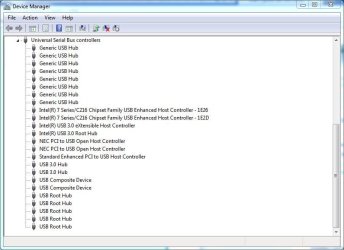
Is the USB 3.0 listed in the USB section of the Device Manager?

See Mine:
 

Attachments

  • Capture.JPG
    Capture.JPG
    55.7 KB · Views: 24

My Computer

Computer type
PC/Desktop
Computer Manufacturer/Model Number
My Own Build
OS
Windows 10 64 bit
CPU
Intel i7 6700K
Motherboard
ASUS ROG Maximus VIII Hero
Memory
16GB Corsair Dominator
Graphics Card(s)
Intel CPU Graphics
Sound Card
RealTek
Monitor(s) Displays
27" Dell S2719dgf
Screen Resolution
2560X1440
Hard Drives
1 TB Samsung 850 EVO SSD for Win 10 Pro
500GB Samsung 850 EVO SSD for Win 10 Insider
2 TB drive for backup
PSU
EVGA Supernova 750G2
Case
BeQuiet Silent Base 600
Cooling
Deepcool Captain 120EX
Keyboard
Microsoft Wireless 2000
Mouse
Microsoft wireless
Internet Speed
100 MB/sec (Cable)
Antivirus
Microsoft Defender and Malwarebytes
Browser
Edge/Firefox
Other Info
Cakewalk (Sonar) by BandLab and Studio One 4.1 Pro recording studio software. MOTU 896Mk3 Hybrid recording interface, Frontier Tranzport wireless control unit, Behringer X-Touch Control Surface.
Five USB connected optical drives for CD Audio production using Nero BurningROM
fireberd loooooong answer

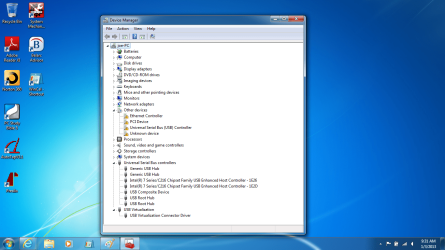
No, the USB 3 is not listed in the device manager. Nor is the USB 2, as such.

What is listed under UNIVERSAL SERIAL BUS CONTROLLERS is:
Generic USB Hub
Generic USB Hub
Standard Enhanced PCI to USB Host Controller
USB Composite Device
USB Root Hub
USB Root Hub
(none have yellow mark)

I listed each one of these two times, because that is the way they appear. I clicked on each one individually, then Properties, then Driver, then Update Driver. And each time it replied "Driver is up to date"

NOW, "farther above" the UNIVERSAL SERIAL BUS CONTROLLER list is a catagory:
OTHER DEVICES: and when I clicked on Properties, each one said, "driver not installed Code 28" and when I tried to upddate the driver, the response was, "windows could not find driver". The devices are:
Ethernet Controller
PCI device
SM Bus Controller
Universal Serial Bus (USB) Controller
Unknown device

Each one has a yellow box by it.

I tried Windows Update and the response is: All updates have been applied. I had done this several days ago after installing WIN-7 PRO and several updates were made.

I ran BELARC ADVISOR "before I deleted WIN-8" and again "after I installed WIN-7 PRO". I am presently trying to find differences in these system lists.

Also, when I go to "HP Download Drivers" page, they want to "scan" my system to check for drivers that need to be updated or are missing. There is only choice of Operating Systems and that is WIN-8. Then they say, "If your operating system is not listed, HP does not have software or driver downloads available for this product". So, my conclusion is this ENVY laptop was designed for WIN-8 and they did not intend for me to mess with this OS. There is only one USB2 port and it works fine with the printer or Logitec mouse. The three USB3 ports do not work with either device. It is my understanding USB3 is backward compatible and USB2 in NOT forward compatible. If necessary, I can live with this, but I would rather have the USB3 ports working too.

 

My Computer

OS
Windows 7 Home 64bit
The motherboard chipset drivers could be the key. The chipset drivers (especially on an Intel system) define all the devices on the motherboard, which needs to be done before devices will be recognized (and installed).

If this is an Intel chipset system, check with Intel for a chipset driver. If it's an AMD chipset, there are also chipset drivers but I'm not sure exactly how they work.

Unfortunately PC vendors will only support the OS that the PC was designed for/delivered. I've seen this on Dell's, too. If a user want to install something else on the PC they are "on their own".

I have a dual boot system (on separate SSD drives) Win 7 and Win 8. I haven't found anything that I run on Win 7 that won't run on Win 8 except Acronis True Image backup software. Acronis 2013 is required for Win 8.

I have installed Start8 on my Win 8 system and it restores the start button and menu so the desktop looks and works just like Win 7. I don't have to use the Win 8 "metro" if I don't want to.
 

My Computer

Computer type
PC/Desktop
Computer Manufacturer/Model Number
My Own Build
OS
Windows 10 64 bit
CPU
Intel i7 6700K
Motherboard
ASUS ROG Maximus VIII Hero
Memory
16GB Corsair Dominator
Graphics Card(s)
Intel CPU Graphics
Sound Card
RealTek
Monitor(s) Displays
27" Dell S2719dgf
Screen Resolution
2560X1440
Hard Drives
1 TB Samsung 850 EVO SSD for Win 10 Pro
500GB Samsung 850 EVO SSD for Win 10 Insider
2 TB drive for backup
PSU
EVGA Supernova 750G2
Case
BeQuiet Silent Base 600
Cooling
Deepcool Captain 120EX
Keyboard
Microsoft Wireless 2000
Mouse
Microsoft wireless
Internet Speed
100 MB/sec (Cable)
Antivirus
Microsoft Defender and Malwarebytes
Browser
Edge/Firefox
Other Info
Cakewalk (Sonar) by BandLab and Studio One 4.1 Pro recording studio software. MOTU 896Mk3 Hybrid recording interface, Frontier Tranzport wireless control unit, Behringer X-Touch Control Surface.
Five USB connected optical drives for CD Audio production using Nero BurningROM
fireberd

I went to the Intel download site. It wanted to download a program to auto scan the system for up-to-date drivers and install them from System Requirements Lab from Husdawg, LLC

I did this and updated the Graphics Driver, and Sata Raid.

It failed to see a problem with: Intel Chipset Software installation Utility, Audio Driver, Wireless Networking, and Wired Networking.

Result: Device Manager looks exactly like it did. The three USB3 ports still do not work. The one USB2 port still works.

As I said above, I can live without the USB3 ports. I would be happier if they did work. I suspect the problem could be solved by HP, but since I scrubbed WIN-8 and replace it with WIN-7 PRO, they would not be interested in helping.

The real reason I went to WIN-7 PRO is that WIN-8 would not run an older version on Microsoft Office, and not even Microsoft Streets & Trips 2011 (only one year old); and, with WIN-7 PRO in XP mode, I can run AutoCad14.

Thanks for your help.
 

My Computer

OS
Windows 7 Home 64bit
Manually install the chipset drivers, even if they are the same as what is installed.

I run MS Office 2003 on Win 8 without problems. Its not listed by Microsoft as compatible but it works OK - and installs in the native Win 8, I didn't have to install it in a compatibility mode. I use Outlook 2003 for e-mail.

I couldn't run my old streets and trips, it wouldn't install even in a compatibility mode.

Did you try installing the autocad in a compatibility mode for Win 7? All my recording studio software and devices except one installed in Win 8 OK. I had one old device (Frontier Tranzport) that I had to install in Win 7 compatibility mode (and it works OK).
 

My Computer

Computer type
PC/Desktop
Computer Manufacturer/Model Number
My Own Build
OS
Windows 10 64 bit
CPU
Intel i7 6700K
Motherboard
ASUS ROG Maximus VIII Hero
Memory
16GB Corsair Dominator
Graphics Card(s)
Intel CPU Graphics
Sound Card
RealTek
Monitor(s) Displays
27" Dell S2719dgf
Screen Resolution
2560X1440
Hard Drives
1 TB Samsung 850 EVO SSD for Win 10 Pro
500GB Samsung 850 EVO SSD for Win 10 Insider
2 TB drive for backup
PSU
EVGA Supernova 750G2
Case
BeQuiet Silent Base 600
Cooling
Deepcool Captain 120EX
Keyboard
Microsoft Wireless 2000
Mouse
Microsoft wireless
Internet Speed
100 MB/sec (Cable)
Antivirus
Microsoft Defender and Malwarebytes
Browser
Edge/Firefox
Other Info
Cakewalk (Sonar) by BandLab and Studio One 4.1 Pro recording studio software. MOTU 896Mk3 Hybrid recording interface, Frontier Tranzport wireless control unit, Behringer X-Touch Control Surface.
Five USB connected optical drives for CD Audio production using Nero BurningROM
fireberd

fireberd: thanks for sticking with me.

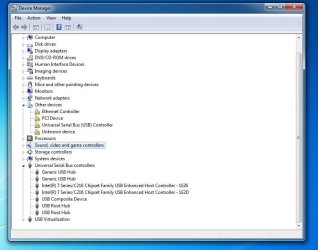
I went back to the Intel site and manually downloaded the chipset. The single USB2 port still works, the three USB3 ports do not work. A change in the description appeared in the Device Manager: The (two) Standard Enhanced PCI to USB Host Controller is now called,
Intel 7 Series/C216 Chipset family USB Enhanced Host Controller - 1E26 (the second one is called 1E2D).

My Microsoft Office 2000 is the edition that would not work in WIN-8.
When I tried several months ago to install AutoCad14 on my desktop WiN-7 Home Edition, it would not do anything except refuse. I did not know at the time about Compatibility Mode. I did find out later that AutoCad14 would install in WIN-7 PRO in "XP Mode" on this new laptop. That is one of the reasons I removed WIN-8.

I was going to paste the screenshot of the Device Manager, but I don't know how. I could do it in Microsoft Word, but not here. I copied by clicking "prt sc" and then I could paste in MS Word, but not here on this forum. There are probably instructions somewhere on the forum, but I didn't take the time to look.
 

My Computer

OS
Windows 7 Home 64bit
again with .jpg

screenshot2.JPG

On the HP trouble shooting page, it suggests un-installing the "USB Root Hubs" and then restarting the PC. I did this and it automatically reinstalled them exactly like they were. I am now wondering if I need to plug in some USB3 device and then expect the PC to recognize the port. Up to this point, I have just plugged in the Logitech cordless mouse to test the different ports. Since it is an old device, maybe the USB3 port will not recognize it. The mouse does not work in any of the USB3 ports, but does work in the USB2 port.
 

My Computer

OS
Windows 7 Home 64bit
The USB3 controller is still not installed according to what I see in the Device Manager, along with other items. You are going to have to find drivers that will work for these devices.

The "Enhanced Controller" entries indicate the USB2 ports ar operating at USB 2 speed.

My USB 3 ports will recognize whatever is plugged in, not just USB 3 devices. If a USB 2.0 device is plugged in then they will work at USB 2.0 speed. If a USB 3.0 device is plugged in then they work at USB 3.0 speed.

It may come down to the fact that HP has got you over a barrel and drivers for the USB3 and others simply are not available and will never work.

If you can return the PC, the best recommendation is to reinstall Win 8 back to how it was originally and return it for a different model that will fully support Win 7. Do your homework first and make sure whatever you are considering does have the PC Vendor's support and drivers for Win 7.
 

My Computer

Computer type
PC/Desktop
Computer Manufacturer/Model Number
My Own Build
OS
Windows 10 64 bit
CPU
Intel i7 6700K
Motherboard
ASUS ROG Maximus VIII Hero
Memory
16GB Corsair Dominator
Graphics Card(s)
Intel CPU Graphics
Sound Card
RealTek
Monitor(s) Displays
27" Dell S2719dgf
Screen Resolution
2560X1440
Hard Drives
1 TB Samsung 850 EVO SSD for Win 10 Pro
500GB Samsung 850 EVO SSD for Win 10 Insider
2 TB drive for backup
PSU
EVGA Supernova 750G2
Case
BeQuiet Silent Base 600
Cooling
Deepcool Captain 120EX
Keyboard
Microsoft Wireless 2000
Mouse
Microsoft wireless
Internet Speed
100 MB/sec (Cable)
Antivirus
Microsoft Defender and Malwarebytes
Browser
Edge/Firefox
Other Info
Cakewalk (Sonar) by BandLab and Studio One 4.1 Pro recording studio software. MOTU 896Mk3 Hybrid recording interface, Frontier Tranzport wireless control unit, Behringer X-Touch Control Surface.
Five USB connected optical drives for CD Audio production using Nero BurningROM
Thanks fireberd!!!

Thanks fireberd. I will quit bothering you for now. I may go back to HP and see if they will provide USB3 drivers, even though I have mutilated their product. I do not intend to return the laptop to Fry's or reinstall WIN8. I consider it my problem since I did not do enough homework before the purchase. It works well otherwise. I do not need the USB3 port for my purposes, at least not today. Since the ports were there, I just wanted them to function. Thanks again for your help and "patience". Joe
 

My Computer

OS
Windows 7 Home 64bit
You are not "bothering" me. This is the whole purpose of the "users helping users" forums. I'm a retired computer geek and I still do this to keep my brain working.

If you knew the manufacturer of the USB 3, there is probably a driver around somewhere.
 

My Computer

Computer type
PC/Desktop
Computer Manufacturer/Model Number
My Own Build
OS
Windows 10 64 bit
CPU
Intel i7 6700K
Motherboard
ASUS ROG Maximus VIII Hero
Memory
16GB Corsair Dominator
Graphics Card(s)
Intel CPU Graphics
Sound Card
RealTek
Monitor(s) Displays
27" Dell S2719dgf
Screen Resolution
2560X1440
Hard Drives
1 TB Samsung 850 EVO SSD for Win 10 Pro
500GB Samsung 850 EVO SSD for Win 10 Insider
2 TB drive for backup
PSU
EVGA Supernova 750G2
Case
BeQuiet Silent Base 600
Cooling
Deepcool Captain 120EX
Keyboard
Microsoft Wireless 2000
Mouse
Microsoft wireless
Internet Speed
100 MB/sec (Cable)
Antivirus
Microsoft Defender and Malwarebytes
Browser
Edge/Firefox
Other Info
Cakewalk (Sonar) by BandLab and Studio One 4.1 Pro recording studio software. MOTU 896Mk3 Hybrid recording interface, Frontier Tranzport wireless control unit, Behringer X-Touch Control Surface.
Five USB connected optical drives for CD Audio production using Nero BurningROM
Do you have a blank CD and the skills to burn an ISO file to it? if so, you could try a Ubuntu Live CD. (if you need help with this, we can help)

Desktop | Ubuntu

Boot from it and see if the USB ports work. They should work.... ubuntu won't use your windows drivers. If they work there then it is a driver issue in windows.
 

My Computer

Computer type
Laptop
Computer Manufacturer/Model Number
ASUS G60-RBBX05
OS
Win7 Home Premium 64x
CPU
Intel Core 2 Duo P7450 / 2.13 GHz (2.29 with Extreme Turbo)
Memory
4 GB PC-6400 Hyundai (2X2) at 800Mhz
Graphics Card(s)
NVIDIA GeForce GTX 260M 1GB DDR3 VRAM
Monitor(s) Displays
16" LED Backlit
Screen Resolution
1366 x 768 on laptop 1600x1050 max res on 22" external mon
Hard Drives
OCZ Agility 3 60GB SSD / 320 GB - Serial ATA-150 - 7200 rpm
PSU
6-cell Lithium ion { lasts 1.5 hours }
Case
ASUS G60 Laptop
Keyboard
Chicklet type back-lit (white light) keyboard
Mouse
Logitech G9 Laser Mouse 3200dpi and 1000 reports per minute
Internet Speed
Comcast 8.60mb/s up - 3.11mb/s down
Antivirus
MSE
Browser
Firefox
Other Info
General mid-budget gaming Comp. Low batterylife - High FrameRates - currently overheating problems :(

2nd Rig: Case: Rosewill BLACKHAWK Gaming ATX Mid Tower Computer Case

Mobo: GIGABYTE GA-990FXA-UD3
CPU: AMD FX-6200 Zambezi 3.8GHz (4.1GHz Turbo)
Heatsink: COOLER MASTER V8 CPU Cooler
RAM: Patriot Viper 3 8GB (2 x 4GB) 240-Pin DDR3 SDRAM 1866 (PC3 15000)
GPU: SAPPHIRE Radeon HD 6850 1GB 2
Problem solved

Thanks to all, especially fireberd. I posted on the HP Forum and a guy named Paul directed me to a USB3 driver download. Now, all three USB3 ports work and even the USB2 still works. Amazing.

Here is the link in case anyone else is interested:

HP EliteBook 8570p Notebook PC -  Intel USB 3.0 Driver - HP Business Support Center

The Device Manager now shows:
Intel USB 3.0 eXtensible Host Controller
Intel USB 3.0 Root Hub

These did not appear earlier, so the old man was confused when looking for USB3 ports.
Thanks again
 

My Computer

OS
Windows 7 Home 64bit
I helped none at all, but so glad to hear you were able to upgrade to w7 and find compatible drivers. :D
 

My Computer

Computer type
PC/Desktop
Computer Manufacturer/Model Number
Home Built Desktop By DataTech
OS
Windows 7 Ultimate X64 SP1
CPU
Intel i5-2550K, Differing ~4.4-4.8GHz No built in GPU
Motherboard
ASUS P8Z68-V PRO/GEN3
Memory
16GB G.Skill Sniper 1866MHz @ 2133MHz 2x8GB
Graphics Card(s)
ASUS GTX650TIB-DC2OC-2GD5, (650TI Boost)
Sound Card
Onboard Realtek 5-1
Monitor(s) Displays
Samsung P2570HD
Screen Resolution
1920x1080
Hard Drives
Samsung 840 Pro 256GB SSD for OS, 500GB Seagate Constellation (Enterprise drive) for Data
PSU
Corsair HX650W
Case
Inwin Dragon Rider
Cooling
Hyper 212 EVO w/two Noctua fans, push-pull, @1300 RPM
Keyboard
E-Z Eyes, bright yellow keys with large characters
Mouse
steelseries SENSEI Laser Pro Gaming
Internet Speed
48-51Mbs Mbs down, 11 Mbs up Xfinity Cable
Antivirus
Norton Internet Security 2013
Browser
IE 10, Opera, Pale Moon if needed
Other Info
4 case fans, LG BluRay-RE, ASUS DVD-RW, Mr. Fusion power supply, 1.21 gigawatts.
Back
Top