USB Access problems

hwb

New member
Local time
12:39 AM
Messages
5
I am having on-going trouble with accessing usb devices. (W7 Ult. not OEM). I have updated the bios on my Gigabyte MB (EP31-DS3L FC). The devices (including memory sticks and external hard drives) work fine on a W7 Home Premium Lap Top on my home network. The exact problems are
1) Slow to recognise the devices in Explorer. Sometimes complete failure.
2) Failure when copying files to device - for example Windows backup 'stuck' for 2 days when copying files as part of backup (13% through the process). The device in this case is a 1TB Seagate drive, non-USB powered.
Any help appreciated
 

My Computer

OS
Windows 7 Ultimate x64
Hi hwb and welcome to SF! :)
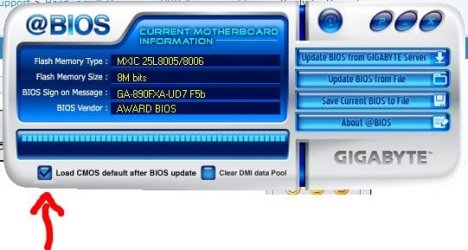
You checked the box "Load default CMOS after BIOS update" as shown below. If not, reboot and hit DEL. Within the BIOS menu, select "load optimized defaults", hit F10 to save changes and reboot normally. Let us know the results. ;)
 

Attachments

  • Capturar.JPG
    Capturar.JPG
    36.4 KB · Views: 1

My Computer

Computer Manufacturer/Model Number
WALLONN7 / LIN BLACK SERIES II
OS
Windows 7 Ultimate x64 SP1
CPU
AMD PHENOM II X6 1090T 3.2GHz
Motherboard
GIGABYTE GA-890FXA-UD7
Memory
8GB G.SKILL RIPJAWS - F3-10666CL7D
Graphics Card(s)
SAPPHIRE ATI RADEON HD 5870 VAPOR X OC
Sound Card
REALTEK DOLBY HOME THEATER
Monitor(s) Displays
LED LG W2486L
Screen Resolution
1080p
Hard Drives
SEAGATE 1TB -ST31000528AS - AHCI MODE - AS SATA
PSU
ZALMAN ZM1000-HP 1000W
Case
THERMALTAKE XASER VI VG4000SWA
Cooling
140MM x3 / 120MM x1 AIR COOLING - THERMALTAKE
Keyboard
MICROSOFT DIGITAL MEDIA KEYBOARD 3000 - USB
Mouse
MICROSOFT BASIC OPTICAL MOUSE 2.0 - USB
Internet Speed
600KBPS
Other Info
MICROSOFT XBOX 360 CONTROLLER
Thanks for your suggestion. I am fairly sure that I had checked Load CMOS after Bios Update in the @Bios utility, but, to be sure, I followed your procedure, and set the Load Optimized Defaults option to 'Y' in the Bios, and rebooted. Unluckily it has made no difference. I checked the USD devices in Device Manager, and they all look OK (no Yellow warnings).
I saw a reference somewhere to deleting two files in System32 (disk.sys and partmgr.sys) to force Windows to reload them. Is this worth trying?
 

My Computer

OS
Windows 7 Ultimate x64
Thanks for your suggestion. I am fairly sure that I had checked Load CMOS after Bios Update in the @Bios utility, but, to be sure, I followed your procedure, and set the Load Optimized Defaults option to 'Y' in the Bios, and rebooted. Unluckily it has made no difference. I checked the USD devices in Device Manager, and they all look OK (no Yellow warnings).
I saw a reference somewhere to deleting two files in System32 (disk.sys and partmgr.sys) to force Windows to reload them. Is this worth trying?

:warn: Do not delete them. :warn:
Reinstall chipset drivers. Download them here.
 

My Computer

Computer Manufacturer/Model Number
WALLONN7 / LIN BLACK SERIES II
OS
Windows 7 Ultimate x64 SP1
CPU
AMD PHENOM II X6 1090T 3.2GHz
Motherboard
GIGABYTE GA-890FXA-UD7
Memory
8GB G.SKILL RIPJAWS - F3-10666CL7D
Graphics Card(s)
SAPPHIRE ATI RADEON HD 5870 VAPOR X OC
Sound Card
REALTEK DOLBY HOME THEATER
Monitor(s) Displays
LED LG W2486L
Screen Resolution
1080p
Hard Drives
SEAGATE 1TB -ST31000528AS - AHCI MODE - AS SATA
PSU
ZALMAN ZM1000-HP 1000W
Case
THERMALTAKE XASER VI VG4000SWA
Cooling
140MM x3 / 120MM x1 AIR COOLING - THERMALTAKE
Keyboard
MICROSOFT DIGITAL MEDIA KEYBOARD 3000 - USB
Mouse
MICROSOFT BASIC OPTICAL MOUSE 2.0 - USB
Internet Speed
600KBPS
Other Info
MICROSOFT XBOX 360 CONTROLLER
I installed the Intel Chipset updates. Seemed to go OK, and rebooted. Unluckily the only difference is that if anything access is even slower than before. Cant be sure of this of course. Device Manager says the Seagate Expansion drive is working normally. But Backup stalls at 12%. And just accessing the drive to check contents takes 10 to 15 minutes - or even longer, I started it at least 15 minutes ago and it has not completed.

Anything else I can try?

Thanks
 

My Computer

OS
Windows 7 Ultimate x64
Two suggestions:

1 - if you have another hard drive that is not in use, install Windows on it and see if the problem persists;

2 - after reading the
FC update news, if you do not have any of the problems mentioned there, do the downgrade. But remember the Gigabyte warning:

Because BIOS flashing is potentially risky, if you do not encounter problems using the current version of BIOS, it is recommended that you not flash the BIOS. To flash the BIOS, do it with caution. Inadequate BIOS flashing may result in system malfunction.
 

My Computer

Computer Manufacturer/Model Number
WALLONN7 / LIN BLACK SERIES II
OS
Windows 7 Ultimate x64 SP1
CPU
AMD PHENOM II X6 1090T 3.2GHz
Motherboard
GIGABYTE GA-890FXA-UD7
Memory
8GB G.SKILL RIPJAWS - F3-10666CL7D
Graphics Card(s)
SAPPHIRE ATI RADEON HD 5870 VAPOR X OC
Sound Card
REALTEK DOLBY HOME THEATER
Monitor(s) Displays
LED LG W2486L
Screen Resolution
1080p
Hard Drives
SEAGATE 1TB -ST31000528AS - AHCI MODE - AS SATA
PSU
ZALMAN ZM1000-HP 1000W
Case
THERMALTAKE XASER VI VG4000SWA
Cooling
140MM x3 / 120MM x1 AIR COOLING - THERMALTAKE
Keyboard
MICROSOFT DIGITAL MEDIA KEYBOARD 3000 - USB
Mouse
MICROSOFT BASIC OPTICAL MOUSE 2.0 - USB
Internet Speed
600KBPS
Other Info
MICROSOFT XBOX 360 CONTROLLER
1. No other hard drive available.
2. Not sure what the Gigabyte warning is. Have seen a reference to problems with a different Gigabyte MB EP45...), and the FC bios. But this wont affect me?

Unless you have any other suggestions, in the meantime I will attach the USB drive to the laptop on the network (Win Home Prem) where it works fine, and manually back up files to it. I cant get my Windows backup to work properly on the network. It copies everything to the drive, but then fails to complete, reporting an access error. Is this because the Laptop is Home Prem? (My PC is Win Ult). Sorry, one more question. Is upgrading to USB 3, and getting a new external drive, likely to fix these on-going issues?

If I dont hear from you in the next day or so I will assume nothing else to be done, and 'Rep'(?, not sure what this is) you for your very helpful efforts to fix my problems.
Thanks a lot
 

My Computer

OS
Windows 7 Ultimate x64

Attachments

  • Capture.JPG
    Capture.JPG
    51.7 KB · Views: 3

My Computer

Computer Manufacturer/Model Number
Something I threw together
OS
Windows 7 Ultimate x64
CPU
Intel Core i7-2600K
Motherboard
Asus P8P67
Memory
16 GB G Skill F3-10666 CL9D-4GBRL
Graphics Card(s)
ATI Radeon HD 6870
Sound Card
ATI Radeon HDMI / Realtek ALC892
Monitor(s) Displays
2 x 22" standard monitors / LG32LC56v TV to watch films
Screen Resolution
1920 x1080
Hard Drives
2 x OCZ Vertex2 111.79GB
3 x Samsung103SJ
1 x Samsung103UJ
1 x WD3200BEVT
1 x Hitachi5K320-160
PSU
Thermaltake Toughpower Cable Management 750W
Case
Antec 300
Cooling
Noctua NH-U12P SE2 and 5 120mm Case fans
Keyboard
Microsoft Comfort Curve Keyboard 2000
Mouse
Hama M3110 / Logitech M305
Internet Speed
16000
Other Info
I have also used Fedora, Suse, Ubuntu Linux
And all other Windows from 95 to date except ME
1. No other hard drive available.
2. Not sure what the Gigabyte warning is. Have seen a reference to problems with a different Gigabyte MB EP45...), and the FC bios. But this wont affect me?

Unless you have any other suggestions, in the meantime I will attach the USB drive to the laptop on the network (Win Home Prem) where it works fine, and manually back up files to it. I cant get my Windows backup to work properly on the network. It copies everything to the drive, but then fails to complete, reporting an access error. Is this because the Laptop is Home Prem? (My PC is Win Ult). Sorry, one more question. Is upgrading to USB 3, and getting a new external drive, likely to fix these on-going issues?

If I dont hear from you in the next day or so I will assume nothing else to be done, and 'Rep'(?, not sure what this is) you for your very helpful efforts to fix my problems.
Thanks a lot

You're welcome! :)

"Rep" means reputation. Every time you believe that the aid offered to you deserve it, just click on the scales on the upper right of this post and say why.

There are no problems in dealing with two different versions of Windows.


Basically an USB3 upgrade and an external HDD would only increase the transfer speed.


#1 rejoinder > Well, since you do not have another hard drive, doubt that I'd like to answer will only be possible when you have to format your PC. No problem anyway.


#2 rejoinder > As you can see in the picture below, unless you had wake up by LAN from S3 issue, and you're planning on overclocking, it wouldn't need a bios upgrade.
 

Attachments

  • Capturar.JPG
    Capturar.JPG
    16.8 KB · Views: 2

My Computer

Computer Manufacturer/Model Number
WALLONN7 / LIN BLACK SERIES II
OS
Windows 7 Ultimate x64 SP1
CPU
AMD PHENOM II X6 1090T 3.2GHz
Motherboard
GIGABYTE GA-890FXA-UD7
Memory
8GB G.SKILL RIPJAWS - F3-10666CL7D
Graphics Card(s)
SAPPHIRE ATI RADEON HD 5870 VAPOR X OC
Sound Card
REALTEK DOLBY HOME THEATER
Monitor(s) Displays
LED LG W2486L
Screen Resolution
1080p
Hard Drives
SEAGATE 1TB -ST31000528AS - AHCI MODE - AS SATA
PSU
ZALMAN ZM1000-HP 1000W
Case
THERMALTAKE XASER VI VG4000SWA
Cooling
140MM x3 / 120MM x1 AIR COOLING - THERMALTAKE
Keyboard
MICROSOFT DIGITAL MEDIA KEYBOARD 3000 - USB
Mouse
MICROSOFT BASIC OPTICAL MOUSE 2.0 - USB
Internet Speed
600KBPS
Other Info
MICROSOFT XBOX 360 CONTROLLER
  • Like
Reactions: hwb
Hello hwb

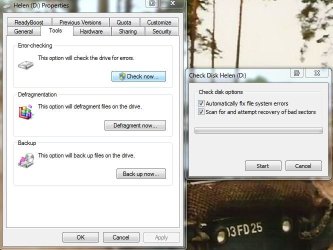
Have you tried doing a check disk on the USB drive, place a tick in the box, Scan for and attempt recovery of bad sectors

If check disk does not help try this; http://www.sevenforums.com/tutorials/165554-usb-driver-general-fix-problems.html?filter[2]=Hardware%20and%20Drivers

If you can get a snip of the access error and post it here it maybe very helpful

Thanks for the advice. My problem is that I can access the drive, and other usb drives, but the access is slow and intermittent, for example I can copy small files to them, but not large ones, and backup runs for a while and then stalls. Yet the drivers are reported to be OK.
 

My Computer

OS
Windows 7 Ultimate x64
Back
Top