BearAttack
New member
- Local time
- 3:50 PM
- Messages
- 5
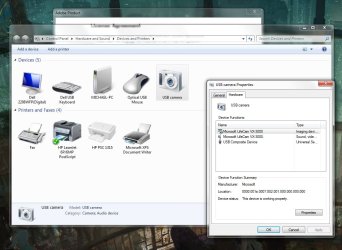
I currently have a Microsoft Lifecam VX-3000 installed. However when I open Devices and Printers, the camera shows up as "usb camera" with a generic icon instead of detecting the proper name/icon.
When I open its properties, the proper Lifecam drivers are properly installed, and the proper name is displayed under Device Manager.
I also did some snooping and noticed that under C:\Users\%name%\AppData\Local\Microsoft\Device Metadata\dmrccache\en-us my other devices (printers) have folders, but there is no existent folder for the webcam.
I have tried reinstalling drivers multiple times but it never seems to detect properly. Under a separate windows 7 machine, the camera detects just fine. Is there anyway to reset the device detection feature or something to make windows correctly detect the camera?
Thanks
When I open its properties, the proper Lifecam drivers are properly installed, and the proper name is displayed under Device Manager.
I also did some snooping and noticed that under C:\Users\%name%\AppData\Local\Microsoft\Device Metadata\dmrccache\en-us my other devices (printers) have folders, but there is no existent folder for the webcam.
I have tried reinstalling drivers multiple times but it never seems to detect properly. Under a separate windows 7 machine, the camera detects just fine. Is there anyway to reset the device detection feature or something to make windows correctly detect the camera?
Thanks
My Computer
- OS
- Windows 7 Professional x64