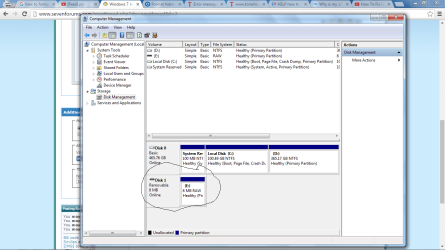
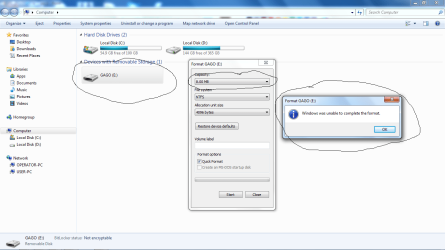
USB Cannot Format and Size Reduced from 32GB to 8MB

creamflakes

New member
Local time
10:53 PM
Messages
3
HELP !!
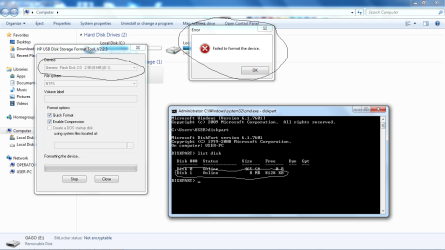
I cannot format the my 32GB USB .
I already tried HP Tool.
Please see picture attached;
 

Attachments

  • pic 1.png
    pic 1.png
    58.1 KB · Views: 3
  • pic 2.png
    pic 2.png
    56.2 KB · Views: 2
  • pic 3.png
    pic 3.png
    61.8 KB · Views: 2

My Computer My Computer

At a glance

Windows 7 Ultimate 32 bit
Computer type
PC/Desktop
OS
Windows 7 Ultimate 32 bit

My Computer My Computer

At a glance

Win-7-Pro64bit 7-H-Prem-64biti7-5930K 2nd i9-9940x both water blocked VRM'...Trident-z 3200C14 2nd Trident-z 3600C16EVGA 1080ti ftw3 2nd Titan Xp both water blocked
Computer type
PC/Desktop
Computer Manufacturer/Model Number
Custom assembled by me :}
OS
Win-7-Pro64bit 7-H-Prem-64bit
CPU
i7-5930K 2nd i9-9940x both water blocked VRM's too
Motherboard
ASUS SABERTOOTH X99 2nd ASUS x299 Apex
Memory
Trident-z 3200C14 2nd Trident-z 3600C16
Graphics Card(s)
EVGA 1080ti ftw3 2nd Titan Xp both water blocked
Sound Card
Built-in Realtek
Monitor(s) Displays
1-AOC G2460PG 24"G-Sync 144Hz/ 2nd 1-ASUS VG248QE 24" 144Hz
Screen Resolution
1920 x 1080 144Hz
Hard Drives
2-Samsung M.2 Evo & Evo Plus
2-Samsung 850 EVO 500GB SSD's/ 3-2.5 W.D. Black 1tb-&3-1tb/3-3.5 WD Black 1tb hdd's
PSU
EVGA SuperNOVA 1000-P2 2nd 1200-P2
Case
2-Corsair Obsidian Series 450D Black ATX Mid Tower
Cooling
Custom water loops
Keyboard
Logitech G710+/ 2nd Logitech G910
Mouse
2-RedDragon M901 Perdition 16400 dpi Gaming mouse = wired
Internet Speed
Comcast Ping 19ms 89.31mbps download speed 6.12mbps upload
Antivirus
Malwarebytes Pro/ Superantispyware Pro
Browser
FireFox & Pale moon
Other Info
2nd ASUS X299 Apex/Intel i9-9940x with Custom water loop/7H-Prem-x64/Corsair 450D case/Ram Trident-z 3600C16 4x8gb / Samsung970Evo plus 500gb SSD/Dual ssd EZ swap evo/PSU EVGA SuperNova 1200w-P2 80+Platinum/GPU Titan Xp /8-ML-140 on push-pull on 2-280GTX rads
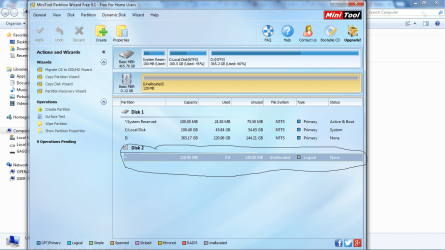
Problem still exist
 

Attachments

  • pic4.png
    pic4.png
    229 KB · Views: 2

My Computer My Computer

At a glance

Windows 7 Ultimate 32 bit
Computer type
PC/Desktop
OS
Windows 7 Ultimate 32 bit

My Computer My Computer

At a glance

Windows 7 Home Premium 32 bit
OS
Windows 7 Home Premium 32 bit
I had something similar happen a while ago when I made a Linux USB boot pen drive - would not reformat back to normal for regular use. I fixed it with a low level format, I think this is the software I used

HDD LLF Low Level Format Tool 4.40 Download - TechSpot

LLF is pretty drastic, and things can go wrong esp if stopped part way through.
 

My Computer My Computer

At a glance

W10 Pro x64, W7 Pro x64 in VMwarei7 2600K @ 4.4GHz8GB Mushkin @ 1600MHzNvidia GTX 750 Ti
Computer type
PC/Desktop
Computer Manufacturer/Model Number
self build
OS
W10 Pro x64, W7 Pro x64 in VMware
CPU
i7 2600K @ 4.4GHz
Motherboard
MSI Z68A-GD80
Memory
8GB Mushkin @ 1600MHz
Graphics Card(s)
Nvidia GTX 750 Ti
Monitor(s) Displays
27" Benq + 27" LG
Screen Resolution
1080p
Hard Drives
500GB 850 Evo SSD + 3 * 2TB Seagate
PSU
EVGA 650 GS modular
Case
Antec 300
Cooling
Seidon 120V v2
Internet Speed
62/18 Mbps
Antivirus
Defender (W10) + MSE (W7)
Browser
Firefox
............HDD LLF Low Level Format Tool 4.40 Download - TechSpot

LLF is pretty drastic, and things can go wrong esp if stopped part way through.

Nothing like that. I use LLF Tool often to wipe my trial HDD clean. I have stopped it midway many times. Nothing drastic happened. ( My 750GB HDD takes about eight hours to complete the zero-writing) The only thing is that the next time you start LLF on that HDD it starts writing zeros from the beginning.That is however a normal behaviour since it does not create a logfile and save it to start from where it left.

And your suggested solution however does not apply in this case where 32GB flash drive shows as 8GB which can happen in the case of fake drives which are manipulated to show higher capacity where in fact it is a low capacity drive. The OP also does not speak of having used it as a Linux boot drive.

I also consider using the LLF Tool as a better method of completely wiping a storage Device rather than using diskpart cleanall inasmuch as this tool indicates the drive details and the progress bar. That to a great extent minimises the chances of accidentally wiping the wrong drive with diskpart clean/cleanall which so often happens.
 
Last edited:

My Computer My Computer

At a glance

Windows 7 Home Premium 32 bit
OS
Windows 7 Home Premium 32 bit
@ jumanji

What site do you get LLF Tool?
I'm presuming it will work on all kinds of drives. Is that correct?
 

My Computer My Computer

At a glance

Windows 10 Pro. 64/ version 1709 Windows 7 Pr...Intel i7-6800K @ 4.3Corsair Platinum 16 gig @2400EVGA GTX 1070 OC
Computer type
PC/Desktop
Computer Manufacturer/Model Number
Home made Desktop
OS
Windows 10 Pro. 64/ version 1709 Windows 7 Pro/64
CPU
Intel i7-6800K @ 4.3
Motherboard
ASUS X-99 Deluxe II
Memory
Corsair Platinum 16 gig @2400
Graphics Card(s)
EVGA GTX 1070 OC
Monitor(s) Displays
Asus 27" LED LCD/VE278Q
Screen Resolution
1920-1080 or 1280-720 HDMI
Hard Drives
INTEL SSD 730-240 Gb Sata 3.0/
PSU
EVGA Platium 1200W
Case
Phanteks Luxe Tempered Glass 8 fans/ one radiator
Cooling
XSPC/ Water Cooled CPU
Keyboard
Das 4 Professional
Mouse
Logitech M705/MX Anywhere 2-S
Internet Speed
100 mbits
Antivirus
Microsoft Security Essentials/ Malwarebytes Premium 3.0/ SAS
Browser
I.E. 11 default/Firefox/ ISP Time Warner Cable/Spectrum
Other Info
LG BluRay Burner/
Sound system-KLipsch-THX/
Icy Dock ssd Hot Swap bays.
jumanji - 1st pic in post #1 shows 8MB which is what I saw when I had a Linux USB problem. The LLF tool I used was slow if free - fast if paid for, so whilst stopping half way through was a hassle, maybe 'drastic' was an overstatement. IIRC not completing the LLF made for an unusable USB.

With fake USB they usually show as the full capacity, but in use keep overwriting the same sectors due to small actual capacity.
 

My Computer My Computer

At a glance

W10 Pro x64, W7 Pro x64 in VMwarei7 2600K @ 4.4GHz8GB Mushkin @ 1600MHzNvidia GTX 750 Ti
Computer type
PC/Desktop
Computer Manufacturer/Model Number
self build
OS
W10 Pro x64, W7 Pro x64 in VMware
CPU
i7 2600K @ 4.4GHz
Motherboard
MSI Z68A-GD80
Memory
8GB Mushkin @ 1600MHz
Graphics Card(s)
Nvidia GTX 750 Ti
Monitor(s) Displays
27" Benq + 27" LG
Screen Resolution
1080p
Hard Drives
500GB 850 Evo SSD + 3 * 2TB Seagate
PSU
EVGA 650 GS modular
Case
Antec 300
Cooling
Seidon 120V v2
Internet Speed
62/18 Mbps
Antivirus
Defender (W10) + MSE (W7)
Browser
Firefox
....1st pic in post #1 shows 8MB which is what I saw when I had a Linux USB problem.....

With fake USB they usually show as the full capacity, but in use keep overwriting the same sectors due to small actual capacity.

May be what you are saying is true if you had experienced it.. I haven't seen 8MB on Linux boot USB drives so far. Let us see what the OP has to say. Again how the fake drives respond can keep changing depending upon the "Tecnological Innovations" adopted by the fakers.:)

@ jumanji

What site do you get LLF Tool?
I'm presuming it will work on all kinds of drives. Is that correct?
"This HDD Low Level Format utility is free for home use. It can erase and Low-Level Format a SATA, IDE, SAS, SCSI or SSD hard disk drive. Will also work with any USB and FIREWIRE external drive enclosures as well as SD, MMC, MemoryStick and CompactFlash media"

HDDGURU: HDD LLF Low Level Format Tool
 
Last edited:

My Computer My Computer

At a glance

Windows 7 Home Premium 32 bit
OS
Windows 7 Home Premium 32 bit
Thank you for the information. Downloaded. Will use it next time I need to do a wipe.
 

My Computer My Computer

At a glance

Windows 10 Pro. 64/ version 1709 Windows 7 Pr...Intel i7-6800K @ 4.3Corsair Platinum 16 gig @2400EVGA GTX 1070 OC
Computer type
PC/Desktop
Computer Manufacturer/Model Number
Home made Desktop
OS
Windows 10 Pro. 64/ version 1709 Windows 7 Pro/64
CPU
Intel i7-6800K @ 4.3
Motherboard
ASUS X-99 Deluxe II
Memory
Corsair Platinum 16 gig @2400
Graphics Card(s)
EVGA GTX 1070 OC
Monitor(s) Displays
Asus 27" LED LCD/VE278Q
Screen Resolution
1920-1080 or 1280-720 HDMI
Hard Drives
INTEL SSD 730-240 Gb Sata 3.0/
PSU
EVGA Platium 1200W
Case
Phanteks Luxe Tempered Glass 8 fans/ one radiator
Cooling
XSPC/ Water Cooled CPU
Keyboard
Das 4 Professional
Mouse
Logitech M705/MX Anywhere 2-S
Internet Speed
100 mbits
Antivirus
Microsoft Security Essentials/ Malwarebytes Premium 3.0/ SAS
Browser
I.E. 11 default/Firefox/ ISP Time Warner Cable/Spectrum
Other Info
LG BluRay Burner/
Sound system-KLipsch-THX/
Icy Dock ssd Hot Swap bays.
Back
Top