
USB Controller problem

merkat106

Network Engineer
Guru
Local time
12:31 PM
Messages
462
Location
Phoenix, Arizona
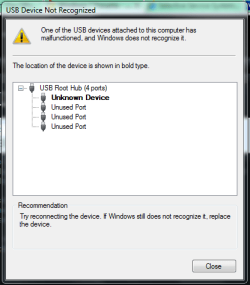
My 5 yr/old laptop (hp zv6130us) has 4 total usb ports. One of them, I believed, had died. No device plugged into it seems to work, however, I discovered that that usb port powers the device.

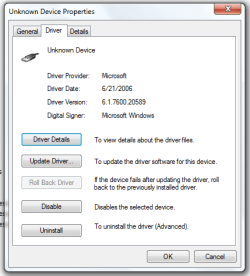
This malfunctioning usb port corresponds to the "unknown device" which upon inspection is one of the usb controllers. All of the other usb ports work, and the other usb controllers are recognised in device manager.

Also, this problem has remained throughout a reformat/clean install and before that, a bios reset (unplugging power/laptop battery) which each was done for other reasons. I will try the latter again later.

Is this hardware (bad controller), bios (doubt it) or what? One bad port isn't critical since the others work.

devicemgr.PNG

Capture.PNG

Capture3.PNG
 

My Computer

Computer Manufacturer/Model Number
ATX Custom Build 2012
OS
Windows 7 Enterprise x64 SP1
CPU
Intel Core i3-2100 @ 3.10GHz
Motherboard
Intel DH67CL desktop ATX
Memory
10 GB DDR3
Graphics Card(s)
Asus EAH5450 series (Radeon)
Monitor(s) Displays
Samsung SyncMaster 226BW, Samsung Syncmaster P2450H
Screen Resolution
226BW: 1680 x 1050 & P2450H: 1920 x 1080
Hard Drives
Western Digital 320 GB sata (boot), Samsung 640 GB sata, Seagate 2 TB sata (data)
PSU
Cooler Master Extreme Power Plus 500W
Case
Thermaltake V3 Black Edition
Cooling
stock cooling with added intake fan
Keyboard
HP Wireless Elite Keyboard Wireless Keyboard
Mouse
Microsoft Touch
Internet Speed
Comcast Cable business class <=18Mb {averages 12Mb}
Other Info
Optical drives: LG SuperMulti Blue, HP DVD 1260T
Other: Kensington Bluetooth Receiver
Network: Buffalo Wireless N USB, DLink N router/DLink Ethernet Switch/DLink Xtreme N wireless bridge
Printer: HP Photosmart Plus, HP Officejet Pro 8600 Plus
PCs: HP dv6-3040us (7 x64 SP1), HP DM4-2165dx (7 x64 SP1), HP Pavilion zv6130us (7 x86), Apple Macbook Air (Lion)
************
My 5 yr/old laptop (hp zv6130us) has 4 total usb ports. One of them, I believed, had died. No device plugged into it seems to work, however, I discovered that that usb port powers the device.

This malfunctioning usb port corresponds to the "unknown device" which upon inspection is one of the usb controllers. All of the other usb ports work, and the other usb controllers are recognised in device manager.

Also, this problem has remained throughout a reformat/clean install and before that, a bios reset (unplugging power/laptop battery) which each was done for other reasons. I will try the latter again later.

Is this hardware (bad controller), bios (doubt it) or what? One bad port isn't critical since the others work.
View attachment 86143

View attachment 86144

View attachment 86145


There is a thread that addresses issues related to what you have faced. Here is the link: http://www.sevenforums.com/tutorials/96442-device-manager-finding-unknown-devices.html
I hope it can be useful! Let us know the results!


"PLEASE REP ANYONE WHO HELPS YOU"
 

My Computer

Computer Manufacturer/Model Number
WALLONN7 / LIN BLACK SERIES II
OS
Windows 7 Ultimate x64 SP1
CPU
AMD PHENOM II X6 1090T 3.2GHz
Motherboard
GIGABYTE GA-890FXA-UD7
Memory
8GB G.SKILL RIPJAWS - F3-10666CL7D
Graphics Card(s)
SAPPHIRE ATI RADEON HD 5870 VAPOR X OC
Sound Card
REALTEK DOLBY HOME THEATER
Monitor(s) Displays
LED LG W2486L
Screen Resolution
1080p
Hard Drives
SEAGATE 1TB -ST31000528AS - AHCI MODE - AS SATA
PSU
ZALMAN ZM1000-HP 1000W
Case
THERMALTAKE XASER VI VG4000SWA
Cooling
140MM x3 / 120MM x1 AIR COOLING - THERMALTAKE
Keyboard
MICROSOFT DIGITAL MEDIA KEYBOARD 3000 - USB
Mouse
MICROSOFT BASIC OPTICAL MOUSE 2.0 - USB
Internet Speed
600KBPS
Other Info
MICROSOFT XBOX 360 CONTROLLER
A USB port has four connections in it. Power, ground, data+ and data-. Without getting technical, it sounds like power and ground are okay, but one or both of the data connections might be bad on that port. If that's the case, the port can't recognize any USB device that might be plugged in to it. Basically, it can't negotiate with the device to set it up, so it reads as unknown.

That's the hardware explanation. It might be a weird driver thing instead, I can't be sure. If it's a hardware problem, there isn't much you can do about it, other than to double check the connectors at the motherboard and the port. If Wallon7's fix doesn't work, you may have to live with the port being shot. Sorry.
 

My Computer

Computer type
PC/Desktop
Computer Manufacturer/Model Number
Mellon Labs (custom build)
OS
Win 7 Pro x64/Win 10 Pro x64 dual boot
CPU
AMD FX 8350 Vishera @ 4200
Motherboard
ASUS M5A97 R2.0
Memory
16 GB Mushkin Blackline DDR3-2400 @ 1866 (9-10-10-10-31)
Graphics Card(s)
XFX Radeon R9 280 Double D Black Edition
Sound Card
Realtek HD Audio on MB. Sounds great.
Monitor(s) Displays
Acer 24", Acer 22"
Screen Resolution
3840 x 1080
Hard Drives
1 x Mushkin Chronos 120 GB SSD (Win 10)
1 x Samsung 850 EVO 250 GB SSD (Win 7)
1 x WD 1TB SATA Blue
1 x WD 1TB SATA Green
PSU
Corsair TX-750
Case
CoolerMaster HAF 912+
Cooling
Coolermaster Seidon 240M Liquid AIO. 6 case fans
Keyboard
Logitech G710+
Mouse
Logitech G500s
Internet Speed
Much better since I got fiber, but still way overpriced.
Antivirus
MSE, Malware Bytes for scanning
Browser
Firefox
Other Info
Corsair VOID USB headphones.

A Mellon Labs X-1 - LCD Smartie driven system status display.

Brought to you by the letter E
A USB port has four connections in it. Power, ground, data+ and data-. Without getting technical, it sounds like power and ground are okay, but one or both of the data connections might be bad on that port. If that's the case, the port can't recognize any USB device that might be plugged in to it. Basically, it can't negotiate with the device to set it up, so it reads as unknown.

That's the hardware explanation. It might be a weird driver thing instead, I can't be sure. If it's a hardware problem, there isn't much you can do about it, other than to double check the connectors at the motherboard and the port. If Wallon7's fix doesn't work, you may have to live with the port being shot. Sorry.

I think you are right. Its hardware...this laptop's 5 years old and has been really used and subjected to many stresses (ie static electricity and being taken to school etc), so I'm not surprised that somehing has failed. Actually, it's the first hardware problem this laptop has had in the 5 years.

By the looks of it in device manager, 7 knows that the unknown device is a usb controller, it just can't make it work. "device cannot start," so it's not driver related.

I'll try to visually inspect the pins, but, I believe its a lost cause.
 

My Computer

Computer Manufacturer/Model Number
ATX Custom Build 2012
OS
Windows 7 Enterprise x64 SP1
CPU
Intel Core i3-2100 @ 3.10GHz
Motherboard
Intel DH67CL desktop ATX
Memory
10 GB DDR3
Graphics Card(s)
Asus EAH5450 series (Radeon)
Monitor(s) Displays
Samsung SyncMaster 226BW, Samsung Syncmaster P2450H
Screen Resolution
226BW: 1680 x 1050 & P2450H: 1920 x 1080
Hard Drives
Western Digital 320 GB sata (boot), Samsung 640 GB sata, Seagate 2 TB sata (data)
PSU
Cooler Master Extreme Power Plus 500W
Case
Thermaltake V3 Black Edition
Cooling
stock cooling with added intake fan
Keyboard
HP Wireless Elite Keyboard Wireless Keyboard
Mouse
Microsoft Touch
Internet Speed
Comcast Cable business class <=18Mb {averages 12Mb}
Other Info
Optical drives: LG SuperMulti Blue, HP DVD 1260T
Other: Kensington Bluetooth Receiver
Network: Buffalo Wireless N USB, DLink N router/DLink Ethernet Switch/DLink Xtreme N wireless bridge
Printer: HP Photosmart Plus, HP Officejet Pro 8600 Plus
PCs: HP dv6-3040us (7 x64 SP1), HP DM4-2165dx (7 x64 SP1), HP Pavilion zv6130us (7 x86), Apple Macbook Air (Lion)
************
Yeah. The pins might be fine, but the electronics behind them might have failed for that port. There's no way to really know for sure, unless you've got a bent pin that you can straighten out.
 

My Computer

Computer type
PC/Desktop
Computer Manufacturer/Model Number
Mellon Labs (custom build)
OS
Win 7 Pro x64/Win 10 Pro x64 dual boot
CPU
AMD FX 8350 Vishera @ 4200
Motherboard
ASUS M5A97 R2.0
Memory
16 GB Mushkin Blackline DDR3-2400 @ 1866 (9-10-10-10-31)
Graphics Card(s)
XFX Radeon R9 280 Double D Black Edition
Sound Card
Realtek HD Audio on MB. Sounds great.
Monitor(s) Displays
Acer 24", Acer 22"
Screen Resolution
3840 x 1080
Hard Drives
1 x Mushkin Chronos 120 GB SSD (Win 10)
1 x Samsung 850 EVO 250 GB SSD (Win 7)
1 x WD 1TB SATA Blue
1 x WD 1TB SATA Green
PSU
Corsair TX-750
Case
CoolerMaster HAF 912+
Cooling
Coolermaster Seidon 240M Liquid AIO. 6 case fans
Keyboard
Logitech G710+
Mouse
Logitech G500s
Internet Speed
Much better since I got fiber, but still way overpriced.
Antivirus
MSE, Malware Bytes for scanning
Browser
Firefox
Other Info
Corsair VOID USB headphones.

A Mellon Labs X-1 - LCD Smartie driven system status display.

Brought to you by the letter E
Back
Top