USB controller problems

unskin

New member
Local time
1:27 AM
Messages
4
Ok, this annoying message appeared recently: "Your USB mass storage device can perform faster if it is plugged into a hi-speed port". It seems like all transfers to my external drives have been capped to less than 1 MB/s. I have a Dell Studio 17 laptop, running Win 7 RC1. Also, when checking device manager, it seems like one of the controllers seems to be malfunctioning - Windows has stopped this device because it has reported problems. (Code 43). Does anyone have any suggestions on what could be causing this issue and what to do about it?
 

Attachments

  • motherboard.jpg
    motherboard.jpg
    77.1 KB · Views: 179
  • USB controller.jpg
    USB controller.jpg
    77.6 KB · Views: 262

My Computer

Computer Manufacturer/Model Number
Dell Studio 17
OS
Windows 7 RC1
CPU
Mobile DualCore Intel Core 2 Duo P8600, 2400 MHz (9 x 267)
Motherboard
Dell Studio 1737
Memory
Samsung M4 70T2864EH3-CF7
Graphics Card(s)
ATI Mobility Radeon HD 3650
Sound Card
ATI Radeon HDMI
Monitor(s) Displays
AU Optronics B170PW06 V2
Screen Resolution
1440x900
Hard Drives
2xWDC WD3200BEVT-75ZCT2 (298 GB)
PSU
n/a
Case
n/a
Cooling
n/a
Keyboard
n/a
Mouse
n/a
Internet Speed
n/a
If you fill out your system specs in your profile, it will make it much easier for us to help determine the problem.

Have you tried updating your drivers?
 

My Computer

Computer Manufacturer/Model Number
HP Pavilion P7-1234
OS
Windows 7 Home Premium 64bit
CPU
AMD A6-3650 APU with Radeon™ HD Graphics
Motherboard
Pegatron 2ACF Version 1.03
Memory
2x 4GB Micron DDR3 [PC3-12800]
Graphics Card(s)
AMD Radeon HD 6530D Graphics (OnBoard)
Sound Card
Realtek High Definition Audio (OnBoard)
Monitor(s) Displays
Westinghouse 24" Widescreen LCD L2410MN
Screen Resolution
1920 x 1200
Hard Drives
1000GB Seagate SATA ST31000524AS
1000GB Seagate SATA ST31000340AS
Keyboard
Logitech G-15
Mouse
Logitech Optical
Other Info
Toshiba Satellite A215-S7472 Windows Vista Home Premium (Laptop)
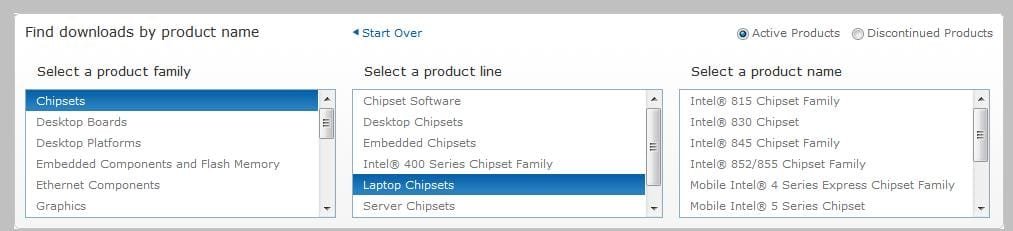
Hi, I would try and reinstall the chipset driver, or go and see if there is an updated one from the manufacturer's website. Before you do go anywhere you need to know the chipset family for your system. Open the System Devices it should state it in there.

Here is the Intel site. Just locate in the right box what your chipset is and look for the correct driver to download.

http://downloadcenter.intel.com/Default.aspx
 

Attachments

  • Noname.jpg
    Noname.jpg
    29.6 KB · Views: 123

My Computer

Computer Manufacturer/Model Number
Lenovo ThinkPad T60
OS
Windows 7 Ultimate 64Bit
CPU
GenuineIntel Intel(R) Core(TM) DuoCore T2400 @ 1.83GHz
Motherboard
Intel(R) 82801G (ICH7 Family)
Memory
2.00 GB
Graphics Card(s)
Mobile Intel(R) 945 Express Chipset
Sound Card
SoundMAX Integrated Digital HD Audio
Monitor(s) Displays
ThinkPad Display
Screen Resolution
1400x1050
Hard Drives
100Gb SATA
Keyboard
Standard Keyboard
Mouse
HID-compliant Mouse
Internet Speed
Cable Broadband - 54Mbps
Other Info
Intel(R) PRO/1000 PL Network Connection
11a/b/g Wireless LAN Mini PCI Express Adapter
If you fill out your system specs in your profile, it will make it much easier for us to help determine the problem.

Have you tried updating your drivers?

Yes, the drivers are up to date.
 

My Computer

Computer Manufacturer/Model Number
Dell Studio 17
OS
Windows 7 RC1
CPU
Mobile DualCore Intel Core 2 Duo P8600, 2400 MHz (9 x 267)
Motherboard
Dell Studio 1737
Memory
Samsung M4 70T2864EH3-CF7
Graphics Card(s)
ATI Mobility Radeon HD 3650
Sound Card
ATI Radeon HDMI
Monitor(s) Displays
AU Optronics B170PW06 V2
Screen Resolution
1440x900
Hard Drives
2xWDC WD3200BEVT-75ZCT2 (298 GB)
PSU
n/a
Case
n/a
Cooling
n/a
Keyboard
n/a
Mouse
n/a
Internet Speed
n/a
Hi, I would try and reinstall the chipset driver, or go and see if there is an updated one from the manufacturer's website. Before you do go anywhere you need to know the chipset family for your system. Open the System Devices it should state it in there.

Here is the Intel site. Just locate in the right box what your chipset is and look for the correct driver to download.

http://downloadcenter.intel.com/Default.aspx

Well, when I go to device manager and select properties for the chipset and select update driver, it says "Windows has determined the driver software for your device is up to date.". Doesn't that mean that I have the latest drivers?

Btw, the chipset family is called Mobile Intel(R) 4 Series Chipset PCI Express Root Port - 2A41. When I go the intel site, select the appropriate OS (Win 7 32-bit) and then Driver under download type, it doesn't seem like there are any drivers that are relevant to this issue, or am I just blind?
 
Last edited:

My Computer

Computer Manufacturer/Model Number
Dell Studio 17
OS
Windows 7 RC1
CPU
Mobile DualCore Intel Core 2 Duo P8600, 2400 MHz (9 x 267)
Motherboard
Dell Studio 1737
Memory
Samsung M4 70T2864EH3-CF7
Graphics Card(s)
ATI Mobility Radeon HD 3650
Sound Card
ATI Radeon HDMI
Monitor(s) Displays
AU Optronics B170PW06 V2
Screen Resolution
1440x900
Hard Drives
2xWDC WD3200BEVT-75ZCT2 (298 GB)
PSU
n/a
Case
n/a
Cooling
n/a
Keyboard
n/a
Mouse
n/a
Internet Speed
n/a
Maybe you need to go to Dell's support website and look up your computers model number and download and update your BIOS. Be careful when doing this and make sure you have a backup.
 

My Computer

Computer Manufacturer/Model Number
Asus K60IJ
OS
Windows 7 Ultimate x64
CPU
Intel Pentium Dual Core T4200
Motherboard
HP Laptop
Memory
4gb PC-6400
Graphics Card(s)
Integrated Intel GMA 4500
Sound Card
onboard(laptop)
Monitor(s) Displays
16"
Screen Resolution
1300 X 766 with true 720p HD support
Hard Drives
320GB 5400RPM
Mouse
Microsoft 3000 laptop mouse
Internet Speed
15mbit+ down and 768kbit up
Other Info
1TB external Western Digital Essentials HDD
Well, when I go to device manager and select properties for the chipset and select update driver, it says "Windows has determined the driver software for your device is up to date.". Doesn't that mean that I have the latest drivers?

Btw, the chipset family is called Mobile Intel(R) 4 Series Chipset PCI Express Root Port - 2A41. When I go the intel site, select the appropriate OS (Win 7 32-bit) and then Driver under download type, it doesn't seem like there are any drivers that are relevant to this issue, or am I just blind?

Ok now i doubt it's the driver cos of the message you just typed. This could be a breakage/corruption of the USB port itself.

Anway try this.

Intel® Graphics Media Accelerator Driver for Windows* 7(exe)

If not work, then

Try and disbable and re-enable the device.

If still fail, we'll need the hardware Id of it.
 

My Computer

Computer Manufacturer/Model Number
Lenovo ThinkPad T60
OS
Windows 7 Ultimate 64Bit
CPU
GenuineIntel Intel(R) Core(TM) DuoCore T2400 @ 1.83GHz
Motherboard
Intel(R) 82801G (ICH7 Family)
Memory
2.00 GB
Graphics Card(s)
Mobile Intel(R) 945 Express Chipset
Sound Card
SoundMAX Integrated Digital HD Audio
Monitor(s) Displays
ThinkPad Display
Screen Resolution
1400x1050
Hard Drives
100Gb SATA
Keyboard
Standard Keyboard
Mouse
HID-compliant Mouse
Internet Speed
Cable Broadband - 54Mbps
Other Info
Intel(R) PRO/1000 PL Network Connection
11a/b/g Wireless LAN Mini PCI Express Adapter
Seems like all I had to do was to uninstall the corrupt driver and let it reinstall again. Now I just feel ashamed. :o

But thanks for the response anyway, I appreciate it. :)
 

My Computer

Computer Manufacturer/Model Number
Dell Studio 17
OS
Windows 7 RC1
CPU
Mobile DualCore Intel Core 2 Duo P8600, 2400 MHz (9 x 267)
Motherboard
Dell Studio 1737
Memory
Samsung M4 70T2864EH3-CF7
Graphics Card(s)
ATI Mobility Radeon HD 3650
Sound Card
ATI Radeon HDMI
Monitor(s) Displays
AU Optronics B170PW06 V2
Screen Resolution
1440x900
Hard Drives
2xWDC WD3200BEVT-75ZCT2 (298 GB)
PSU
n/a
Case
n/a
Cooling
n/a
Keyboard
n/a
Mouse
n/a
Internet Speed
n/a
Seems like all I had to do was to uninstall the corrupt driver and let it reinstall again. Now I just feel ashamed. :o

But thanks for the response anyway, I appreciate it. :)

Sometimes the simplest fixes are often overlooked. Nah... it can't be THAT easy. LOL Glad you were able to fix your problem.

:D
 

My Computer

Computer Manufacturer/Model Number
HP Pavilion P7-1234
OS
Windows 7 Home Premium 64bit
CPU
AMD A6-3650 APU with Radeon™ HD Graphics
Motherboard
Pegatron 2ACF Version 1.03
Memory
2x 4GB Micron DDR3 [PC3-12800]
Graphics Card(s)
AMD Radeon HD 6530D Graphics (OnBoard)
Sound Card
Realtek High Definition Audio (OnBoard)
Monitor(s) Displays
Westinghouse 24" Widescreen LCD L2410MN
Screen Resolution
1920 x 1200
Hard Drives
1000GB Seagate SATA ST31000524AS
1000GB Seagate SATA ST31000340AS
Keyboard
Logitech G-15
Mouse
Logitech Optical
Other Info
Toshiba Satellite A215-S7472 Windows Vista Home Premium (Laptop)
Back
Top