Solved USB controllers with a yellow exclamation mark after restart error 10

Serbaneski

New member
Local time
3:20 AM
Messages
5
I have a problem with my usb ports for over a month. Only the ones in which the mouse and the keyboard work, for the rest I have to disable and enable the Intel(R) N10/ICH7 Family USB Universal Host Controller - 27C9, 27CA, 27CB, 27CC like in the picture below (before doing these steps). I have tried countless time to uninstall the driver and install it again for each port, and I also reinstalled my motherboard driver twice and I'm stuck with the same problem. I didn't have it before but I messed up my ports thanks to Oracle VM VirtualBox. I even tried that fix it thing from microsoft, and I still have the same problem. The only way to make the ports work is to disable and enable each of them, but I'd like them to stay enabled (So i wouldn't repeat these steps all over again after each restart). At Device status it says This device cannot start. (Code 10). My motherboard model is MSI g41m-p26. Thanks in advance for your help!
WDkIBeQ.png
 

My Computer My Computer

At a glance

Windows 7 Ultimate x64
Computer type
PC/Desktop
OS
Windows 7 Ultimate x64
Have you got a restore point prior to installation of Virtual Box.

Roy
 

My Computer My Computer

At a glance

W7 home premium 32bit/W7HP 64bit/w10 tp insid...E5300 dual core3gbNvidia Geforce 7100 Nforce 630i
Computer type
PC/Desktop
Computer Manufacturer/Model Number
medionl/Aspire 6930G/acer x55a
OS
W7 home premium 32bit/W7HP 64bit/w10 tp insider ring
CPU
E5300 dual core
Motherboard
medion MS7366
Memory
3gb
Graphics Card(s)
Nvidia Geforce 7100 Nforce 630i
Monitor(s) Displays
avixc
Internet Speed
n (isp resticted to 72)
Antivirus
mse/pands
Browser
palemoon
Other Info
Belkin Fd7050 n USB using Railink RT2870 drivers, more upto date
The drivers for those are on the motherboard cd, you have got to try again.

This time, Right click on each one and choose to update the driver and have it point to your motherboard cd, it should find the driver and install it.
 

My Computer My Computer

At a glance

Windows 10 Pro x64Intel Core i7 6700KGSkill TridentZ RGB 16GB 3600 16-16-16-36EVGA GTX 980 Ti SC x2
Computer type
PC/Desktop
Computer Manufacturer/Model Number
Skylake Special #666
OS
Windows 10 Pro x64
CPU
Intel Core i7 6700K
Motherboard
Asus Sabertooth Z170 Mark 1
Memory
GSkill TridentZ RGB 16GB 3600 16-16-16-36
Graphics Card(s)
EVGA GTX 980 Ti SC x2
Sound Card
Realtek High Definition
Monitor(s) Displays
AOC G2460PG
Screen Resolution
1920 x 1080 144Hz
Hard Drives
Samsung 860 Pro 256GB, Seagate Barracuda 4TB x2
PSU
EVGA 1000 P2, EVGA White Custom Braided Cables
Case
Corsair Vengeance C70 Gunmetal Black
Cooling
Corsair H100i v2, Corsair ML120 x2, Thermal Grizzly Kryonaut
Keyboard
Logitech G910 Orion Spectrum
Mouse
Logitech G700s
Internet Speed
Verizon Fios Quantum Gateway 75/75
Antivirus
Windows Defender, Malwarebytes Free 3.8.3
Browser
Chrome
Other Info
Corsair SP120 x4, LG Blu-ray Drive, Durabrand HT-395 100 Watt Dolby Digital Amp, Corsair H2100 Wireless 7.1 Headset
I don't have any restore point before installing virtual box.

Tried to update from cd drivers but it says The best drivers for your device is already installed. After that I found a box that said delete driver files, and after that it installed Intel(R) 82801G (ICH7 Family) USB Universal Host Controller - 27C9, 27CA and so on, but I still get This device cannot start. (Code 10)error after restart and i have to disable and enable them again. Can it be fixed through task scheduler, Services or System Configuration?
 

My Computer My Computer

At a glance

Windows 7 Ultimate x64
Computer type
PC/Desktop
OS
Windows 7 Ultimate x64
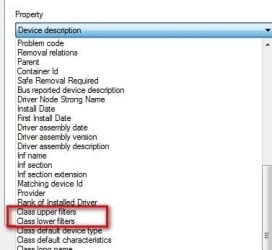
Right click any one of the problem controllers->Properties->Details tab. Use the pull down menu and look carefully if Class Upper Filters or Class Lower Filters exist. If yes, select then copy/paste the information displayed about the filters
 

Attachments

  • Filters.jpg
    Filters.jpg
    18.7 KB · Views: 12

My Computer My Computer

At a glance

Desk 1: Win 7 Pro x32; Desk 2: Windows 10 x64
Computer type
PC/Desktop
Computer Manufacturer/Model Number
Dell Optiplex 360 and Optiplex 755
OS
Desk 1: Win 7 Pro x32; Desk 2: Windows 10 x64
Hard Drives
500GB Crucial SSD in both Desktops
Other Info
Buffalo 6TB NAS, Raid 1
It only has Class upper filters and the Value box is empty.
 

My Computer My Computer

At a glance

Windows 7 Ultimate x64
Computer type
PC/Desktop
OS
Windows 7 Ultimate x64
Create a system restore point.

Open an elevated command prompt enter regedit

Navigate to
Code:
HKEY_LOCAL_MACHINE\SYSTEM\CurrentControlSet\Control\Class\{36FC9E60-C465-11CF-8056-444553540000}

If you're in the right spot you should see key Class with value USB (as in pic below). I'm guessing you'll also see another key named Upper Filters with a blank value? In any case, delete the Upper Filters key and restart your computer
 

Attachments

  • 2016-01-08_172604.jpg
    2016-01-08_172604.jpg
    47.8 KB · Views: 1

My Computer My Computer

At a glance

Desk 1: Win 7 Pro x32; Desk 2: Windows 10 x64
Computer type
PC/Desktop
Computer Manufacturer/Model Number
Dell Optiplex 360 and Optiplex 755
OS
Desk 1: Win 7 Pro x32; Desk 2: Windows 10 x64
Hard Drives
500GB Crucial SSD in both Desktops
Other Info
Buffalo 6TB NAS, Raid 1
Wow, it worked, problem solved. Thanks a lot!
 

My Computer My Computer

At a glance

Windows 7 Ultimate x64
Computer type
PC/Desktop
OS
Windows 7 Ultimate x64
You're most welcome! Glad i was able to help :)
 

My Computer My Computer

At a glance

Desk 1: Win 7 Pro x32; Desk 2: Windows 10 x64
Computer type
PC/Desktop
Computer Manufacturer/Model Number
Dell Optiplex 360 and Optiplex 755
OS
Desk 1: Win 7 Pro x32; Desk 2: Windows 10 x64
Hard Drives
500GB Crucial SSD in both Desktops
Other Info
Buffalo 6TB NAS, Raid 1
One more thing, I managed somehow to create another useless Removable Disk (the circled one), and anytime I add an USB device it shows another one. How can I get rid of the first one (without the Hide empty drives in the Computer folder from Folder option)?

eWwf5Mu.png


Later edit: Solved by deleting from Disk Management.
 

My Computer My Computer

At a glance

Windows 7 Ultimate x64
Computer type
PC/Desktop
OS
Windows 7 Ultimate x64
Back
Top