
You are using an out of date browser. It may not display this or other websites correctly.
You should upgrade or use an alternative browser.
You should upgrade or use an alternative browser.
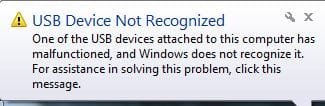
USB Device Not Recognized
- Thread starter south91
- Start date

Hi South91 .. Have you Installed the Kies software ?.. You should also read the Tutorial about the Kies software .. Both can be found on the Samsung website .
My Computer
- Computer Manufacturer/Model Number
- W530-3630QM1
- OS
- windows 7 home 64bit
- CPU
- INTEL-CORE I7
- Memory
- 16GB
- Hard Drives
- 750GB
- Browser
- Chrome
Okay did you Read the Tutorial ? And did the Software Install .. If so what problems are you having ?
My Computer
- Computer Manufacturer/Model Number
- W530-3630QM1
- OS
- windows 7 home 64bit
- CPU
- INTEL-CORE I7
- Memory
- 16GB
- Hard Drives
- 750GB
- Browser
- Chrome
Do you mean Windows does not recognize any usb devices ? Or is it just this one .. Have you tried different usb ports ?
My Computer
- Computer Manufacturer/Model Number
- W530-3630QM1
- OS
- windows 7 home 64bit
- CPU
- INTEL-CORE I7
- Memory
- 16GB
- Hard Drives
- 750GB
- Browser
- Chrome
Do you mean Windows does not recognize any usb devices ? Or is it just this one .. Have you tried different usb ports ?
No just this one.Yes i tired test with other usb ports.(Behind case)
My Computer
- OS
- windows 7
- Memory
- 4
Fair enough .. I shall do a bit of Research and see what i can find out .. About this problem . Will get back to you ASAP
My Computer
- Computer Manufacturer/Model Number
- W530-3630QM1
- OS
- windows 7 home 64bit
- CPU
- INTEL-CORE I7
- Memory
- 16GB
- Hard Drives
- 750GB
- Browser
- Chrome
Hi there .. Have you ran Windows Updates recently .. Also do you have SP1 Installed
My Computer
- Computer Manufacturer/Model Number
- W530-3630QM1
- OS
- windows 7 home 64bit
- CPU
- INTEL-CORE I7
- Memory
- 16GB
- Hard Drives
- 750GB
- Browser
- Chrome
Hi there .. I thought you said it was just this Device .That did not work . Can you also please answer my questions . Do you have SP1 Installed .. also have you ran Windows updates recently ?
My Computer
- Computer Manufacturer/Model Number
- W530-3630QM1
- OS
- windows 7 home 64bit
- CPU
- INTEL-CORE I7
- Memory
- 16GB
- Hard Drives
- 750GB
- Browser
- Chrome
I have the similar problem.
My flash drive did connect and functionnal on my laptop ASUS.
Suddenly it is not recognized anymore by Windows, it is not displayed in the Computer window Explorer.
At the beginning, the flash drive was getting work after the reboot. But not now.
The flash drive is VERBATIM 1TB.
My OS :
- Windows 7 Professionel 64 bits, SP 1
- I applied Windows Updates regularly. Last updates installed on 6-Aug-2013.
I did the following check :
- Connect the flash drive to other PC & LAPTOP. The flash drive is recognized and functionnal.
- For the laptop ASUS :
. Connect to other USB port. --> not work.
. In the Event Viewer :
. Check error in Applications/Microsoft/Windows/DriverFrameWorks-UserMode/Operational
--> oNLY 1 event and the message is "The Driver Manager service started successfully".
. Check error in Windows Logs/Application
--> 1 warning "LMS Service cannot connect to Inter(R) MEI driver
. Check USB Storage Device - Enable in Windows registry
. In HKEY_LOCAL_MACHINE\SYSTEM\CurrentControlSet\services\USBSTOR , Start value is 3.
Please help.
Yasminth.
My flash drive did connect and functionnal on my laptop ASUS.
Suddenly it is not recognized anymore by Windows, it is not displayed in the Computer window Explorer.
At the beginning, the flash drive was getting work after the reboot. But not now.
The flash drive is VERBATIM 1TB.
My OS :
- Windows 7 Professionel 64 bits, SP 1
- I applied Windows Updates regularly. Last updates installed on 6-Aug-2013.
I did the following check :
- Connect the flash drive to other PC & LAPTOP. The flash drive is recognized and functionnal.
- For the laptop ASUS :
. Connect to other USB port. --> not work.
. In the Event Viewer :
. Check error in Applications/Microsoft/Windows/DriverFrameWorks-UserMode/Operational
--> oNLY 1 event and the message is "The Driver Manager service started successfully".
. Check error in Windows Logs/Application
--> 1 warning "LMS Service cannot connect to Inter(R) MEI driver
. Check USB Storage Device - Enable in Windows registry
. In HKEY_LOCAL_MACHINE\SYSTEM\CurrentControlSet\services\USBSTOR , Start value is 3.
Please help.
Yasminth.
My Computer
- Computer type
- PC/Desktop
- Computer Manufacturer/Model Number
- Asus
- OS
- Windows 7 Professionel 64-bits, Service Pack 1
- CPU
- i7 Q720 @ 1.60 GHz
- Memory
- 4Gb
- Graphics Card(s)
- NVDIA GeForce GTS 360M
The hard drive is not listed in Computer Management\Storage\Disk Management.
My Computer
- Computer type
- PC/Desktop
- Computer Manufacturer/Model Number
- Asus
- OS
- Windows 7 Professionel 64-bits, Service Pack 1
- CPU
- i7 Q720 @ 1.60 GHz
- Memory
- 4Gb
- Graphics Card(s)
- NVDIA GeForce GTS 360M
Hello yasminhth Welcome to Seven Forums  .. Can you please start a new thread of your own .
.. Can you please start a new thread of your own .My Computer
- Computer Manufacturer/Model Number
- W530-3630QM1
- OS
- windows 7 home 64bit
- CPU
- INTEL-CORE I7
- Memory
- 16GB
- Hard Drives
- 750GB
- Browser
- Chrome
Hi Maxie,
I do not find the way to open a new thread on my own.
Please guide me.
Thanks.
I do not find the way to open a new thread on my own.
Please guide me.
Thanks.
My Computer
- Computer type
- PC/Desktop
- Computer Manufacturer/Model Number
- Asus
- OS
- Windows 7 Professionel 64-bits, Service Pack 1
- CPU
- i7 Q720 @ 1.60 GHz
- Memory
- 4Gb
- Graphics Card(s)
- NVDIA GeForce GTS 360M
Hi there .. On the right hand side of this thread you will see Hardware & Devices click on that .. Then on the top of the page left hand side you will see New Thread
My Computer
- Computer Manufacturer/Model Number
- W530-3630QM1
- OS
- windows 7 home 64bit
- CPU
- INTEL-CORE I7
- Memory
- 16GB
- Hard Drives
- 750GB
- Browser
- Chrome