
USB device over current status detected, can't enter BIOS.

CaptainCrazy

New member
Local time
4:32 PM
Messages
25
Okay so yesterday I was making music and had just finished when my mouse started to be really sluggish. I turned the computer off and then back on.

I now get the message:
"USB device over current status detected"

Here's an image:
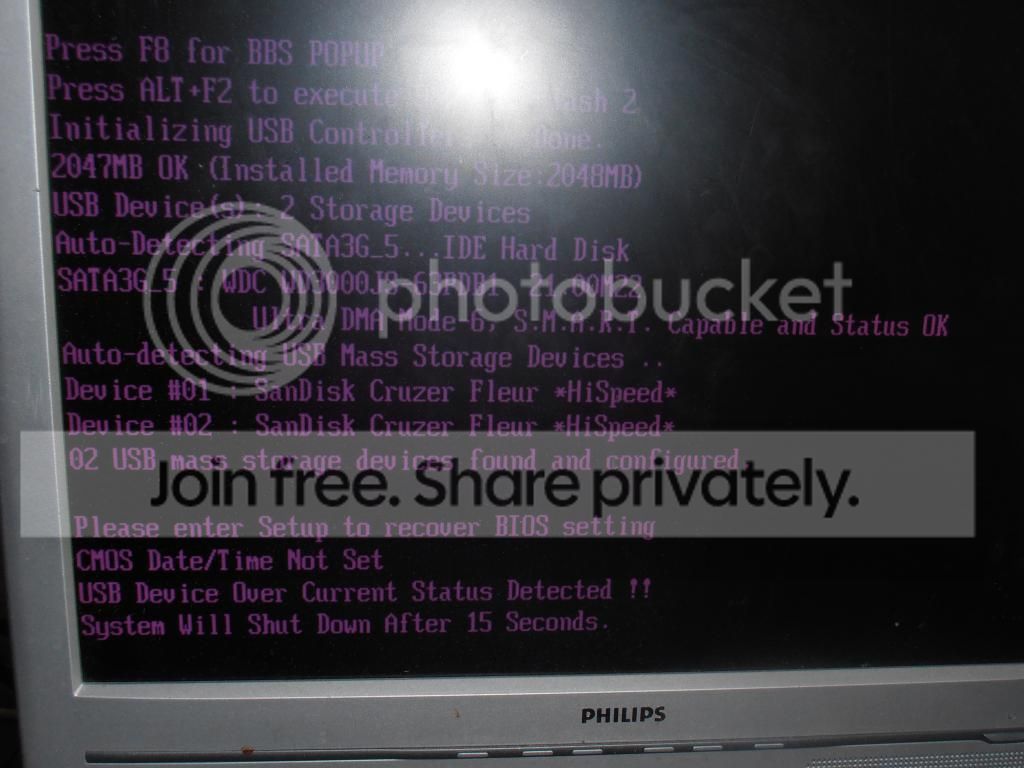
P7130177_zps280d3245.jpg


Things that I have tried in order to fix things:

1. I've tried clearing the CMOS by removing the battery and also the jumper for about 2-3 minutes with no power to the motherboard.

2. Updated/flashed the BIOS to the most current version.

3. Re-seated things such as RAM, processor, hard drives.

4. The cables from the front USB ports aren't even connected as I never really used them anyway and they sometimes caused problems because my gf accidentally damaged the port.

5. Tried a different CMOS battery.

I have consired re-installing Windows as, for about 10 minutes or so, I kept getting an error message saying that a file was missing or corrupt.

If I could get to the BIOS it'd be a start but it only allows me to use the EZ Flash 2 by pressing ALT+F2. F8 doesn't work, TAB doesn't work and neither does DEL.

My motherboard is an Asus M5A78L-M USB3. Is there anything else that I could try? I don't give up easily and if re-installing Windows is an option then I'll do it but I'm not thinking that this is the issue here.
Any help would be great!

****EDIT****
Okay I left the BIOS battery out for half an hour as well as the jumper on different pins. I'm able to access the BIOS again now as it thankfully seems to have reset itself. Sadly it looks as though I'll have to re-install Windows as it informs me that it's missing a file -.-
 
Last edited:

My Computer My Computer

At a glance

Windows 7AMD6Gig DDR3
Computer type
PC/Desktop
Computer Manufacturer/Model Number
Asus
OS
Windows 7
CPU
AMD
Motherboard
M5A78L-M USB3
Memory
6Gig DDR3
Hard Drives
2 SATA

My Computer My Computer

At a glance

W7 Pro x64 SP1 | W10 Pro IP x64 | W8.1 Pro x6...i7-4790k @ 4GHz (4.4GHz Boost)16GB DDR3 Kingston HyperX Fury @ 1600MHz CL 9...EVGA GTX 980 Classified
Computer type
PC/Desktop
Computer Manufacturer/Model Number
Custom Build
OS
W7 Pro x64 SP1 | W10 Pro IP x64 | W8.1 Pro x64 VM | Linux Mint VM
CPU
i7-4790k @ 4GHz (4.4GHz Boost)
Motherboard
ASUS Sabertooth Z87 (BIOS Rev 2004)
Memory
16GB DDR3 Kingston HyperX Fury @ 1600MHz CL 9-9-9-27
Graphics Card(s)
EVGA GTX 980 Classified
Sound Card
Realtek Onboard
Monitor(s) Displays
Samsung S27D390
Screen Resolution
1920 x 1080
Hard Drives
240GB Intel 520 Series SSD |
Samsung 850 EVO 120GB SSD |
2TB WD Caviar Black |
2TB WD Caviar Green
PSU
Corsair HX850-80 Gold Modular
Case
Cooler Master Silencio 650
Cooling
Corsair H80i w/2 x Corsair SP120 | 2 x 120mm Noctua NF-S12B
Keyboard
Microsoft Sidewinder X4
Mouse
Gigabyte M6900 optical
Internet Speed
152mb
Antivirus
F-Secure
Browser
Firefox 38.0
Other Info
Backup Rig: Win 7 Pro 64-bit | AMD A10-5800k | ASUS F2A85-V Pro | 8GB Samsung DDR3 @1600MHz | 120GB Toshiba SDD | 2TB Seagate HDD | Cooler Master Silencio 550
Before pulling the motherboard, I would disconnect all front panel connections from the motherboard except the start button, especially the USB headers, unplug all USB devices except keyboard and mouse and try again. If you still get the same message, try a different keyboard and mouse, if it continues you can unplug the start button and short the 2 pins with a screwdriver for just a second and it will start. If you continue to have problems, pull the motherboard then. I suspect the front panel is shorted out from when your gf damaged them. If you reset the CMOS by replacing the battery, you will have to enter bios, reset optimized defaults and set everything up again including the date and time.
 

My Computers My Computers

  • At a glance

    Windows 11 ProRyzen 9 5900X32GB G Skill DDR4-3600EVGA RTX 3080 FTW 3 Ultra
    Computer type
    PC/Desktop
    Computer Manufacturer/Model Number
    ALWAYS UNDER CONSTRUCTION
    OS
    Windows 11 Pro
    CPU
    Ryzen 9 5900X
    Motherboard
    Asus X570 Crosshair Viii Hero
    Memory
    32GB G Skill DDR4-3600
    Graphics Card(s)
    EVGA RTX 3080 FTW 3 Ultra
    Sound Card
    On Board/Sennheiser PC37X Headset
    Monitor(s) Displays
    3 X Asus 27"
    Screen Resolution
    2560x1440
    Hard Drives
    2 X 1 TB NVME drives
    PSU
    EVGA 850
    Case
    Phanteks Eclipse P400A
    Cooling
    EVGA 280 AIO
    Keyboard
    Logitech G510s/ Logitech G13
    Mouse
    Logitech G502
    Internet Speed
    24/1
    Antivirus
    ESET/MBAM Pro/SAS Pro
    Browser
    Chrome/ Firefox/ Edge
  • At a glance

    Windows 11 ProIntel Ultra 9 288V32 GB LPDDR5X 8533
    Computer type
    Laptop
    System Manufacturer/Model Number
    Dell 16 Plus
    OS
    Windows 11 Pro
    CPU
    Intel Ultra 9 288V
    Memory
    32 GB LPDDR5X 8533
    Monitor(s) Displays
    16" Mini-LED HDR600 Touch 90 Hz
    Screen Resolution
    2560X1600
    Hard Drives
    1 TB NVME
The front ports had been long unplugged, for maybe half a year... I managed to get it working again last night and again this morning it was fine. Then I put it back into my system and the damn thing starts again so I'm currently clearing the BIOS again.

Nothing is plugged into any USB ports and whenever a HDD is plugged in and I try to get to BIOS it stays on:
"Auto-detecing SATA_2"

I've tried different SATA ports, I have 6 in all and when plugged into a different port the stupid "USB device over current.."

It's weird that clearing the CMOS seemed to fix it an maybe I did something wrong in the BIOS this morning. I did upgrade to the latest BIOS so maybe reverting it to an older one will help but it tells me that the file is older than the board so I can't even do that.

I've read a lot on Google where people using Asus motherboards often have this same problem and my girlfriends faith in my ability to fix the damn thing is almost blinding her from the reality. I mean it was she who told me that I needed to put the motherboard back into the case and not just have it laying on top on a cardboard box.

@Boozad I have 6 USB ports and nothing is plugged into them currently.

***EDIT***
Okay it seems that it is actually shorting somewhere but that's even when it's sitting on cardboard. I tried suspending the motherboard so that it's not touching anything and it seems to work so I dunno how I'm gonna keep it stable =/ The problem seems to be orientated around the processor housing/radiator so I'll have to take a look...

I wiggled the radiator around gently before plugging the power back in and it seems to have stopped it from doing this stuff but it's not an ideal long-term solution...

If I suspent the motherboard (with support obviously) from the radiator itself then it seems to work I just don't get it...
 
Last edited:

My Computer My Computer

At a glance

Windows 7AMD6Gig DDR3
Computer type
PC/Desktop
Computer Manufacturer/Model Number
Asus
OS
Windows 7
CPU
AMD
Motherboard
M5A78L-M USB3
Memory
6Gig DDR3
Hard Drives
2 SATA
Back
Top