
USB devices stopped working; Window 7 Code 19 Failure loading Using th

Drissa

New member
Local time
8:08 PM
Messages
4
Trouble shooters and windows fix-it centre no longer work; previously was able to restore devices which would stop working after a shutdown.
Windows File Checker utility (sfc.exe) reports "Windows Resource Protection did not find any integrity violations"
The following is a diagnostic report. Any help would be appreciated.
DrissaDevice TypeIntel(R) ICH9 Family USB Universal Host Controller - 2935 Device StatusFailure using the VxD loader. (Code 19) Plug and Play IDPCI\VEN_8086&DEV_2935&SUBSYS_3624103C&REV_03\3&21436425&0&E9
 

My Computer

Computer Manufacturer/Model Number
Hewlett-Packard Hp Pavilion dv7-2230sa Entertainment Notebook Pc
OS
Windows 7 Home Premium 64 bit
CPU
Intel(R) Core(TM)2 Duo CPU T6600 @ 2.20GHz
Motherboard
Quanta 3624 version 18.42
Memory
4.00 GB
Graphics Card(s)
ATI Mobility Radeon HD 4530
Sound Card
ATI High Definition Audio Device
Monitor(s) Displays
Generic PnP Monitor
Screen Resolution
1024 x 768
Hard Drives
Hitachi HTS725050A9A364
Keyboard
Standard 101/102-Key
Mouse
Synaptics PS/2 Port Touchpad
Internet Speed
Download Speed 3182 kbps (398kB/s), Upload Speed 524 kbps
Hello Drissa, Welcome to the forum.
Could you please fill out your system specs it would help us to help you
As this is a reoccuring problem and Code 19 points to a registry problem I think it might be best/quicker if you were to make backups and reinstall Windows, if you have a windows DVD you may wish to try a repair install; http://www.sevenforums.com/tutorials/3413-repair-install.html?ltr=R
 

My Computer

Computer Manufacturer/Model Number
Something I threw together
OS
Windows 7 Ultimate x64
CPU
Intel Core i7-2600K
Motherboard
Asus P8P67
Memory
16 GB G Skill F3-10666 CL9D-4GBRL
Graphics Card(s)
ATI Radeon HD 6870
Sound Card
ATI Radeon HDMI / Realtek ALC892
Monitor(s) Displays
2 x 22" standard monitors / LG32LC56v TV to watch films
Screen Resolution
1920 x1080
Hard Drives
2 x OCZ Vertex2 111.79GB
3 x Samsung103SJ
1 x Samsung103UJ
1 x WD3200BEVT
1 x Hitachi5K320-160
PSU
Thermaltake Toughpower Cable Management 750W
Case
Antec 300
Cooling
Noctua NH-U12P SE2 and 5 120mm Case fans
Keyboard
Microsoft Comfort Curve Keyboard 2000
Mouse
Hama M3110 / Logitech M305
Internet Speed
16000
Other Info
I have also used Fedora, Suse, Ubuntu Linux
And all other Windows from 95 to date except ME
Hello Pooch and thanks for your input; system specs now entered.
 

My Computer

Computer Manufacturer/Model Number
Hewlett-Packard Hp Pavilion dv7-2230sa Entertainment Notebook Pc
OS
Windows 7 Home Premium 64 bit
CPU
Intel(R) Core(TM)2 Duo CPU T6600 @ 2.20GHz
Motherboard
Quanta 3624 version 18.42
Memory
4.00 GB
Graphics Card(s)
ATI Mobility Radeon HD 4530
Sound Card
ATI High Definition Audio Device
Monitor(s) Displays
Generic PnP Monitor
Screen Resolution
1024 x 768
Hard Drives
Hitachi HTS725050A9A364
Keyboard
Standard 101/102-Key
Mouse
Synaptics PS/2 Port Touchpad
Internet Speed
Download Speed 3182 kbps (398kB/s), Upload Speed 524 kbps
Last edited:

My Computer

Computer Manufacturer/Model Number
Something I threw together
OS
Windows 7 Ultimate x64
CPU
Intel Core i7-2600K
Motherboard
Asus P8P67
Memory
16 GB G Skill F3-10666 CL9D-4GBRL
Graphics Card(s)
ATI Radeon HD 6870
Sound Card
ATI Radeon HDMI / Realtek ALC892
Monitor(s) Displays
2 x 22" standard monitors / LG32LC56v TV to watch films
Screen Resolution
1920 x1080
Hard Drives
2 x OCZ Vertex2 111.79GB
3 x Samsung103SJ
1 x Samsung103UJ
1 x WD3200BEVT
1 x Hitachi5K320-160
PSU
Thermaltake Toughpower Cable Management 750W
Case
Antec 300
Cooling
Noctua NH-U12P SE2 and 5 120mm Case fans
Keyboard
Microsoft Comfort Curve Keyboard 2000
Mouse
Hama M3110 / Logitech M305
Internet Speed
16000
Other Info
I have also used Fedora, Suse, Ubuntu Linux
And all other Windows from 95 to date except ME
chipset and bios

Installed updated chipset from Intel, with no joyful result; do not know what to do with the BIOS. Do I need to edit the registry, upper and lower filters, and how do I identify these.
thanks
Drissa
 

My Computer

Computer Manufacturer/Model Number
Hewlett-Packard Hp Pavilion dv7-2230sa Entertainment Notebook Pc
OS
Windows 7 Home Premium 64 bit
CPU
Intel(R) Core(TM)2 Duo CPU T6600 @ 2.20GHz
Motherboard
Quanta 3624 version 18.42
Memory
4.00 GB
Graphics Card(s)
ATI Mobility Radeon HD 4530
Sound Card
ATI High Definition Audio Device
Monitor(s) Displays
Generic PnP Monitor
Screen Resolution
1024 x 768
Hard Drives
Hitachi HTS725050A9A364
Keyboard
Standard 101/102-Key
Mouse
Synaptics PS/2 Port Touchpad
Internet Speed
Download Speed 3182 kbps (398kB/s), Upload Speed 524 kbps
You are using drives in a USB 3.0 enclosure according to your specs. What other USB devices are you using?

Do you have the USB 3.0 Drivers installed?


ASUS P7P55D-E bios & drivers

The BIOS can be updated, but this is a last resort, and only to be used if it addresses your problem. Flashing a BIOS ( meaning to burn new data into it) is inherently dangerous, and can render your motherboard useless.

You also mention that you use a Norton product. Could you try uninstalling that, ( you may need a special tool to do that), and then rebooting the machine.

Regards....Mike Connor
 

My Computer

OS
Several, including Windows 7 x64 Ultimate
Installed updated chipset from Intel, with no joyful result; do not know what to do with the BIOS. Do I need to edit the registry, upper and lower filters, and how do I identify these.
thanks
Drissa
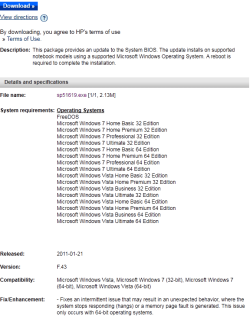
The Bios from HP appears to be another .exe file which you can install through Windows I could not check more here as the model number from your Laptop are still missing from your specs.

The only other option I see is a new install of Windows as I wrote in my first post
 

My Computer

Computer Manufacturer/Model Number
Something I threw together
OS
Windows 7 Ultimate x64
CPU
Intel Core i7-2600K
Motherboard
Asus P8P67
Memory
16 GB G Skill F3-10666 CL9D-4GBRL
Graphics Card(s)
ATI Radeon HD 6870
Sound Card
ATI Radeon HDMI / Realtek ALC892
Monitor(s) Displays
2 x 22" standard monitors / LG32LC56v TV to watch films
Screen Resolution
1920 x1080
Hard Drives
2 x OCZ Vertex2 111.79GB
3 x Samsung103SJ
1 x Samsung103UJ
1 x WD3200BEVT
1 x Hitachi5K320-160
PSU
Thermaltake Toughpower Cable Management 750W
Case
Antec 300
Cooling
Noctua NH-U12P SE2 and 5 120mm Case fans
Keyboard
Microsoft Comfort Curve Keyboard 2000
Mouse
Hama M3110 / Logitech M305
Internet Speed
16000
Other Info
I have also used Fedora, Suse, Ubuntu Linux
And all other Windows from 95 to date except ME
Hewlett-Packard Hp Pavilion dv7-2230sa Entertainment Notebook
 

My Computer

Computer Manufacturer/Model Number
Hewlett-Packard Hp Pavilion dv7-2230sa Entertainment Notebook Pc
OS
Windows 7 Home Premium 64 bit
CPU
Intel(R) Core(TM)2 Duo CPU T6600 @ 2.20GHz
Motherboard
Quanta 3624 version 18.42
Memory
4.00 GB
Graphics Card(s)
ATI Mobility Radeon HD 4530
Sound Card
ATI High Definition Audio Device
Monitor(s) Displays
Generic PnP Monitor
Screen Resolution
1024 x 768
Hard Drives
Hitachi HTS725050A9A364
Keyboard
Standard 101/102-Key
Mouse
Synaptics PS/2 Port Touchpad
Internet Speed
Download Speed 3182 kbps (398kB/s), Upload Speed 524 kbps

Attachments

  • Capture.PNG
    Capture.PNG
    18.8 KB · Views: 28

My Computer

Computer Manufacturer/Model Number
Something I threw together
OS
Windows 7 Ultimate x64
CPU
Intel Core i7-2600K
Motherboard
Asus P8P67
Memory
16 GB G Skill F3-10666 CL9D-4GBRL
Graphics Card(s)
ATI Radeon HD 6870
Sound Card
ATI Radeon HDMI / Realtek ALC892
Monitor(s) Displays
2 x 22" standard monitors / LG32LC56v TV to watch films
Screen Resolution
1920 x1080
Hard Drives
2 x OCZ Vertex2 111.79GB
3 x Samsung103SJ
1 x Samsung103UJ
1 x WD3200BEVT
1 x Hitachi5K320-160
PSU
Thermaltake Toughpower Cable Management 750W
Case
Antec 300
Cooling
Noctua NH-U12P SE2 and 5 120mm Case fans
Keyboard
Microsoft Comfort Curve Keyboard 2000
Mouse
Hama M3110 / Logitech M305
Internet Speed
16000
Other Info
I have also used Fedora, Suse, Ubuntu Linux
And all other Windows from 95 to date except ME
Back
Top