USB drive inaccessible by any means

If I have mentioned it before apologies but any chance of trying this drive on another machine as we are fast running out of options D.
 

My Computer My Computer

At a glance

Desk1 7 Home Prem / Desk2 10 Pro / Main lap A...Desk1 i5 3750K / Laptop i7 GTX 860M / Desk2 i...Desk1 8GB (1866) / Desk2 16GB (1333) / Laptop...Desk 1& 2NVidia GTX 650 & Laptops on board Intel
Computer type
PC/Desktop
Computer Manufacturer/Model Number
Own build (new) Desk1 / Asus ROG Win 7 / Desk2 1st build
OS
Desk1 7 Home Prem / Desk2 10 Pro / Main lap Asus ROG 10 Pro 2 laptop Toshiba 7 Pro Asus P2520 7 & 10
CPU
Desk1 i5 3750K / Laptop i7 GTX 860M / Desk2 i5 2500
Motherboard
Desk1 Asus P877-V / Desk2 Gigabyte H67 UD3H / Laptop ?
Memory
Desk1 8GB (1866) / Desk2 16GB (1333) / Laptop 8Gb DDR3
Graphics Card(s)
Desk 1& 2NVidia GTX 650 & Laptops on board Intel
Sound Card
Desk 1 & 2 -XONAR DG Realtek High Def audio Laptop
Monitor(s) Displays
Desk 1 Benq HD 2450 / Desk2 Philips 24" / Laptop 17.5"
Screen Resolution
1920x1080 D1 & D2 & Laptop 1
Hard Drives
Desk1 Samsung 120GB 830 SSD
Asus ROG 256GB 850 Pro SSD
Desk2 Samsung 840 256 SSD
Toshiba 120GB EVO
PSU
Desk 1 Corsair HX 1050/ Laptop ? / Desk 2 Corsair HX 650
Case
Desk 1 Cooler HAF XM ? Toshiba laptop / Desk2 Coolermaster
Cooling
Fans on all Desk1 -2 Desk2 - all Coolermasters 5 Laptop ?
Keyboard
Desk 1 MS Sidewinder X6 Desk 2 MS Sidewinder X 4
Mouse
Desk 1&2 - Gigabyte MS 900 gamer - laptop - Logitec wireless
Internet Speed
ADSL2+
Other Info
One other Desktop (tester) and spare Toshba laptop both with SSD's
Running Kaspersky 2016 ISS on all machines config'd identically
Logitec audio stereo systems on each machine (x3)
Canon MG5250MFC
Router/modem TP-Link running WPA2SK
Just plugged the drive on a Samsung notebook. Again, no partitions are displayed.

I think it's time that I should just give up and trash the thumb drive, unless you guys have another option...
 

My Computer My Computer

At a glance

Win 8 duals Win 7 64bit2.90GHz with Intel TurboBoost4 GBNvidia GForce GT 550M Cuda 2GB
Computer Manufacturer/Model Number
Asus N53SN
OS
Win 8 duals Win 7 64bit
CPU
2.90GHz with Intel TurboBoost
Memory
4 GB
Graphics Card(s)
Nvidia GForce GT 550M Cuda 2GB
Sound Card
Realtek
Screen Resolution
1366x768
Hard Drives
640 GB SATA Internal
1 TB Samsung External
Internet Speed
9.2 Mbit
In post #9, you did say "Only "Change drive letter" is clickable". Rest is greyed out, because no partitions are displayed."

In the reference I had given, the user clicked on Change Drive Letter and removed the drive letter. Did you do that and then check whether you can create and format the partition as he had done?
 

My Computer My Computer

At a glance

Windows 7 Home Premium 32 bit
OS
Windows 7 Home Premium 32 bit
In post #9, you did say "Only "Change drive letter" is clickable". Rest is greyed out, because no partitions are displayed."

In the reference I had given, the user clicked on Change Drive Letter and removed the drive letter. Did you do that and then check whether you can create and format the partition as he had done?

Yep, done that. But even if I remove the drive letter, playing with volumes was not possible while no volumes were displayed at all. So the "partitioning" options were unavailable..
 

My Computer My Computer

At a glance

Win 8 duals Win 7 64bit2.90GHz with Intel TurboBoost4 GBNvidia GForce GT 550M Cuda 2GB
Computer Manufacturer/Model Number
Asus N53SN
OS
Win 8 duals Win 7 64bit
CPU
2.90GHz with Intel TurboBoost
Memory
4 GB
Graphics Card(s)
Nvidia GForce GT 550M Cuda 2GB
Sound Card
Realtek
Screen Resolution
1366x768
Hard Drives
640 GB SATA Internal
1 TB Samsung External
Internet Speed
9.2 Mbit
I presume that it is still shown in Disk Management but now without a drive letter. What options do you get when right clicking after you have removed the drive letter?
 

My Computer My Computer

At a glance

Windows 7 Home Premium 32 bit
OS
Windows 7 Home Premium 32 bit
I presume that it is still shown in Disk Management but now without a drive letter. What options do you get when right clicking after you have removed the drive letter?

Same options. A drive letter could be assigned, and that's it.
 

My Computer My Computer

At a glance

Win 8 duals Win 7 64bit2.90GHz with Intel TurboBoost4 GBNvidia GForce GT 550M Cuda 2GB
Computer Manufacturer/Model Number
Asus N53SN
OS
Win 8 duals Win 7 64bit
CPU
2.90GHz with Intel TurboBoost
Memory
4 GB
Graphics Card(s)
Nvidia GForce GT 550M Cuda 2GB
Sound Card
Realtek
Screen Resolution
1366x768
Hard Drives
640 GB SATA Internal
1 TB Samsung External
Internet Speed
9.2 Mbit
I am giving up.:)
 

My Computer My Computer

At a glance

Windows 7 Home Premium 32 bit
OS
Windows 7 Home Premium 32 bit
Thank you all for your support.. Have any last resort options? Something that can write an MBR? Because the absence of an MBR would explain why the drive is not listed by any app...
 

My Computer My Computer

At a glance

Win 8 duals Win 7 64bit2.90GHz with Intel TurboBoost4 GBNvidia GForce GT 550M Cuda 2GB
Computer Manufacturer/Model Number
Asus N53SN
OS
Win 8 duals Win 7 64bit
CPU
2.90GHz with Intel TurboBoost
Memory
4 GB
Graphics Card(s)
Nvidia GForce GT 550M Cuda 2GB
Sound Card
Realtek
Screen Resolution
1366x768
Hard Drives
640 GB SATA Internal
1 TB Samsung External
Internet Speed
9.2 Mbit
No D looks like we have exhausted all options ate might just have to put it down to experience mate:(
 

My Computer My Computer

At a glance

Desk1 7 Home Prem / Desk2 10 Pro / Main lap A...Desk1 i5 3750K / Laptop i7 GTX 860M / Desk2 i...Desk1 8GB (1866) / Desk2 16GB (1333) / Laptop...Desk 1& 2NVidia GTX 650 & Laptops on board Intel
Computer type
PC/Desktop
Computer Manufacturer/Model Number
Own build (new) Desk1 / Asus ROG Win 7 / Desk2 1st build
OS
Desk1 7 Home Prem / Desk2 10 Pro / Main lap Asus ROG 10 Pro 2 laptop Toshiba 7 Pro Asus P2520 7 & 10
CPU
Desk1 i5 3750K / Laptop i7 GTX 860M / Desk2 i5 2500
Motherboard
Desk1 Asus P877-V / Desk2 Gigabyte H67 UD3H / Laptop ?
Memory
Desk1 8GB (1866) / Desk2 16GB (1333) / Laptop 8Gb DDR3
Graphics Card(s)
Desk 1& 2NVidia GTX 650 & Laptops on board Intel
Sound Card
Desk 1 & 2 -XONAR DG Realtek High Def audio Laptop
Monitor(s) Displays
Desk 1 Benq HD 2450 / Desk2 Philips 24" / Laptop 17.5"
Screen Resolution
1920x1080 D1 & D2 & Laptop 1
Hard Drives
Desk1 Samsung 120GB 830 SSD
Asus ROG 256GB 850 Pro SSD
Desk2 Samsung 840 256 SSD
Toshiba 120GB EVO
PSU
Desk 1 Corsair HX 1050/ Laptop ? / Desk 2 Corsair HX 650
Case
Desk 1 Cooler HAF XM ? Toshiba laptop / Desk2 Coolermaster
Cooling
Fans on all Desk1 -2 Desk2 - all Coolermasters 5 Laptop ?
Keyboard
Desk 1 MS Sidewinder X6 Desk 2 MS Sidewinder X 4
Mouse
Desk 1&2 - Gigabyte MS 900 gamer - laptop - Logitec wireless
Internet Speed
ADSL2+
Other Info
One other Desktop (tester) and spare Toshba laptop both with SSD's
Running Kaspersky 2016 ISS on all machines config'd identically
Logitec audio stereo systems on each machine (x3)
Canon MG5250MFC
Router/modem TP-Link running WPA2SK
Last edited:

My Computer My Computer

At a glance

Windows 7 Home Premium 32 bit
OS
Windows 7 Home Premium 32 bit
If the drive supports it you could try Toshiba's USB security software it may work if it recognises the drive and after you create the security partition and the drives working again you could then just remove it.

If you tell me the model of the drive I could find a link to the software that I think would have the best chance of working with your model.
 

My Computer My Computer

At a glance

Windows 7 Ultimate x64Intel Pentium Dual Core E5200 2.5GHz (3.77GHz...Corsair 4GB DDR2 (4x1GB CM2X1024-6400C4)Palit GeForce GTS 250 (1024MB)
Computer Manufacturer/Model Number
Self built
OS
Windows 7 Ultimate x64
CPU
Intel Pentium Dual Core E5200 2.5GHz (3.77GHz OC)
Motherboard
Asus P5Q-E
Memory
Corsair 4GB DDR2 (4x1GB CM2X1024-6400C4)
Graphics Card(s)
Palit GeForce GTS 250 (1024MB)
Sound Card
On Board (ADI AD2000B 8ch HD)
Monitor(s) Displays
Samsung 32in LCD TV
Screen Resolution
1360x768
Hard Drives
2 x 1TB Samsung 103SJ (Raid0)
2 x External 500GB Samsung 502IJ (NexStar 3 HD Enclosures)
PSU
550W Antec Neo HE 550
Case
Antec P180
Cooling
Xigmatex Red Scorpion CPU Cooler. 3x120mm Fans
Keyboard
Logitech MX5000 Laser (Combo)
Mouse
Logitech MX5000 Laser (Combo)
Internet Speed
ADSL2+ (avg 10 Mbps Down, 0.80 Mbps up)
Other Info
Gigabyte GN-WP01GS 54g Wireless Lan Card
I do not want to pour cold water into your desire to write the MBR.:) Please do and report.

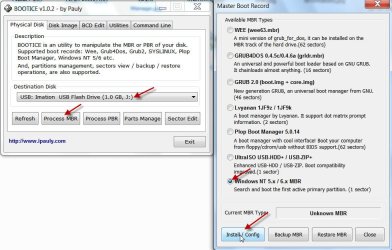
Bootice can write MBR - provided it can recognise your pendrive. BOOTICE v1.02 2012.12.12

BOOTICE - Modify, Backup, Restore Master Boot Record & Partition Boot Record

View attachment 253616

Click on Process MBR, Select Windows NT 5.x / 6.x MBR, click on Install/config and then in the ensuing screen giving you the choice click on Windows NT 5.x MBR.

Nope, Bootice didn't see the drive either.
 

My Computer My Computer

At a glance

Win 8 duals Win 7 64bit2.90GHz with Intel TurboBoost4 GBNvidia GForce GT 550M Cuda 2GB
Computer Manufacturer/Model Number
Asus N53SN
OS
Win 8 duals Win 7 64bit
CPU
2.90GHz with Intel TurboBoost
Memory
4 GB
Graphics Card(s)
Nvidia GForce GT 550M Cuda 2GB
Sound Card
Realtek
Screen Resolution
1366x768
Hard Drives
640 GB SATA Internal
1 TB Samsung External
Internet Speed
9.2 Mbit
If the drive supports it you could try Toshiba's USB security software it may work if it recognises the drive and after you create the security partition and the drives working again you could then just remove it.

If you tell me the model of the drive I could find a link to the software that I think would have the best chance of working with your model.

It's called: 8GB Toshiba TransMemory™ U2M USB Flash Drive
I've looked everywhere and couldn't find any recovery software just for Toshiba memory sticks in particular. But if you do, that would really help.
 

My Computer My Computer

At a glance

Win 8 duals Win 7 64bit2.90GHz with Intel TurboBoost4 GBNvidia GForce GT 550M Cuda 2GB
Computer Manufacturer/Model Number
Asus N53SN
OS
Win 8 duals Win 7 64bit
CPU
2.90GHz with Intel TurboBoost
Memory
4 GB
Graphics Card(s)
Nvidia GForce GT 550M Cuda 2GB
Sound Card
Realtek
Screen Resolution
1366x768
Hard Drives
640 GB SATA Internal
1 TB Samsung External
Internet Speed
9.2 Mbit
Well it's not actually a repair tool it allows you to create a privacy zone, x amount of password protected memory, but if it's like my Corsair USB it will create 2 partitions on the drive and format them both and there's a chance this will work, either way it's worth a try.

You can download the software and manual here - Software Downloads - TOSHIBA Memory Solutions
It should be the 5th one down for U2M drives so try that. It doesn't mention Win7 so you may have to use compatibility mode if it doesn't work the first time.

And as I said if it works and you can access the drive again then you can run it again and remove the privacy zone if you don't with to keep it.
 

My Computer My Computer

At a glance

Windows 7 Ultimate x64Intel Pentium Dual Core E5200 2.5GHz (3.77GHz...Corsair 4GB DDR2 (4x1GB CM2X1024-6400C4)Palit GeForce GTS 250 (1024MB)
Computer Manufacturer/Model Number
Self built
OS
Windows 7 Ultimate x64
CPU
Intel Pentium Dual Core E5200 2.5GHz (3.77GHz OC)
Motherboard
Asus P5Q-E
Memory
Corsair 4GB DDR2 (4x1GB CM2X1024-6400C4)
Graphics Card(s)
Palit GeForce GTS 250 (1024MB)
Sound Card
On Board (ADI AD2000B 8ch HD)
Monitor(s) Displays
Samsung 32in LCD TV
Screen Resolution
1360x768
Hard Drives
2 x 1TB Samsung 103SJ (Raid0)
2 x External 500GB Samsung 502IJ (NexStar 3 HD Enclosures)
PSU
550W Antec Neo HE 550
Case
Antec P180
Cooling
Xigmatex Red Scorpion CPU Cooler. 3x120mm Fans
Keyboard
Logitech MX5000 Laser (Combo)
Mouse
Logitech MX5000 Laser (Combo)
Internet Speed
ADSL2+ (avg 10 Mbps Down, 0.80 Mbps up)
Other Info
Gigabyte GN-WP01GS 54g Wireless Lan Card
Well it's not actually a repair tool it allows you to create a privacy zone, x amount of password protected memory, but if it's like my Corsair USB it will create 2 partitions on the drive and format them both and there's a chance this will work, either way it's worth a try.

You can download the software and manual here - Software Downloads - TOSHIBA Memory Solutions
It should be the 5th one down for U2M drives so try that. It doesn't mention Win7 so you may have to use compatibility mode if it doesn't work the first time.

And as I said if it works and you can access the drive again then you can run it again and remove the privacy zone if you don't with to keep it.

It says "firmware update failed" :(

How about we just drop this... Thanks to you, we tried every possible way after all, eh?
 

My Computer My Computer

At a glance

Win 8 duals Win 7 64bit2.90GHz with Intel TurboBoost4 GBNvidia GForce GT 550M Cuda 2GB
Computer Manufacturer/Model Number
Asus N53SN
OS
Win 8 duals Win 7 64bit
CPU
2.90GHz with Intel TurboBoost
Memory
4 GB
Graphics Card(s)
Nvidia GForce GT 550M Cuda 2GB
Sound Card
Realtek
Screen Resolution
1366x768
Hard Drives
640 GB SATA Internal
1 TB Samsung External
Internet Speed
9.2 Mbit
Makes me think either your USB is not compatible with the software or it is totally stuffed.

I don't think anyone has any other suggestions so if no one new comes along I guess we will have to give up.

Sorry we could not help.
 

My Computer My Computer

At a glance

Windows 7 Ultimate x64Intel Pentium Dual Core E5200 2.5GHz (3.77GHz...Corsair 4GB DDR2 (4x1GB CM2X1024-6400C4)Palit GeForce GTS 250 (1024MB)
Computer Manufacturer/Model Number
Self built
OS
Windows 7 Ultimate x64
CPU
Intel Pentium Dual Core E5200 2.5GHz (3.77GHz OC)
Motherboard
Asus P5Q-E
Memory
Corsair 4GB DDR2 (4x1GB CM2X1024-6400C4)
Graphics Card(s)
Palit GeForce GTS 250 (1024MB)
Sound Card
On Board (ADI AD2000B 8ch HD)
Monitor(s) Displays
Samsung 32in LCD TV
Screen Resolution
1360x768
Hard Drives
2 x 1TB Samsung 103SJ (Raid0)
2 x External 500GB Samsung 502IJ (NexStar 3 HD Enclosures)
PSU
550W Antec Neo HE 550
Case
Antec P180
Cooling
Xigmatex Red Scorpion CPU Cooler. 3x120mm Fans
Keyboard
Logitech MX5000 Laser (Combo)
Mouse
Logitech MX5000 Laser (Combo)
Internet Speed
ADSL2+ (avg 10 Mbps Down, 0.80 Mbps up)
Other Info
Gigabyte GN-WP01GS 54g Wireless Lan Card
Back
Top