Ok I got a 120gig old ide drive in use via usb cable to my pc. I do plan to replace this soon with a drive that will be going internal but for now I am using it. However it keeps powering down when idle and I dont want it power cycling, is there a way to make it stay on without opening up the case and putting it directly into an ide port?
I am looking in device manager and thinking about enabling write cache which removes the instant removal feature but that may not solve the problem and leave it with corrupted writes.
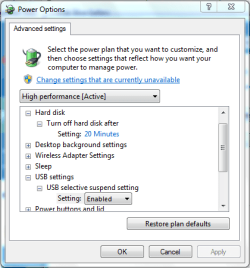
If you open Control Panel -> Hardware and Sound -> Power Options then click 'Change plan settings' followed by 'Change advanced power settings' you can change whether HDD powers down or USB suspends.
I have the same problem with my wireless usb adapters for my modem. If I make these adjustments, do I need to reboot the computer to activate the changes?
System info: Windows 7 Home Premium, Service Pack 1.
I've tried 2 different adapters now and I have the same problem with both of them. After about 15-20 minutes of not using the internet, my computer deactivates the adapter and gives this response with troubleshooting: "Windows has stopped this device because it has reported problems. (Code 43)"
You shouldn't need to restart for the changes to take effect if memory serves me correctly. However you may need to power the device back up again (ie use it) before it will wake up an stay on.
My Computer
At a glance
Windows 10 Pro x64Intel Core i5 7400 @ 3.00GHz8GB 2133Mhz DDR4 (OEM supplied)Gygabyte Windforce GTX 1050Ti (Factory Overcl...
Computer type
PC/Desktop
Computer Manufacturer/Model Number
Medion Erazer (note to self: insert model number) - with custom additions
This may have been down to the hdd itself, I noticed it was powering down even when used and it seemed to be whenever a particular file was accessed as it kept powering down whilst trying to copy that file to another hdd. I have now swapped the hdd with another one and not had the problem since.
Well let's see... I loaded the driver from the CD that came with it. Then when it was up and running I checked for driver updates and I've got the most recent version. Netgear driver version 5.60.180.11 for Wireless N 300 (WNA3100)
Well try turning select suspend off, see if that helps, if not I'd recommend making a new thread so one of our Hardware Guru's can help you further. You'll get more attention with a new thread than an old one, as people sort of assume that it's been solved.
My Computer
At a glance
Windows 10 Pro x64Intel Core i5 7400 @ 3.00GHz8GB 2133Mhz DDR4 (OEM supplied)Gygabyte Windforce GTX 1050Ti (Factory Overcl...
Computer type
PC/Desktop
Computer Manufacturer/Model Number
Medion Erazer (note to self: insert model number) - with custom additions
Sorry, my fault there, should have explained better.
Click Start and type "Power Options" click the first result in the list.
Click "change plan settings" next to your current power plan
click "Change advanced plan settings" followed by "change settings that are currently anavailable"
Make sure that Wireless Adapter Settings>Power Saving Mode is set to "Maximum Performance" and USB Settings>USB selective suspend setting" is set to Disabled
My Computer
At a glance
Windows 10 Pro x64Intel Core i5 7400 @ 3.00GHz8GB 2133Mhz DDR4 (OEM supplied)Gygabyte Windforce GTX 1050Ti (Factory Overcl...
Computer type
PC/Desktop
Computer Manufacturer/Model Number
Medion Erazer (note to self: insert model number) - with custom additions