USB driver required for Dell Studio 1558 - Windows 7 Home Premium

georgycherian

New member
Local time
6:14 PM
Messages
4
Hello Everyone!

Can someone help me out with the driver for the USB? All the USB controllers are okay under the Device Manger but the OS ain't detecting any of my USB's. Kindly help.

Many thanks!

Georgy
 

My Computer My Computer

At a glance

Windows 7 Home Premium 64 biti3 m350
Computer type
Laptop
Computer Manufacturer/Model Number
Dell Studio 1558
OS
Windows 7 Home Premium 64 bit
CPU
i3 m350
The ONLY device drivers for USB is the default Windows USB driver.

There is some other problem. What is not being detected? If you connect a device, such as a USB flash drive, it has to be disconnected with the "Safely Remove Hardware" function FIRST. If its just unplugged there is a very good chance when its connected the next time Windows Will not detect it. In these cases, connect whatever device is not being recognized, then go to the Device Manager and display the USB section. Usually there will be an "unknown" device listed and that will be the device that is not being detected. If this is the case, RIGHT click on the entry for the unknown device and then LEFT click "Uninstall". Physically disconnect the device, restart the PC and after Windows has started, connect the device and Windows should detect it as "new hardware" and reinstall it (and it will work).
 

My Computer My Computer

At a glance

Windows 10 64 bitIntel i7 6700K16GB Corsair DominatorIntel CPU Graphics
Computer type
PC/Desktop
Computer Manufacturer/Model Number
My Own Build
OS
Windows 10 64 bit
CPU
Intel i7 6700K
Motherboard
ASUS ROG Maximus VIII Hero
Memory
16GB Corsair Dominator
Graphics Card(s)
Intel CPU Graphics
Sound Card
RealTek
Monitor(s) Displays
27" Dell S2719dgf
Screen Resolution
2560X1440
Hard Drives
1 TB Samsung 850 EVO SSD for Win 10 Pro
500GB Samsung 850 EVO SSD for Win 10 Insider
2 TB drive for backup
PSU
EVGA Supernova 750G2
Case
BeQuiet Silent Base 600
Cooling
Deepcool Captain 120EX
Keyboard
Microsoft Wireless 2000
Mouse
Microsoft wireless
Internet Speed
100 MB/sec (Cable)
Antivirus
Microsoft Defender and Malwarebytes
Browser
Edge/Firefox
Other Info
Cakewalk (Sonar) by BandLab and Studio One 4.1 Pro recording studio software. MOTU 896Mk3 Hybrid recording interface, Frontier Tranzport wireless control unit, Behringer X-Touch Control Surface.
Five USB connected optical drives for CD Audio production using Nero BurningROM
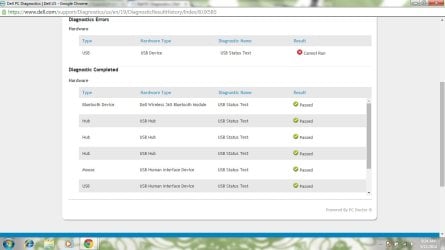
I had used the Diagnostic facility of Dell & the USB device had a result of cannot run(attached a snapshot of that)
 

Attachments

  • Dell diag.jpg
    Dell diag.jpg
    63.2 KB · Views: 2

My Computer My Computer

At a glance

Windows 7 Home Premium 64 biti3 m350
Computer type
Laptop
Computer Manufacturer/Model Number
Dell Studio 1558
OS
Windows 7 Home Premium 64 bit
CPU
i3 m350
What is the USB device you are trying to run?
 

My Computer My Computer

At a glance

Win 10 Pro x64Intel I5-2500K @3.3GHz16GB G.Skill Ripjaws X (4x4GB)EVGA GeForce 750 Ti SC 2GB
Computer type
PC/Desktop
Computer Manufacturer/Model Number
Self Built
OS
Win 10 Pro x64
CPU
Intel I5-2500K @3.3GHz
Motherboard
Asrock P67 Extreme4
Memory
16GB G.Skill Ripjaws X (4x4GB)
Graphics Card(s)
EVGA GeForce 750 Ti SC 2GB
Sound Card
ASUS Xonar DG 5.1 Channels 24-bit 96KHz PCI Interface Sound
Monitor(s) Displays
auria eq2367
Screen Resolution
1920 x 1080
Hard Drives
250GB Samsung 850 EVO SSD
1TB WD Blue
1TB Hitachi
PSU
SeaSonic X 650W 80 Plus Gold
Case
Corsair Obsidian 750D
Cooling
Corsair H60, Three 140mm case fans
Keyboard
Logitech Wireless Keyboard K520
Mouse
Logitech Wireless Mouse M310
Internet Speed
Wave Broadband ~ 100 dn 5 up
Antivirus
Windows Defender, Malwarebytes Premium
Browser
Edge, IE11, Chrome
Other Info
Laptop specs: HP g7-1365dx /
CPU: AMD A6-3420M APU with Radeon(tm) HD Graphics /
RAM: Crucial 8Gb (2x4Gb) /
SSD: Crucial M4-CT128M4SSD2 ATA Device/ FW 000F /
GFX: AMD Radeon HD 6520G /
OS: Windows 10 Pro x64
An ordinary pen drive or even if I connect any device to the three USB ports, none are detected
 

My Computer My Computer

At a glance

Windows 7 Home Premium 64 biti3 m350
Computer type
Laptop
Computer Manufacturer/Model Number
Dell Studio 1558
OS
Windows 7 Home Premium 64 bit
CPU
i3 m350
Download and reinstall the Intel motherboard chipset driver from the Dell downloads. The chipset drivers can affect motherboard devices, including USB.

Product Support | Dell US
 

My Computer My Computer

At a glance

Windows 10 64 bitIntel i7 6700K16GB Corsair DominatorIntel CPU Graphics
Computer type
PC/Desktop
Computer Manufacturer/Model Number
My Own Build
OS
Windows 10 64 bit
CPU
Intel i7 6700K
Motherboard
ASUS ROG Maximus VIII Hero
Memory
16GB Corsair Dominator
Graphics Card(s)
Intel CPU Graphics
Sound Card
RealTek
Monitor(s) Displays
27" Dell S2719dgf
Screen Resolution
2560X1440
Hard Drives
1 TB Samsung 850 EVO SSD for Win 10 Pro
500GB Samsung 850 EVO SSD for Win 10 Insider
2 TB drive for backup
PSU
EVGA Supernova 750G2
Case
BeQuiet Silent Base 600
Cooling
Deepcool Captain 120EX
Keyboard
Microsoft Wireless 2000
Mouse
Microsoft wireless
Internet Speed
100 MB/sec (Cable)
Antivirus
Microsoft Defender and Malwarebytes
Browser
Edge/Firefox
Other Info
Cakewalk (Sonar) by BandLab and Studio One 4.1 Pro recording studio software. MOTU 896Mk3 Hybrid recording interface, Frontier Tranzport wireless control unit, Behringer X-Touch Control Surface.
Five USB connected optical drives for CD Audio production using Nero BurningROM
I had tried it out earlier on..just did it again. Doesn't help :(
 

My Computer My Computer

At a glance

Windows 7 Home Premium 64 biti3 m350
Computer type
Laptop
Computer Manufacturer/Model Number
Dell Studio 1558
OS
Windows 7 Home Premium 64 bit
CPU
i3 m350

My Computer My Computer

At a glance

Windows 10 64 bitIntel i7 6700K16GB Corsair DominatorIntel CPU Graphics
Computer type
PC/Desktop
Computer Manufacturer/Model Number
My Own Build
OS
Windows 10 64 bit
CPU
Intel i7 6700K
Motherboard
ASUS ROG Maximus VIII Hero
Memory
16GB Corsair Dominator
Graphics Card(s)
Intel CPU Graphics
Sound Card
RealTek
Monitor(s) Displays
27" Dell S2719dgf
Screen Resolution
2560X1440
Hard Drives
1 TB Samsung 850 EVO SSD for Win 10 Pro
500GB Samsung 850 EVO SSD for Win 10 Insider
2 TB drive for backup
PSU
EVGA Supernova 750G2
Case
BeQuiet Silent Base 600
Cooling
Deepcool Captain 120EX
Keyboard
Microsoft Wireless 2000
Mouse
Microsoft wireless
Internet Speed
100 MB/sec (Cable)
Antivirus
Microsoft Defender and Malwarebytes
Browser
Edge/Firefox
Other Info
Cakewalk (Sonar) by BandLab and Studio One 4.1 Pro recording studio software. MOTU 896Mk3 Hybrid recording interface, Frontier Tranzport wireless control unit, Behringer X-Touch Control Surface.
Five USB connected optical drives for CD Audio production using Nero BurningROM
Try this
> Shutdown computer. unplug from AC outlet. If a laptop, remove the battery
> Go to sleep (that is, YOU go to sleep :) ) . Let the computer sit over night

Re-connect in the morning and try your USB devices again.

fyi... Not often, but i have seen this work on a couple different occasions for your symptoms
 

My Computer My Computer

At a glance

Desk 1: Win 7 Pro x32; Desk 2: Windows 10 x64
Computer type
PC/Desktop
Computer Manufacturer/Model Number
Dell Optiplex 360 and Optiplex 755
OS
Desk 1: Win 7 Pro x32; Desk 2: Windows 10 x64
Hard Drives
500GB Crucial SSD in both Desktops
Other Info
Buffalo 6TB NAS, Raid 1
Back
Top