USB Drives inaccessible after brief appearance in disk management

ta man

New member
Local time
3:22 PM
Messages
9
The post subject line details my final observation of this problem.

A few weeks ago I found I was unable to access a USB flash drive I plugged into my Win7 system. The system would make the audio alert typical when a flash drive was inserted but the drive did not show up anywhere in the system (Explorer or Disk management).

I got around the specific problem at the time by plugging the drive in a different windows computer and accessing it over the network.

The problem manifested again, trying to get files on a digital camera accessed via USB. I got the sound plugging it in (and unplugging it) but the device was nowhere to be seen.

I did some searching on this, found a page that recommended a Microsoft fix no longer available (because they want me to use Win 10) and one that suggested I delete the USB devices in device manager and let the OS re-install those drivers/devices on re-boot.
That didn't work.

Then at one point while I was trying some stuff I had the disk management console window open. I had previously tried other USB sticks with the same result and was trying one more. As I plugged one in, I noticed it showed up in the disk management console with a drive letter and then disappeared. When I removed it and plugged it in again, it did not show up again. Tried a different stick and again, it showed up briefly and disappeared. When plugged in a second time, it never showed up.

So it seems that a drive is recognized and immediately rejected and Windows remembers it was rejected and doesn't show it again, even briefly.

I would like to fix this so I can use USB drives on my windows system again.

Any ideas?

BTW, My USB mouse and USB speakers still worked and have not had their use interrupted (I briefly used a PS2 mouse when removing the USB devices in device manager).

I saw a recent post about a problem that ended up being duplicate disk signatures. I don't think this is that because after the first time the drive(s) don't show up in Disk Management at all. Also, one of these USB drives was used in this computer two weeks before the first time it failed.
 

My Computer My Computer

At a glance

Windows 7 Professional 64-bit12GB
Computer type
PC/Desktop
Computer Manufacturer/Model Number
HP
OS
Windows 7 Professional 64-bit
Memory
12GB
Does it has yellow alert on device manager?
 

My Computers My Computers

  • At a glance

    Windows 7 HP 64i5 6600K - 800MHz to 4200MHz4+4G GSkill DDR4 3000IG - Intel 530
    Computer type
    PC/Desktop
    Computer Manufacturer/Model Number
    custom build
    OS
    Windows 7 HP 64
    CPU
    i5 6600K - 800MHz to 4200MHz
    Motherboard
    GA-Z170-HD3P
    Memory
    4+4G GSkill DDR4 3000
    Graphics Card(s)
    IG - Intel 530
    Monitor(s) Displays
    Samsung 226BW
    Screen Resolution
    1680x1050
    Hard Drives
    (1) -1 SM951 – 128GB M.2 AHCI PCIe SSD drive for Windows 7 and Lubuntu
    (2) -1 WD SATA 3 - 1T for Data
    (3) -1 WD SATA 3 - 1T for backup
    PSU
    Thermaltake 450W TR2 gold
    Keyboard
    Old and good Chicony mechanical keyboard
    Mouse
    Logitech mX performance - 9 buttons (had to disable some)
    Internet Speed
    500Mb/s
    Browser
    Firefox 64
    Other Info
    TinyWall firewall
  • At a glance

    Windows 7 Proi7-4500U 800MHz to 3.0GHz(4+4)G DDR3 1600IG intel 4400 + NVIDIA GeForce GT 745M
    Computer type
    Laptop
    System Manufacturer/Model Number
    Asus Q550LF
    OS
    Windows 7 Pro
    CPU
    i7-4500U 800MHz to 3.0GHz
    Motherboard
    Asus Q550LF
    Memory
    (4+4)G DDR3 1600
    Graphics Card(s)
    IG intel 4400 + NVIDIA GeForce GT 745M
    Sound Card
    Realtek
    Monitor(s) Displays
    LG Display LP156WF4-SPH1
    Screen Resolution
    1920 x 1080
    Hard Drives
    BX500 120G SSD for Windows and programs +
    1T HDD for data
    Internet Speed
    500 Mb/s
    Browser
    Firefox
    Other Info
    TinyWall firewall
Does it has yellow alert on device manager?
Thanks for responding. Your question led me to look at something I did not look at before.

To first answer your question, there are no yellow alerts in device manager. I opened device manager to look at this and while I had it open I decided to insert on of the drives that doesn't get recognized. I saw this then show up as a disk drive in device manager.

I right clicked on the USB drive to look at Properties and found the device was DISABLED.
I clicked the button to enable it and after Device Manager refreshed a few times, looked at the right click menu and found it was Still Disabled.

The properties mentioned "Code 22", so I googled that and found a couple web pages purporting to tell you how to fix Device Manager error code 22.
Here is one example:
How to Fix Error Code 22: This Device Is Disabled

They all have the same set of suggestions:
1. Enable the device (this doesn't work for me)
2. Restart your computer (done many time to no effect)
3. If you made a change in device manager or drivers, roll it back (I made no changes)
4. Update drivers (I didn't do this yet - this driver is used for the system disks)
5. Clear CMOS (Not yet willing to do this and risking the whole system not working.)
6. Update BIOS (Device worked before so I see no reason to do this even if I could)
7. Move device to a different slot (can't - these are motherboard USB Ports)
8. Replace the hardware (done multiple time with different USB drives)

I looked at the driver for this device and it is a Microsoft provided and signed driver dated 6/21/06 with a version number 6.1.7601.23403

Here's a pic of my device manager display with the USB drive properties.
device-manager.png
 

My Computer My Computer

At a glance

Windows 7 Professional 64-bit12GB
Computer type
PC/Desktop
Computer Manufacturer/Model Number
HP
OS
Windows 7 Professional 64-bit
Memory
12GB
Did you try another USB device to see if it's not a failure on the Philips USB device?
 

My Computers My Computers

  • At a glance

    Windows 7 HP 64i5 6600K - 800MHz to 4200MHz4+4G GSkill DDR4 3000IG - Intel 530
    Computer type
    PC/Desktop
    Computer Manufacturer/Model Number
    custom build
    OS
    Windows 7 HP 64
    CPU
    i5 6600K - 800MHz to 4200MHz
    Motherboard
    GA-Z170-HD3P
    Memory
    4+4G GSkill DDR4 3000
    Graphics Card(s)
    IG - Intel 530
    Monitor(s) Displays
    Samsung 226BW
    Screen Resolution
    1680x1050
    Hard Drives
    (1) -1 SM951 – 128GB M.2 AHCI PCIe SSD drive for Windows 7 and Lubuntu
    (2) -1 WD SATA 3 - 1T for Data
    (3) -1 WD SATA 3 - 1T for backup
    PSU
    Thermaltake 450W TR2 gold
    Keyboard
    Old and good Chicony mechanical keyboard
    Mouse
    Logitech mX performance - 9 buttons (had to disable some)
    Internet Speed
    500Mb/s
    Browser
    Firefox 64
    Other Info
    TinyWall firewall
  • At a glance

    Windows 7 Proi7-4500U 800MHz to 3.0GHz(4+4)G DDR3 1600IG intel 4400 + NVIDIA GeForce GT 745M
    Computer type
    Laptop
    System Manufacturer/Model Number
    Asus Q550LF
    OS
    Windows 7 Pro
    CPU
    i7-4500U 800MHz to 3.0GHz
    Motherboard
    Asus Q550LF
    Memory
    (4+4)G DDR3 1600
    Graphics Card(s)
    IG intel 4400 + NVIDIA GeForce GT 745M
    Sound Card
    Realtek
    Monitor(s) Displays
    LG Display LP156WF4-SPH1
    Screen Resolution
    1920 x 1080
    Hard Drives
    BX500 120G SSD for Windows and programs +
    1T HDD for data
    Internet Speed
    500 Mb/s
    Browser
    Firefox
    Other Info
    TinyWall firewall
Did you try another USB device to see if it's not a failure on the Philips USB device?

Many others, as mentioned in the original post:

Then at one point while I was trying some stuff I had the disk management console window open. I had previously tried other USB sticks with the same result and was trying one more. As I plugged one in, I noticed it showed up in the disk management console with a drive letter and then disappeared. When I removed it and plugged it in again, it did not show up again. Tried a different stick and again, it showed up briefly and disappeared. When plugged in a second time, it never showed up.

Plus, any drive that I tried and was inaccessible in this Win7 computer worked fine in another computer (which is Win10).
 

My Computer My Computer

At a glance

Windows 7 Professional 64-bit12GB
Computer type
PC/Desktop
Computer Manufacturer/Model Number
HP
OS
Windows 7 Professional 64-bit
Memory
12GB
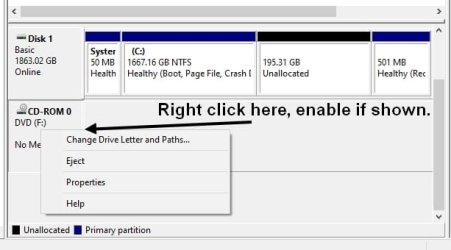
If that USB drive shows up in Disk Management, you need to enable it. See my screenshot.

gnjf.jpg


In Device Manager under Human Interface Devices, right click each device and make sure "Allow the computer to turn off this device" is unchecked.


Do this for the USB Serial Controllers below as well. Not all of these properties have a power management option.

The other thing you might want to look into is uninstalling and reinstalling the chipset driver. That driver is at your computer or motherboard manufacturer website.

There's a program called USBDeView that can remove all devices, but it may do this differently than what you did. View any installed/connected USB device on your system

I'd be apt to remove all devices and reboot. But if it's a chipset issue your keyboard and mouse probably won't work anymore after uninstall. So prior to removing all devices, make sure you have that chipset driver on the desktop and a PS/2 mouse.

Check for Windows issues as well. Go into cmd as Admin and run sfc /scannow


Use SFC Scannow to Repair Windows System Files
 

My Computer My Computer

At a glance

Windows 7 Ultimate x64
Computer type
PC/Desktop
OS
Windows 7 Ultimate x64
Thanks for these suggestions, F22 Simpilot! I tried some things you suggested but none of those appear to be the problem.

My conclusion is that there is nothing wrong with the drivers or the system files, but that SOMETHING is disabling the USB devices and I would like to figure out what and stop it.

I ran the system file checker and it reported no errors.
Just to make sure it wasn't actually a hardware problem I booted the Windows XP image I still have on this dual boot machine and was able to access my USB drives.
I went through every USB device/hub/etc in device manager looking at each right click menu and every property sheet page. I found places that had the option "Allow system to turn off to save power" and I unchecked every one.

Before testing anything I made sure that I could see all of the Device Manager entries and I opened up Disk Management so I could see the drives (like you showed regarding enabling of a drive).

I inserted a USB flash drive in one of the ports, one that had been previously used and got what seems to be a slightly different result.

When I inserted the drive the following things happened:
1. I got the windows sound for drive insertion
2. Device manager refreshed
3. I could see the drive show up in Disk Management
4. I got an Autoplay icon show up in the task bar
5. The drive DISAPPEARED from Disk Management
6. The Autoplay icon DISAPPEARED from the task bar

I right clicked on the drive Device Manager (which showed up in the Disk Drives section as seen in a capture of device manager I included in my previous post).
I found that the right click menu had an option to enable the drive (presumably because the system considered it to be disabled).
I clicked on the "Enable" option and got the following sequence of events:

1. I could see the drive show up in Disk Management
2. I got an Autoplay icon show up in the task bar
3. Device manager refreshed
4. Simultaneously (as far as I can tell), the drive DISAPPEARED from Disk Management and the Autoplay icon DISAPPEARED from the task bar
5. Device manager refreshed

I repeated this a number of times, not because I expected a different result, but so I could document it clearly. The same thing happens every time.
The LED on the USB stick was illuminated through all this.
When I pulled the drive out I got the Windows "device removed" sound.

Then I tried the insertion/enable/enable/enable/remove sequence with a different USB drive and got the same results.
When the drive briefly shows up in Disk Management, the description is accurate ("Philiips UFD") and matches what is seen when the drive is put in a different Windows computer.

At this point (being a programmer) I wrote a toy program that would, every 32 miliseconds, execute a CMD.EXE shell with a command to do a DIR on the drive letter (where I expected the USB drive to show up) and stop when it got something other than "The system cannot find the path specified.".

Took a couple tries to get the timing of enter key presses and mouse clicks right, but I was able to start my program the instant after I enabled the drive in device manager. I got the sequence I mentioned above about the refresh, autoplay, and stuff going away, but this time my program was able to access the drive and get the directory listing in the brief time the drive was enabled.

So the drive was accessible once I enabled it until something came along and disabled it again. What could be doing this?


If that USB drive shows up in Disk Management, you need to enable it. See my screenshot.

In Device Manager under Human Interface Devices, right click each device and make sure "Allow the computer to turn off this device" is unchecked.

Do this for the USB Serial Controllers below as well. Not all of these properties have a power management option.

The other thing you might want to look into is uninstalling and reinstalling the chipset driver. That driver is at your computer or motherboard manufacturer website.

There's a program called USBDeView that can remove all devices, but it may do this differently than what you did. View any installed/connected USB device on your system

I'd be apt to remove all devices and reboot. But if it's a chipset issue your keyboard and mouse probably won't work anymore after uninstall. So prior to removing all devices, make sure you have that chipset driver on the desktop and a PS/2 mouse.

Check for Windows issues as well. Go into cmd as Admin and run sfc /scannow

Use SFC Scannow to Repair Windows System Files
 

My Computer My Computer

At a glance

Windows 7 Professional 64-bit12GB
Computer type
PC/Desktop
Computer Manufacturer/Model Number
HP
OS
Windows 7 Professional 64-bit
Memory
12GB
Uninstall and reinstall the chipset driver and then I can dive deeper.
 

My Computer My Computer

At a glance

Windows 7 Ultimate x64
Computer type
PC/Desktop
OS
Windows 7 Ultimate x64

My Computers My Computers

  • At a glance

    Windows 7 HP 64i5 6600K - 800MHz to 4200MHz4+4G GSkill DDR4 3000IG - Intel 530
    Computer type
    PC/Desktop
    Computer Manufacturer/Model Number
    custom build
    OS
    Windows 7 HP 64
    CPU
    i5 6600K - 800MHz to 4200MHz
    Motherboard
    GA-Z170-HD3P
    Memory
    4+4G GSkill DDR4 3000
    Graphics Card(s)
    IG - Intel 530
    Monitor(s) Displays
    Samsung 226BW
    Screen Resolution
    1680x1050
    Hard Drives
    (1) -1 SM951 – 128GB M.2 AHCI PCIe SSD drive for Windows 7 and Lubuntu
    (2) -1 WD SATA 3 - 1T for Data
    (3) -1 WD SATA 3 - 1T for backup
    PSU
    Thermaltake 450W TR2 gold
    Keyboard
    Old and good Chicony mechanical keyboard
    Mouse
    Logitech mX performance - 9 buttons (had to disable some)
    Internet Speed
    500Mb/s
    Browser
    Firefox 64
    Other Info
    TinyWall firewall
  • At a glance

    Windows 7 Proi7-4500U 800MHz to 3.0GHz(4+4)G DDR3 1600IG intel 4400 + NVIDIA GeForce GT 745M
    Computer type
    Laptop
    System Manufacturer/Model Number
    Asus Q550LF
    OS
    Windows 7 Pro
    CPU
    i7-4500U 800MHz to 3.0GHz
    Motherboard
    Asus Q550LF
    Memory
    (4+4)G DDR3 1600
    Graphics Card(s)
    IG intel 4400 + NVIDIA GeForce GT 745M
    Sound Card
    Realtek
    Monitor(s) Displays
    LG Display LP156WF4-SPH1
    Screen Resolution
    1920 x 1080
    Hard Drives
    BX500 120G SSD for Windows and programs +
    1T HDD for data
    Internet Speed
    500 Mb/s
    Browser
    Firefox
    Other Info
    TinyWall firewall
Thanks very much for your help and the info you offered but no need:
I have determined that this problem is because the corporate security suite I have on that computer was recently updated to prevent use of USB storage devices. Now I just have to get the password to uninstall it and install my own alternative anti-virus software.

Uninstall and reinstall the chipset driver and then I can dive deeper.


My Computer My Computer

At a glance

Windows 7 Professional 64-bit12GB
Computer type
PC/Desktop
Computer Manufacturer/Model Number
HP
OS
Windows 7 Professional 64-bit
Memory
12GB
And another "winning" for BS, overzealous anti-virus software.

Go into group policy and disable autorun. That's the one sure way to "nuke it from orbit" when it comes to auto execution of a malicious script or program or whatever. Disable autorun autoplay via group policy

Note: Pro versions and above of Windows are required for GPedit ability.
 

My Computer My Computer

At a glance

Windows 7 Ultimate x64
Computer type
PC/Desktop
OS
Windows 7 Ultimate x64
And another "winning" for BS, overzealous anti-virus software.

Go into group policy and disable autorun. That's the one sure way to "nuke it from orbit" when it comes to auto execution of a malicious script or program or whatever. Disable autorun autoplay via group policy

Note: Pro versions and above of Windows are required for GPedit ability.
Tried that - no difference.

I'm trying to get the company to help me removed the product (needs an uninstall password) since this is my personal machine and not theirs.
 

My Computer My Computer

At a glance

Windows 7 Professional 64-bit12GB
Computer type
PC/Desktop
Computer Manufacturer/Model Number
HP
OS
Windows 7 Professional 64-bit
Memory
12GB
That doesn't make any sense. I've turned off autorun via group policy since XP and it worked every time.
 

My Computer My Computer

At a glance

Windows 7 Ultimate x64
Computer type
PC/Desktop
OS
Windows 7 Ultimate x64
That doesn't make any sense. I've turned off autorun via group policy since XP and it worked every time.
I don't think the anti-virus software disabling the drives has anything to do with Autorun. There are 9 different kernel level drivers installed by this product two of which have "filter" in their file names so I expect the filter drivers are having a hand in disabling the USB storage devices.

I'm hoping I can get the software uninstalled legitimately. If not I'm going to nuke it from another bootable OS on that machine, but I may need to manually uninstall those drivers and services. If you have hints on that or references I can use, that would be appreciated.
 

My Computer My Computer

At a glance

Windows 7 Professional 64-bit12GB
Computer type
PC/Desktop
Computer Manufacturer/Model Number
HP
OS
Windows 7 Professional 64-bit
Memory
12GB
Oh, I was referring to the fact USB autorun CAN be deactivated. Not something to do with anti-virus removal.

As to your question, I bet that is so intertwined in the OS it isn't even funny. Ring 3 or deeper and hooked in with the TCP/IP stack. If not removed properly you'll probably have even more issues.

Oh, services can be nuked via the command line. That may need to be run while in the bootable environment though. I'd have to test that myself because I'm curios if a live environment can do it. #5 How to Delete a Service in Windows 7, Vista, or XP

As to drivers, that's a hard one, really. The most obvious is their install paths, but beyond that I'd have to investigate with Process Hacker and see what is all being loaded. It's just a lot of work and time. I like doing that sort of stuff, but to others they may just want to reformat the computer. The program Autoruns can help here, too.


I'll do a video here really quick on Process Hacker.

- - - Updated - - -

Use 720p and full screen. Sorry about the sniffles. I have post nasal drip.


Overview - Process Hacker


Downloads - voidtools


Autoruns for Windows - Sysinternals | Microsoft Learn
 

My Computer My Computer

At a glance

Windows 7 Ultimate x64
Computer type
PC/Desktop
OS
Windows 7 Ultimate x64
As to your question, I bet that is so intertwined in the OS it isn't even funny. Ring 3 or deeper and hooked in with the TCP/IP stack. If not removed properly you'll probably have even more issues.

Oh, services can be nuked via the command line. That may need to be run while in the bootable environment though. I'd have to test that myself because I'm curios if a live environment can do it. #5 How to Delete a Service in Windows 7, Vista, or XP

As to drivers, that's a hard one, really. The most obvious is their install paths, but beyond that I'd have to investigate with Process Hacker and see what is all being loaded. It's just a lot of work and time. I like doing that sort of stuff, but to others they may just want to reformat the computer. The program Autoruns can help here, too.
I'm still hoping the company will help me uninstall the software but plan to try and remove it manually if they don't.

I've identified nine drivers that are related to this software and done some registry exploring into one of them. I've found the name listed in HKLM\SYSTEM\Controlset001\Enum\Root, found the ClassGUID in that data and found the GUID elsewhere in the registry.

I've googled "manually uninstall driver" but all the results tell me is how to do it from an active Windows system. My plan is to clone the system to another physical disk and work on that either from a WinPE boot. I've found the relevant .inf files that installed all these drivers but don't know if I can use them to uninstall.

I'd certainly consider a fresh install but the device driver for the software for the camera I use is no longer available. I a;ready tried installing the camera software on another computer and it starts up but tells me the driver is missing.

If you have any hints on removing drives from non-running windows systems, I'd be appreciate hearing them.

What is so ridiculous is that the system I use for software development for this company has the same corporate andi-virus software on it and that system does NOT have USB access disabled.

Re: ProcessHacker - I tried downloading it and the Anti-Virus software helpfully "cleaned" it for me. LOL So I'll have to do it from another system if I want to use it.
 

My Computer My Computer

At a glance

Windows 7 Professional 64-bit12GB
Computer type
PC/Desktop
Computer Manufacturer/Model Number
HP
OS
Windows 7 Professional 64-bit
Memory
12GB
Yes, in my original video I said your anti-virus will think it's badware. That upload was like take 3. It's just a false positive. Even VirusTotal has Process Hacker pegged for badware.

It might be possible to extract the camera driver with DISM...

DISM Exports Drivers: Here's How | TechTarget

How to Backup and Restore Device Drivers in Windows 10 / 8 / 7 | Password Recovery


If you ever want a GUI. GitHub - mikecel79/DISMGUI: DISM GUI is a graphical interface for the DISM command line utility written in the .NET. DISM GUI allows you to mount and dismount WIMs, manager drivers, features and packages.

Note: I have never used DISM for driver deployment so YMMV as I don't know too much about it. Looks simple enough however.
 

My Computer My Computer

At a glance

Windows 7 Ultimate x64
Computer type
PC/Desktop
OS
Windows 7 Ultimate x64
Back
Top