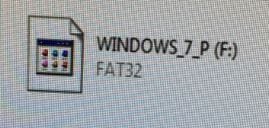
USB Error FAT32

mohammadzeitoun

New member
Local time
4:39 PM
Messages
10
Location
kuwait
Good day
I need help
If I plugin any USB whatever NTFS or any file type it getting converted by itself to FAT32 like disabled mode and I have no permission to access ,
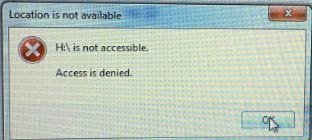
Error Massage “H: is not accessible. Access denied”:cry:
I tried to change registry permission not thing working, tried from gpedit.msc also not thing happen, and tried from usb properties security tab . it is saying can’t save permission on windows 7
no permission have been assigned for this object
I cant add any one to owner , tried command prompt takeown not thing happens
Note I am the administrator
OS: win 7
same flash , inserted in diff. pc working fine
look at attachments
thanks for all
 

Attachments
  • 1.JPG
    1.JPG
    16.5 KB · Views: 13
  • 2.JPG
    2.JPG
    38.9 KB · Views: 13
  • 3.JPG
    3.JPG
    15.3 KB · Views: 13

My Computer

OS
Windows 7 professional x86
Motherboard
IBM
You've certainly lost administrator rights on the file or folder.

To recover these rights, just follow the following procedure:


Open Security tab

On Vista and Windows 7, the Security tab is displayed by default.
Accessing file

Right click on the file/folder
Properties
Security
Advanced
Properties tab
Click on Edit
Select your name/your session
Click on "Apply" then "OK".
 

My Computer

Computer type
PC/Desktop
OS
Windows 7 Ultimate 64 bit
CPU
Intel pentium 3
Motherboard
MSI
Memory
2GB RAM DDR 3
Graphics Card(s)
Intel HD Graphics
Sound Card
Realtek Audio
Monitor(s) Displays
zenware
Screen Resolution
1680x1050
Hard Drives
80 GB
Case
i-Max
Cooling
Cooler Master
Keyboard
A4TECH
Mouse
edvan
Antivirus
Avast Anti virus 2015
Browser
Google chrome
Hello,

Try this 1

You nee to add the permissions to it.

Click on Start --> In search box, type cmd. When the cmd appears in the

search list, right-click on it and select "Run as administrator".

"Command Prompt" will be opened.

Since access denied message appears only for F-Drive, enter the below

commands

takeown /f f: --> Press Enter.

icacls f: /grant username:f --> Press Enter.

Note : In the above icacls command, replace the word

"username" with your account username.

Good Luck
 

My Computer

Computer type
PC/Desktop
OS
Windows 7 Ultimate 64 bit
CPU
Intel pentium 3
Motherboard
MSI
Memory
2GB RAM DDR 3
Graphics Card(s)
Intel HD Graphics
Sound Card
Realtek Audio
Monitor(s) Displays
zenware
Screen Resolution
1680x1050
Hard Drives
80 GB
Case
i-Max
Cooling
Cooler Master
Keyboard
A4TECH
Mouse
edvan
Antivirus
Avast Anti virus 2015
Browser
Google chrome
thanks for all ... i am facing this issue only when i insert usb . i tried all . now i tired CMD , saying Error: acess is Denied

i tried permision tab Error : An Error occured whiler applying secureity information to D:H .. access denied
- i dont want to formate windows ...
- note i am using mecafee DLP endpoint ... but it is working fine ... only on some machines
 

My Computer

OS
Windows 7 professional x86
Motherboard
IBM

My Computer

Computer type
PC/Desktop
OS
Windows 7 Ultimate 64 bit
CPU
Intel pentium 3
Motherboard
MSI
Memory
2GB RAM DDR 3
Graphics Card(s)
Intel HD Graphics
Sound Card
Realtek Audio
Monitor(s) Displays
zenware
Screen Resolution
1680x1050
Hard Drives
80 GB
Case
i-Max
Cooling
Cooler Master
Keyboard
A4TECH
Mouse
edvan
Antivirus
Avast Anti virus 2015
Browser
Google chrome
my dear i think the issue not with ntfs or any thing else
issue may be in reg
 

My Computer

OS
Windows 7 professional x86
Motherboard
IBM
Back
Top