USB external hard disk shows up as internal fixed disk

sactyr

New member
Local time
8:01 PM
Messages
4
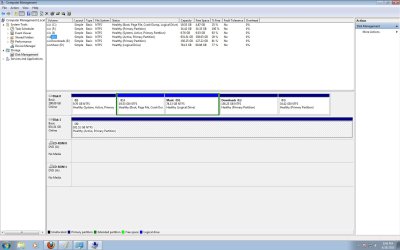
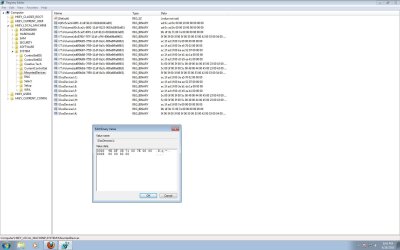
Couple of hours ago my Windows 7 could not recognize my external USB hard disk (Maxtor Basic). It came up on Disk Management and Device Manager but not on My Computer. However I fixed it (by deleting its line off regedit in HKEY_LOCAL_MACHINE\SYSTEM\MountedDevices, plugging out the ext. HD and plugging back in). Windows automatically installed the drivers and I could access the drive.

But now Windows shows my Maxtor as a fixed disk drive, instead of "devices with removable storage". I still have the option to "Safely remove hardware and eject media" from taskbar, however I rather have Windows treating it as a Removable USB Storage so that the disk can sleep when not in use. I am pretty sure it has something to do with regedit, so any help would be appreciated.
 

Attachments
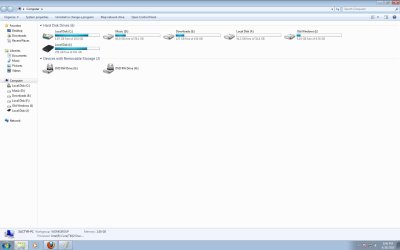
  • My computer.jpg
    My computer.jpg
    67.1 KB · Views: 184
  • Disk Management.jpg
    Disk Management.jpg
    141 KB · Views: 180
  • Regedit.jpg
    Regedit.jpg
    139.8 KB · Views: 181

My Computer My Computer

OS
Windows 7
HDD

:warn::warn:Welcome to Windows 7 Support Forums, Sactyr.
A word of caution! Its never a good idea to alter your register,
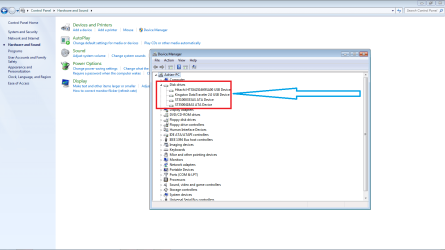
IMHO please review your device manager and check your devices for your disk drives, check for any warnings in the driver area.
I'm attaching my screenshot for comparison as I have a similar configuration.
 

Attachments

  • hdd.png
    hdd.png
    53.2 KB · Views: 412

My Computer My Computer

Computer Manufacturer/Model Number
Custom Build
OS
Windows 7 7600 1 X64
CPU
AMD PHENOM II X 550 PROCESSOR 3.1 ghz
Motherboard
ASUS M4A78-TE
Memory
Corsair 4 gig ddr 3
Graphics Card(s)
ati radeon 3300
Sound Card
ati hd
Monitor(s) Displays
syncmaster 2033sw
Screen Resolution
1600X900 60 hz refresh
Hard Drives
twin_seagates SATA's 1 TB & 500 Gig, hitachi_slimline 160 gig
PSU
antec_550 watt
Case
cooler master GLite
Cooling
stock_heat sink
Internet Speed
20mbs up/ 1.5mbs down
Other Info
favorite child "stewie"
favorite dog "brian"
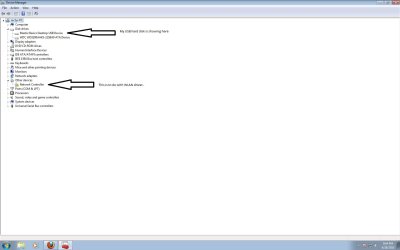
Hi Adrian, thanks for your reply. I have attached my screenshot. Seems how it should be.
 

Attachments

  • Device Manager.jpg
    Device Manager.jpg
    56.8 KB · Views: 292
Last edited:

My Computer My Computer

OS
Windows 7
Hi Adrian, thanks for your reply. I have attached my screenshot. Seems how it should be.
It looks like your NIC is offline.
 

My Computer My Computer

Computer Manufacturer/Model Number
Custom Build
OS
Windows 7 7600 1 X64
CPU
AMD PHENOM II X 550 PROCESSOR 3.1 ghz
Motherboard
ASUS M4A78-TE
Memory
Corsair 4 gig ddr 3
Graphics Card(s)
ati radeon 3300
Sound Card
ati hd
Monitor(s) Displays
syncmaster 2033sw
Screen Resolution
1600X900 60 hz refresh
Hard Drives
twin_seagates SATA's 1 TB & 500 Gig, hitachi_slimline 160 gig
PSU
antec_550 watt
Case
cooler master GLite
Cooling
stock_heat sink
Internet Speed
20mbs up/ 1.5mbs down
Other Info
favorite child "stewie"
favorite dog "brian"
Power Settings

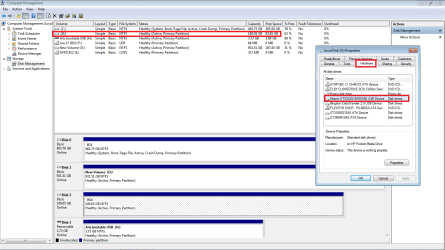
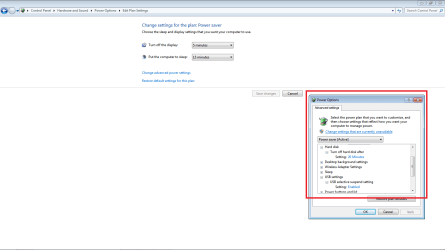
I think I would use my Advanced Power Settings to change my USB device power settings because my USB drives are similarly configured in my Disk manager.
 

Attachments

  • disk_mgr.png
    disk_mgr.png
    44.8 KB · Views: 272
  • pwr.png
    pwr.png
    26.3 KB · Views: 185

My Computer My Computer

Computer Manufacturer/Model Number
Custom Build
OS
Windows 7 7600 1 X64
CPU
AMD PHENOM II X 550 PROCESSOR 3.1 ghz
Motherboard
ASUS M4A78-TE
Memory
Corsair 4 gig ddr 3
Graphics Card(s)
ati radeon 3300
Sound Card
ati hd
Monitor(s) Displays
syncmaster 2033sw
Screen Resolution
1600X900 60 hz refresh
Hard Drives
twin_seagates SATA's 1 TB & 500 Gig, hitachi_slimline 160 gig
PSU
antec_550 watt
Case
cooler master GLite
Cooling
stock_heat sink
Internet Speed
20mbs up/ 1.5mbs down
Other Info
favorite child "stewie"
favorite dog "brian"
Thank you for that, but is there no way that I can make Windows load it as USB Removable Storage?
 

My Computer My Computer

OS
Windows 7
Thank you for that, but is there no way that I can make Windows load it as USB Removable Storage?
Thats beyond my capability.
 

My Computer My Computer

Computer Manufacturer/Model Number
Custom Build
OS
Windows 7 7600 1 X64
CPU
AMD PHENOM II X 550 PROCESSOR 3.1 ghz
Motherboard
ASUS M4A78-TE
Memory
Corsair 4 gig ddr 3
Graphics Card(s)
ati radeon 3300
Sound Card
ati hd
Monitor(s) Displays
syncmaster 2033sw
Screen Resolution
1600X900 60 hz refresh
Hard Drives
twin_seagates SATA's 1 TB & 500 Gig, hitachi_slimline 160 gig
PSU
antec_550 watt
Case
cooler master GLite
Cooling
stock_heat sink
Internet Speed
20mbs up/ 1.5mbs down
Other Info
favorite child "stewie"
favorite dog "brian"
Hi,
I have my LG 500GB hdd recognized as nonremovable.

I found that formating it as extFAT madeit apear as removable storage.

-pp-
 

My Computer My Computer

OS
Windows 7 Ultimate x64
Back
Top